


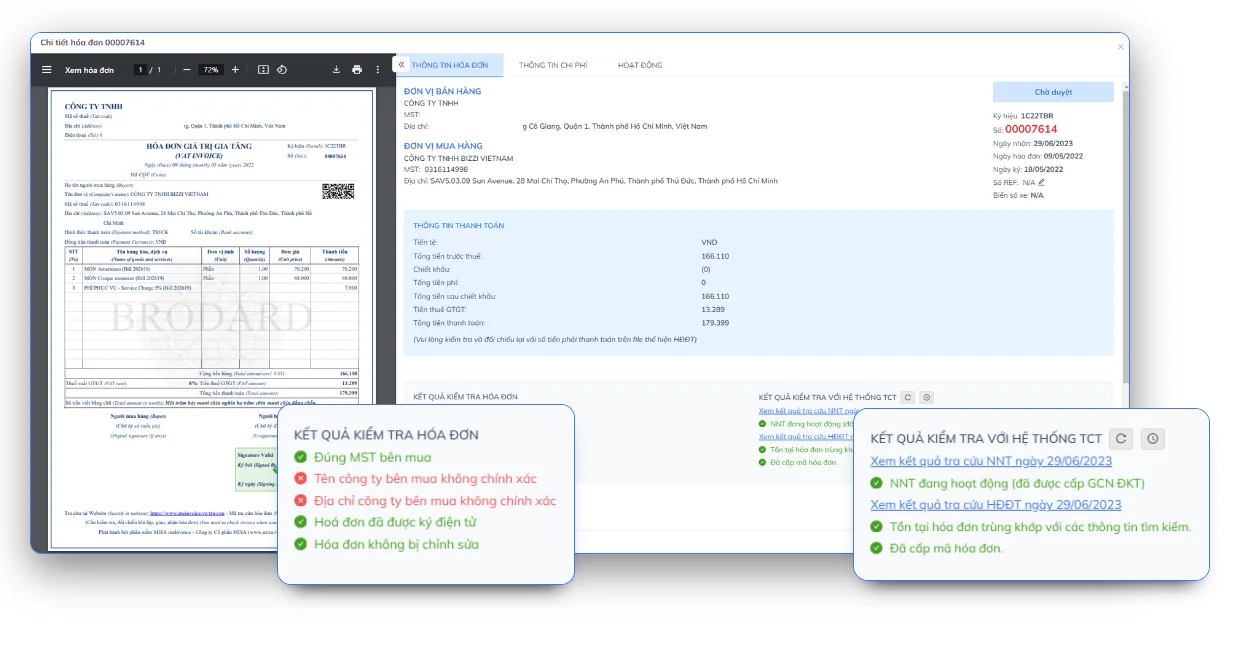
Electronic invoice reading software is a tool that automatically reads, extracts, and processes data from electronic invoices in XML or PDF format. Instead of opening each file and manually entering data, businesses can use the software to identify invoice information, verify data, and facilitate faster document reconciliation.
This article by Bizzi will guide you on how XML/PDF invoice reading software works, selection criteria, and solutions to help accountants automate the process of handling incoming invoices.
Software for reading XML/PDF electronic invoices: Which method is best?
You can read electronic invoices in many ways depending on your needs. If you only need to quickly view the invoice content, PDF files are usually more convenient. However, when you need to check the original data, compare information, or store it according to regulations, XML files remain the most important format. For businesses that process a large number of invoices, specialized electronic invoice reading software will significantly save time and effort.
| Demand | How to use | Suitable for whom? | Note |
| Read an XML file for free. | Supplier's electronic invoice lookup portal | Individual accountants with few invoices | It usually requires uploading an XML file or searching by invoice code. |
| Quickly open XML files | Chrome, Edge, or Notepad++ | The person who needs to check XML data. | It is possible to display XML code instead of the invoice interface. |
| View invoice contents | PDF reader | General users | PDFs are easy to read but do not replace the original XML data. |
| Read and manage multiple XML/PDF files. | Electronic invoice reading software | Accounting, business | Supports searching, storing, classifying, and extracting data. |
| Batch invoice reconciliation | AP Automation software (e.g., Bizzi) | AP Team, CFO, a business with a large volume of invoices. | Automatic data matching reduces manual operations. |
Should I use XML or PDF?
If the goal is to quickly view invoice information, PDF is the most convenient option. However, when it comes to verifying validity, cross-referencing data, archiving, or accounting/tax purposes, XML files are the original source of electronic invoice data. Therefore, businesses should store both XML and PDF files simultaneously for convenient retrieval and management later on.
3 ways to read electronic invoice XML files
There are three common ways to read electronic invoice XML files: using an electronic invoice portal, opening them with a web browser, or using specialized software. Each method suits different needs.
Method 1: Reading XML using the electronic invoicing portal
This is the correct method and is used by many accountants when they need to check the validity of an invoice.
Steps to take
- Access the invoice lookup portal of the issuing entity or the tax authority.
- Select the function to read or look up the XML invoice.
- Upload the XML file to the system.
- The system automatically displays invoices in an easy-to-read format.
- Check:
- Seller's tax identification number
- Buyer's tax identification number
- Some bills
- Date of establishment
- Goods price
- VAT
- Total payment
Advantage
- Free of charge.
- The data is displayed clearly.
- The invoice information has been verified.
Disadvantages
- Suitable only for handling a small number of invoices.
- Each file must be manipulated individually.
Method 2: Open the XML file using Chrome or Edge browser.
If you want to quickly check if a file is corrupted, you can drag the XML file directly into your browser.
How to do it
- Open Chrome or Edge.
- Drag the XML file into your browser window.
- XML will be displayed as a data structure.
When should it be used?
- Check if the file is intact.
- Confirm that the XML file can be opened.
Limit: Users often see a series of characters and data tags and mistakenly think the file is corrupted. In reality, this is how XML is designed to store structured data.
Method 3: Using XML invoice reading software
This is the most suitable solution when a business receives many invoices from different suppliers. A good XML invoice reading software should be able to:
- Display XML in the invoice interface.
- Reads both XML and PDF files.
- Automatic data extraction.
- Quickly search for invoices.
- Centralized storage.
- Check the invoice data.
- Assists in reconciliation with the accounting system.
This is also the direction businesses are moving in, shifting from manual to automated invoice processing.
Learn more about: Top 21 most popular and automatic electronic invoice software 2025
How to read PDF invoices and why you shouldn't just save them as PDFs?
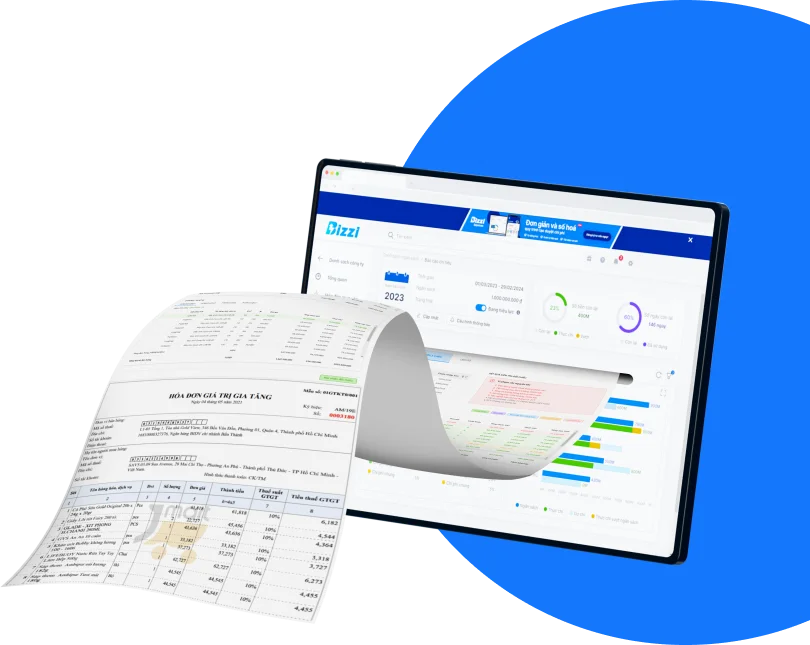
PDF is a visual representation of an electronic invoice.
To view a PDF file, users simply need to:
- Open with Adobe Reader or a web browser.
- Check the invoice information.
- Print or share if needed.
However, PDFs are not always the primary source of data for comparison or verification. In many cases, XML is the accurate data source for storage and automated processing.
What are the differences between XML and PDF electronic invoices?
This is one of the most common questions when working with electronic invoices.
| Criteria | XML | |
| Purpose | Save original data | Display invoices |
| Readability | Software is needed. | Read directly |
| Data extraction | Good | Limit |
| Automation | High | Short |
| System comparison | Have | More difficult |
Simply put:
- XML for the system.
- PDFs are for humans.
Therefore, businesses should save both formats instead of just saving PDFs.
Why does opening an XML invoice file reveal only code?
This is not a mistake.
XML is a data format designed for software to read. When opened with a browser or text editor, users will see data tags that resemble programming code.
For example: 000123
This is the standard XML data structure. If you want to view it as an invoice, please use an electronic invoicing portal or specialized invoice reading software.
Should iTaxViewer be used to read XML invoices?
iTaxViewer is primarily designed to assist in reading tax returns and other tax-related data files.
For XML electronic invoices, users should not consider iTaxViewer as the primary solution. Dedicated electronic invoice portals or invoice reading software often offer a better experience, are easier to verify, and support more functions.
Common errors when reading XML/PDF electronic invoice files.
Common errors when reading electronic invoices include XML displaying only code, incorrect XML formatting, inability to open with iTaxViewer, only PDF files missing XML, PDF font errors, or PDF data not matching the XML. Users should check the original file before proceeding.
Unable to open XML file
Reason:
- The file is corrupted.
- Download not complete.
- The XML format is not standard.
The XML file contains the code.
Reason:
- Currently open in a browser or Notepad.
- Do not use receipt reading software.
Unable to read PDFs
Reason:
- Missing PDF reader software.
- The PDF file is corrupted.
XML and PDF do not match.
Reason:
- I downloaded the wrong file.
- The invoice has been edited or reissued.
When discrepancies are detected, it is best to prioritize checking the original XML file.
When do businesses need software to read electronic invoices?
Businesses should consider using electronic invoice reading software when:
- We receive many input invoices each month.
- Accountants have to open each XML/PDF file manually.
- Invoice data must be re-entered into the ERP or accounting software.
- You need to check the tax rate, invoice status, and supplier information.
- The invoice needs to be compared with the purchase order (PO), gross receipt (GRN), or contract.
- Centralized storage and fast retrieval are needed.
A simple way to assess needs: Monthly invoice processing time = Number of invoices × Time spent opening, reading, and checking each invoice.
If this number continues to grow, automation often proves more effective than manual processing.
How does Bizzi read and process electronic invoices?
Unlike tools that only support opening XML or PDF files, Bizzi is built to automate the processing of incoming invoices.
Clean up invoice data.
Bizzi Bot can:
- Read XML/PDF invoices.
- Automatic data extraction.
- Standardize invoice information.
Check and compare
Support system:
- Check the invoice data.
- Identify exceptions.
- Perform a three-way reconciliation between invoices, purchase orders (PO), and gross receipts (GRN) when the business has the relevant data.
Connecting financial processes
Instead of just reading the file, invoice data can be connected to:
- Accounts payable.
- Expense.
- Approve payment.
- ERP and accounting software.
This is a crucial step in helping businesses move from "opening invoices to view" to "automating invoice processing throughout the entire financial process.".
See more solutions Matching invoices and documents from Bizzi
How to securely store electronic invoice XML/PDF files
Businesses should store both XML and PDF files of electronic invoices, with the XML being the original data that needs to be preserved intact. Organizing the folders by year, accounting period, or supplier facilitates easy searching, comparison, and auditing when needed.
After reading and verifying the validity of electronic invoices, proper storage is a crucial step that helps businesses reduce the risk of document loss, facilitate quick reconciliation, and meet accounting record management requirements.
To ensure data integrity and ease of retrieval, businesses should adhere to the following principles:
Keep the original XML file.
XML files are the original electronic data of invoices, containing all the information used for authentication, verification, and automated processing. Therefore, businesses should:
- Save the original XML file sent by the vendor.
- Do not edit the XML content.
- Do not open and overwrite using data editing tools.
- Do not convert XML to another format and then replace the original file.
The PDF file is attached.
In addition to XML, you should also save a PDF version for the following reasons:
- Easy to read and look up information.
- Convenient for internal use.
- Provide quick audit support for departments that are not specialized in accounting.
In reality, many businesses only save PDFs because they are easier to view. However, this can create difficulties when it comes to data comparison, ERP integration, or auditing later on.
Do not change the file format.
Businesses should retain the XML and PDF formats issued from the electronic invoicing system. Converting or saving to other formats may result in data loss or affect the ability to verify the validity of the invoice.
Naming structured files
A consistent naming convention makes searching for invoices much faster.
For example:
2026-01-15_MST0312345678_HD000123.xml
2026-01-15_MST0312345678_HD000123.pdf
Information fields can be combined such as:
- Bill date
- Supplier tax identification number
- Some bills
- Supplier Name (abbreviation)
Classification by accounting period or supplier
Instead of storing all invoices in a single folder, you should categorize them by:
- Fiscal year
- Month of occurrence
- Supplier
- Tax code
- Type of expense (if applicable)
This organizational method significantly reduces the time spent searching for information when reconciling accounts payable or during audits.
Sample folder structure for storing electronic invoices.
Businesses can refer to the following storage structure:
Electronic invoice/
│
├── 2026/
│ ├── 01/
│ │ ├── NCC_A/
│ │ │ ├── XML/
│ │ │ └── PDF/
│ │ │
│ │ ├── NCC_B/
│ │ │ ├── XML/
│ │ │ └── PDF/
│ │
│ ├── 02/
│ ├── 03/
│
├── 2027/
For businesses that issue thousands of invoices each month, a clear folder structure will help:
- Find invoices faster.
- Minimize data duplication.
- Convenient for reconciling accounts payable.
- Support for internal and independent audits.
How long is the storage period for electronic invoices?
According to current regulations on accounting document archiving, accounting vouchers and related records must be preserved for the legally prescribed period. For electronic invoices, businesses need to store data ensuring accessibility, retrieval, and usability throughout the retention period as stipulated by accounting laws.
When publishing an official article, it is advisable to refer to the latest regulations. Accounting Law, Decree 123/2020/ND-CP and current guidelines to ensure accuracy.
Learn more about: Detailed instructions for storing electronic invoices.
The risks of improper invoice storage.
Storing files in a scattered manner across personal email, personal computers, or multiple folders can lead to:
| Risk | Impact |
| Lost XML file | Original data could not be found during comparison. |
| Save only PDF | Limitations of automation capabilities |
| Inconsistent file naming | Difficult to search |
| Save across multiple systems | Data is easily duplicated or missing. |
| No access permissions | Information security risks |
These problems are often only discovered when a business needs to undergo an audit, settle taxes, or reconcile accounts payable with suppliers.
How does Bizzi support the storage and management of electronic invoices?
Instead of manually storing invoices across multiple folders and emails, Bizzi helps businesses build a centralized invoice data warehouse.
Centralized storage
XML and PDF invoices are collected and managed on the same platform, reducing the risk of data loss.
Link invoice records to the financial process.
Each invoice can be linked to:
- Approval process
- Accounts Payable
- Purchase Order (PO)
- Goods Receipt (GRN)
- Costs by department or cost center
This helps businesses not only store invoices but also manage all related transaction records.
Provides quick access to information when needed.
When the need arises:
- Reconciliation of debts
- Internal audit
- Working with auditors
- Review end-of-period documents
Businesses can search for invoices by multiple criteria instead of having to open each folder or email individually.
Frequently Asked Questions about Electronic Invoice Reader Software
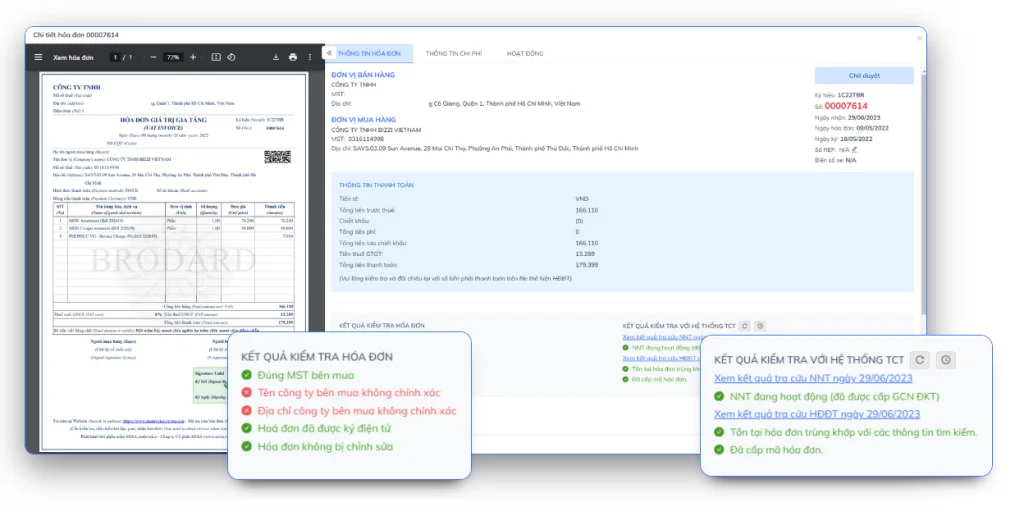
Electronic invoice reading software is a tool that helps decode, verify the validity, and extract data from invoice files (primarily in XML format). Understanding how to use this software helps businesses optimize their accounting processes and avoid unnecessary errors. Below are the most frequently asked questions when using electronic invoice reading and lookup software:
Why does opening an XML invoice file reveal only code?
Because XML is a structured data file intended for system processing, when opened with a browser or text editor, it typically displays as data tags, resembling code.
Should iTaxViewer be used to read XML?
This should not be considered the primary tool for reading electronic invoices. Electronic invoice portals or specialized software are more suitable.
Is saving only as a PDF sufficient?
Businesses should save both XML and PDF files. XML is the original data, while PDF is the presentation for viewing and printing.
Does renaming an XML file have any effect?
Renaming files usually doesn't change the data inside. However, it's advisable to maintain a consistent naming convention for easier storage and retrieval.
When should you use invoice reading software?
When the number of invoices increases, it becomes necessary to automatically extract data, compare it with ERP systems, or manage it centrally instead of manually opening each file.
Conclude
Electronic invoice reading software helps businesses process XML and PDF files faster, reduces manual data entry, and improves accuracy in managing incoming invoices. In addition to data reading capabilities, modern solutions also support centralized invoice verification, reconciliation, and storage, significantly saving accounting departments time in processing documents.
However, as the number of incoming invoices increases to hundreds or thousands per month, simply using a basic invoice reader may not be enough. Businesses need a solution capable of automatically collecting invoices from multiple sources, extracting data using AI, verifying validity, and supporting reconciliation with related documents to reduce risk and optimize operational processes.
Bizzi helps businesses automatically read XML/PDF invoices using AI, process incoming invoices centrally, support data verification, and connect with enterprise expense management processes. As a result, accounting teams can reduce manual workload, improve control efficiency, and prepare more accurate data for financial and accounting operations.
Sign up for a Bizzi demo today to experience our automated XML/PDF electronic invoice reading solution, optimize your input invoice processing workflow, and improve your business's operational efficiency.: https://bizzi.vn/dat-lich-demo/

Bizzi's solution helps businesses automate about 90% of invoice processing from suppliers such as downloading invoices, reading invoices, checking invoice information, Help reduce 80% time and Save the handling fee to about 1 cup of iced tea/per bill.
- Bizzi provides businesses with a free, private email to receive e-invoices
- Bizzi automatically downloads and reads e-invoices
- Automatically calculate the validity and legality of invoices
- Automatically extract data suitable for accounting and ERP software
- Store and search easily with 10-year archiving system
No more worrying about incorrect input, missing entries, or lost invoices. Bizzi is a diligent and meticulous assistant to read invoices, check invoices and process invoices including paper invoices and electronic invoices for businesses.
Register for free use of bill processing software Bizzi FORM SIGN UP
Follow other posts on Fanpage Bizzi