


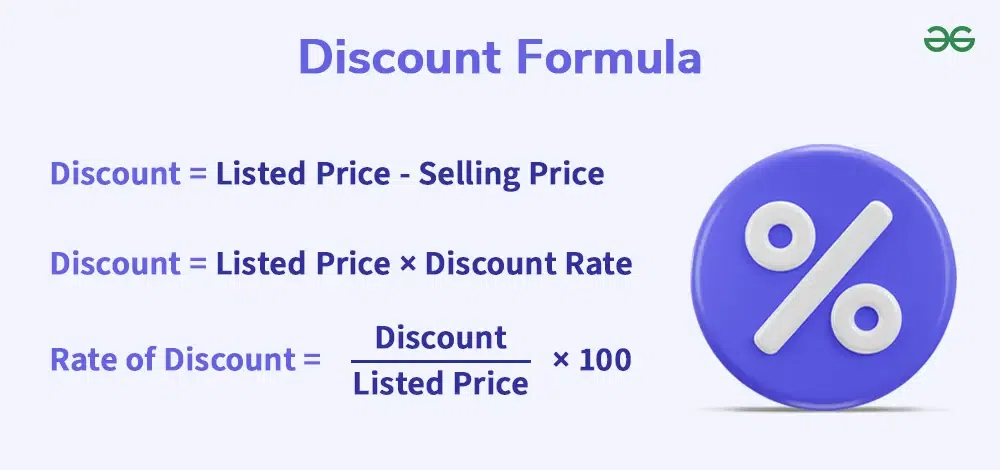
In business, calculating discount percentages is more than just a matter of arithmetic. Incorrect base calculation, incorrect rounding, or uncontrolled overlapping discounts can create discrepancies between quotations, purchase orders, and invoices, leading to cost losses, and even eroding gross margin and distorting cash flow/DSO ratios. Calculating discounts in Excel is a traditional method commonly used by many businesses.
This article by Bizzi will provide a guide on calculating discount percentages according to operational financial standards: from the core formula to reconciliation and internal control processes, along with how Bizzi helps automate discrepancy detection, budget management, and more. debt management.
How is the percentage discount calculated?
A percentage discount is a rate indicating the reduction from the original price of a product or service, commonly used in sales, promotions, and price negotiations.
Recipe: Percentage discount (%) = Original price / Original price - Discounted price × 100 / %
Distinguish between some easily confused concepts:
- Discount percentage vs. discount amount
- Discount amount: 250,000 VND
- Percentage reduction: 25%
- Reduce % vs. reduce absolute value
- Discount 20% on orders over 1 million VND = a discount of 200,000 VND
- A discount of 200,000 VND doesn't always mean 20%.

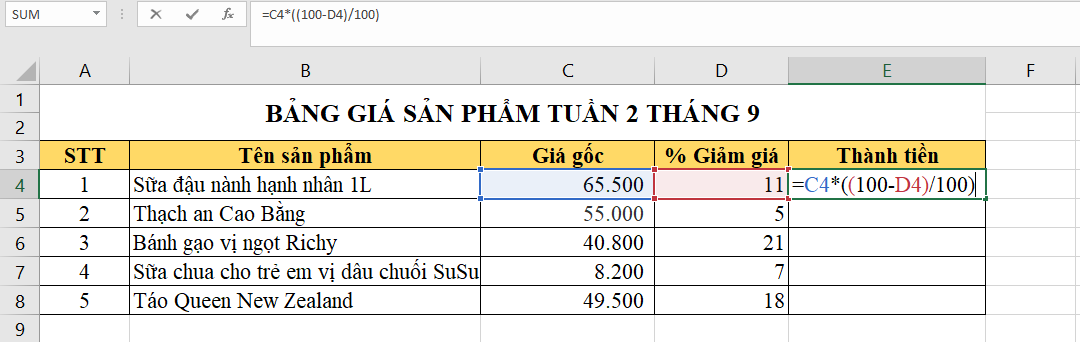
How to determine the "original price" and "price after discount" to calculate the discount percentage without making a mistake in the base calculation.
To accurately calculate the percentage discount without getting the "base" wrong, the most important thing is to correctly determine the "original price" (base price) and the "net price" after the discount.
Original price To be original listed price, before any What kind of discount is offered? Depending on the context, the original price could be:
- Prices are listed on the website/app.
- Suggested Retail Price (RRP/MSRP)
- The price is the price of a product that was previously sold at a reasonable time (not a fake listed price).
- Unit price as stated in the contract or original purchase order.
- The standard price list has been approved.
- Price before trade discount
Price after discount To be price actually paid by the customer, after application:
- % discount
- Cash discount
- Voucher / coupon
- Program offers
Not included:
- VAT
- Shipping fees and other charges (unless a discount applies to the entire order)
Below is how to calculate discount percentages correctly, avoiding common mistakes in sales, finance, and e-commerce.
Phaˆˋn tra˘m giảm giaˊ=Giaˊ goˆˊc−Giaˊ sau giảmGiaˊ goˆˊc×100%\text{Phần trăm giảm giá} = \frac{\text{Giá gốc} – \text{Giá sau giảm}}{\text{Giá gốc}} \times 100\%Phaˆˋn tra˘m giảm giaˊ=Giaˊ goˆˊcGiaˊ goˆˊc−Giaˊ sau giảm×100%
Incorrect base calculation not only leads to poor communication but also:
- Do incorrect profit margin
- Misleading promotional effectiveness
- This distorts sales and discount reports.
So, Standardized base price This is a prerequisite for:
- Evaluate the ROI of the discount program.
- Comparing the effectiveness of different campaigns
How to calculate the discount percentage using the standard formula when the original price and the discounted price are known.
Below is how to calculate the discount percentage using the standard formula, along with notes to avoid discrepancies when comparing financial and sales figures.
The standard formula for calculating percentage discounts is: % decrease = (P0 − P1) / P0 × 100, in there P0 is the original price and Part 1 This is the price after the discount. The result should include rounding rules to avoid discrepancies when comparing.
Illustrative example
- Original price P0P_0P0 = 1,200,000 VND
- Price after discount P1P_1P1 = 930,000 VND
% giảm=1.200.000−930.0001.200.000×100=22,5%\%\ \text{giảm} = \frac{1.200.000 – 930.000}{1.200.000} \times 100 = 22{,}5\%% giảm=1.200.0001.200.000−930.000×100=22,5%
The discount rate is 22.5%.
Note the following for correct base calculation:
- P0P_0P0 and P1P_1P1 must:
- Together currency unit
- Together Tax status (VAT included or VAT excluded)
- Nếu có nhiều ưu đãi chồng: P1=P0×(1−d1)×(1−d2)×…P_1 = P_0 \times (1 – d_1) \times (1 – d_2) \times \dotsP1=P0×(1−d1)×(1−d2)×…
How to calculate the discount amount from the discount percentage and the original price.
Standard formula for Amount Reduced = P0 × 1/TP3T Reduced 100\text{Amount Reduced} = P_0 \times \frac{\1/TP3T\ \text{reduced}}{100}Amount Reduced = P0×100/TP3T Reduced
In there:
- P0P_0P0: Original price
- %\ reduction: The reduction level has been determined (correct base)
For example
- Original price P0P_0P0 = 2,000,000 VND
- Reduction = 15%
Discount amount = 2,000,000 × 15/% = 300,000 VND
Budget for discount usage: 300,000 VND
How to calculate the price after discount from the discount percentage and the original price.
Standard formula
P1=P0×(1−% giảm100)P_1 = P_0 \times \left(1 – \frac{\%\ \text{giảm}}{100}\right)P1=P0×(1−100% giảm)
In there:
- P1P_1P1Net price
- P0P_0P0Original price
For example
- Original price P0P_0P0 = 2,000,000 VND
- Discount = 15%
P1=2.000.000×(1−15%)=1.700.000đP_1 = 2.000.000 \times (1 – 15\%) = 1.700.000đP1=2.000.000×(1−15%)=1.700.000đ
1,700,000 VND To be net price Used for:
- Set up PO
- Set up Invoice
- Payment reconciliation
How to calculate the original price when the discounted price and discount percentage are known to track discrepancies.
Tracing back the original price helps:
- Discounts exceeding budget discovered.
- Review compliance with price list/contract
- Reduce disputes with suppliers.
- Prevent discount fraud.
This is an important step in:
- Control purchasing costs
- Invoice reconciliation
- Internal audit
Below is how to calculate the original price when the discounted price and discount percentage are known, used to track price discrepancies, reconcile purchase orders (POs) and invoices, or check for discount fraud.
Standard formula (correct base): P0=P11−% giảm100P_0 = \frac{P_1}{1 – \frac{\%\ \text{giảm}}{100}}P0=1−100% giảmP1
In there:
- P0P_0P0Base price
- P1P_1P1Net price
- %\ reduction: The discount has been applied
Illustrative example
- Price after discount P1P_1P1 = 850,000 VND
- Reduction = 15%
P0=850.0001−15%=850.0000,85=1.000.000đP_0 = \frac{850.000}{1 – 15\%} = \frac{850.000}{0,85} = 1.000.000đP0=1−15%850.000=0,85850.000=1.000.000đ
The original price is 1,000,000 VND.
How to round when calculating discount percentages to avoid discrepancies between quotations, purchase orders, and invoices.
Discrepancies in reconciliation often arise from rounding: rounding % before or after pricing, rounding on individual lines or the total invoice.
To avoid discrepancies between quotations, purchase orders, and invoices, businesses need to standardize rounding when calculating discount percentages according to the following principles:
- Do not round % before calculating the price: Always use the % method to calculate the discounted price, only rounding at the final step.
- Rounding is based on unit price, not on %: Round the net price after the discount according to accounting regulations (VND / 2 decimal places), and use that price throughout the quotation – purchase order – invoice.
- Standardized rounding of grades: The regulations clearly state whether rounding should be done line-by-line or on the total invoice; mixing the two methods is strictly prohibited.
- Issue an internal rounding policy: Clearly state the number of decimal places, the rounding rule (round half up), and the system used as the standard. With a consistent rounding policy, the three-way reconciliation (PO–GR–Invoice) will match immediately, reducing rework and price disputes.
How to choose the number of decimal places for percentage discounts based on unit price and total line value.
To avoid discrepancies between quotations, purchase orders, and invoices, the number of decimal places for a % discount should depend on the unit price and rounding method (based on unit price or total line), and should not be chosen arbitrarily.
Choose the number of decimal places when rounding to the line-level.
Applicable when:
- Purchase order/invoice with low unit price
- Large quantity
- Each line is independently verified.
Recommendation:
- % reduces to 2 decimal places (e.g., 12,34%)
- Discounted price: rounded to the correct currency (VND / 2 decimal places)
Reason:
- With small unit prices, even a difference of just 0.01% can result in a difference of a few cents per line.
- Adding multiple rows will result in a mismatch in the total.
Choose the number of decimal places when rounding to the total number of lines/total invoice.
Applicable when:
- Large unit price
- Few lines
- The reconciliation mainly focuses on the total amount.
Recommendation:
- % reduces by 1 decimal place (e.g., 12.5%)
- Round the total amount after the discount, do not round each line item.
Reason:
- Errors caused by rounding each line may cancel themselves out when calculated as a total.
- Accurate enough for budget control and reporting.
Special cases: large discounts / budget-sensitive
- Deep discount (>30%)
- Large transaction value
- Long-term B2B contracts
Use:
- % reduces to 2–3 decimal places
- Lock in the net price right from the purchase order to avoid disputes.
How to differentiate between trade discounts and early payment discounts to calculate the correct percentage discount for management purposes.
To calculate discount percentages effectively for management purposes, businesses need to clearly distinguish between trade discounts and early payment discounts. These two types are not based on the same principle, have different objectives, and should not be combined into a % (One-Time Payment, Three-Time Payment) system.
1. Trade discount
Nature
- Discounts are associated with buy-sell transactions.
- Apply before issuing the invoice.
- To boost sales, production, and distribution channels.
How to calculate the discount percentage:
% CK thương mại=P0−PnetP0×100\%\ \text{CK thương mại} = \frac{P_0 – P_{\text{net}}}{P_0} \times 100% CK thương mại=P0P0−Pnet×100
Management characteristics
- Directly impacts revenue and profit margins.
- Record this directly on the Purchase Order/Invoice.
- This is the net price after discount used for reconciliation.
Use when: Comparing prices, analyzing profit margins, evaluating the effectiveness of promotions.
2. Early payment discount
Nature
- Financial incentives, not price reductions.
- Only applies if payment is made before the due date.
- For example: 2/10, net 30
How to calculate %
% Early Payment Discount = Discount Amount / Invoice Value × 100 % Early Payment Discount = Discount Amount / Invoice Value 100
Management characteristics
- This does not change the original price or net price.
- Impact on DSO & cash flow
- Recorded as financial expense/financial income
Use when: Analyzing cash-in, cost of capital, deciding whether or not to pay early.
How to calculate the percentage discount when there are consecutive discounts (stacking discounts) to avoid misunderstanding "add %"
When available stacking discounts, Do not add % directly. because each reduction is applied on different basesThe correct calculation is as follows:
The standard formula for consecutive price reductions:
Let's assume there are reduction levels d1,d2,…,dnd_1, d_2, \dots, d_nd1,d2,…,dn:
P1=P0×(1−d1)×(1−d2)×⋯×(1−dn)P_1 = P_0 \times (1 – d_1) \times (1 – d_2) \times \dots \times (1 – d_n)P1=P0×(1−d1)×(1−d2)×⋯×(1−dn)
In there:
- P0P_0P0: original price
- P1P_1P1: price after all reductions
Actual discount percentage To be:
% giảm thực=[1−(1−d1)(1−d2)…(1−dn)]×100\%\ \text{giảm thực} = \left[1 – (1 – d_1)(1 – d_2)\dots(1 – d_n)\right] \times 100% giảm thực=[1−(1−d1)(1−d2)…(1−dn)]×100
Illustrative example
- Cost: 1,000,000 VND
- Reduce by 1: 20%
- Reduce by 2: 10%
Correctness:
P1=1.000.000×0,8×0,9=720.000đP_1 = 1.000.000 \times 0,8 \times 0,9 = 720.000đP1=1.000.000×0,8×0,9=720.000đ % giảm thực=(1−0,72)×100=28%\%\ \text{giảm thực} = (1 – 0,72) \times 100 = 28\%% giảm thực=(1−0,72)×100=28%
- Incorrect addition: 20% + 10% = 30%
- Correct: 28%
How to calculate the final price when applying 2-3 consecutive percentage discounts to the same item.
To control the discount cap and avoid exceeding policy limits when applying discount percentages, businesses need to control the formulas, data, and approval processes from the outset, not just at the final verification stage.
1. Clearly define the "discount ceiling" according to the policy.
First, the policy must clearly state:
- Maximum ceiling reduction of % (e.g., ≤ 20%)
- Or a price reduction ceiling (e.g., ≤ 500,000 VND/line)
- Or both (take the lower one)
A monetary ceiling should be prioritized, as it directly reflects the budgetary impact.
2. Consolidate all offers into a single base.
When there is:
- Reduce %
- Reduce the price.
- Stacking discounts
Convert everything to the actual discount on the original price:
% giảm thực=1−∏(1−di)\%\ \text{giảm thực} = 1 – \prod (1 – d_i)% giảm thực=1−∏(1−di)
Compare the actual reduction of %, or the actual reduction amount, with the established ceiling.
3. Control at the pricing stage (before approval)
Recommended rule:
- Automatic final price calculation system
- Check the ceiling before saving/submitting for review.
- If the limit is exceeded:
- Edit key
- Or require higher-level approval.
Don't wait until you issue the purchase order/invoice to discover the problem.
4. Apply an approval matrix.
For example:
- ≤ 10% → Department Head
- 10–20% → Block Director
- 20% → CFO / CEO
The price reduction ceiling is directly linked to the approval authority, not just a number.
5. Controlled by net price, not by %.
- Use the net price after the discount as the benchmark.
- Do not allow % adjustments if the net price has exceeded the ceiling.
- Reconciling purchase orders (POs) – Invoices based on net price.
Here's how to avoid it:
- Spleen % with multiple layers of reduction
- Controversy due to rounding
How to control the discount cap when calculating discount percentages to avoid exceeding the policy.
To control the discount cap and avoid exceeding policy limits when applying discount percentages, businesses need to control the formulas, data, and approval processes from the outset, not just at the final verification stage.
1. Clearly define the "discount ceiling" according to the policy.
First, the policy must clearly state:
- Maximum ceiling reduction of % (e.g., ≤ 20%)
- Or a price reduction ceiling (e.g., ≤ 500,000 VND/line)
- Or both (take the lower one)
A monetary ceiling should be prioritized, as it directly reflects the budgetary impact.
2. Consolidate all offers into a single base.
When there is:
- Reduce %
- Reduce the price.
- Stacking discounts
Convert everything to the actual discount on the original price:
% giảm thực=1−∏(1−di)\%\ \text{giảm thực} = 1 – \prod (1 – d_i)% giảm thực=1−∏(1−di)
Compare the actual reduction of %, or the actual reduction amount, with the established ceiling.
3. Control at the pricing stage (before approval)
Recommended rule:
- Automatic final price calculation system
- Check the ceiling before saving/submitting for review.
- If the limit is exceeded:
- Edit key
- Or require higher-level approval.
Don't wait until you issue the purchase order/invoice to discover the problem.
4. Apply an approval matrix.
For example:
- ≤ 10% → Department Head
- 10–20% → Block Director
- 20% → CFO / CEO
The price reduction ceiling is directly linked to the approval authority, not just a number.
5. Controlled by net price, not by %.
- Use the net price after the discount as the benchmark.
- Do not allow % adjustments if the net price has exceeded the ceiling.
- Reconciling purchase orders (POs) – Invoices based on net price.
Here's how to avoid it:
- Spleen % with multiple layers of reduction
- Controversy due to rounding
How to reconcile discount percentages between Quotations, Purchase Orders, and Invoices to avoid discrepancies in unit prices and accounts payable errors.
When the price on the invoice differs from the purchase order due to a discount incurred after the purchase, businesses should not amend the purchase order or force the invoice to match. Instead, they should handle it with a valid price adjustment (credit note/debit note) to ensure correct accounting and clean reconciliation.
With the goal of maintaining clean 3-way matching (PO – GR – Invoice), accounting and reconciliation principles.
- The purchase order (PO) is the initial commitment → no retroactive modifications are allowed once the goods have been received.
- The invoice must match the purchase order at the time of shipment.
- Discounts arising later → process with adjustment documents, do not "patch" the invoice.
Standard Processing Procedure (Finance / AP)
- PO & GR Locks
- Invoice reconciliation by Purchase Order
- If there is a discount after purchase:
- Request a Credit Note
- Record the adjustment of accounts payable.
- Provide a reason + policy approval
- Net payment after adjustments
How to handle discrepancies between the invoice price and the purchase order price due to a post-purchase discount (adjustment/credit note).
When the invoice differs from the purchase order due to a reduction in expenses after purchase (rebate, additional promotion), the business handles it using exception handling: verify the terms, determine the type of adjustment (credit note/accounts payable adjustment), record it separately, and do not amend the purchase order, to ensure accurate reconciliation and reporting.
- Classification of causes of price discrepancies
Price discrepancies aren't always mistakes. Businesses need to differentiate clearly in order to address them correctly:
- Due to meeting the volume requirement after the period: the discount will only be activated when the total volume/purchase period reaches the committed threshold.
- Due to rebate (retroactive refund/discount): the discount is confirmed after delivery and invoice issuance.
- Because the supplier issued a credit note: the supplier proactively adjusted the price using separate documentation, without amending the original invoice.
2. Standard processing procedure
The processing flow should follow this control order: Verify contracts and commercial terms → confirm valid adjustment documents (credit note, rebate statement) → record in AP, cost of goods sold, or expense in the correct period.
All adjustments must be linked to the original documents and terms to ensure traceability.
3. Principle of mandatory control
Do not manually amend purchase orders or invoices when post-purchase discounts occur, as this will disrupt the audit trail, creating audit risks and leading to inaccurate reporting. Instead, businesses must use proper internal adjustment documents (credit notes, journal adjustments) to maintain the integrity of financial data.
How to set up a threshold-based discount approval process to reduce losses and fraud.
The % discount approval process helps with internal control by setting threshold Based on categories/suppliers/roles, approval is required when exceeding thresholds. This method reduces discount leakage, prevents employees from applying discounts improperly, and creates an audit trail for auditing purposes.
To control losses and prevent fraud, discount percentage approvals should be threshold-based, directly linked to financial data and clear authority, rather than being based on subjective feelings.
1. Core design principles
- Approvals under the % scheme reduce and impact money, not just based on the appraiser's title.
- Segregation of duties: proposal, approval, and recording.
- No verbal/chat exceptions will be approved; all discounts must have a system trace.
- Apply before issuing quotations/POs., no "post-audit" processing on invoices.
2. Set discount percentage thresholds (e.g., benchmarks)
Businesses can be configured along two axes: % decrease and absolute monetary value.
| Discount threshold | Approving authority | Required conditions |
| ≤ 5% | Head of Department | Within the policy framework, the benchmark margin is not affected. |
| > 5% – 10% | Sales Manager | There are business reasons + price comparisons. |
| > 10% – 15% | CFO | Profit and Cash Flow Impact Analysis |
| > 15% or exceed the limit | Board of Directors | Special case, with exceptional approval. |
Safety principles: If % is low but the amount of money is large., it still needs to be pushed to a higher level.
3. Normalize input data for browsing.
A discount request is only included in the approval flow when sufficient data is available:
- Original price (list price / contract price)
- Discount percentage + Net price after discount
- Absolute money impact
- Discount type: trade / rebate / early payment
- Apply by line or by total order
Missing data → submission not allowed.
4. Integrated automatic control (anti-fraud)
- Automatic blocking if the discount ceiling is exceeded.
- Anomaly alert: Same supplier/customer, same employee, % high repetition rate.
- Compare historical data: current price drop vs. average price drop over the past 3–6 months.
- Log audit: who proposed it, who approved it, when, and why.
5. Connect with the Purchase Order (PO) – Invoice to avoid loopholes.
- % reduction approved must Hardware lock on PO.
- The invoice will only match if Net price = Approved PO or have valid credit note.
- Any reductions incurred after purchase → go through the channel. exception / adjustment, do not edit the purchase order.
6. Tracking metrics for CFOs & Executive Boards
- Percentage of orders exceeding the discount threshold
- Total value reduced by approver
- % average reduction per customer/supplier
- Number of exceptions arising after the invoice
How to define an “unusual percentage discount threshold” by category/supplier to detect fraud and errors.
The "abnormal discount percentage threshold" should be dynamic, constructed from historical data by category/supplier, combining % and monetary value, and linked to a clear approval and accountability flow. When done correctly, this threshold becomes a tool for early fraud detection, not an operational barrier.
Set baseline by category / supplier
For each Category × Supplier, identify:
-
- % average discount
- Standard deviation (σ)
- Common range of values (historical min–max)
- For example:
-
-
- Packaging – NCC A: Avg = 6%, σ = 1.2%
- Marketing services – Supplier B: Avg = 18%, σ = 4%
- Formula for determining the threshold of abnormality (recommended)
-
Method 1: Based on statistical deviation (common, easy to implement)
- Warning threshold = Avg + 1.5σ
- High abnormality threshold = Avg + 2–3σ
For example:
Packaging – Supplier A
- Warning: 6% + 1.5×1.2% ≈ 7.8%
- Abnormal: > 9–10%
Method 2: By percentile (when the data is skewed)
- Warning threshold = P90
- Abnormality threshold = P95 / P97
Suitable for situations with outliers or large sample sizes.
Combine "money impact" to avoid overlooking risks.
A decrease in % is only a necessary condition. An abnormal threshold should be triggered when:
- % decreases > threshold or
- % decreased on average but monetary value > X (e.g., > 200 million)
Avoid the situation where "% is small but the cost is high".
Categorize the causes before flagging fraud.
When the threshold is exceeded, the system should categorize it as follows:
- Because volume tier achieved after the period
- Because rebate under framework contract
- Because The special deal has been approved.
- Because Incorrect base / Incorrect rounding / Data entry
Only when The terms don't match. They have now moved to suspect fraud.
- Alarm design & processing flow
- Soft alertExceeding the warning threshold → requires explanation.
- Hard stopExceeding the threshold abnormally → requires senior approval / CFO.
- Repeat flag: Same supplier + same proposer repeatedly exceeding the threshold.
KPI tracking for CFO & Internal Control
- Percentage of trades exceeding thresholds by portfolio
- Top suppliers have discount outliers.
- The number of cases exceeded the limit, but there were no contractual provisions.
- Exception processing time
How to calculate the impact of percentage discounts on gross margin to avoid selling below cost.
% discount reduces selling price/revenue, from which it is possible to "shrink". Gross Margin If the cost of goods sold remains unchanged, the CFO should calculate... Gross profit margin before/after reduction and estimate the "production volume that needs to increase" to maintain gross profit, avoiding increased sales but decreased profit.
To avoid selling below cost, businesses need to convert the percentage discount into a direct impact on the Gross Margin, instead of just looking at the % discount on the selling price.
- Standard formula for linking Discount → Gross Margin
Symbol:
- P₀: List price
- d: % discount
- P₁ = P₀ × (1 − d): Selling price after discount
- COGS: Cost of Goods Sold
- GM%: Gross profit margin
Gross Margin sau giảm: GM%after=P0(1−d)−COGSP0(1−d)×100GM\%_{after} = \frac{P_0(1-d) – COGS}{P_0(1-d)} \times 100GM%after=P0(1−d)P0(1−d)−COGS×100
Simply reducing the price and getting a smaller denominator means GM% drops faster than the perceived % discount.
- The condition is "not to sell below cost price".
Minimum requirements: P0(1−d)≥COGSP_0(1-d) \ge COGSP0(1−d)≥COGS
Therefore, the maximum allowable discount ceiling is: dmax=1−COGSP0d_{max} = 1 – \frac{COGS}{P_0}dmax=1−P0COGS
If the number of items exceeds dₘₐₓ, the business incurs a loss at the order level, even before considering selling expenses.
- Contact Gross Margin directly.
If the business requires a minimum GM value of m: P0(1−d)=COGS1−mP_0(1-d) = \frac{COGS}{1-m}P0(1−d)=1−mCOGS ⇒dmax=1−COGSP0(1−m)\Rightarrow d_{max} = 1 – \frac{COGS}{P_0(1-m)}⇒dmax=1−P0(1−m)COGS
This is the formula CFO uses to lock in the discount ceiling according to the profit policy.
How to estimate the “required increase in output” to maintain gross profit margin when the percentage discount increases.
To maintain gross profit when reducing prices, you need to simulate the reduced revenue per unit and compare it to the cost of goods sold. If the gross margin shrinks, production must increase to compensate for the lost gross profit. This should be calculated using scenarios before running the program.
- Gross profit per unit:
GPu=P0(1−d)−COGSGP_u = P_0(1-d) – COGSGPu=P0(1−d)−COGS
- Keep the total gross profit unchanged:
Q1=Q0×P0(1−d0)−COGSP0(1−d1)−COGSQ_1 = Q_0 \times \frac{P_0(1-d_0) – COGS}{P_0(1-d_1) – COGS}Q1=Q0×P0(1−d1)−COGSP0(1−d0)−COGS
Symbol:
- P₀Listed price
- d₀: % current discount
- d₁: % new discount (higher)
- COGSCost of goods sold
- Q₀Current output
- Q₁Target output
Before agreeing to a price reduction to "boost volume," the CFO/Sales Ops needs to ask:
- Does the market have enough demand to increase Q?
- Are production, inventory, and delivery capacities adequate?
- Do variable costs (logistics, commissions, platform fees) increase with Q?
Otherwise, price reductions will only eat into profits, not generate real growth.
How to use dynamic discounting to improve cash flow and its impact on DSO/cost of capital.
An early payment discount is a price reduction offered in exchange for earlier payment, which can improve cash flow and impact the index. DSO/cost of capital. CFOs need to compare the cash flow benefits with the “cost” of discounted %, especially when the business is illiquid.
1. Direct impact on DSO & cash flow
For the seller (AR):
- Pay early → DSO decreases → money arrives faster.
- Fewer reminders, less overdue payments → reduced debt collection costs.
Each day the DSO decreases = working capital is released early.
2. Compare early discounting vs. cost of capital
To determine whether a discount is appropriate, convert the discounted % into an annualized interest rate. Standard formula:
Annualized Cost=Discount %1−Discount %×365Days EarlyAnnualized\ Cost = \frac{Discount\ \%}{1 – Discount\ \%} \times \frac{365}{Days\ Early}Annualized Cost=1−Discount %Discount %×Days Early365
For example:
- Reduce 1% to receive your money 20 days early.
=1%99%×36520≈18.4%/na˘m= \frac{1\%}{99\%} \times \frac{365}{20} \approx 18.4\%/năm=99%1%×20365≈18.4%/na˘m
If cost of capital > 18.4% → early discounting should be used.
If it's lower → you should keep your money, no need to lower it.
3. When is dynamic discounting "worth the money"?
It should be applied when:
- High DSO, many accounts nearing their due date.
- Businesses are borrowing short-term at high interest rates.
- We want to improve cash-in performance this quarter.
Do not use when:
- The profit margin is very thin.
- The customer has consistently made timely payments.
- Low cost of capital, surplus cash flow.
4. How to design daily discount rates (best practice)
% must be less than the annual cost of capitalization, otherwise it will be a "financial loss".
| Pay early | % Discount Suggestion |
| 5 days | 0.2–0.3% |
| 10 days | 0.4–0.6% |
| 20 days | 0.8–1.2% |
How to allocate discount costs by Cost Center/project to track budget in real time.
The cost of the discount should be allocated as follows: Cost Center/Project This is to accurately reflect the effectiveness of each department or campaign. If only end-of-period summaries are compiled, the CFO will lose the ability to provide early warnings. Standardized methods for recording discounts and linking budgets are needed for tracking. real-time.
Cost Center/Project Allocation Principles
To track discounts in real-time, each discount should be linked from the outset along the following axes:
- According to the cost owner (Department / Cost Center)
Examples: Sales, Marketing, Key Account, E-commerce. - According to the project/campaign
Applicable to promotional programs, product launches, and quarterly push sales. - By category / product group / supplier
This helps analyze the effectiveness of discounts across portfolios, avoiding placing all the blame on Sales.
A discount is possible. multidimensional (1 department + 1 campaign + 1 category).
How to operate for real-time monitoring
- Note net price after discount Right at the source of origin (quotation / order / invoice).
- Automatically allocate the discount to correct Cost Center / Project code.
- The budget is reduced. term courses, no exceeding the limit is allowed without additional approval.
Tracking cost center/project discounts helps CFOs:
- Know Who is "burning" the budget? and in which campaign
- Timely intervention before eating into the company's overall profit margin.
- Decision-making based on real-time data, not a late report
Only if the price is reduced. Attach the Cost Center/project from the very beginning.Only then can businesses manage their budgets in real time. Otherwise, price reductions become an “invisible cost” and only become apparent when profits have already been lost.
How to identify “hidden costs” caused by price reductions that increase operating costs and exception handling errors.
Price reductions not only decrease revenue/returns but can also create hidden costsThis leads to increased processing volume, more reconciliation exceptions, higher delivery/customer service costs, and longer approval times. Businesses should measure the exception rate and cost-to-serve when running promotions.
Groups hidden costs Often overlooked:
Operating and processing costs
- Increased time for data entry, verification, and reconciliation due to multiple price/discount levels.
- Personnel must handle exceptions instead of standard tasks.
Reconciliation & Approval Costs
- Price discrepancies between quotation, purchase order, and invoice result in exceptions.
- Multiple additional approval rounds outside the standard process.
Refund/Exchange & Claim Fees
- Incorrect discount → customer complaint → refund/adjustment of outstanding debt
- Credit notes that arise complicate AR/AP.
Logistics & fulfillment costs
- Boosting volume with discounts but requiring expedited delivery → higher shipping costs.
- Return due to misunderstanding of promotional terms and conditions.
Costs of data and reporting errors
- Manual discount input → incorrect base, incorrect % → GM deviation, incorrect forecast
- Unclean data distorts sales/marketing performance reports.
Principles of control to avoid hidden costs.
- Standardize discount rule and rounding policy
- Lock net price before the purchase order/invoice is generated.
- Automated reconciliation & exception-only handling
- Limit uncontrolled discount stacking.
In short, price reductions are only truly effective when Hidden costs are measured and controlled.If the exception rate, cycle time, and cost per invoice are increasing, the price reduction is... Profit erosion through operations, not equal to % on the price list.
How to calculate discounts in Excel/Google Sheets for multiple rows and multiple conditions to reduce manual errors.
Here's how Calculate discounts in Excel/Google Sheets for multiple rows and multiple conditions. aiming reduce manual errors and easy to control and reconcile quotations – purchase orders – invoices.

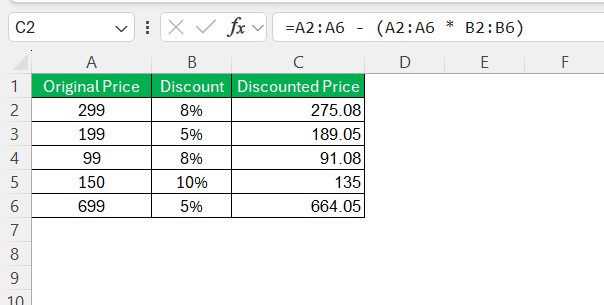
Input data table (Input – not manually entered %)
| Column | Column name | Purpose | Control notes |
| A | Product Code | Line identification | No duplicate |
| B | Original price (P0) | Base reduction | Required > 0 |
| C | Price after reduction (Part 1) | Actual price | No < COGS |
| D | Conditions/Groups | Reduced application | VIP / Wholesale / Campaign |
| E | COGS | GM Control | Optional |
| F | Cost Center | Cost allocation | Mandatory if there is a reduction. |
Standard calculation formula table by line level
| Column | Target | Excel/Sheets Formulas | Control objectives |
| G | Value decrease | =B2-C2 | For budget purposes |
| H | % Reduce (standard) | =IFERROR((B2-C2)/B2,0) | Avoid dividing by zero. |
| I | % Reduce (shown) | =ROUND(H2,2) | Consistent rounding |
| J | Flag exceeded the limit. | =IF(I2>25%,”EXCEPTION”,”OK”) | Discount cap |
Principle: Calculations do not round; rounding is only applied during display.
Table for handling multiple discount conditions (Rule-based)
| Condition (D) | % Discount applies | Sample formula |
| VIP | 10% | =B2*10% |
| Digestive | 15% | =B2*15% |
| Transportation | 20% | =B2*20% |
Stacking Discounts
| Discount 1 | Discount 2 | Discount 3 | Price after discount |
| 10% | 5% | – | =B2*(1-10%)*(1-5%) |
| 10% | 5% | 3% | =B2*(1-10%)*(1-5%)*(1-3%) |
Discount Cap Table
| Target | Recipe | Meaning |
| % maximum reduction | =MIN(H2,25%) | Do not exceed the policy. |
| Minimum price | =MAX(C2,B2*75%) | Protect GM |
Summary table of multiple rows (Summary – correct method)
| Target | Recipe | Note |
| Total value reduction | =SUM(G2:G100) | For budget purposes |
| % decreases on average | =SUM(G2:G100)/SUM(B2:B100) | Do not use AVERAGE |
| Number of exception lines | =COUNTIF(J2:J100,”EXCEPTION”) | Risk monitoring |
Automatic warning panel (Conditional Formatting)
| Condition | Rule |
| % reduces > cap | =I2>25% |
| Price < COGS | =C2 |
In summary, calculating discounts in Excel is a common and widely used method adopted by many businesses. The use of tables and fixed formulas makes Excel/Google Sheets a tool for controlling discounts, not just a spreadsheet. When % discounts are calculated automatically, capped, and alerts are added, manual errors are significantly reduced.
Frequently Asked Questions (FAQ) about calculating percentage discounts in businesses
Below is the FAQ – Frequently Asked Questions about how to calculate percentage discounts in a business.
How can I automatically detect improper discounts (exceeding the limit/incorrect recipient) on input invoices?
Standardize discount cap/threshold by supplier-catalog, compare actual % discount with purchase order/contract and flag exceptions when thresholds are exceeded; require workflow approval before payment.
Why do the purchase order and invoice still differ even when the formula is correct, especially when a discount percentage is included?
This is often due to incorrect base calculation, inconsistent rounding, line-level versus total calculation, or post-purchase reductions (rebates/credit notes). Clear rounding policies and tolerances are needed.
If we reduce the order value by 20%, by how much should we increase production to maintain the same Gross Margin?
Simulate Revenue–COGS to calculate Gross Margin before/after the reduction; if GM contracts, calculate the necessary volume uplift to compensate for the lost Gross Profit according to the scenario.
How do early payment discounts affect DSO and cost of capital?
Early discounts reduce the amount collected per invoice but shorten the date of sale (DSO); the CFO compares the implicit interest of the discount with the cost of capital to make a decision.
How do you calculate the percentage discount when prices are stacked to get an "effective discount"?
Use the remaining coefficient: Pn=P0∏(1−di)P_n=P_0\prod(1-d_i)Pn=P0∏(1−di); effective discount: deff=1−∏(1−di)d_{eff}=1-\prod(1-d_i)deff=1−∏(1−di). Avoid adding % to control cap.
What percentage discount is offered in a buy one get one free promotion, based on percentage discount calculation?
If the price remains unchanged and the two products are of equivalent value, reduce the effective value by 50%/unit.
What percentage discount is offered in a "buy 2 get 1 free" promotion?
Receive 3, pay for 2, reduced effective value 33.33% (1/3 of the gifted value).
When should the % discount be calculated per line item, and when should it be calculated on the total invoice?
Detailed auditing/reconciliation is required → line-level; programs applied to single-line, low-level applications → header-level, but rounding policy and tolerance must be consistent.
How can I allocate Cost Center discounts in real time instead of waiting until the end of the month?
Attach discounts to cost objects (Cost Center/project) as soon as they occur, set budgets, and monitor variances in real-time so that the CFO can receive early warnings.
How can we simulate the multi-tiered impact of price reductions on projected P&L before implementation?
Create scenario planning (Price, Volume, COGS, discount tiers) to calculate Revenue–Gross Profit–GM, then compare Planned vs. Actual after implementation for adjustments.
Conclude
Understanding the true nature of discount percentage calculations isn't about "getting the formula right," but about managing profitability, cash flow, and operational risk. Without clarity on the calculation base, rounding methods, stacking, or discount ceilings, businesses risk selling below cost, discrepancies in purchase orders (PO) and invoices, and the occurrence of exceptions and hidden costs.
Conversely, when the % reduction is converted into Gross Margin, DSO, budget, and ROI, businesses can make data-driven decisions, lock in risks early, and turn price reductions into controlled leverage, not a source of loss.
Calculating discounts in Excel/Sheets is a fast, flexible, and free tool suitable for small to medium-sized workloads. However, with large datasets, numerous conditions, or real-time requirements, audits, and ERP integration, Excel is prone to exceptions, discrepancies, and hidden costs. Therefore, it's advisable to standardize formulas, apply rules, rounding policies, discount caps, and combine automation/ERP if the volume and risk are high.
To receive consultation and experience our corporate financial management solutions, register here: https://bizzi.vn/dang-ky-dung-thu/