


Cloud Computing is becoming a strategic platform for smart businesses, both cost-optimized and flexible to expand, while supporting digital transformation, automation and advanced data analysis.
This article by Bizzi will analyze in detail the concept of Cloud Computing, and at the same time point out the benefits and risks when applying the solution for the goal of financial automation.
Cloud Computing: The “Backbone” of Business Digital Transformation
Cloud computing is the “backbone” of enterprise digital transformation, as it provides a flexible, scalable and cost-effective platform for data management, collaboration and deployment of new applications.. It is no longer an option but an essential element for businesses to adapt to market changes, improve security and innovate rapidly.
1. Global context & trends
Cloud is no longer a trend – it is mandatory infrastructure for every business that wants to accelerate digital transformation. By 2025, the global Cloud market is expected to exceed 830 billion USD, growing by more than 20% per year. Cloud becomes the backbone of digital transformation, serving from startups to multinational corporations.
Furthermore, 95% businesses are gradually moving important applications to the cloud. Cloud becomes the foundation of applications: financial management, ERP, CRM, automation (Automation, RPA), AI & Machine Learning, real-time data, cost management & risk management.
In other words, Every digital transformation initiative – from ERP, EPM, T&E to BI – needs the Cloud to operate smoothly, scale flexibly and optimize costs.
2. Problems Vietnamese businesses are facing
Despite rapidly changing world trends, many Vietnamese businesses still largely rely on old infrastructure (on-premises), leading to:
- High maintenance costs, difficult to expand as the business grows.
- On-prem servers are expensive to maintain and upgrade hardware.
- Every time storage needs expand or users have to invest in new equipment.
- High downtime directly affects financial and accounting operations.
- Financial data is fragmented, insecure, and difficult to integrate across departments.
- Data is scattered between ERP – Excel – email – departments.
- Manual approval process → prone to errors, fraud, and lack of audit trail.
- The risk of data loss/hard drive failure still happens every day.
- Difficulty in implementing automation in cost management and lack of integration capabilities
- Unable to connect smoothly between T&E, e-invoice, purchasing, and accounting systems.
- Each integration must be "smashed and rebuilt".
- Not meeting the needs of growth or opening more branches.
Consequence: Slow data management, high risk of manual errors, loss of real-time decision making.
Cloud adoption helps businesses operate, store and process data flexibly, securely and scalably:
- Centralized data storage, easy decentralization and security.
- Rapidly deploy SaaS applications, reducing infrastructure investment costs.
- Seamless integration between departments (finance, HR, projects, sales).
- Support automation and real-time reporting, improve management efficiency.
What is Cloud Computing? Operating mechanism and system structure
Cloud Computing is considered a solution to help businesses be flexible, optimize costs, secure and automate processes.
1. What is the definition of Cloud Computing?
Cloud Computing is a model of providing information technology resources – servers, storage, databases, software – over the Internet instead of having to install and operate on-premises. In other words, businesses do not need to invest in physical infrastructure, but can use IT services on demand, paying based on usage (pay-as-you-go).

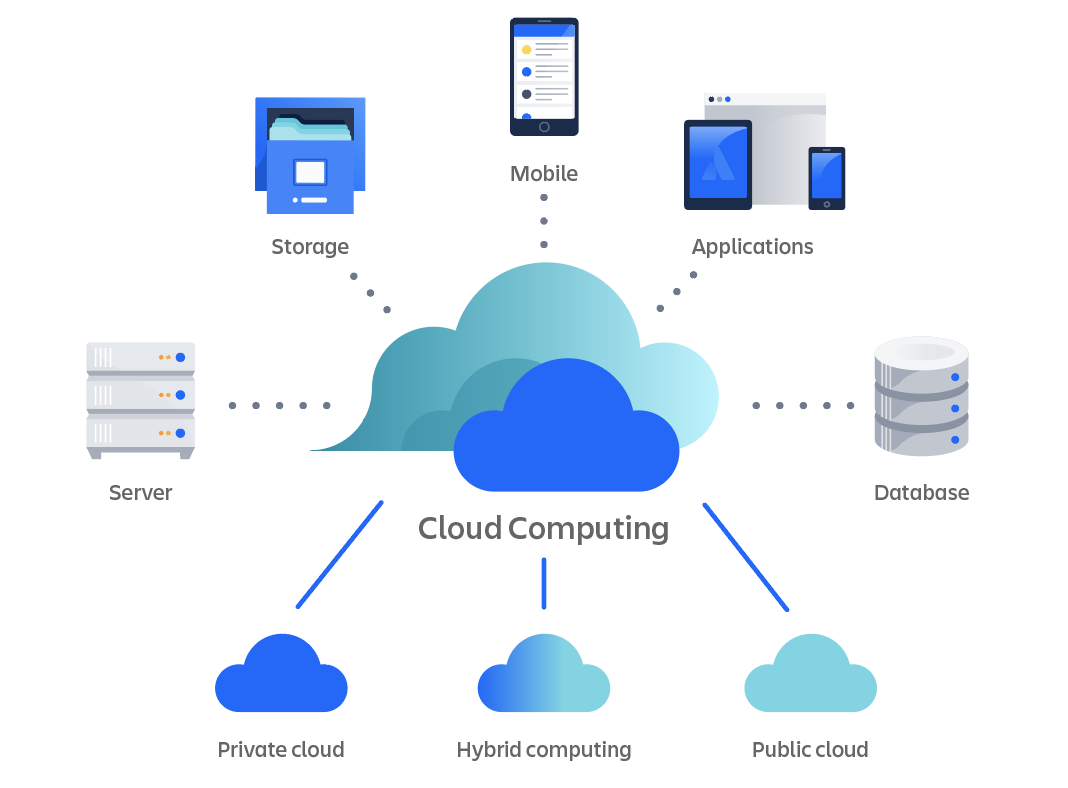
2. Comparison of Cloud and On-premise (traditional infrastructure)
Cloud Computing suitable for businesses that want flexibility, cost savings, quick deployment and easy expansion. Meanwhile, On-premise Still suitable for large-scale businesses that require absolute data security or complex legacy systems.
| Criteria | On-premise | Cloud Computing |
| Expense | Large Capital Investment (CapEx) | Pay only when you use (OpEx) |
| Administration | Need internal IT team | Infrastructure management provider |
| Maintenance | Handmade | Automatic update |
| Extend | Hardware limitations | Elastic computing – flexible scaling |
| Availability | Internal server dependency | Uptime 99.9%, multi-region redundancy |
In the digital transformation trend, many businesses are moving from On-premise to Cloud, especially with financial, project management and SaaS applications like Bizzi.
3. Cloud system structure
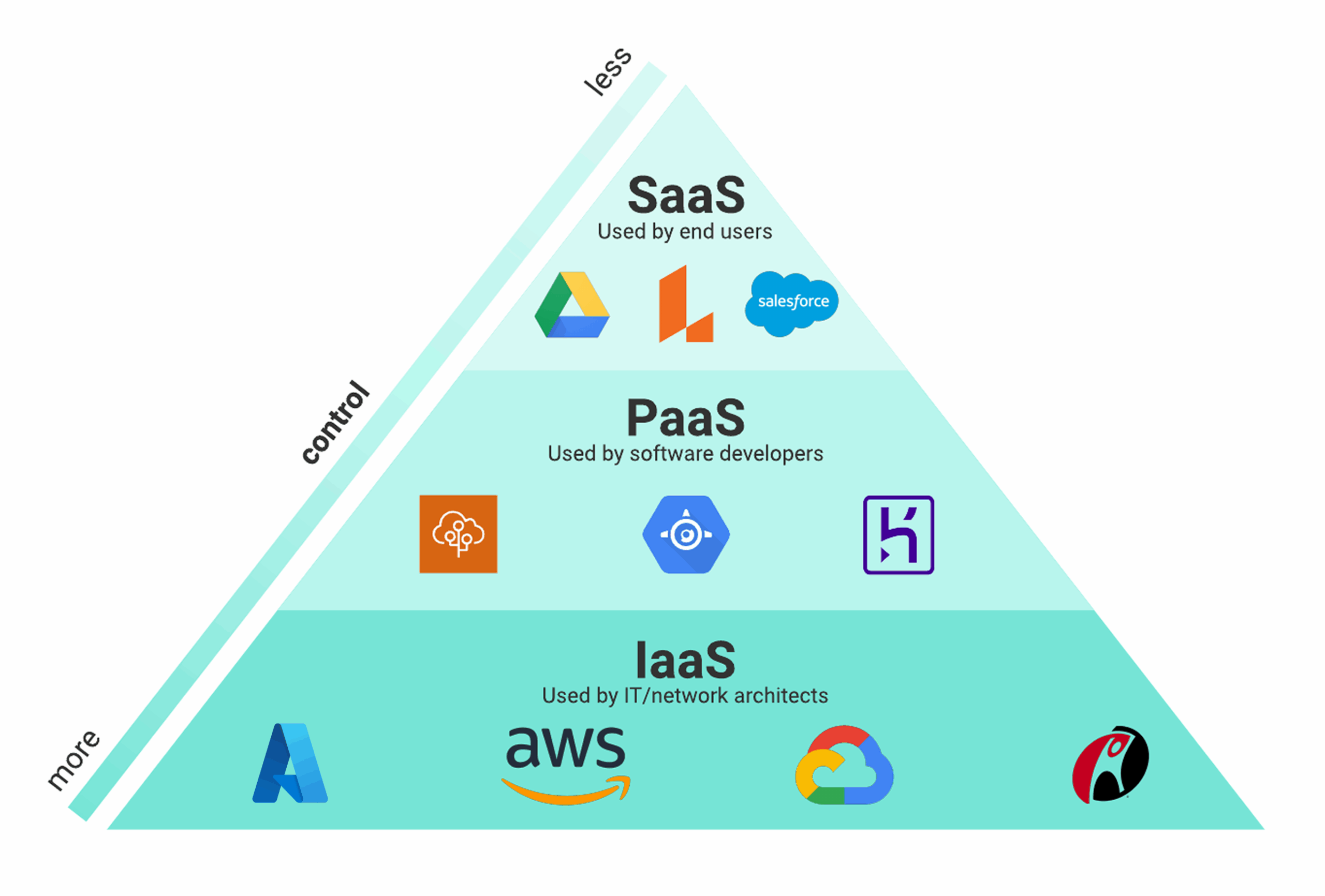
Clouds are often divided into 3 main layers (Service Models):
| Service class | Function | For example |
| IaaS (Infrastructure as a Service) | Providing server, storage, and network infrastructure for businesses to deploy their own systems | AWS EC2, Microsoft Azure VM |
| PaaS (Platform as a Service) | Providing application development platform, database, middleware | Google App Engine, Heroku |
| SaaS (Software as a Service) | Provide complete software on the cloud, users only access and use | Bizzi, Salesforce, Base.vn |
In addition, there is also CaaS (Container as a Service) and FaaS (Function as a Service) for modern, microservices or serverless applications.
Cloud Service Models
Each Cloud Computing model will have different levels of management and responsibility:

1. IaaS – Infrastructure as a Service
Providing: Basic infrastructure (server, storage, networking) over the Internet.
- Users: Self-install operating system, middleware, applications.
- For example: AWS EC2, Google Compute Engine, Viettel Cloud Server.
Special features: Supports Infrastructure-as-Code (IaC) – automatically initializes and manages resources, facilitating DevOps and rapid deployment.
2. PaaS – Platform as a Service
Provides: Application development environment (runtime, database, toolchain).
- User: Writes only code; provider is responsible for operating the infrastructure.
- Examples: Google App Engine, Azure App Services.
- Advantages: Reduce operating costs and speed up application deployment.
3. SaaS – Software as a Service
Offers: Complete application, web-accessible, no installation or maintenance required.
Examples: Google Workspace, Salesforce, Bizzi.
- Bizzi SaaS Cloud – Financial Automation
-
- Automate invoice processing (IPA + 3-Way Matching) on the cloud, control spending in real time.
- Manage your accounts receivable (ARM) and expenses (Bizzi Expense) according to budget.
- Data is encrypted and stored in a domestic ISO 27001 certified data center, ensuring safety and security.
4. FaaS – Function as a Service (Serverless)
Offer: Run a standalone function, charge only when the code executes.
- Examples: AWS Lambda, Google Cloud Run.
- Practical application: Automatically send email reports, batch process accounting or financial data by event, help optimize costs.
Cloud Deployment Models
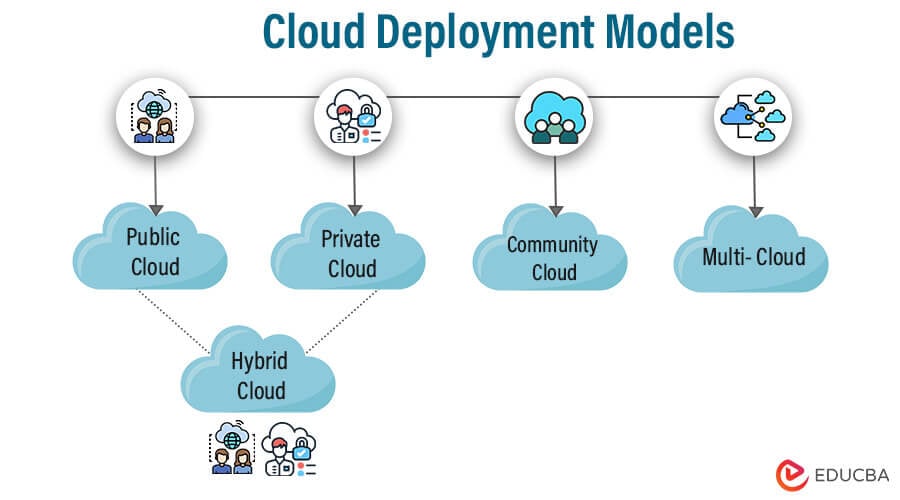
Businesses need to consider data sensitivity, cost, scalability, and governance strategy to choose the right deployment model.
1. Public Cloud
- Features: Service sharing among multiple users, low cost, fast deployment, easy to scale.
- Examples: AWS, Google Cloud Platform (GCP), Microsoft Azure.
- Special features:
- Multi-zone support for increased availability.
- The auto-scaling feature automatically expands or contracts resources.
- Cross-region replication enables fast data backup and recovery.
2. Private Cloud
- Features: Dedicated to one organization, absolute control, high security, higher operating costs.
- Use case: Internal accounting system, sensitive data needs to be stored on-site.
3. Hybrid Cloud
- Features: Combine Public + Private Cloud, take advantage of both.
- Use case: Sensitive data is stored on private cloud, the rest runs on Bizzi SaaS (public cloud) for financial automation.
- Benefits: Flexible, cost-effective and secure
4. Multi-Cloud
- Features: Use multiple cloud providers at the same time, avoid vendor lock-in and optimize costs.
- For example: Combine AWS for compute, GCP for machine learning, Azure for storage.
5. Community Cloud
- Characteristics: Sharing resources between organizations in the same field (e.g., healthcare, education).
- Benefits: Lower cost than private cloud, still ensuring industry standards.

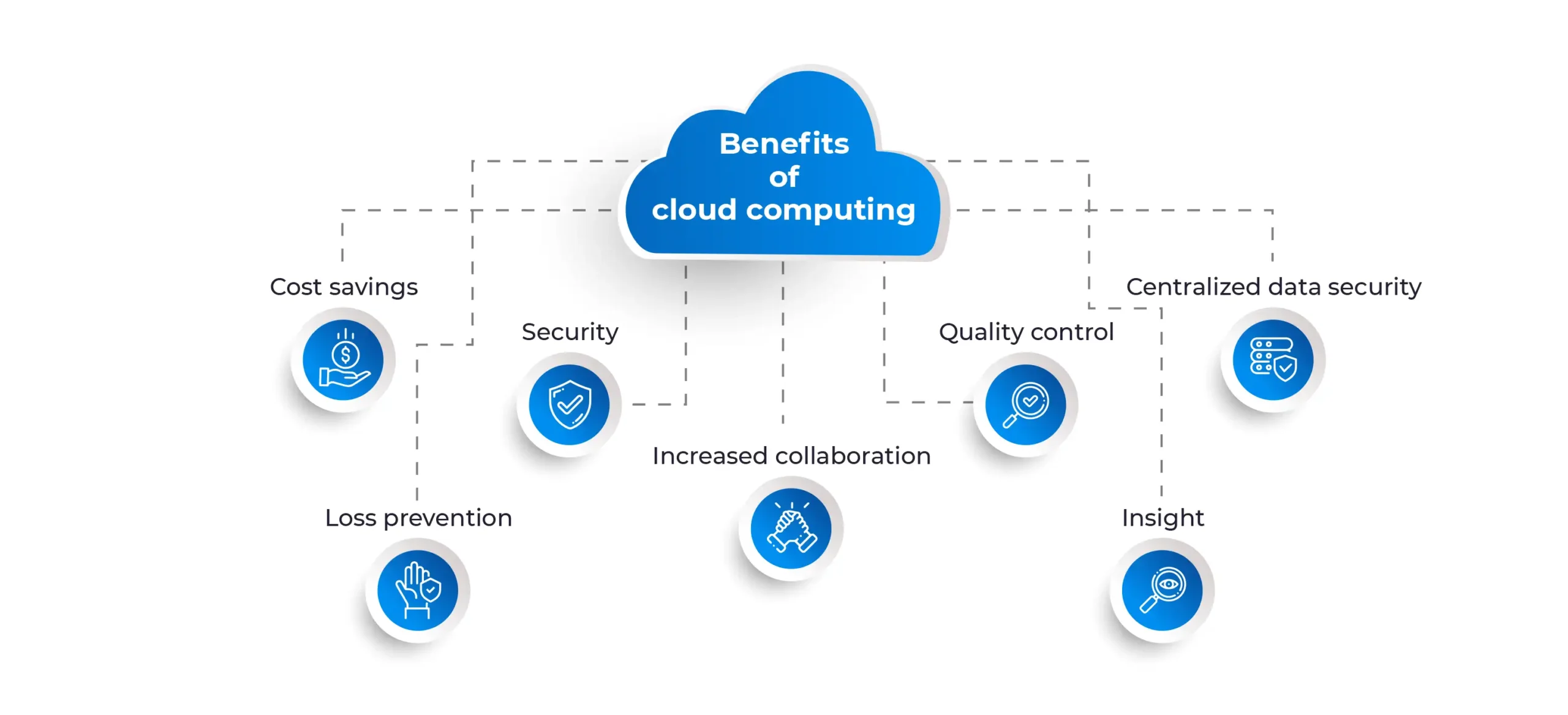
Outstanding benefits of Cloud Computing for businesses
Cloud Computing is not only IT infrastructure, but also optimizes costs, increases performance, high security and transparency, helping businesses operate flexibly and make confident decisions.
Cost optimization & flexible financial model
- Shift from CapEx to OpEx: pay only when you use it.
- Pay-as-you-go: measure costs accurately by project or department.
- Fast deployment, reducing the need for internal IT staff.
- FinOps: track and optimize cloud costs periodically, ensuring effective budgeting.
Scalability & Elasticity
- Auto-scaling: automatically increase/decrease resources according to actual load.
- Burstable instance: adds processing capacity during peak times, e.g. Bizzi processing accounting data or settlement season.
- Flexible to expand both horizontally or vertically.
Performance & Deployment Speed
- Uptime 99.9%, low latency thanks to multi-AZ (Availability Zone) infrastructure.
- Fast application deployment, reduced physical infrastructure wait time.
Security & Compliance
- Data encryption at rest/in transit: AES-256, SSL/TLS.
- IAM access management, multi-factor authentication (MFA).
- Multi-tier backup, immutable backup, disaster recovery (DR).
- Zero-trust access and audit log for accounting and finance departments.
Transparency & Effective Monitoring
- The metrics – logs – trace system helps track:
- System status
- Cloud usage costs
- Real-time security & compliance

What are the challenges and risks when implementing Cloud Computing?
While Cloud offers significant benefits in terms of cost, performance, and security, businesses need to anticipate hidden costs, legacy system integration, configuration security, and vendor lock-in risks. Adopting FinOps, hybrid cloud, policy-as-code, and multi-cloud will help ensure a secure and efficient Cloud deployment.
Hidden Cost
- Problem: Egress fees, snapshots, static IP, log storage… can cause unexpected costs.
- Fix:
- Set up budget alerts to warn you when you go over budget.
- Use tagging to track costs by project, department.
- Apply FinOps to manage and optimize recurring costs.
Legacy System Integration
- Problem: Internal systems may not be directly compatible with the cloud.
- Fix:
- Use an API Gateway or adapter to connect between the cloud and legacy systems.
- Deploy hybrid cloud to reduce migration risk, keep sensitive data in-house, and run new applications in the cloud.
Configuration security risks
- Problem: Incorrect permission, public bucket, leaked key, incorrect cloud configuration.
- Fix:
- Apply policy-as-code to control security policy.
- Automatic security checks and regular scans.
- Set up zero-trust access and audit logs to track all activities.
Vendor lock-in
- Problem: Completely dependent on one cloud provider → difficult to migrate or expand to another platform.
- Fix:
- Design multi-cloud architecture for service delivery.
- Use open standards and containerization for increased flexibility and portability.
Cloud Computing Applications in Financial Automation & Business Administration
Cloud Computing is not just a storage infrastructure, but an operational center for financial automation, project management and comprehensive digital transformation. Bizzi SaaS is a typical example, helping businesses control costs and optimize progress, all on a secure, flexible and scalable cloud platform.
Cloud in financial management - accounting
- Store invoices, documents, and financial reports securely on the cloud, ensuring security and access anytime, anywhere.
- Support remote approval: multiple departments can access and approve expenses, reducing dependence on physical paperwork.
- Automatic data synchronization: connect ERP, banks, accounting software via cloud API, avoid manual errors.
Cloud for Finance Process Automation
Bizzi is a SaaS Cloud-based platform that helps businesses automate financial processes with outstanding functions such as:
- Automatic Invoice Processing (IPA).
- Real-time invoice – PO – GR reconciliation.
- Manage debt and over-budget warnings.
- Cloud spend approval, full traceability.
Bizzi puts cost and cash flow control directly on the cloud, helping businesses operate efficiently without the need for complex IT operations.
Cloud in overall digital transformation
- Connecting automation – AI – analytics on the same cloud platform, creating a smart ecosystem.
- Consolidate data from multiple departments, enabling fast and accurate decision making.
- Creating a platform for “smart businesses”, accelerating performance, optimizing costs and providing information transparency.
What is the roadmap for businesses to deploy Cloud Computing?
Cloud deployment is not just about infrastructure migration, but a systematic process: from current situation assessment → architectural design → testing → continuous expansion and cost management. This roadmap ensures businesses optimize ROI, control costs, increase performance and data security.
Step 1 – Assess current situation & determine goals
- Identify the processes with the highest ROI to move to the cloud, for example:
- Automatic invoice processing
- Approve spending
- Debt control and budget
- Make a priority list, define implementation goals: save costs, increase efficiency, reduce processing time.
Step 2 – Design a basic secure Cloud architecture
- Create standardized Landing Zone: configure IAM, VPC, logging, backup.
- Select the region that matches your data residency requirements.
- Ensure security and compliance from the start, avoid risks as you scale.
Step 3 – Pilot & Measure KPIs
- POC (Proof of Concept) implementation 4–6 weeks for a small process:
- Evaluate processing time, cost, downtime.
- Set up RTO/RPO (Recovery Time Objective / Recovery Point Objective) for financial and accounting data.
- Collect feedback from users and tweak configuration before expanding.
Step 4 – Expand & Manage Ongoing Costs
- Apply Infrastructure as Code (IaC) to automate deployment, standardize infrastructure, and backup/lifecycle.
- Establish FinOps team Monitor and optimize cloud costs periodically.
- Scale deployments of applications, data, and automation of other processes along a defined roadmap.
Frequently Asked Questions What is Cloud Computing?
Below is a summary of some of the issues related to Cloud Computing.
1. What is Cloud Computing and how does it work?
- Cloud Computing is a model of providing infrastructure, platforms and software over the Internet, instead of having to install and operate on-premise.
- Operates on a client-server basis, with data and applications running on the provider's data center, accessed by users via the web or API.
2. Is the cloud safe for business financial data?
- Modern clouds offer data encryption at rest/in transit (AES-256, SSL/TLS), IAM access management, multi-factor authentication (MFA).
- Combining multi-tier backup, immutable backup and disaster recovery, helps keep financial data safe, transparent and compliant.
3. How is Cloud different from traditional server (on-premise)?
| Criteria | Cloud | On-premise |
| Infrastructure investment | No need, pay as you go | Must purchase, install and maintain |
| Extend | Flexible, auto-scaling | Expensive, dependent on physical infrastructure |
| Security | Supplier assurance, compliance with standards | Self-managed enterprise |
| Deployment | Fast, anytime, anywhere | Slow, usually at the office |
4. Should I choose Public, Private or Hybrid model?
- Public Cloud: low cost, fast deployment, easy to scale.
- Private Cloud: maximum control, high security, expensive.
- Hybrid Cloud: a combination of both, sensitive data stored locally, the rest running in the cloud – e.g. Bizzi SaaS.
- The choice depends on data sensitivity, budget, and scaling strategy.
5. Is cloud cost really cheap? How to avoid hidden costs?
- Cloud costs can be optimized thanks to pay-as-you-go models and FinOps.
- However there are hidden costs: egress, snapshots, static IP, log storage.
- How to avoid: set up budget alerts, tagging, regular monitoring, and apply FinOps.
6. Is Bizzi a Cloud-based software? How does it integrate ERP/accounting?
- Bizzi is a Cloud-based SaaS platform that automates financial processes: invoice processing, PO – GR reconciliation, debt management, budget alerts.
- Bizzi comprehensive ERP integration and accounting software via cloud API, real-time data synchronization, no need for complex IT operations.

Conclude
Above is all the information related to what is Cloud Computing solution. It can be seen that Cloud Computing is the center of automation, digital transformation and effective management, and Bizzi is a practical application that helps businesses maximize the value of Cloud, especially in financial management - accounting and project cost control.
Bizzi takes advantage of all the benefits of Cloud Computing to:
- Automate financial processes: invoice processing (IPA), PO – GR reconciliation, debt management, budget overage warning.
- Project cost management: control cash flow directly on the cloud, no need for IT team to operate.
- ERP/accounting integration via cloud API, real-time data synchronization.
With this special advantage, businesses can complete projects on time, keep costs within budget, and increase transparency and management efficiency.
Sign up today for a quick consultation and a free trial of Bizzi's financial management solutions for your business: https://bizzi.vn/dang-ky-dung-thu/