


Manual purchasing processes with fragmented data are the biggest obstacle preventing businesses from controlling costs and cash flow. For CFOs, a standardized purchasing process flowchart is essential. ERP It's not just about operational steps, but also about internal control systems that prevent duplicate payments and Maverick Spending. This article clarifies the five core steps in the P2P cycle, from PR creation to automated payments, integrating the power of AI to optimize financial performance.
What is a purchasing process flowchart?
Before optimizing, the CFO needs to understand the nature of the problem. Purchasing process flowchart In a business, this is not simply a business flow diagram, but a structure for controlling cash outflows.
A P2P (Paid-to-Private Partnership) flowchart is a systematization of the steps from the initial need to the completion of payment obligations. CFOs use this flowchart to establish budget control points, approval authority, and ensure transparency for all financial data.
Essentially, this is the data infrastructure of COGS and OPEX. All generated costs go through this system. If Purchase and payment cycle flowchart Without proper oversight, businesses will face risks such as inventory discrepancies, overpayments, and difficulty achieving Fast Close targets.
A key difference is between Trade and Non-Trade purchasing flowcharts. Trade focuses on inventory and cost of goods sold; Non-Trade focuses on budgeting, spending patterns, and departmental spending policies. Draw a purchasing process flowchart. These two groups require different approaches to ensure appropriate control.
To operate effectively, CFOs need to master the standard five-step process of this cycle.

The 5-step roadmap in the standard ERP purchasing process flowchart.
One Purchase process document flowchart The standard always revolves around 5 core steps: PR → PO → GR → Invoice → Payment. Each step creates a document that forms the basis for control in the next step.
The CFO essentially makes the cash flow commitment decision at the purchase order approval stage based on the pre-sale budget. From that point on, the business has established a future financial obligation.
Modern data flows are no longer fragmented. Warehouse management systems (WMS) are interconnected with ERP systems; electronic invoices are integrated with tax authorities; and banks are connected via host-to-host systems. Draw a purchasing process flowchart.It is important to ensure data interoperability rather than simply describing administrative steps.
Comparison Table: Manual vs. Automation
| Steps in the Flowchart | Manual Process (Risky) | Automated Process (Bizzi Solution) |
| Prepare a proposal (PR). | Manual document verification | Automatically check and verify the validity of invoices: information such as name, address, tax identification number, invoice code, etc.
Warning of duplicate invoices, invalid invoices, and errors |
| Place a purchase order (PO) | Manual data entry is prone to errors in unit prices. | Automatically generate Purchase Orders (POs) from approved Purchase Orders (PRs). |
| Receive goods (GR) | Reconciliation of disparate documents | Smart 3-way collation with more accuracy than 99%. |
| Invoices & Reconciliation | Manual three-sided joint | AI-OCR & 3-Way Match automatic |
| Pay | Create orders manually on e-banking. | Host-to-Host secure payment |
The most important first step in Purchasing process flowchart This is essentially managing purchase orders.
Initiate a purchase proposal (PR) with integrated budget control.
The PR phase is the first "gateway to control." If this step is skipped or done superficially, the entire system that follows will lose its meaning.
Purchase Request (PR) Management This involves identifying needs and checking the budget before committing to purchases. The basic control formula is:
Available budget = Total budget – (Actual expenses + pending purchase orders)
If PR approvals are done manually via email, the CFO doesn't have an immediate view of the remaining budget. This can easily lead to Maverick Spending and supply chain bottlenecks when budget overruns are discovered too late.
After the PR (Private Partnership) is approved, the business officially enters the phase of committing to the supplier.
Issuing a purchase order (PO) establishes a commitment with the supplier.
The PR phase is the first "gateway to control." If this step is skipped or done superficially, the entire system that follows will lose its meaning.
Purchase Request (PR) Management This involves identifying needs and checking the budget before committing to purchases. The basic control formula is:
Available budget = Total budget – (Actual expenses + pending purchase orders)
If PR approvals are done manually via email, the CFO doesn't have an immediate view of the remaining budget. This can easily lead to Maverick Spending and supply chain bottlenecks when budget overruns are discovered too late.
With Bizzi ExpenseEmployees submit PRs directly through the system. The system automatically checks budgets by department or project in real time. The CFO can approve them instantly on their mobile device, ensuring uninterrupted workflow while maintaining control.
After the PR (Private Partnership) is approved, the business officially enters the phase of committing to the supplier.
Record the GR warehouse receipt as a basis for actual verification.
Warehouse receipt (GR) Confirming that the goods have been received in full and meet quality standards. This is the intersection between the physical world and accounting data. Purchase and payment cycle flowchart.
If discrepancies between the Purchase Order (PO) and the Gross Order (GR) are not detected in time, the settlement process will be complicated and there is a risk of incorrect payment.
Bizzi Bot integrates data from WMS or ERP, automatically comparing quantities on GR (Grout) with PO (Purchase Order). If a discrepancy occurs, the system immediately alerts the warehouse and purchasing departments for action. This ensures that inventory and cost of goods sold data are always accurate.
The purchase order (PO) and gross receipt (GR) data will become the basis for the invoice when it is sent.
Process input invoices and perform three-way reconciliation.
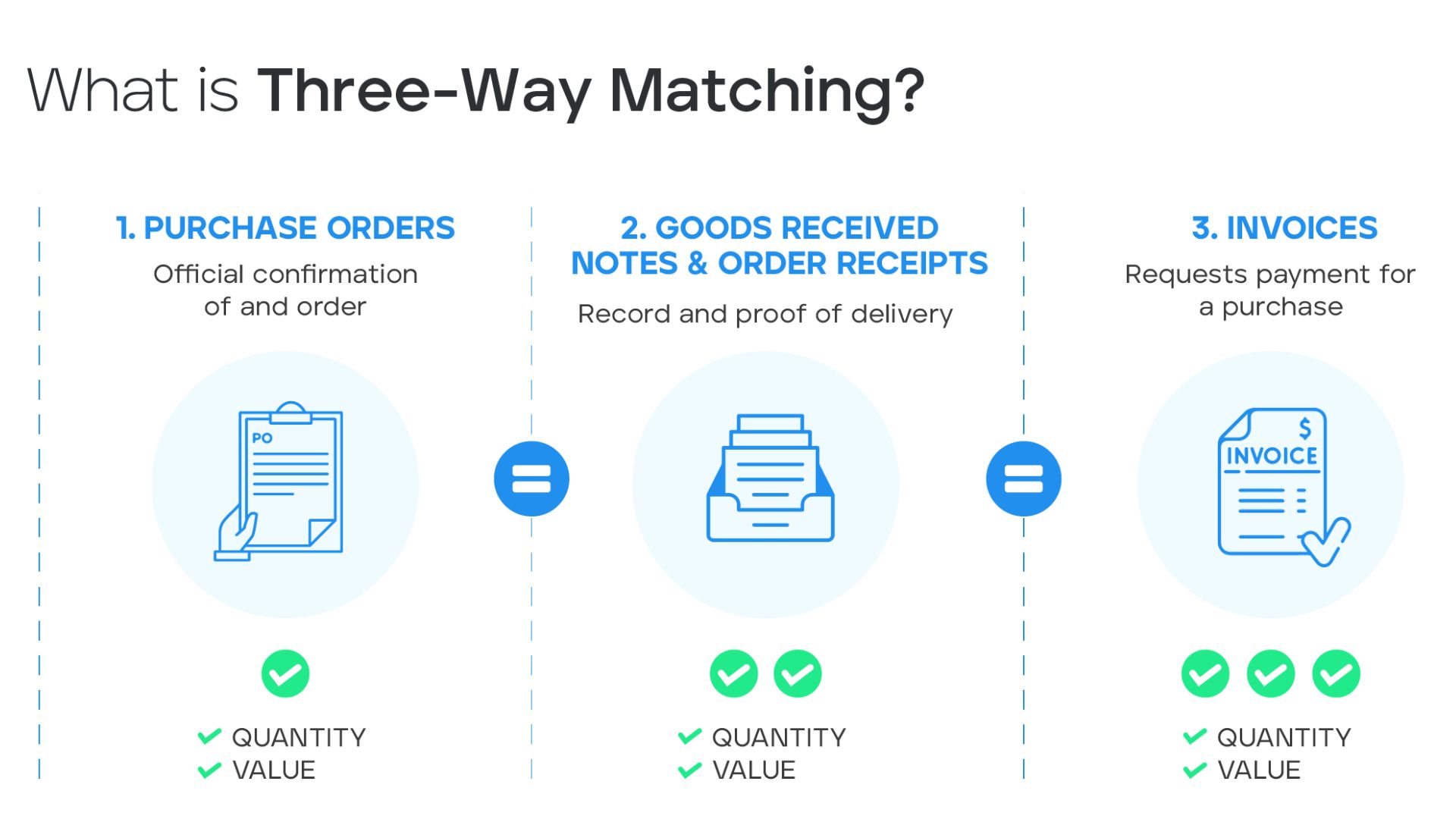
This is the most important step in risk control. Purchasing process flowchart. 3-Way Matching Ensure that businesses only pay for what they ordered and actually received.
If done manually, the AP accountant must enter and match each line item. Errors can lead to duplicate payments, incorrect pricing, or payments for goods not yet received.
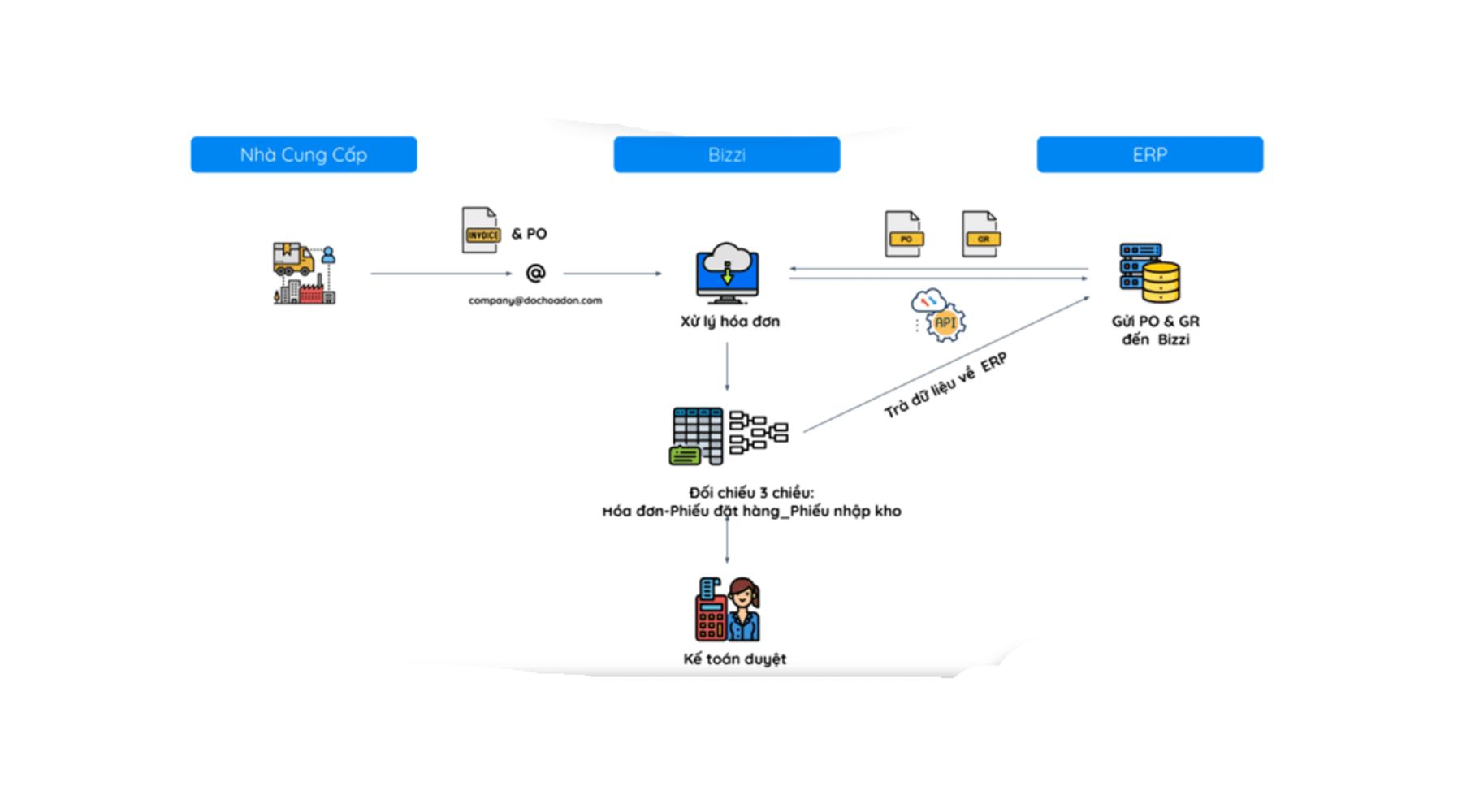
Bizzi Bot uses AI-OCR to extract invoice data with an accuracy of over 99%. The system performs automatic 3-Way Matching between Purchase Order (PO), General Receipt (GR), and Invoice, and checks its validity with the tax authorities. Only invoices with discrepancies are forwarded to staff for exception processing; the rest are automatically pushed into the ERP system for accounting.
Once the invoice has been approved, the final step is payment.
Process payments and automatically reconcile bank statements.
Payment is the final step in Purchase and payment cycle flowchart, where cash actually leaves the business.
If orders are placed manually on e-banking, the risk of entering incorrect amounts or making duplicate payments is very high. Furthermore, delays in reconciling bank statements leave CFOs without immediate information on liquidity.
Bizzi Payment connects ERP systems and banks via a Host-to-Host system. The system automatically generates scheduled payment orders, checks for duplicates before execution, and automatically reconciles daily statements. Payment status is updated back to the ERP system immediately, enabling CFOs to accurately and securely monitor cash outflows.
Completing these 5 steps helps businesses own a Purchase process document flowchart Solid and transparent.
A strategy to eliminate extraneous spending using digital flowcharts.
Maverick spending doesn't stem from employee "bad habits," but often from opaque processes, slow approvals, or unfriendly systems. When needs arise but processing times are too long, departments will find alternative routes. Therefore, to eliminate extraneous spending, CFOs can't just tighten controls; they need to redesign the system. Purchasing process flowchart towards digitalization, transparency, and ease of compliance.
From a management perspective, this is not just an operational issue, but a strategy to protect profit margins and working capital.
1. Identify the nature of extraneous spending.
Before developing a solution, managers need to understand where extraneous spending is "hidden" within the organization. Purchase and payment cycle flowchart.
There are three common forms:
- Firstly, purchasing without prior PR leads to a lack of budget control. Without this step... Purchase Request (PR) Management With standardization, businesses don't know when their spending obligations have arisen.
- Secondly, payments are made without valid purchase orders (POs). This breaks the "data anchor" for 3-Way Matching, forcing the accounting department to handle exceptions manually.
- Thirdly purchase cost This arises from small, fragmented contracts scattered across departments. When data is not centralized, CFOs cannot perform accurate Spend Analysis to negotiate better prices.
If not Purchase process document flowchart If these expenses are not strictly controlled, they will gradually accumulate into a significant financial risk.
2. Redesign the flowchart according to the "No PO - No Pay" principle.
One of the core strategies to eliminate Maverick Spending is to implement the principle of "No Purchase Order - No Payment".
This means that every invoice must be traceable to the approved PR and valid PO. Purchasing process flowchartSystem-wise, the process needs to be configured to automatically block invoices without a referenced purchase order (PO).
For the CFO, this represents a shift from post-audit to pre-audit control. Instead of detecting errors after the money has already gone, the company prevents them from happening in the first place.
When Draw a purchasing process flowchart.This principle must be placed at the center, with clear control points at the PR and PO stages.
3. Integrate real-time budget control.
An effective digital flowchart goes beyond simply describing a process; it must integrate real-time budget data.
The basic control formula needs to be automatically calculated by the system:
Available budget = Approved budget – (Recorded expenses + Open purchase orders)
Without this review, PR approval is merely a formality. Managers could inadvertently commit to exceeding the budget without realizing it.
Solutions like Bizzi Expense allow budget checks as soon as employees submit PRs. CFOs approve them on mobile with full details of remaining limits. This transforms Purchase Request (PR) Management It has become a tool for strategic control rather than an administrative procedure.
4. Normalize data for performing Spend Analysis.
One of the biggest benefits of digitization. Purchase and payment cycle flowchart It is the ability to perform focused expense analysis.
When all PR, PO, GR, and Invoice data are interconnected, the CFO can:
- Identify the most frequently used supplier for each category.
- The department was found to have a tendency to exceed its regular budget.
- Renegotiate the contract based on the total value of the purchases rather than on individual transactions.
If data remains scattered across email, Excel, and e-banking, Spend Analysis is virtually impossible. Therefore, a strategy to eliminate extraneous spending must be accompanied by data standardization. Purchase process document flowchart.
5. Automate 3-Way Matching to prevent discrepancies.
A major drawback of manual processes is the slow detection of discrepancies. When invoices are paid before full reconciliation, businesses lose the opportunity to negotiate or request adjustments.
Automated 3-Way Matching helps the system only allow payment when the Purchase Order (PO), Gross Receipt (GR), and Invoice match. Bizzi Bot uses AI-OCR to extract invoice data, then automatically compares it with the PO and GR in the ERP system.
This not only reduces the workload of accountants but also establishes a "technical barrier" against extraneous spending. Draw a purchasing process flowchart.This is the most important risk control point.
6. Increase transparency through Audit Trails
Every step in the digital flowchart needs to leave an audit trail. Who creates the purchase order (PR), who approves the purchase order (PO), who confirms the gross rebate (GR), and who approves the payment must all be documented.
For managers, this is not a tool for monitoring individuals, but rather a mechanism to protect the organization from the risk of fraud. When every step in Purchasing process flowchart If everything is transparent, any deviations from established procedures will automatically decrease.
7. Evaluating ROI from a CFO's Perspective
Eliminating extraneous spending not only reduces risk but also yields clear financial benefits:
- Reduced closing time by 30–50% thanks to normalized data.
- Reduce invoice processing costs through automation.
- Optimize DPO by making payments on time instead of reactively.
By implementing the Bizzi ecosystem, businesses not only digitize processes but also integrate everything from PR to Payment on a single platform. This provides CFOs with clean data for making accurate and timely financial decisions.
Answering questions about the steps in the purchasing process flowchart.
Most of the questions revolve around Purchasing process flowchart It's not about "how to draw," but about "how to control." Below is an in-depth explanation from a financial manager's perspective, focusing on risk, cash flow, and internal controls.
1. Why is creating a PR (Private Relationship Management) step the most important step for a CFO?
In the whole Purchase and payment cycle flowchartPublic relations (PR) is the only point of control before a business makes a financial commitment.
If not properly controlled Purchase Request (PR) ManagementIn the first place, every subsequent step is merely dealing with the consequences. When PR is approved without checking available budget in real time, businesses may inadvertently exceed their budget right from the start.
From a CFO's perspective, PR is essentially a tool to "lock the valve on the cash flow." When digitized, the system can automatically check limits, warn of budget overruns, and record approval history. This shifts control from manual to preventative.
2. How do I handle it if the quantity on the GR differs from the PO?
Discrepancies between purchase orders (PO) and gross receipts (GR) are common, especially for businesses with high transaction volumes.
In Purchase process document flowchartA clear exception handling procedure is needed. When a discrepancy occurs, the system must automatically pause the payment process and send an alert to the relevant department.
There are three standard handling options:
- Adjust the Purchase Order if both parties agree to the changes.
- Request the supplier to deliver additional items if there is a shortage.
- Prepare a record of rejecting any excess or substandard goods.
The key point is that exceptions must be handled before step 3 - Way Matching. Otherwise, AP accountants will have to process them manually, and the risk of incorrect payments increases significantly.
3. What risks does 3-Way Matching protect businesses from?
3-Way Matching is the most important "technical barrier" in Purchasing process flowchart.
This mechanism protects businesses from:
- The unit price paid was incorrect compared to the purchase order.
- Payment for goods not yet received.
- Duplicate payment.
- Paying for a fake or invalid invoice.
For CFOs, this is not just about accounting control, but about protecting cash flow. When automated, the system only forwards incorrect invoices to staff for processing, while the rest is handled automatically. This significantly reduces manual workload and increases accuracy.
4. Can invalid electronic invoices be included in the payment flowchart?
The answer is no.
In Purchase and payment cycle flowchart According to ERP standards, the system must automatically block invalid invoices before proceeding to the payment step.
This includes:
- Check the supplier's tax identification number.
- Check the operational status on the tax system.
- Verify the validity of the digital signature.
If invalid invoices are still included in the process, legal and tax risks can directly impact a business's after-tax profits.
5. How much time does P2P automation reduce bookkeeping time?
When Draw a purchasing process flowchart. Following a comprehensive digitalization approach, data is standardized right from the PR and PO stages. This significantly reduces the amount of work required for end-of-period reconciliation. Practical implementation shows that automation can reduce closing time by 30–50%, especially in businesses with a large volume of invoices.
From a management perspective, this not only reduces pressure on the accounting department but also allows the CFO to have financial reports sooner for timely decision-making.
6. What is the difference between a Trade and a Non-Trade purchasing flowchart?
In Purchase process document flowchartTrade and Non-Trade have different control objectives. Trade directly relates to goods, inventory, and COGS. Here, GR plays a crucial role as it affects the cost of goods sold and gross profit.
Non-Trade relates to operating expenses (OPEX), departmental budgets, and project budgets. In this group, the step... Purchase Request (PR) Management and budget control is a key focus.
The CFO needs to design two separate flowchart branches that are still integrated into a unified data system to ensure comprehensiveness.
7. What are the benefits of connecting Host-to-Host in payment systems?
In the final step of Purchase and payment cycle flowchartHost-to-Host payment systems facilitate a direct connection between ERP systems and banks.
Management benefits include:
- Eliminate manual data entry in e-banking.
- Reduce the risk of errors in the amount of money and beneficiary information.
- Automatically update payment status to the accounting system.
- Assist with daily bank reconciliation.
For CFOs, this is the foundation for monitoring cash outflows in real time and detecting unusual transactions early.
Conclusion: From flowcharts to proactive financial control systems
One Purchasing process flowchart ERP standards not only facilitate smooth operations but also serve as a strategic tool to protect profits and working capital. When digitized, flowcharts are no longer just business diagrams but become integrated internal control systems, from PR to Payment.
For houses corporate financial managementThe challenge doesn't lie in... Draw a purchasing process flowchart.This involves transforming it into an automated, transparent, and measurable operating mechanism. Every control point, from managing purchase requests (PRs), issuing purchase orders, 3-Way Matching to Host-to-Host payments, needs to be interconnected on a single data platform.
The Bizzi ecosystem helps businesses standardize and digitize everything. Purchase and payment cycle flowchart through solutions such as Bizzi Expense (PR and budget control), Bizzi Bot (AI-OCR and 3-Way Matching), and Bizzi Payment (host-to-host connection and automatic reconciliation of subsidiary ledgers).
Instead of dealing with errors after the money has gone, CFOs can proactively prevent risks from the very beginning of the process. This is the difference between a manually operated purchasing process and a modern financial control system – where technology not only supports accounting but also elevates the management capabilities of the entire enterprise.
To receive advice on solutions tailored to your business, schedule an appointment with Bizzi here: https://bizzi.vn/dang-ky-dung-thu/





