


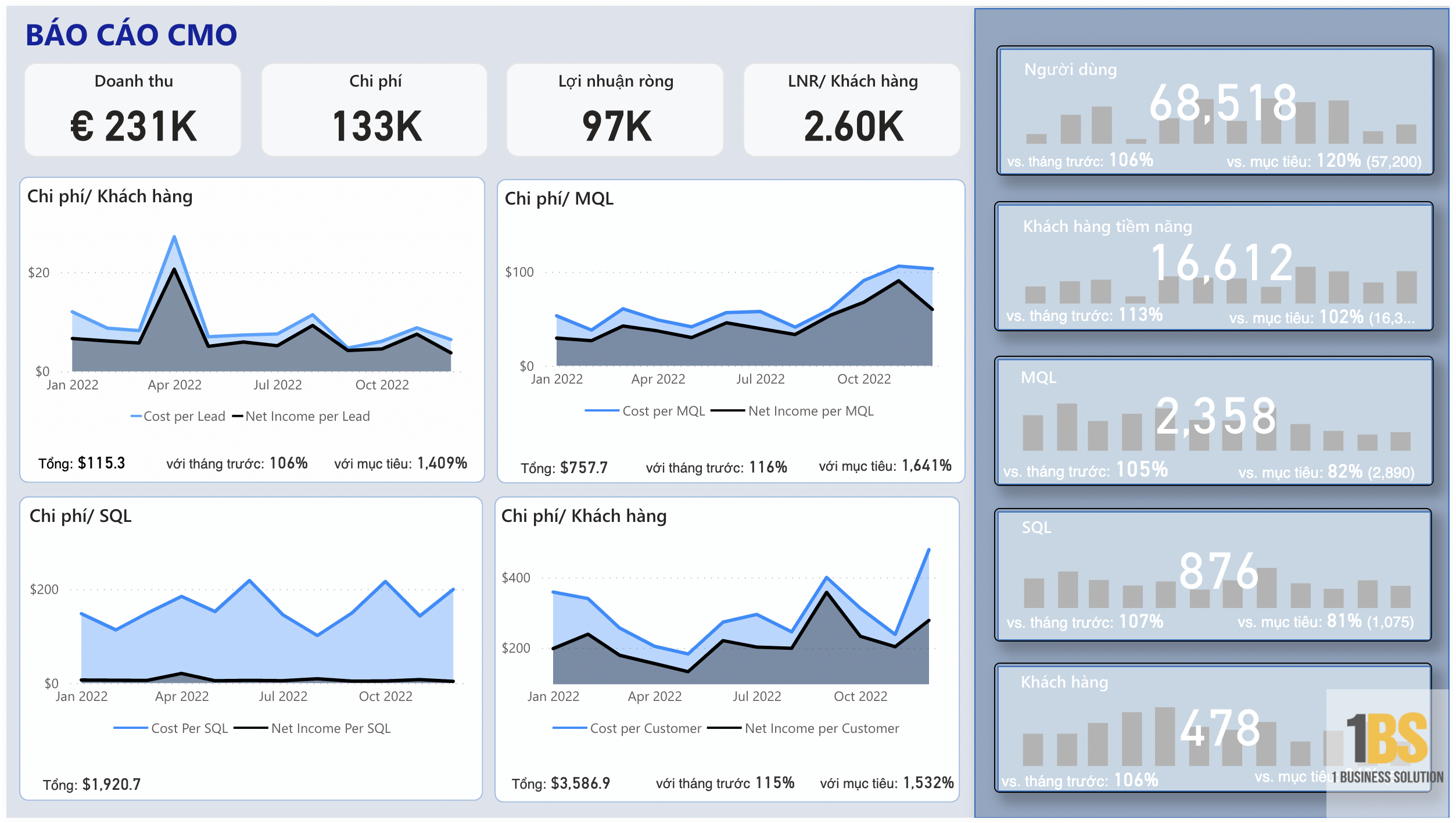
In the era of digital marketing, businesses are generating massive amounts of data. From Google Ads, Facebook Ads, TikTok, SEO, email marketing, to KOL and offline campaigns, operational data is constantly being produced. However, the biggest challenge is not a lack of data, but rather... The data is scattered. and lack of a comprehensive picture.
Performance data resides in Ads Manager, behavioral metrics in GA4, customer information in CRM, while actual costs remain dormant within the Accounting/ERP system.
Running multiple channels simultaneously and having scattered data created a major "blind spot" for decision-makers. Without a standardized dashboard, meetings between Sales, Marketing, and Finance often turned into arguments about figures instead of focusing on strategy.
What are the consequences?
- Newspaper marketing "Good performance" (High number of leads, high CTR).
- Finance report "Inflated costs" (Budget exceeded, payments overlapped).
- CEO/Board of Directors The ROI/ROAS picture is not clearly visible. and it is difficult to make decisions about budget allocation.
This is where marketing dashboards become indispensable tools. Let Bizzi help you discover 5 effective marketing dashboard templates for your business.
What is a Marketing Dashboard?
Before delving into specific examples, we need to agree on the definition and role of a Marketing Dashboard within an organization.
What is a marketing dashboard?
Marketing Dashboard It is an intuitive interface that aggregates and displays marketing performance data from various sources (Ads Manager, GA4, CRM, Accounting) through charts, tables, and key performance indicators (KPIs).

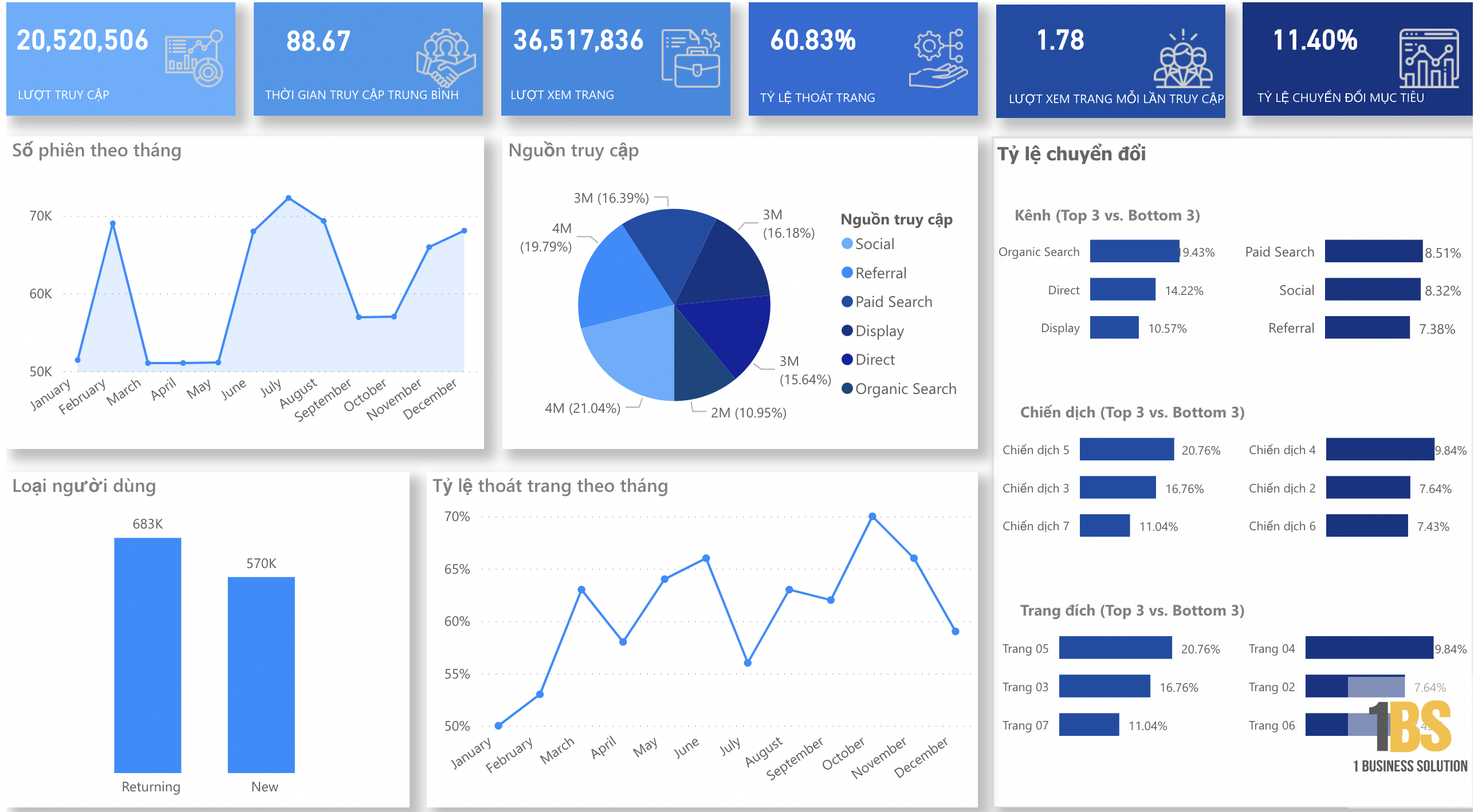
Main purpose: Help users Answer key business questions quickly. (Business Questions) at a glance, for example:
- Which channel is currently the most cost-effective?
- "Is the advertising expenditure burning according to plan/budget?"
- "Is ROI/ROAS increasing or decreasing compared to the previous period and compared to the target?"
User-based dashboard stratification in enterprises
A single dashboard cannot serve everyone. It needs to be tiered according to strategic and operational levels:
Dashboard for CMO/CEO (Executive Level)
- Focus on: Bottom Line and the Sustainability of Growth.
- KPIs: Revenue, Gross Profit, CAC (Customer Acquisition Cost), LTV/CAC ratioMarketing Spend / Revenue (%), Budget Acquisition Rate.
- Target: Make strategic budget allocation decisions and evaluate the effectiveness of all departments.
Dashboard for Head of Marketing / Performance Manager (Management Level)
- Focus on: Performance by channel, campaign, and budget shift.
- KPIs: Spend by channel, Leads/MQLs by channel, CPL (Cost Per Lead), CPA (Cost Per Acquisition), ROAS (Return On Ad Spend).
- Target: Manage monthly budgets, optimize multi-channel performance, and adjust campaigns.
Dashboard for professionals (Operational Level)
- Focus on: Operational details.
- KPIs: CPM, CPC, CTR, Frequency, Creative Performance, Search Terms (Google), Open Rate/Unsubscribe (Email).
- Target: Optimize operational elements such as A/B testing, bid strategy, and creative processes on a daily/hourly basis.
Contact Business Intelligence & Finance
Marketing Dashboard is Visualization Layer, not the original data source (Source of Truth). To obtain accurate and reliable data, it needs to be connected to:
- Performance data: Traffic, Conversion, Leads from GA4, CRM.
- Actual Cost Data: Expenditure data, Purchase Orders (PO), and Invoices from the finance and accounting system.
In particular, connecting to the Cost/Payment/Budget data controlled by Finance is extremely important. This is where cost management systems like Bizzi and financial planning platform Sactona (EPM/FP&A) become "Data Backbone" (Data backbone) for the Marketing Dashboard. If the costs are wrong, the ROI/ROAS calculation will be incorrect.
5 Popular Marketing Dashboard Template Types
Using pre-made marketing dashboard templates saves you design time, allowing you to focus solely on customizing KPIs and connecting data.
Marketing Performance Dashboard (multi-channel – overall view)
This is the most popular marketing dashboard template, providing a 360-degree view of digital marketing performance.

- Use when: We need a quick overview of the performance across all digital channels: Paid, Organic, Email, and Social.
- Core KPIs:
- Spend by channel.
- Impressions, Clicks, CTR.
- Leads, Conversions, Revenue.
- CPL, CPA, ROAS.
- The blocks in the dashboard:
- Total KPI card (Spend, Revenue, ROAS, Conversions).
- Trend chart over time.
- Comparison table of channels: Google, Facebook, TikTok, SEO, Email.
- Campaign performance heatmap.
CMO / CEO Dashboard (Strategy – Finance & Growth)
This marketing dashboard template helps management evaluate marketing as an investment, not a cost center.
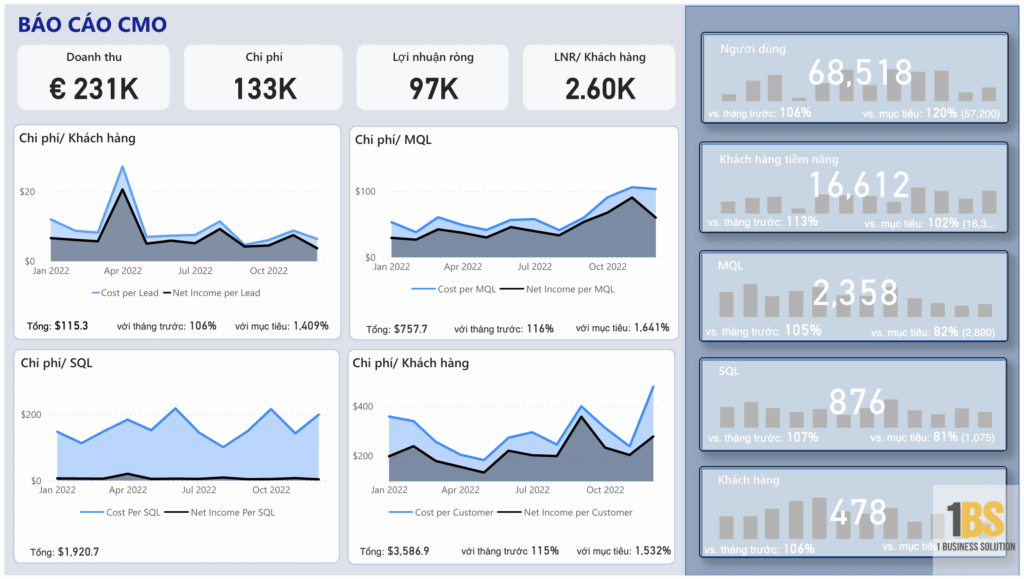
- Use when: The leadership team needs to consider: "How much value has the marketing budget actually generated?"
- Key KPIs should include:
- Revenue by channel.
- Marketing Spend / Revenue (%).
- CAC (Customer Acquisition Cost).
- LTV / CAC ratio.
- Net profit per customer / per channel.
- Target achievement rate by month/quarter (target vs actual).
- Display components:
- The funnel diagram is Marketing → Sales → Revenue.
- Cost and revenue breakdown table by channel, product, and region.
- Warning: Channel shows unusually high CAC and ROAS below threshold.
Channel-specific Dashboard (Google Ads, Facebook Ads, SEO, Email, Social)
For specialists to work effectively, they need a detailed marketing dashboard template for their channel.
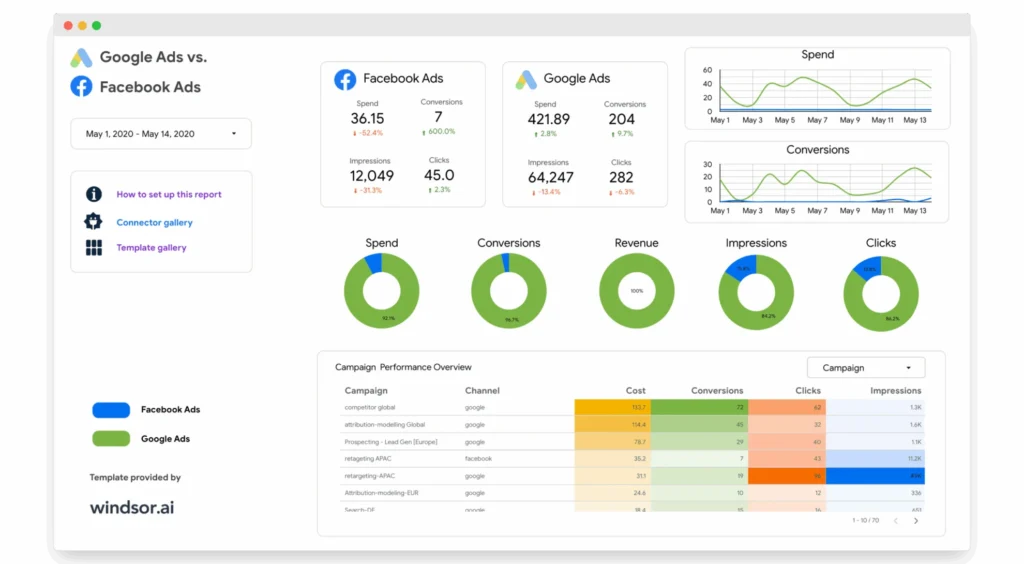
- Each channel has its own dashboard, for example:
- Google Ads dashboard: cost, clicks, CTR, conv., search terms, device.
- Facebook Ads dashboard: CPM, CPC, CTR, results, frequency, creative performance.
- SEO dashboard: organic sessions, top landing pages, keyword rankings, CTR, backlinks.
- Email dashboard: open rate, CTR, unsubscribe, revenue per email.
- Use when deep optimization is needed. each channelA/B testing, creative optimization, keyword research.
Campaign Performance Dashboard
Focus on the performance of a specific campaign, usually those with large budgets (Seasonal, Product Launch).
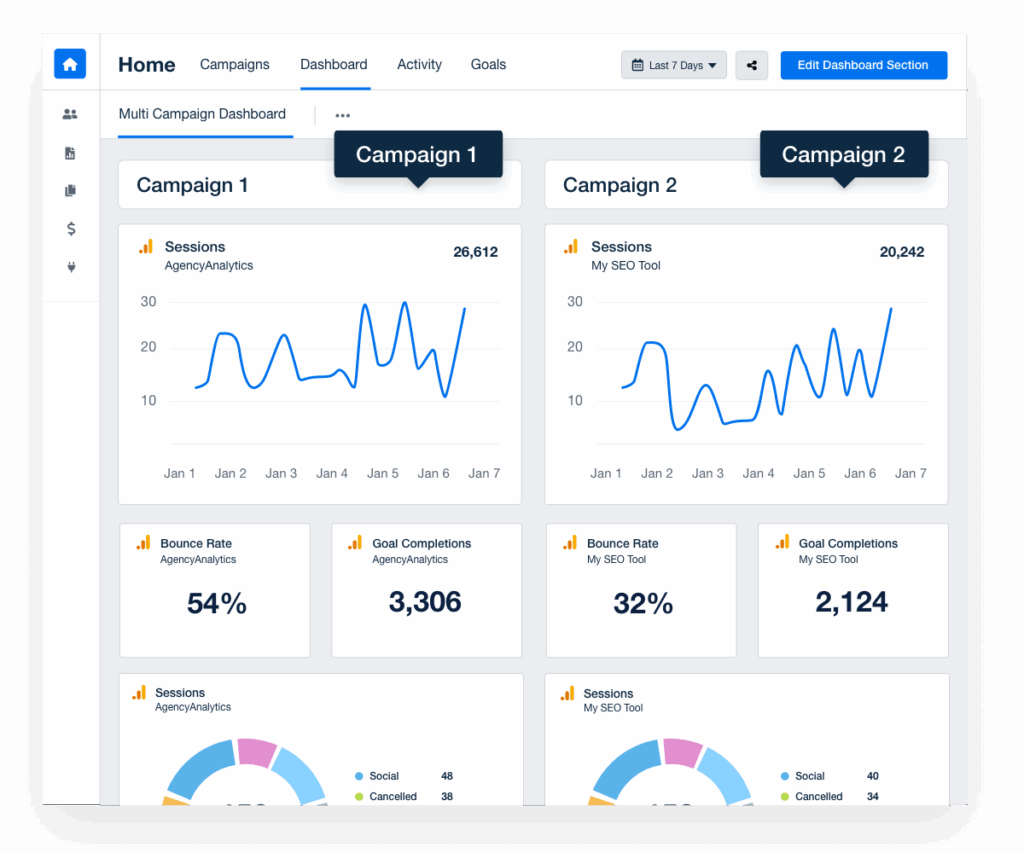
- Summary of results according to the campaign instead of following the channel.
- Suitable for: Product launches, seasonal campaigns, and large-budget campaigns.
- KPIs:
- Reach, frequency, CTR.
- Leads, MQL, SQL, Opportunities, Deals.
- CPA, CPL, cost per opportunity.
Customer Acquisition & Funnel Dashboard
Focusing on the customer journey helps Marketing and Sales identify bottlenecks.
- Focus on customer journey From awareness to purchase.
- Ingredient:
- Traffic → Leads → MQL → SQL → Customer → Revenue.
- Conversion rate between steps.
- Cost per stage (cost per MQL, cost per SQL).
- This helps to clearly see which channels are generating quality leads and which stages are experiencing high dropout rates.

5 steps to designing a standard marketing dashboard template for your business.
Regardless of the template used, designing an effective dashboard always follows these 5 steps:
Step 1: Clearly identify the user and the main question.
Dashboards should be designed around... Business Question It's for the user's benefit, not just to display available data.
- CMO/CEO: "Are we spending the money wisely?", "Is LTV/CAC sustainable?"
- Head of Marketing: "Which channels should have their budgets cut, and which should receive budget increases for 20% this month?"
- Performance: "Which campaign has the lowest CPA, and which creative campaigns should be scaled up?"
 Step 2: Choose KPIs based on business questions, not just randomly selecting a few.
Each question should only be answered by 2–5 KPI directly related.
Limit: The dashboard has 30 KPIs, but users only see 3 and don't know what to do with the remaining 27. The KPIs should be... Actionable Metrics (Data leads to action).
Step 3: Design the dashboard layout structure
The layout should allow users to easily transition from the overview to the details:
- Top Section: Overall KPIs (Executive summary) – 3-5 most important metrics (ROAS, Spend, Revenue).
- Middle Section: Trends over time (Month over Month, Year over Year), comparison with target/budget (Target vs Actual).
- Bottom Section: Detailed table by channel, campaign, creative, audience – where specialists search for data to optimize.
Step 4: Standardizing data and naming conventions
The input data must be normalized; otherwise, the dashboard will be very difficult to read.
- Naming Normalization: How to name campaigns, ad groups, and purchase orders/marketing-related contracts.
- UTM normalization: A unified convention for using UTM (Source, Medium, Campaign) ensures consistent traffic/conversion data between GA4 and CRM.
- Mapping: Standardize how you map channels to Source/Medium to ensure Google Ads/Facebook Ads are always categorized correctly.
Step 5: Determine the update frequency and data latency.
Everyone needs to agree on the frequency of data refresh (Real-time, every 4 hours, every 1 day, etc.).
Ensure all dashboards clearly display messages like this: “Data updated as of 10:00 AM, December 10, 2025” To avoid arguments about discrepancies between the systems.
Marketing dashboard builder tools and template suggestions
Choosing the right tools to suit your scale and budget is crucial.
Free/accessible tool
- Looker Studio (Google Data Studio): Suitable for SMEs and Digital Teams. Integrates well with the Google ecosystem (GA4, Ads, Sheets, BigQuery). Requires the use of third-party connectors (Supermetrics, Fivetran) to pull Facebook/TikTok data.
- GA4 Explorer: Provides customized reports and in-depth visualizations of website and event tracking, useful for SEO/Website professionals.
Advanced BI tools & dashboards
- Power BI, Tableau: Designed for large businesses looking to integrate Marketing, Sales, and Finance into a single, centralized Business Intelligence (BI) platform. Supports complex data models and stringent security and access control policies.
- Databox, Klipfolio, Supermetrics Dashboard: Specialized marketing dashboard tools often have many ready-made templates and diverse connections to marketing/sales data sources.
Data connectors / data pipeline (Data infrastructure)
To eliminate manual work, data connectivity tools need to be used:
- Supermetrics, Funnel.io: Specifically designed to pull data from marketing sources (Facebook, Google, TikTok, CRM, Email) into one place. Data Warehouse (like BigQuery) or Google Sheet/SQL Database.
- Self-built/Zapier API: Used to automate simpler data flows.
Common mistakes when using pre-made "marketing dashboard templates"
Using templates is good, but if you don't address the following core issues, the dashboard will never be effective.
1. The dashboard looks nice but isn't aligned with the actual budget/cost.
The most common mistake is that the dashboard only shows operational metrics (Clicks, Leads, Conversions) without mapping them to:
- Actual cost (Total Actual Spend) for each campaign.
- Approved budget According to the budget.
- Actual costs according to the accounting system. (The invoice has been processed).
Consequences: ROAS is calculated based on the cost figures from Ads Manager (excluding VAT, agency fees, and platform fees), leading to inflated and inaccurate ROI/ROAS ratios.
2. Numerous KPIs but no clear decision path.
A dashboard is just a collection of useless KPIs if it doesn't answer this question: "What should we do after seeing this?"
A good dashboard should have clear rules (rule-based):
- If ROAS (Google Ads) < $X$ (Break-even point) → The system will flag it as Red (Campaign Review).
- If CPA (Facebook Ads) > $Y$ (Maximum Threshold) → Automatically send an alert to the Performance Team (Reduce Budget / Replace Creative).
3. Incorrect data due to failure to reconcile with the financial system.
There is a large difference between Costs according to Ads Manager and Actual costs according to accounting:
- The Ads Manager reported a spending budget of 500 million VND.
- The accountant recorded an invoice of 600 million VND (due to the addition of agency fees, platform fees, and other production costs...).
If the Marketing Dashboard is not based on verified and accounted-for cost data from Finance, then any budget allocation decisions based on ROI/ROAS on that Dashboard are flawed.
Connect your Marketing Dashboard to your costs and budget using Bizzi/Sactona.
This is the solution to transform your Marketing Dashboard into a truly effective financial decision-making tool.
Bizzi Expense – Marketing Cost Control Layer (Finance)
Bizzi Expense help control Marketing costs Right from the first step:
- Setting a Budget: Set up your marketing budget by Channel/Campaign/Cost Center within the Bizzi system.
- Approval process: All marketing expenses (agency fees, media, KOLs, production) must go through this channel. Payment Request / Approval on Bizzi.
- Record Actual Spend: Once the expense is approved and paid, the Bizzi system records: the actual amount, the campaign it belongs to, the channel it belongs to, and the department it belongs to.
Data actual usage The cost data recorded by Bizzi is the controlled cost data, the "Source of Truth" used to calculate ROI/ROAS in the dashboard.
Bizzi IPA + 3way – Guaranteed that the costs displayed on the dashboard are genuine and legitimate.
Bizzi IPA (Intelligent Process Automation) and 3-Way Matching technology:
- Check the Invoice: Automatically retrieve and verify input invoices from suppliers, agencies, and advertising platforms.
- Reconciliation: Automatically reconcile with Purchase Orders / Contracts / Banking:
- Avoid duplicate payments.
- Ensure that costs, taxes, and suppliers are legitimate.
Result: The marketing costs used in the dashboard are data that has already been processed. Finance confirms (Not an estimate from Ads Manager), ensuring the validity and accuracy of ROI/ROAS.
Sactona – Bringing the marketing dashboard into the FP&A picture / Rolling Forecast
Once the Cost data is clean and standardized through Bizzi, it is fed into an EPM platform like Sactona.
- Budget Management: Sartona collected Planned Budget (Approved budget) – actual usage (Actual cost from Bizzi) Forecast (Remaining cost forecast) into a centralized environment.
- Strategic Decision: CFOs and FP&A can view marketing performance according to scenarios (Scenario Planning) and Adjusting the Marketing Budget in the model Rolling Forecast based on actual ROI/ROAS results.
Marketing dashboards are no longer just "beautiful reporting" tools; they are an indispensable part of the marketing process. Continuous Financial Planning System of the business.
Conclude
Sample Marketing Dashboard A good chart is not just a collection of pretty charts; it's a strategic tool that helps businesses move from recording to... making immediate decisions and optimizing costs..
An effective dashboard must be aligned with core business questions, focus on actionable KPIs, and most importantly, connect to data. Actual Costs and Budget It has been confirmed by the financial system.
By standardizing data processes and integrating platforms such as Bizzi (Control spending and actual bills) with the platform EPM/FP&A like Sactona (with budget management and rolling forecasting), businesses will gain a seamless data stream from actual spending to future forecasts. This makes the Marketing Dashboard an indispensable part of a continuous financial performance management system, helping leaders allocate resources accurately and maximize ROI.





