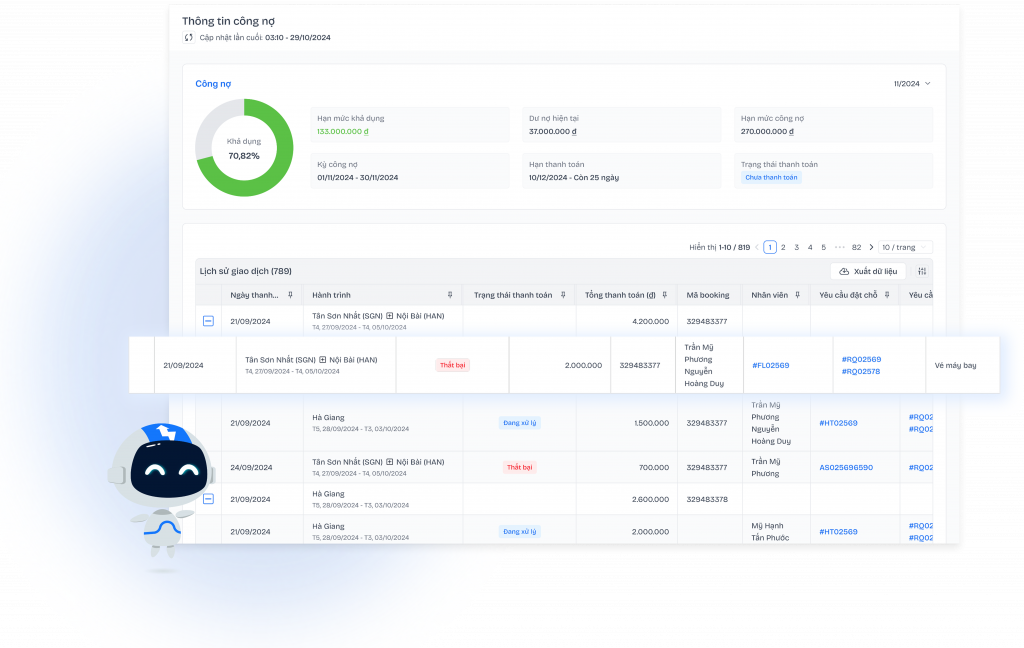


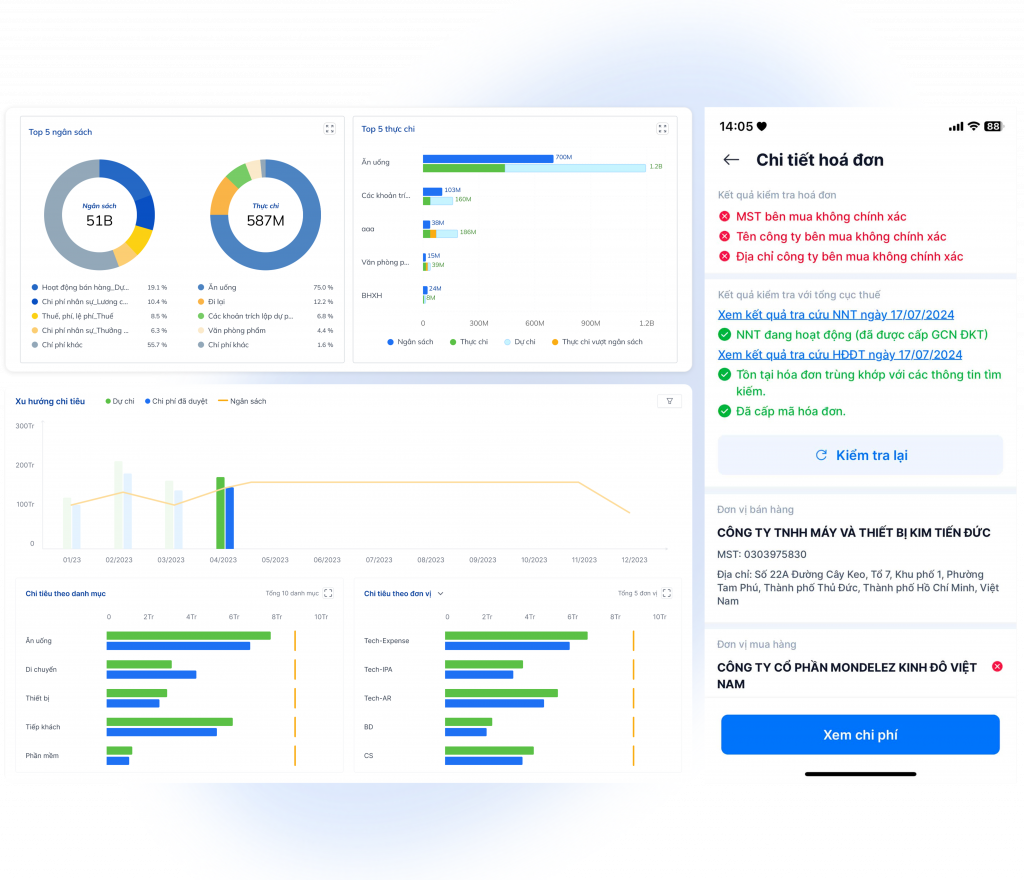
In a landscape of increasingly fragmented business data, leaders lack not reports, but a reliable dashboard system for making informed decisions. So, What is a dashboard system? And why is it different from a "beautiful but wrong" chart display?
This article correctly explains the nature of dashboard systems, clarifying the following: What is the purpose for which leaders use the dashboard? in operations, and how dashboards connect data – risk control – financial forecasting according to CFO standards.
At the same time, you'll see why many businesses have dashboards but still make slow or inaccurate decisions, and the right approach to implementing dashboards that truly create value.
What is a dashboard system in modern business management?
Dashboard system It is a layer that aggregates and visualizes core management metrics, helping leaders track performance, identify risks, and make decisions based on data that has been controlled for accuracy, time, and context.
The biggest misconception is viewing the dashboard as "a chart screen." In reality, the dashboard system is translation-support layerIt shouldn't just display data, but transform that data into management signals. Therefore, the dashboard other reports Its key is that it's designed to answer short-term decision-making questions: Is the business "stable or off," where is it off, and which transactions need drilling down?
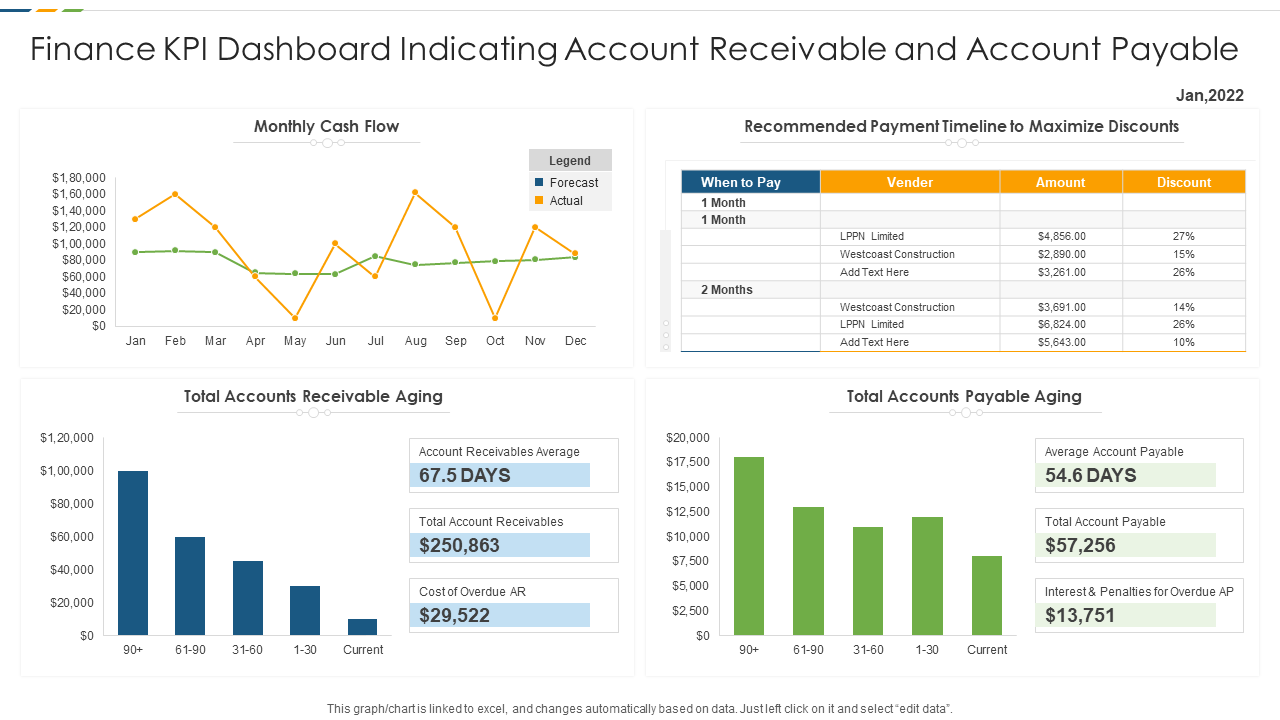
A standard dashboard system typically includes the following essential components:
- KPI/KRIPerformance indicators and risk indicators (not just KPIs).
- Warning thresholdRed/yellow/green depending on the company's tolerance.
- Drill-down Exceptional circumstances: from index → list of transactions/suppliers/projects causing discrepancies.
- Data governance: defines the index, data source, owner, and update schedule.
- SSOT (Single Source of Truth): a “standard data source” to avoid controversy.
In reality, SSOT doesn't just appear out of nowhere by buying a BI tool. SSOT is created when a business gains control over its data sources – especially invoices, expenses, and accounts payable – so that all indicators on the dashboard reflect the same financial truth.”
Therefore, many businesses set up a layer for document normalization and reconciliation before uploading the data to the dashboard. Bizzi is often used as this foundational layer to reduce input discrepancies and create data that is sufficiently 'clean' for the decision-making layer.
What purpose do leaders use dashboards for?
Leaders use dashboards to quickly grasp the company's status, identify deviations from plans, control financial risks, and make timely operational decisions without having to read dozens of detailed reports.
Although they all look at the same dashboard, each job title often "reads" it according to different objectives:
- CEO: Growth, profit margins, execution schedule, overall risk. The CEO needs signals: what is deviating and impacting strategic goals.
- CFO: Cash flow, budget, accounts payable, payment/compliance risk. The CFO needs to see the connection. Cost → Cash → Risk.
- COO: Operational performance, productivity, process turnover, approval bottlenecks.
The distinguishing feature of a CFO's dashboard is the need for 'traceability': not just seeing metrics exceeding thresholds, but tracing back to the transactions, suppliers, expenses, or liabilities that caused the fluctuations.
To achieve this, data needs to be closely tied to documentation and approval/payment status. When the data layer is controlled right from the invoice, expense request, and accounts payable stage (for example, via Bizzi), the dashboard truly supports CFOs in taking action instead of just observing.
How does a dashboard system differ from traditional reporting and BI?
Dashboards differ from reports in their near real-time capabilities, alerting features, and exception-based drill-down capabilities; they also differ from traditional BI in their focus on leadership decision-making rather than in-depth data analysis for analysts or IT professionals.
Quick comparison table:
| Criteria | Report | Dashboard | BI | EPM |
| Target | Synthesis/Compliance | Make quick decisions | In-depth analysis | Performance Management |
| Main users | Staff/Accountant | Leader | Analyst/BI team | CFO/FP&A |
| Time | By period | Near real-time | Flexible | According to the plan-forecast-actual cycle |
| Use | Read details | Look at the signal + drill-down | Ad-hoc & modeling | Budget/Forecast/Scenario |
A practical perspective is: dashboards help leaders 'see deviations quickly', while EPM/FP&A helps 'explain deviations and simulate scenarios'. For this chain to run smoothly, the financial operational data layer must be sufficiently consistent.
In implementation, Bizzi can handle the operational data (invoice/expense/AR/AP) so that the dashboard accurately reflects the current situation; and when a deeper analysis of Budget-Actual-Forecast is needed, businesses can then use EPM systems like SACTONA for analysis and forecasting.
Where does the data come from to enter the leadership dashboard system?
Executive dashboard data should not go directly from ERP or Excel but should go through a standardization layer such as a Data Warehouse/Data Lake to ensure consistency and avoid data conflicts between systems.
Common data sources:
- ERP/Accounting: General ledger, AP/AR, inventory, cost of goods sold.
- CRM: pipeline, projected revenue.
- Bank: balance, actual cash inflow/outflow.
- Purchasing/Cost System: invoice, payment request, approval, supplier.
To transform it into a dashboard, businesses need ETL:
- Extract – Transform – LoadExtract, normalize, and load into the data warehouse.
- Management is needed. master data, data lineage to find out "where this number comes from".
The problem isn't that businesses lack data, but rather that the data comes from multiple systems and is 'contextually inconsistent': the same expense but in different cost centers, different statuses, and different recording periods.
Therefore, a document collection, standardization, and reconciliation layer at the source will significantly reduce the burden of ETL and reconciliation. For invoice/expense/accounts payable transactions, Bizzi typically acts as this standardization layer before the data is fed into the data warehouse and dashboard.
Why do "beautiful" dashboards still lead leaders to make wrong decisions?
A dashboard may look good, but it can still be inaccurate if the input data is outdated, manually entered, or not properly reconciled, leading to discrepancies between actual expenses, liabilities, and cash flow.
Three common root causes:
- Data delay: Data is delayed by 2-6 weeks, causing leaders to make decisions based on "past events".
- No reconciliation: Expenses have been incurred but invoices have not been received; accounts payable have not been reconciled; cash flow does not match the status of the documents.
- Lack of audit trail: It is unknown who changed the number, when, or on what basis.
In other words, a faulty dashboard is often not a chart error, but rather an error in the 'control chain' preceding the chart. Without preventing discrepancies at the documentation and reconciliation stages, the dashboard will only make the discrepancies appear faster.
Therefore, the standard CFO approach is to establish verification and reconciliation mechanisms early on – for example, automatically collecting invoices, reconciling purchase logic (Invoice-PO-GR), and tracking processing. When Bizzi takes over this layer, the dashboard receives already controlled data, reducing the risk of 'looking good but wrong'.
The relationship between cost control and cash flow forecasting on the financial dashboard.
Real-time cost control helps CFOs forecast cash flow more accurately, as every expense incurred directly impacts the cash flow forecast and working capital.
Commonly used (simplified) CFO framework formula:
Cash Flow Forecast = Cash In – Cash Out ± ΔWorking Capital
When the dashboard is connected Budget – Actual – ForecastA CFO can see the difference not only in P&L but also in cash:
- Spending exceeding the budget often leads to an increase in projected cash-out.
- Changes in accounts receivable/payable cause fluctuations in working capital.
Related indicators:
- DSO, DPO, Cash Conversion Cycle (CCC)This helps CFOs focus on cash flow rather than just profit.
The accuracy of a forecast depends not only on the model, but also on timely updating of incoming and outgoing data, proper classification, and clear processing status.
When expenses are controlled by limits/budgets and accounts receivable are tracked by aging, CFOs can update forecasts more accurately. This is where Bizzi directly supports this: Bizzi Expense helps control expenses, while Bizzi ARM helps standardize accounts receivable data for feeding into dashboards and forecasts.
How does a financial dashboard differ from an EPM/FP&A dashboard for leaders?
The financial dashboard focuses on monitoring current status and alerting to exceptions; while the EPM/FP&A dashboard helps leaders analyze plan-actual discrepancies and simulate future scenarios.
If the financial dashboard answers "what's happening," then EPM/FP&A answers "what will the results be if we do A/B/C?". Therefore, in a mature business, these two layers complement each other:
- Dashboard: Fast deviation detection.
- FP&A/EPM: Driver analysis, simulation, and adjustment decision-making.
If dashboard is a 'control panel', then EPM is an 'autopilot system': it allows for driver analysis and scenario simulation. However, both depend on the quality of the input data.
In practical implementation, Bizzi helps ensure that financial operational data is clean and timely enough for the dashboard to accurately reflect the current state; thereby, FP&A has a solid data foundation to run in-depth analysis and forecasting on EPM.
Common mistakes when implementing dashboards for leaders.
The most common mistake is building dashboards based on existing data instead of the decision-making questions of leaders, resulting in dashboards with many charts that nobody uses.
Common mistakes:
- There are too many KPIs: Too many metrics can lead to confusion. Leaders need 10-20 core metrics, not 200.
- No owner index: No one is responsible for defining, updating, or explaining the fluctuations.
- No warnings: It only displays numbers, with no red/yellow/green thresholds and no "next action" option.
- No drill-down by exception: The discrepancy was observed, but the transaction/unit causing the discrepancy could not be identified.
- Ignore data governance: Each department has its own way of calculating SSOT losses.
A good dashboard should have 'action touchpoints': when a metric exceeds a threshold, the user immediately knows where to drill down and who is responsible for handling it.
If the data is linked to the document and processing status from the start (for example, via Bizzi), the drill-down doesn't stop at viewing additional charts, but goes straight to the list of invoices/payment requests/accounts payable that need to be processed.
Frequently Asked Questions about Executive Dashboard Systems
Can dashboards replace financial reports?
No. Financial reports serve standards and compliance; dashboards serve operational management based on signals and exceptions.
How can I automate the dashboard for reconciling invoices, purchase orders, and inventory receipts?
The purchasing process and documentation data need to be standardized, and a 3-way matching mechanism should be established before the data is uploaded to the dashboard.
Does the dashboard support Budget vs. Actual analysis?
Yes, if there is a standardized budget definition, cost center/project mapping, and up-to-date actual data. For in-depth analysis, EPM/FP&A should be combined.
Can the dashboard predict cash flow?
It is possible that, when the dashboard receives accounts receivable/payable data, payment schedules, and assumptions about ΔWorking Capital, the quality of the forecast depends on the quality of the data and the frequency of updates.
Should businesses with multiple branches and multiple currencies use a dashboard or EPM?
Both layers should be used: dashboard for monitoring and alerts; EPM for consolidation, planning, forecasting, and scenario simulation.
Is it possible to configure the dashboard without IT assistance?
While perhaps at a basic level, SSOT, ETL, and data governance often require IT/BI collaboration to ensure standardization and security.
Does a real-time updated dashboard require any additional controls?
The more "real-time" a system is, the more control is needed: access control, audit trails, data reconciliation, and exception handling mechanisms to avoid "real-time errors."
Conclude
In short, when you answer the question correctly What is a dashboard system?Businesses will understand that dashboards are not just sets of charts presenting data, but rather a "decision-making layer" based on controlled data. The next question that CEOs/CFOs always need to clarify is... What is the purpose for which leaders use the dashboard?Quickly assess the business's status, identify exceptions, trace the root cause, and take timely action before risks translate into costs and cash flow is affected.
For the CFO, the value of a dashboard lies in its connectivity. Costs – Liabilities – Cash Flow It's all within the same context and drills down to the skewed trade, rather than arguing about figures across multiple reports. So, if you want a dashboard to truly create value, start with the decision-making question and the quality of the input data – because a "beautiful" dashboard only makes sense when it does. correct, Have warning, and possibly tracing Get to the root cause.
_______
Bizzi – Financial automation layer helps CFO Dashboard update real-time and no more errors
CFO Dashboard is only accurate when the input data is clean – complete – synchronized. However, most businesses encounter the following situation:
- Disparate data across multiple systems
- Incorrect/late/duplicate invoices cause data discrepancies
- Manual AP → incorrect cashflow forecast
- Lack of cost standardization & audit trail
Instead of trying to “prettify” dirty data on the dashboard, businesses need a layer of filtering – cleaning – standardizing data before it is put into BI. Or in other words, when the data is clean, the Dashboard is accurate.
Bizzi – A powerful financial assistant, automatically and intelligently “filters” data to help CFOs make real-time, error-free decisions! With support from Bizz in automating & standardizing data before entering BI, dashboard becomes a real-time decision-making tool, no longer misleading.
Bizzi supports CFO Dashboard through the following aspects:
Bizzi IPA (Invoice Processing Automation) – Clean invoice data from input
- Automatically download – extract – check – compare invoices
- Verify suppliers, eliminate risky/duplicate/wrong invoices
- Synchronize data Invoice → ERP → Dashboard
- Automatic document compliance check
CFOs have real-time, accurate, transparent cost data right from the source.
Bizzi Expense / Travel – Control expenses & standard budget
Function:
- Control spending before - during - after.
- Over budget warning, internal policy check.
- Tracking & audit trail according to tax standards.
Benefit:
- Ensure spending compliance.
- Reduce internal fraud, increase transparency.
- Assist CFO and FP&A in tracking and reporting accurate expenses.
Bizzi Integration – Standardized multi-system connection
- ERP – accounting – eInvoice – banking – AP/AR integration
- Enterprise-standard API
- Multi-branch synchronization
- Full audit trail & transparent authorization
In short, Bizzi's solution helps source data layer automation, providing “clean and timely raw materials” to the CFO Dashboard, thereby elevating the role of the CFO from a traditional manager to a data-driven strategic leader.