



Having SAP ERP does not mean the entire accounts receivable and accounts payable process is automated. Accounts Receivable/Payable Automation Software integrated with SAP ERP It is designed as an automation layer that connects with SAP to handle AP/AR tasks that are still performed manually, such as receiving and verifying invoices, reconciling purchase orders (PO-GR-Invoice), handling exceptions, tracking accounts receivable, sending payment reminders, and reconciling incoming funds. SAP remains the core ERP system and financial data source; the automation layer supplements the workflow and handles steps that occur before, during, or after ERP transactions.
The key difference is: Automation is not a standalone accounting system that competes with SAP.. Businesses already using SAP should start by identifying which steps still need to be performed using Excel, email, external documents, or bank statements, before assessing whether to configure SAP further or integrate a dedicated automation layer.
What is SAP-integrated accounts receivable/payable automation software?
SAP-integrated AP/AR automation software is software or automation layer that connects with SAP financial data to automate related tasks. Accounts Payable (AP) and Accounts Receivable (AR), while SAP continues to play the role of core ERP and accounting system.
In there:
- AP – Accounts Payable This is the amount a business must pay to its supplier.
- AR – Accounts Receivable This is the amount that customers must pay to the business.
SAP already has functionalities for AP and AR. Current SAP documentation also clearly separates Payable Accounts, Receivable Accounts, and Bank Accounting functions within the system; therefore, adding automation should not be interpreted as SAP "not having AP/AR".
The automation layer typically focuses on steps where the data or workflow isn't fully integrated into the ERP system, such as:
- Receive invoices from email, vendor portal, or external sources.
- Extract and verify invoice data.
- Retrieve purchase orders (PO), grand prize (GR), and master data from SAP for comparison.
- Exception classification and handling.
- Track approvals.
- Track invoices and payment status.
- Track accounts receivable and due dates.
- Payment reminder.
- Receive bank data and assist in reconciling payments with open invoices.
The architecture can be visualized simply as follows:
External SAP data → AR/AP Automation → Verification & Reconciliation → Exceptions/Approvals → SAP ERP
Some automation capabilities may already be available in SAP depending on the version, module, and configuration. Therefore, businesses should not assume that simply using SAP requires purchasing additional software. SAP also currently offers receivables management, collections, and cash application automation functions within the S/4HANA ecosystem.
Why do businesses that already use SAP still have AR/AP tasks that need to be processed manually?
The bottleneck is often not that SAP is unable to manage accounts receivable, but rather... Data and workflows prior to or after SAP are still outside the ERP system or have not been automatically connected..
The causes can be classified into four groups:
- The data comes from SAP's system or external sources.
- The processes between Finance, Procurement, Sales, and related departments are not yet interconnected.
- Many exceptions still require human verification.
- Some operations in SAP still rely on manual data entry or matching.
| Bottleneck | Currently being made by hand. | Where is the data located? |
| Invoice AP | Download invoices, enter data, find purchase orders/clearance items. | Email, portal, file, SAP |
| Matching | Comparison of PO–GR–Invoice | SAP + invoice |
| Exception | Send an email to find someone to handle it. | SAP + email/chat |
| Approval | Track approval status | Workflow/email |
| AR aging | Export the list and process it in Excel. | SAP + Excel |
| Collection | Send reminders manually | SAP + email |
| Cash application | Open your bank statement and check your payment. | Bank + SAP |
| Payment matching | Find the corresponding invoice | Bank statement + open item |
For example, SAP might already contain the customer's open invoice, but the accountant still has to open the bank statement, read the transfer details, identify the customer, and then find the corresponding invoice to offset the transaction. As the number of transactions increases, the manual work becomes more complex. around SAP It could become a bottleneck.
However, before adding software, businesses should identify the real cause. SAP configuration, process, integration, or automation. If the necessary functionality already exists in SAP but is not properly configured or utilized, the appropriate solution might be to optimize SAP rather than adding another system. Automation also cannot automatically fix poor master data or an unstandardized internal process.
What aspects of accounts payable and accounts receivable can the software automate?
AP Automation focuses on the flow of information. Supplier invoices are being recorded/paid., while AR Automation focuses on word flow. Collect payments from customers and reconcile incoming payments..
| Accounts Payable – AP | Accounts Receivable – AR | |
| Starting point | Supplier invoice/document | Invoice/open receivable |
| Main automation | Capture, validation, matching, approval | Aging, reminder, cash application |
| Important SAP data | Vendor, PO, GR | Customer, invoice, open item |
| Exception | Wrong PO/GR/Invoice, duplicate, tolerance | Underpayment/overpayment/combined payments, missing reference |
| Result | Invoice/payment data has been processed. | Payment/collection status has been updated. |
The actual scope depends on the specific solution and integration architecture. Therefore, when evaluating a vendor, businesses should examine each object, data dimension, and endpoint rather than just looking at the feature list.
Accounts Payable Automation – SAP Integrated AP
In AP, automation focuses on processing invoices and reconciling documents before the data is eligible to proceed in SAP.
A typical workflow might include:
Receive invoice → Extract data → Verify vendor/invoice → Retrieve purchase order (PO) and general merchandise order (GR) from SAP → PO–GR–Invoice matching → Detect exceptions → Approve → Synchronize results
The steps that can be automated include:
- Receive the invoice.
- Extract data.
- Check the supplier information and invoice.
- Get Purchase Orders (PO) and General Receipts (GR) from SAP.
- Compare the Purchase Order (PO), Gross Price (GR), and Invoice.
- Duplicate or discrepancy detected.
- Transfer the exception to the correct person in charge.
- Approval via workflow.
- Synchronize invoice/payment status based on integration scope.
For example, if Purchase Order (PO) = 100 products, but Gross Value (GR) = 95 and Invoice = 100., The system should not automatically accept an invoice simply because it has three supporting documents. The discrepancy needs to be marked as an exception for verification by an authorized person.
Not all invoices are suitable for 3-way matching. Non-PO invoices may require a different workflow; for services, acceptance documents may serve the equivalent of Goods Receipts in some processes.
Businesses can learn more about AP automation to analyze the accounts payable processing procedure separately.
Accounts Receivable Automation – SAP Integrated AR
In AR, automation should help Finance know... Which amounts need to be collected, when should they be collected, and which amounts have arrived but have not yet been verified?.
A workflow may include:
SAP customer/open invoice → Aging → Reminder → Bank transaction → Payment matching → Exception → Accountant confirmation → Update accounts payable
The main steps include:
- Receive customer data, open invoice, and due date from ERP.
- Track aging.
- Payment due/overdue warning.
- Send reminders according to the rules.
- Receive bank transaction data.
- Identify the customer/invoice involved.
- Match the payment with the open invoice.
- Separate the exceptions.
- Have the accountant confirm it.
- Update the debt status.
A payment does not necessarily correspond to an invoice. Different invoices may be needed. Partial payment, prepayment, payment of multiple invoices at once, or transactions without an invoice number..
For example, a customer transfers 500 million VND to pay 7 invoices, but the transfer details only include the company name. The system needs to use customer and open item data to help identify the relevant invoices, then flag the case as an exception instead of automatically deducting the amount without proper verification.
Businesses can refer to additional solutions. Automated debt management To delve deeper into aging, DSO, reminders, and debt reconciliation, Bizzi now publicly offers features such as automated debt reminders, DSO tracking, debt aging reporting, and payment reconciliation with bank statements.
How does AR/AP Automation software integrate with SAP?
The approach to integration design should begin with a question. What data does SAP provide to automation, and what data or state must automation return to SAP?, Then, choose your connection method.
General model:
SAP master/transaction data → Automation processing & matching → Exception/Approval → Result → SAP
AP Data
The objects that may need to be exchanged include:
- Vendor.
- Item/Product & UOM.
- Purchase Order.
- Goods Receipt.
- Invoice.
- Payment city.
AR data
Consider the following:
- Customer.
- Invoice/open receivable.
- Remaining balance.
- The agreed date.
- Payment/bank data.
- Clearing/payment status.
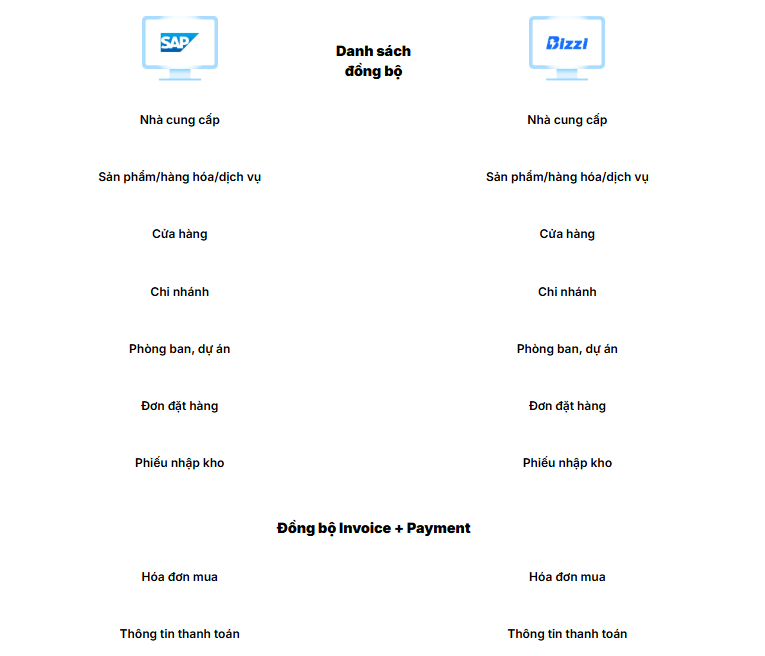
Bizzi's current SAP S/4HANA integration page publicly displays AP data groups such as Vendor, Item/Product & UOM, PO, GR, and Invoice + Payment information. The page also outlines three synchronization mechanisms: Excel/CSV, SFTP, and API.
An AP architecture can be described as follows:
SAP PO + GR → Automation → Invoice capture → Matching → Exception/Approval → Results → SAP
For example, purchase orders (PO) and general merchandise (GR) are created on SAP. The automation reads this data, compares it with invoices received from external sources, assigns discrepancies as exceptions, and sends the processed results back to SAP via the designed interface.
The important point is It is not by default that all AP/AR must be real-time bidirectional.. The scope of integration needs to be defined according to the object, data dimension, update frequency, and business control requirements.
API, SFTP, or Excel/CSV?
There is no single best default method for every SAP landscape.
| Method | Suitable when |
| Excel/CSV | Pilot, a simple process or one that doesn't yet require full automation. |
| SFTP | Automated data exchange is required according to a schedule. |
| API | A low-latency data exchange system is needed. |
An API doesn't mean all data has to be real-time. For example, master data can be synchronized in batches, while some transactions need to be updated more frequently.
Businesses can view more content. Bizzi integrates with SAP S/4HANA To better understand the scope of objects and the synchronization mechanisms publicly disclosed by Bizzi.
SAP should still retain its role as a system of records.
An important principle when designing integration is Automation should not create a standalone accounts receivable data set that competes with SAP..
Businesses need to determine:
- Master data has a clear owner.
- Open item and accounting record data sources are standardized.
- Automation handles workflow, matching, and intelligence.
- The results are returned to the ERP system according to the defined rules.
- Avoid entering the same data across multiple systems.
- There is an audit trail and a reference to the SAP transaction.
Some workflow data may only exist within the automation system, but a reference is needed to trace back to the relevant invoice, customer, payment, or SAP document.
What value do businesses gain from automating AR/AP while retaining SAP as their core ERP system?
The value lies not in "having another software program," but in... Reduce repetitive processing steps outside of SAP and shift Finance's focus to control, exceptions, and decision-making..
| Procedure | Before automation | After automation | The role of accountants |
| AP invoice | Receive email → enter → find PO/GR → compare | Invoice is captured → SAP data is retrieved → matching → exception | Mistake handling/approval |
| AP approval | Manually monitor emails and statuses. | Workflow with threading | Control and approval |
| AR collection | Export aging data → filter in Excel → send reminder | Aging + reminder according to the rules | Handling cases requiring intervention. |
| Cash application | Open bank statement → check payment → find invoice | Payment is supported matching with the open item. | Confirm exception |
| Sea | Multiple disparate files/emails | Workflow + audit trail + reference SAP | Control |
With AP, automation can reduce data re-entry, support early discrepancy detection, reduce manual PO/GR searching, and help track invoice progress. With AR, automation helps centralize receivables, set up systematic reminders, reduce manual payment tracking, and increase visibility into aging/cash collection.
These benefits do not mean 100% touchless Or completely eliminate the accounting control role. Transactions that don't qualify for automation still need to be included in the exception workflow for human processing.
When should businesses using SAP consider implementing AR/AP automation?
Businesses should evaluate automation when a significant portion of their AP/AR processes still take place outside of SAP, creating bottlenecks, discrepancies, or difficulties in scaling.
Signs to be evaluated
- Invoices still need to be uploaded or entered manually.
- The AP regularly opens SAP, Excel, and emails for comparison.
- Discrepancies in purchase orders (PO)/gross orders (GR)/invoices are handled via email or chat.
- It's difficult to track the approval status.
- AR needs to export the aging data and then process it using Excel.
- The reminder was sent manually.
- Bank statements require downloading and checking each transaction individually.
- Customers often make lump-sum payments or lack invoice references.
- At the end of the period, there were still many invoices/payments that had not been processed.
- Increased transactions lead to increased staffing needs.
- The business has multiple company, branch, or bank accounts.
However, this is not proof that the business definitely needs new software. First, it's necessary to distinguish:
SAP configuration → Process → Integration → Automation
If the volume is small and the workflow is simple, additional automation may not create a sufficiently clear business case. Conversely, if SAP already has the right functionality but it is not configured or implemented correctly, the business should consider optimizing SAP first.
What criteria should you use when choosing AR/AP automation software integrated with SAP?
A solution shouldn't be judged solely by the number of AI features, OCR, or dashboards. A more important criterion is... Does the solution properly handle AP/AR business logic, integrate with SAP, and control exceptions?.
1. Scope of operations
- A solution for AP, AR, or both?
- Which processes actually need automation?
- Is exception handling necessary, or is it just happy path handling?
- Does it support multiple legal entities, branches, or complex organizational structures?
2. SAP integration
- Which SAP edition/version has been confirmed?
- Which objects are readable?
- Which objects are writable?
- One-way or two-way?
- Batch or real-time?
- API, SFTP, or file?
3. Exceptions and Controls
- Where are the discrepancies transferred to?
- Who approved it?
- Where is tolerance configured?
- Is there a system of user access control?
- Is there an audit log?
- Is there a way to track SAP transactions?
4. Operation
- What should we do if an interface fails?
- Is there a retry option?
- Is there an error queue?
- Who is responsible for handling this?
- Is there any monitoring?
- How are changes to the master data handled?
There is no single "best solution for every business." A more appropriate approach is to use the business's own transactions as a test.
5 questions you should ask your supplier during a demo.
- Which SAP editions/versions does the solution support?
- What data is retrieved from SAP and what data is written back?
- How is a mismatched transaction handled?
- At what stage does the accounting department exercise control or approval?
- Is it possible to trace the workflow and original documents from SAP documentation?
In particular, you should ask the vendor to demonstrate with a scenario that closely resembles real-world business processes, for example: Invoice discrepancies between Purchase Order/Gr at AP or One payment results in multiple invoices. In AR, instead of just displaying a dashboard.
How does Bizzi support AP/AR automation around the SAP system?
Bizzi is positioned here as an automation layer connected to the existing financial system, This is not a replacement for SAP ERP. The scope should be assessed based on the specific business processes and objects that the enterprise actually needs to integrate.
With AP
Bizzi currently publicly lists his skills in the following areas:
- Invoice processing.
- PO–GR–Invoice matching.
- Exception handling.
- Workflow.
- ERP integration.
Bizzi's SAP S/4HANA integration page publicly displays AP data groups including: Vendor, Item/Product & UOM, PO, GR, Invoice and Payment information, along with Excel/CSV synchronization mechanisms, SFTP, and API.
Can be visualized:
SAP
PO + GR + Vendor
↓
Bizzi AP Automation
Invoice processing → Matching → Exception → Approval
↓
SAP
Results of processing within the integration scope
Businesses can learn more about AP automation and SAP S/4HANA integration.
With AR
Bizzi currently offers functionalities related to:
- Manage accounts receivable.
- Aging.
- DSO.
- Reminder.
- Reconcile accounts payable.
- Reconcile payments against bank statements according to the current product range.
One point to note is It is not advisable to extend AR integration capabilities to all SAP versions or to assert that all AR is real-time bidirectional.. Object scope, synchronization direction, and posting/clearing capabilities need to be verified according to the specific architecture and implementation scope.
Therefore, for businesses using SAP, the appropriate approach is to clearly define... Which steps are within SAP, which are outside of SAP, and which data needs to go through automation? before choosing a solution.
Conclude
Businesses using SAP shouldn't start with this question: “"What additional software should I buy?"” Instead, it should begin with a question. “"Which AP/AR steps are still being processed outside of SAP?"”
If the bottleneck lies in invoice capture, PO–GR–Invoice matching, exception workflow, collection, reminders, or cash application, an integrated automation layer can connect these tasks to the ERP process instead of creating a separate accounting system. SAP can still continue to play a role. System of records, While automation handles workflows that require greater flexibility.
Before implementation, Finance and IT can map the current process according to 5 fields:
Data Source → Manual Operation → SAP Data → Exception → Approver
From this mapping, businesses can determine whether the problem lies in SAP configuration, internal processes, integration, or whether a layer of automation is truly needed.
For businesses already using SAP, but AP or AR still involves many processing steps on Excel, email, or a separate system, Bizzi can be considered as an automation layer connected to SAP S/4HANA., Focusing on AP/AR workflows within the defined product and architecture, Bizzi's SAP integration page now publicly displays the scope of SAP S/4HANA synchronization and the Excel/CSV, SFTP, and API mechanisms. The next appropriate step is to review the current process with the Finance and IT teams, identify areas for automation, and determine the scope of data that needs to be integrated with SAP., instead of defaulting to changing the core ERP system.






