



In the context of the modern economy, controlling and optimizing costs, especially business management costs, becomes a key factor determining the competitiveness and sustainable development of each organization. business management cost report template Science is not just a tool to support the department. accountant monitoring, but also helps management evaluate and make strategic decisions, ensuring resources are allocated effectively according to a professional process.
Bizzi will explore with you in detail about business management cost report template, its importance, the core components required, as well as introducing automated cost management solutions that help businesses save time and improve performance.
first. What is a business management cost report template?
Business management cost report template (CPQLDN) is a document or form designed to record, summarize, and analyze accounts management costs arising in the general operation of a enterprise.
These are costs that are not directly related to the production of products or provision of services, but are extremely necessary to maintain the operations of the entire organization, such as office rental costs, salaries of office staff (human resources, accountant, administrative expenses), office supplies, depreciation of fixed assets for management, taxes, fees, charges and many other expenses. administrative costs other.
Purpose main of report template This is to provide an overview and details of the CPQLDN structure, helping Accounting Department and Board of Directors easy to track, compare with budget, detect abnormalities and make timely corrective decisions.
One business management cost report template usually presented below format Excel, Word or integrated in specialized accounting and management software.

2. The importance of business management cost report template
Use one business management cost report template Standards bring many essential benefits to management activities:
- Helps control budget effectively: By comparing actual figures on the report with the estimated CPQLDN, businesses can quickly identify excess expenditures, thereby taking corrective measures to ensure financial resources are used as planned.
- Management performance evaluation: Detailed analysis of the above items report template Helps management identify areas of ineffective spending, thereby providing solutions to optimize processes and improve productivity of management departments.
- Support strategic business decision making: Data from business management cost report template is an important basis for building business plans, reallocating resources, deciding to cut unnecessary costs or investing in activities that bring higher value.
- Enhance transparency and accountability: One report template Clear and detailed information helps to make expenses transparent, minimize the risk of fraud and error, and increase the responsibility of each department in using expenses.
- Ensuring compliance: For many businesses, detailed monitoring and reporting of CPQLDN is required to comply with current accounting regulations (for example, as a basis for preparing notes to the Financial Statements according to Circular 200/2014/TT-BTC). One report template Standards help ensure this is done correctly.

3. Core elements of an effective business management cost report template
To one business management cost report template To truly promote value, it needs to ensure the following factors: Content, format, purpose of use, Customization and version Fit:
-
Content must be complete and clear:
-
General information: Business name, tax code, address, reporting period (month/quarter/year), preparer, approver.
-
Detailed list of CPQLDN items: This is the most important part, including main cost groups such as:
-
Management staff costs (salary, bonus, insurance, allowances) Chief Accountant, administrative staff, human resources...)
-
Management material costs (stationery, office consumables, etc.)
-
Office supplies costs (tools, small appliances, etc.)
-
Depreciation costs of fixed assets used for management (computers, printers, office furniture, etc.)
-
Taxes, fees and charges (business license tax, management-related fees, etc.)
-
Contingency costs (if any).
-
Cost of outsourced services (electricity, water, telephone, internet, office rental, fixed asset repair, legal consulting, auditing, etc.)
-
Other cash expenses (reception, conference, management block business expenses, etc.).
-
-
Information columns: Serial number, explanation/cost content, unit, quantity, unit price, total amount, related accounting account code (for example: TK 642), notes.
-
Summary and signature: Total cost, signature of the preparer (Accountant), Chief Accountant, and Director.
-

-
Format and Flexibility:
-
The most popular is format Excel files are convenient, easy to edit and perform basic calculations. However, the report template Word or PDF formats can also be used for archival or presentation purposes.
-
Important is report template must have Customization high, allowing businesses to adjust items, add or remove information columns to suit their industry characteristics and scale of operations.
-
-
Clear purpose of use:
-
Purpose belong to report template need to be identified at the outset (e.g. for internal monitoring, for audit purposes, for cost-effectiveness analysis) in order to design appropriate information fields and levels of detail.
-
-
Versions and updates:
-
Version belong to report template need to be managed and updated periodically, especially when there are changes in government regulations (e.g. changes in accounting practices under Circular new by the Ministry of Finance) or changes in the organizational structure, management process of enterprise.
-
5. Risks when businesses use manual business management cost report templates
Job create manual expense report on Excel, Although familiar, it has many potential risks:
-
Data errors and low accuracy: Manual data entry can easily lead to typing errors, incorrect calculations, or missing information. This can seriously affect the accuracy of reports and lead to wrong decisions.
-
Time consuming and labor intensive: The process of collecting invoices, documents, entering data, comparing and synthesizing data manually consumes a lot of time and resources of the department. accountant, especially with the enterprise large scale
-
Difficult to control, easy to miss costs: Lack of a centralized and automated system makes tracking cost flows fragmented, leading to missed expenses or untimely recording.
-
Lack of visualization and deep analysis: Simple Excel files can hardly provide visual charts and dashboards to analyze trends, compare cost efficiency between periods, or between departments quickly.
-
Limitations on security and collaboration: Data in Excel files is easily edited, deleted by mistake, and access rights are difficult to control. At the same time, it is also inconvenient for many people to work on the same file.
6. Monthly expense report template on Excel file
Using an Excel expense report template is the simplest and most popular way for small and medium-sized businesses. Some monthly expense report templates on Excel files include:
- Monthly expense report template by department: Helps track spending by each department.
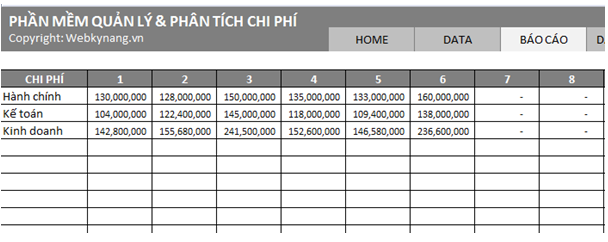
- Monthly Project Expense Report Template: Track spending for each specific project.
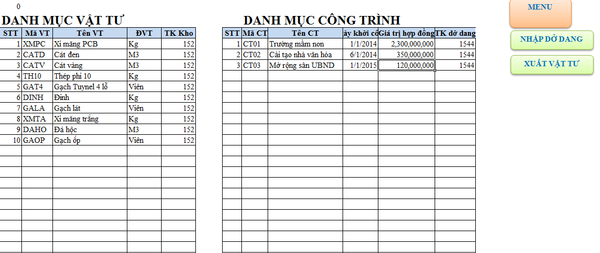
- Detailed expense report template: Includes specific expenses, detailed down to each expense category.
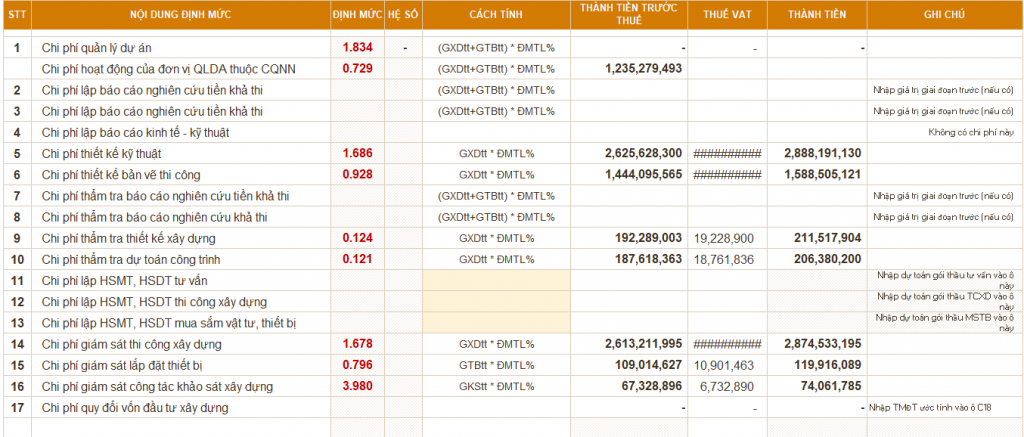
- Monthly expense report template by category: Track spending allocations for each available category.
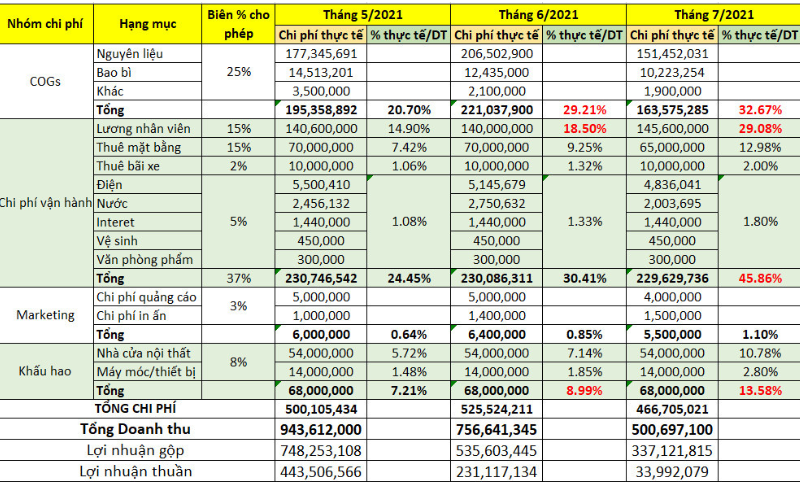
These monthly expense report templates all include columns for date, amount spent, expense category, and department, making it easier to manage business expenses.
7. Easily track spending reports effectively with Bizzi
Use expense management tool Modern software helps businesses solve problems in managing expenses effectively. In particular, automatic expense management software helps businesses easily track and business cost management without much time and effort.
Bizzi is one of the leading expense management tools today, providing an automated solution for the business expense reporting process.
Bizzi's outstanding features
- Set up spending policies: Allows businesses to easily set up and customize spending policies for each department, project, or expense type. Spending limits are clearly defined, and the system will automatically warn when spending exceeds or does not comply with policies.
- Flexible expense approval process: Bizzi automates the expense approval process, setting up approval flows based on hierarchy and expense type. Users can easily configure approval steps to meet internal needs, ensuring approvals are done quickly, anytime, anywhere.

- Budgeting for departments and projects: Bizzi helps businesses allocate and manage detailed budgets for each department, project, or specific spending category.
- Track and Real-time cost management: The system updates transactions and expenses as they occur, helping managers stay on top of the company's financial situation in real time.
- Cost and budget reporting dashboard: Provides intuitive dashboards with detailed reports and easy-to-understand charts, helping users easily track costs and budgets at any given time. Automatic reports help managers gain an overview and insight into the efficiency of their business's resource use without the need for complicated operations.
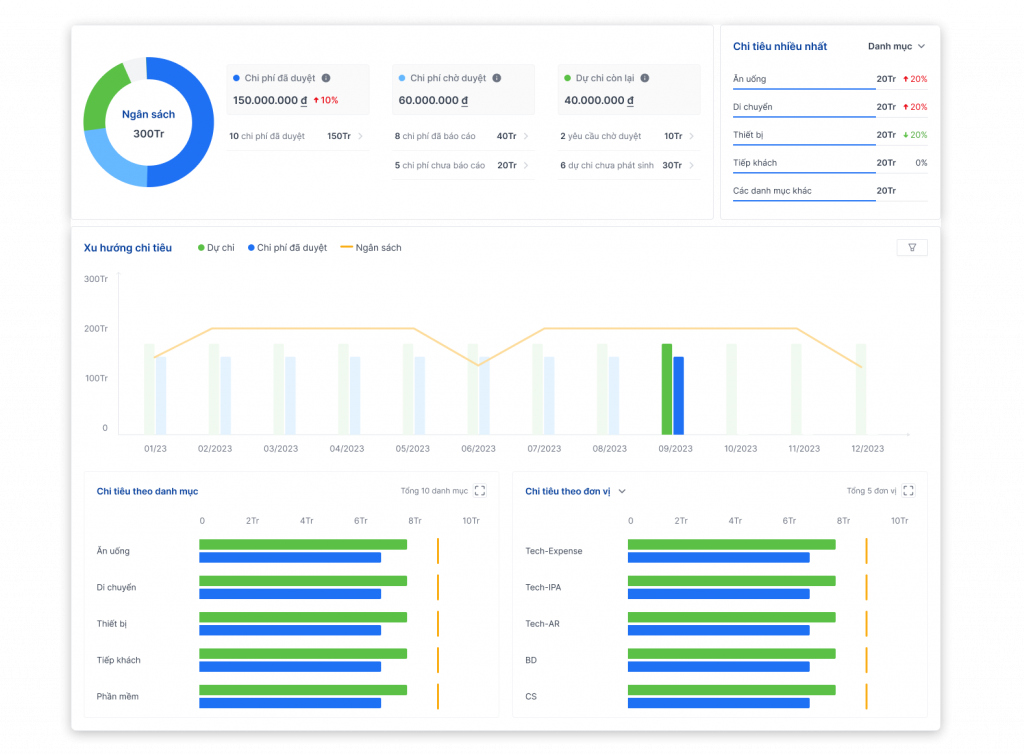
- ERP integration: Bizzi seamlessly integrates with major ERP systems, helping to synchronize cost and budget data from multiple sources into one platform.
Benefits of using Bizzi:
- Save time and money: Bizzi helps businesses save maximum time and effort when creating expense reports.
- Minimize the risk of error: With automation, Bizzi ensures high accuracy for business expense reports.
- Support quick decision making: Real-time updated expense reports help management make business decisions easily.
Sign up for a free trial now at: https://bizzi.vn/dang-ky-dung-thu/
7. Conclusion
One business management cost report template Scientifically constructed and consistently applied is an important foundation for control. finance, optimize resources and improve overall operational efficiency. enterpriseHowever, in the digital age, switching from manual methods to automated solutions like Bizzi is no longer a trend but has become an inevitable requirement.
With Bizzi, businesses not only own a powerful reporting tool but are also equipped with a smart cost management system, helping to save time, minimize risks, increase transparency and support the leadership to make informed decisions, contributing to sustainable and professional development according to international standards.
Sign up for a free Bizzi trial today to experience the difference: https://bizzi.vn/dang-ky-dung-thu/





