


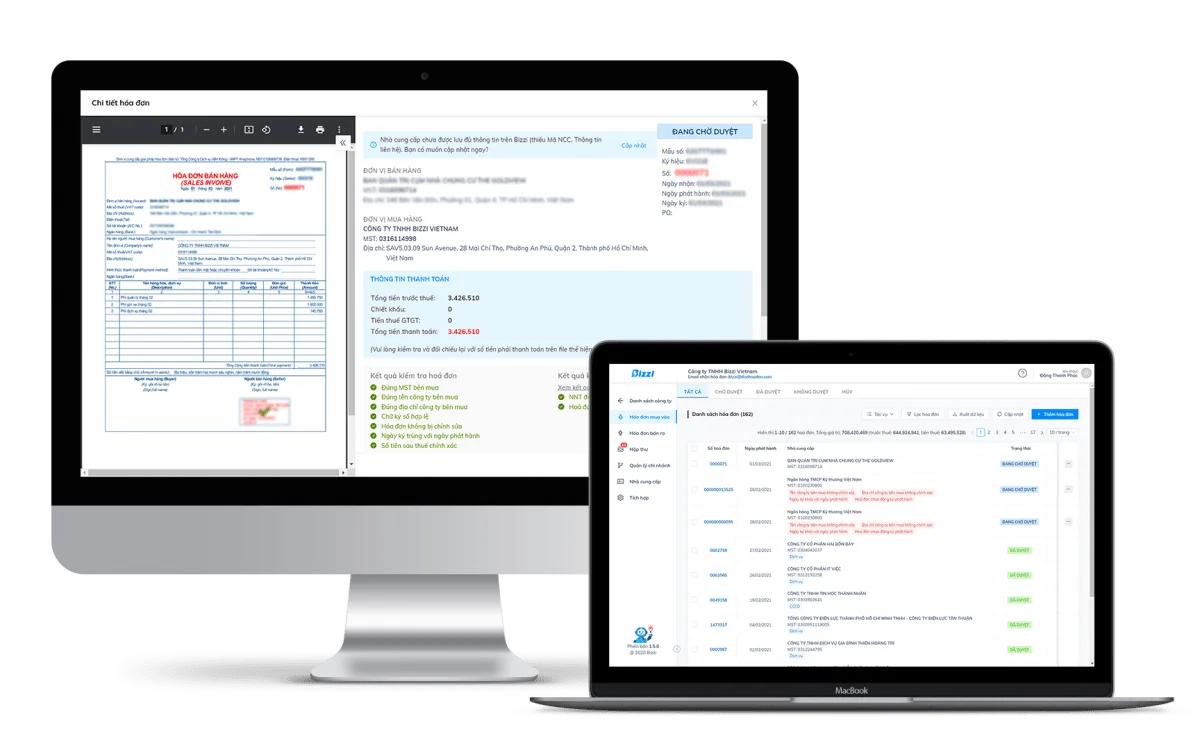
Solution invoice processing and loading This helps businesses automate the entire process of handling incoming invoices, from receiving and extracting data to validating, reconciling documents, approving, and synchronizing with the ERP system. For CFOs, chief accountants, and the Accounts Payable (AP) department, this is a crucial layer of control before expenses are recognized and cash flows leave the business.
In the context of the increasing number of electronic invoices, manual processing via email, Excel, and hand-entered data not only increases workload but also creates numerous risks related to compliance, accounts receivable, and cost control.
To understand why this solution is becoming an increasingly important part of financial digital transformation strategies, we need to start with the actual invoicing workflow in businesses.
What is Invoice Processing Automation in the AP process?
Invoice Processing Automation is the process for handling incoming invoices in Accounts Payable (AP) operations, including invoice receipt, data extraction, validity verification, document reconciliation, approval, accounting, and payment preparation.
Many businesses often understand invoice processing automation simply as entering invoice data into an accounting system. In reality, it is a series of operations involving multiple departments and various types of documents, such as:
- Input invoice
- Purchase Order (PO)
- Warehouse receipt (GR)
- Sales contract
- Acceptance report
- Supplier payment records
- ERP data
If you want to learn more about the concept of a platform, businesses should refer to the separate article on this topic. What is invoice processing automation?. This article will focus on the invoice processing flow and how to choose the right solution.
Once you understand that invoice processing automation is part of the AP process, not a single data entry operation, the next question is what steps this process actually goes through within the business.
What steps are involved in the input invoice processing flow?
A standard invoice processing flow typically goes from invoice receipt, information verification, document reconciliation, internal approval, accounting entry into ERP, to archiving and payment. This is a common 8-step process.
Step 1: Receive the invoice
Invoices can come from many sources:
- The supplier ships directly.
- Electronic portal
- Electronic invoicing system
- Scan from paper documents
Step 2: Extract data
Key data fields include:
- Tax code
- Some bills
- Release date
- Total amount
- VAT
- Product line information
Step 3: Verify validity
Businesses need to verify:
- Legitimate invoice
- The supplier exists.
- Accurate tax information
- No duplicates
Step 4: Verify documents
Compare invoice with:
- PO
- Receipt
- Contract
- Receipt and delivery record
Step 5: Attach the expense code.
Classify:
- Department
- Project
- Cost center
- Accounting accounts
Step 6: Internal Approval
The invoice is passed through the approval workflow as follows:
- Limit
- Budget
- Title
- Internal regulations
Step 7: Synchronize ERP
The data after verification is entered:
- ERP
- Accounting Software
- Financial management system
Step 8: Storage and Payment
The system stores the entire processing history for later use:
- Auditing
- Tax
- Reconciliation
- Supplier payment
workflow overview
| Step | Person in charge | Risks if done manually | Automation support |
| Reception | AP | Lost invoice | Automatic collection |
| Data entry | AP | Incorrect data | AI-OCR |
| Check | AP | Missing an error. | Rule engine |
| Reconciliation | AP/Purchase | PO deviation | Automatic Matching |
| Approve | Manager | Delay | Workflow |
| Accounting | Accountant | Re-enter data | ERP computing |
| Storage | AP | Missing documents | Audit trail |
The more touchpoints a process has, the greater the risk if the business remains reliant on email, Excel, and manual data entry.
Why does manual invoice processing create risks for businesses?
Manual invoice processing creates risks because data is prone to errors, documents are difficult to reconcile, approvals are slow, and businesses have difficulty detecting duplicate or invalid invoices before payment. Common risks:
Data entry error
A minor error regarding:
- Tax code
- Amount
- Tax rate
- Bill date
This could directly affect financial reporting.
Duplicate Payment
Duplicate payment is one of the most common risks associated with APs.
The causes usually stem from:
- Multiple people working together
- Multiple invoices
- There is no duplicate checking mechanism.
Invalid invoice
If errors are discovered after accounting or payment, the business will incur additional resources to correct them.
Delayed approval
Invoices stored in emails or group chats can be overlooked for days.
Lack of Audit Trail
Businesses are having difficulty answering:
- Who handles it?
- Who approved it?
- When will it be approved?
- Why was payment made?
Common Risks Table
| Risk | Reason | Impact |
| Incorrect data | Manual input | Incorrect reporting |
| Duplicate Payment | No inspection | Financial loss |
| Slow approval | Disjointed emails | Late payment |
| Incorrect PO | Manual comparison | Incorrect cost |
| Missing documents | Dispersed flow | Audit risk |
When risks accumulate into cash flow and compliance issues, businesses need a layer of automation capable of pre-payment control.
How does Invoice Processing Automation work?
Our invoice processing automation solution utilizes AI-OCR, IDP, RPA, and automated workflows to read invoice data, check validity, reconcile documents, and move invoices through approval steps without manual data entry.
Core technology
| Technology | Role | Value |
| AI-OCR | Read invoice data | Reduce data entry |
| IDP | Understanding the structure of documents | Increase accuracy |
| RPA | Automate repetitive tasks | Save time |
| Rule Engine | Logic testing | Reduce errors |
| Workflow | Automatic approval | Increase control |
| ERP Integration | Data synchronization | Eliminate re-entry |
| Dashboard | Status monitoring | Improve governance capabilities |
Automation process
- Automatically receive invoices
- AI-OCR data extraction
- Validity check
- Document reconciliation
- Submit for approval
- ERP Synchronization
- Storage and tracing
Automation only truly creates value when the system not only reads invoices but also detects discrepancies between invoices and purchase documents.
3-Way Matching and Pre-Payment Control in Accounts Payable Process Automation (AP Automation)
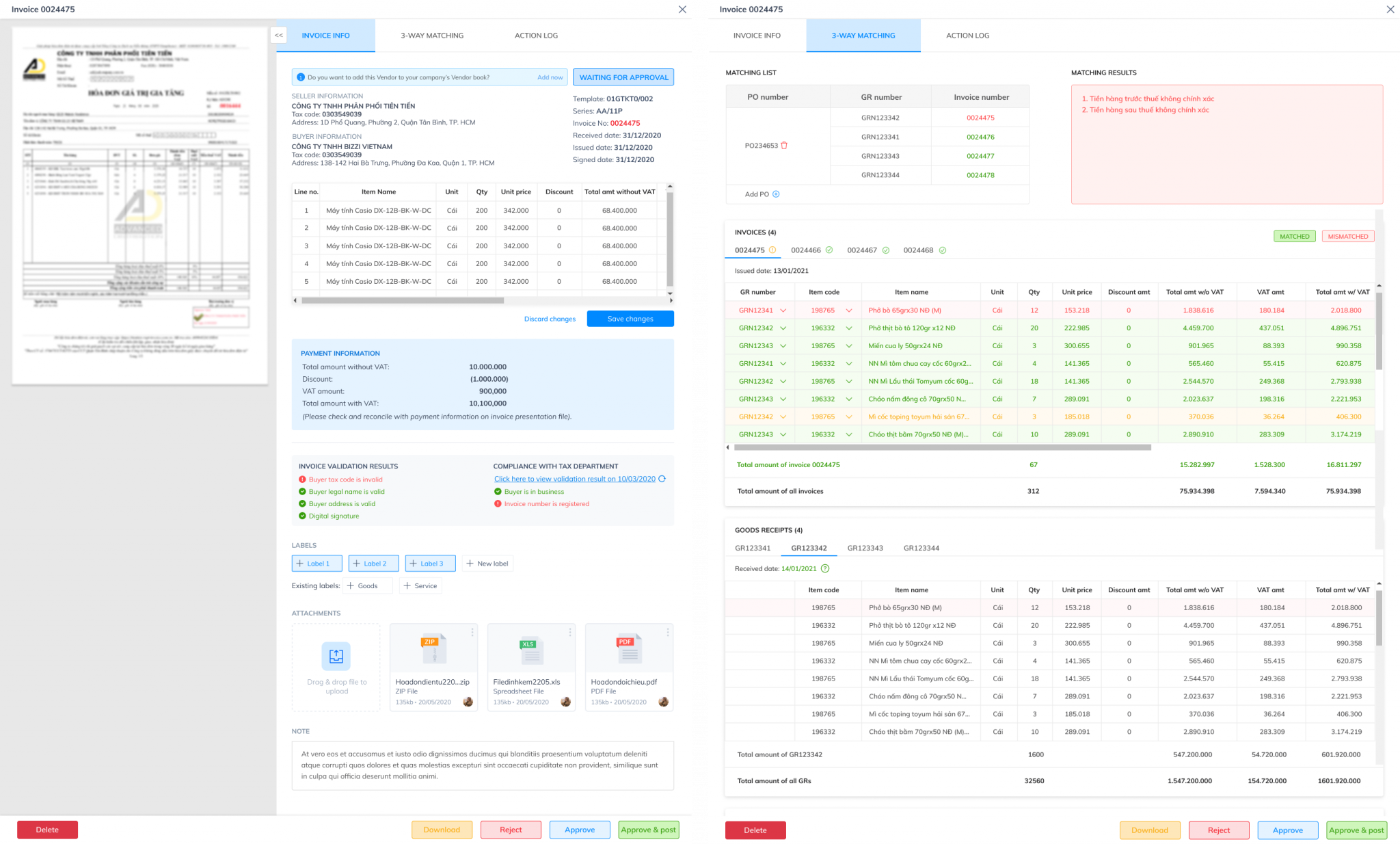
The 3-way matching mechanism between Purchase Order – Goods Receipt – Invoice This helps businesses only make payments when the invoice matches the order and delivery note, thereby significantly reducing the risk of incorrect payments or misrecording of expenses.
Three documents need to be reconciled.
- Invoice
- Purchase Order – PO
- Goods Receipt – GR
Common errors
| Type of error | For example | The system should process |
| Quantity Variance | Input 90, invoice 100 | Warning |
| Price Variance | Different unit prices than PO | Warning |
| Vendor Mismatch | Wrong supplier | Warning |
| VAT Mismatch | Incorrect tax rate | Warning |
| Duplicate Invoice | Duplicate invoice | Automatic blocking |
Timely document reconciliation, rather than waiting until payment is completed, is crucial for businesses to avoid delays in closing the books at the end of the period. Simultaneously, this process completely eliminates the risk of duplicate payments, optimizes cash flow, and maximizes the benefits of trade discounts from suppliers.
From this, it can be seen that OCR, accounting software, and invoice processing automation do not address the same level of problem.
Comparing manual invoice processing, OCR, and invoice processing automation.
The biggest difference between manual processing, OCR, and invoice processing automation lies in the level of control.
| Criteria | Handmade | Basic OCR | Invoice Processing Automation |
| Receive invoice | Handmade | Upload | Automatic |
| Data extraction | Manual input | Have | Have |
| Validity check | Handmade | Limit | Automatic |
| Reconciliation of Purchase Order/Gross Order | Excel | Limit | Automatic |
| Workflow approval | Sporadic | Integration | |
| ERP Integration | Re-enter | Part | Two-way |
| Audit Trail | Incomplete | Part | Complete |
| Dashboard | Are not | Limit | Have |
Many businesses confuse OCR with Invoice Processing Automation. In reality, OCR is only one component of the overall process.
Therefore, the criteria for selecting a solution should not be limited to the ability to read invoices but should extend to control, integration, and auditing.
Criteria for selecting Invoice Processing Automation solutions for businesses
A suitable invoice processing automation solution needs to simultaneously meet the requirements of data accuracy, compliance checking, document reconciliation, ERP integration, approval authorization, and cost control reporting.
Checklist for evaluating solutions
- Does it automatically receive invoices from multiple sources?
- Can it handle XML, PDF, images, and emails?
- Did you check the validity of the invoice?
- Is supplier verification necessary?
- Does it support 3-way matching?
- Is there a departmental approval workflow?
- Is there budget control?
- Does it have ERP integration?
- Is the full audit trail recorded?
- Does it have a dashboard for real-time monitoring?
- Does this comply with Vietnamese regulations on electronic invoices?
- Is there support for implementation based on specific business processes?
When these criteria are considered within the context of Vietnamese businesses, Bizzi can act as an AP automation layer connecting invoicing, ERP, and cost control.
How does Bizzi help businesses automate invoice processing?
Bizzi helps businesses automate invoice processing by combining AI-OCR, invoice verification, document reconciliation, approval workflows, and ERP integration into a unified AP process.
Automatic invoice acceptance
Invoices are collected from various sources instead of relying on manual uploads.
AI-OCR data extraction
Automatic reading system:
- Tax code
- Some bills
- Bill date
- VAT
- Total amount
- Goods…
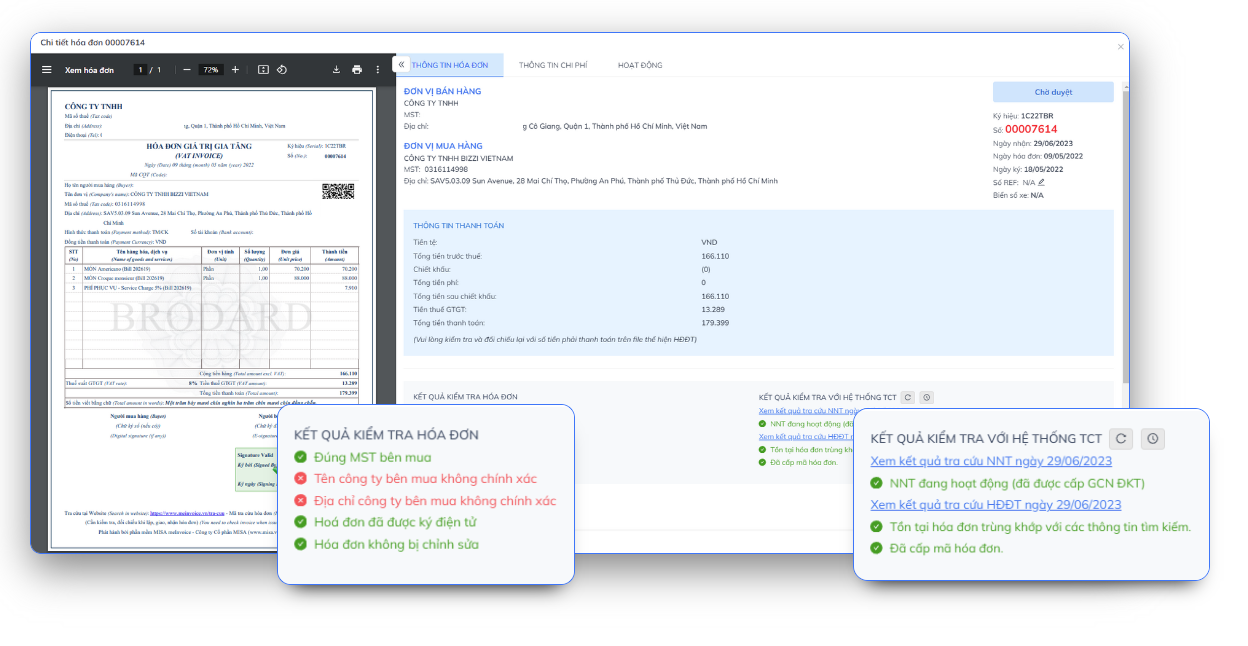
Check the invoice
Automatic detection:
- Duplicate invoice
- Incorrect invoice format
- Data discrepancies
- Unusual supplier
Document reconciliation
Bizzi assists with reconciliation:
- Invoice
- PO
- GR
- Contract
- Purchase order
Workflow approval
The system allows:
- Decentralization
- Set limits
- Multi-level approval flow
ERP integration
Data is standardized before being entered into the accounting or ERP system.
Admin Dashboard
The finance team can monitor:
- Processing status
- Accounts Payable
- AP Backlog
- Invoice processing performance
In a context where businesses need to control costs more tightly, invoice processing is no longer just a data entry tool but has become an integral part of an AP Automation strategy.
When should businesses implement Invoice Processing Automation solutions?
Businesses should implement invoice processing automation solutions when invoice volume increases, approval processes are slow, AP data is scattered, or CFOs lack the ability to track expenses in real time.
- Processing hundreds or thousands of invoices each month.
- Accountants spend a lot of time on data entry.
- The invoice came from multiple branches.
- The number of suppliers is increasing.
- Approval via email or chat
- Incorrect or duplicate invoices are frequently discovered.
- ERP systems have inconsistent data.
- CFOs find it difficult to track accounts payable.
- The business is expanding.
The earlier a company implements this, the easier it is to standardize its financial data and avoid having to deal with backlog invoices as it grows.
FAQ about Invoice Processing Automation solutions
Invoice Processing Solution Aautomation (Automated invoice processing) automates the entire lifecycle of incoming invoices—from receipt, data extraction, reconciliation, approval to payment. This technology helps accounting departments eliminate manual data entry, minimize errors, and speed up the approval process.
Below are the frequently asked questions (FAQs) about this solution:
Can invoice processing automation solutions replace in-person accounting?
No. This solution automates repetitive tasks such as data entry, basic checks, and document reconciliation. Accountants still play a role in exception control and ensuring the quality of financial data.
Is OCR sufficient to automate invoice processing?
No. OCR only reads data from invoices. Invoice processing automation also includes reconciliation, approval workflows, audit trails, and ERP integration.
If a business already has an ERP system, do they still need invoice processing automation?
It's still necessary. ERP is where data is recorded, while invoice processing automation helps clean and control the data before it's fed into the ERP. Additionally, given the specific invoice regulations in Vietnam, businesses need to use specialized software like Bizzi.
Which businesses are suitable for invoice processing automation solutions?
Suitable for businesses with numerous input invoices, multiple suppliers, multiple departments, or those requiring tighter control over costs and accounts payable.
How does Invoice Processing Automation differ from AP Automation?
Invoice processing automation is part of AP Automation. AP Automation covers the entire accounts payable process, including invoice processing, approval, accounting, payment, and reporting.
Conclude
Invoice processing automation is not just about handling incoming invoices; it's a crucial link in the entire Accounts Payable process. As the volume of invoices increases, relying on email, Excel, and manual data entry can create numerous risks, including data errors, duplicate payments, delayed approvals, and a lack of control over cash flow.
A modern invoice processing automation solution helps businesses automate the invoice processing flow from receipt, data extraction, validity verification, PO/GR reconciliation, approval, to ERP synchronization. More importantly, this solution helps CFOs and finance departments shift from transaction processing to cost management and data-driven decision-making.
If your business is struggling with fragmented input invoices, manual AP processes, or a lack of real-time accounts receivable tracking capabilities, now is the time to reassess your entire invoice processing workflow.
Bizzi provides an AP Automation platform integrating AI-OCR, document reconciliation, approval workflows, and ERP connectivity, helping businesses standardize invoice data before recording expenses and making payments.
Sign up for a Bizzi Demo today to evaluate your current AP workflow and discover how to automate your invoice processing flow to best suit your business: https://bizzi.vn/dat-lich-demo/






