


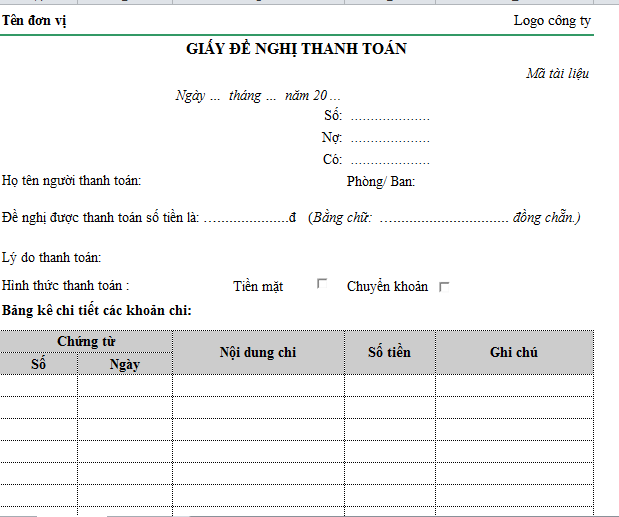
Payment Request is the bridge between operations and accounting, and is the “last gate” before money is spent. Building and standardizing the Request to Pay process not only helps control strategic spending but also helps businesses optimize cash flow, increase transparency and reduce financial risks.
This article by Bizzi will analyze in depth the nature of Payment Request and propose solutions to help optimize business costs.
Why do businesses need to take “Payment Request” seriously?
In modern businesses, expense management is always a big headache. Expenses appear every day: supplier payments, outsourcing, marketing, business travel expenses or employee reimbursements... but the management process is often fragmented, running through Excel, email, scanned files or internal chat. This leads to many consequences:
- Lost or delayed payment request: Staff sent payment request form via email or chat, approvals can easily slip through or be forgotten.
- Wrong payment, duplicate invoice, wrong cost code: Due to the lack of centralized control, employees can make mistakes, duplicate or mis-record expense items.
- Difficult to reconcile with internal budget and spending policy: During the audit, accountants spend a lot of time reviewing, leading to lack of transparency and audit risks.
This situation raises the need Take the “payment request” process seriously — an important tool for cash flow control and cost transparency.
What is a Payment Request? Concepts, related terms & basic distinctions
In an increasingly complex business spending landscape, automating the Payment Request process is a strategic choice, especially for fast-growing businesses.
What is a Payment Request? (Core Definition)
Payment Request is an internal document issued by an employee or department requesting the company to pay a specific expense, with all relevant supporting documents.
Payment Request is the step that triggers the payment process, before the accountant makes the payment.
- Payment request = internal payment request / payment request form.
Payment Request can be:
- Vendor payment request (supplier payment).
- Employee payment request (refund, advance, internal expenditure).
5. Related terms that need to be distinguished
In Vietnamese businesses, you may come across many different names, but in essence, they are all records that initiate the payment process:
- Request for Payment / Payment Requisition / Payment Approval Request: All are internal “payment requests” only, used in the approval process.
- Cost proposal form: A common term in Vietnamese businesses, often used for internal costs.
- Payment Invoice Request: Ask the supplier to send an invoice for payment.
Note: The names may vary between businesses, but the essence is the same. an initial step to request payment and go through the approval steps.
6. How is Payment request different from Invoice, PO, Payment Order?
Payment Request is bridge between Invoice – PO – Payment Order help control costs.
| Type of document | Who created? | Function | Legal role |
| Payment Request | Staff / Internal Department | Request payment, initiate payment workflow | Internal, not tax documents |
| Invoice | Supplier | Payment documents, accounting basis | Legal documents, tax declaration |
| PO (Purchase Order) | Purchasing Department | Place order, confirm purchase request | Created before payment obligation arises |
| Payment Order / Payment Order | Accounting / Finance | Bank instructions to make payment | Used after payment request has been approved |
What are the components of a Payment Request?
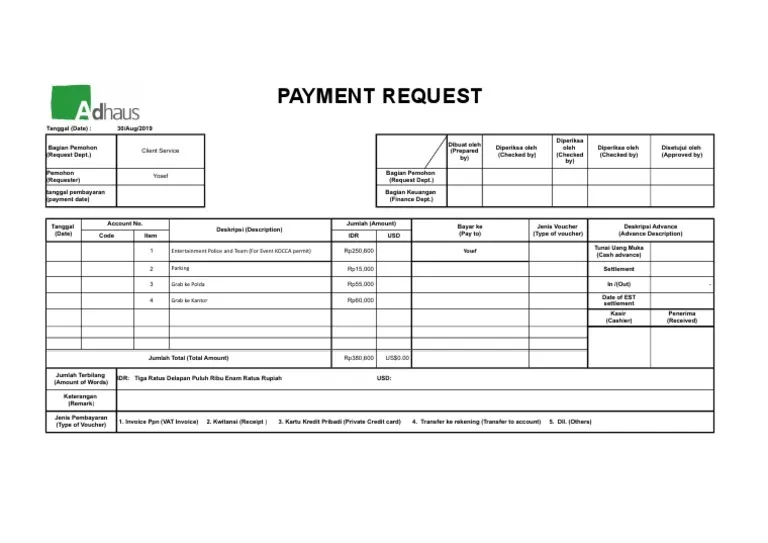
A standard Payment Request is not just a payment proposal, but a cost and budget control document that helps businesses ensure transparency, compliance and optimize cash flow. Below is the standard structure and advanced attributes that growing businesses and large corporations are applying.
General information of payment request form
These information fields help the system manage and track easily:
| Ingredient | Meaning |
| Coupon Number / Payment Request Code | Identifies a unique request |
| Request creation date | Basis for calculating SLA processing and payment deadline |
| Request Type | Define document approval and control processes
Can automatically validate by expense type |
| Due Date | Avoid late payments with vendors |
| Project code / budget code | Link to budget management |
Classification of payment requests
- Supplier payment
- Advance
- Refund
- Marketing costs
- Project costs
- Outsourcing / procurement costs
- Internal expenses (office, travel)
Advanced factors: Priority level (urgent / normal / planned), automatic validation rules by expense type.
Claimant & Beneficiary Information
| Applicant Information | Recipient information |
| Full name | Name of supplier/recipient |
| Part | Tax Identification Number (MST) |
| Employee code | Address |
| Contact Email | Bank – account number – account holder |
| Phone | Bank branch area |
Applicable to cases
- Vendor: contract payment, invoice
- Staff: advance, advance, business trip expenses
Advanced factors:
- Vendor ID / Supplier Code (sync with ERP)
- Vendor risk index (Risk score)
- Blacklist check (suppliers whose cooperation has been terminated)
Reference contract information (Contract number – effective date)
Content of costs to be paid
Cost details help accountants determine the correct nature and allocate the correct budget.
| Information field | Purpose |
| Detailed cost explanation | Explain the purpose of payment |
| Cost group | Marketing / IT / Logistics / Outsourcing / Office / Travel |
| Branch classification | OPEX / CAPEX |
| Cost nature | Operating costs / project costs / capital expenditure |
| Accounting period | Month / Quarter / Year |
| Amount requested | Total amount |
| VAT | VAT rate and tax amount |
| Currency | VND / USD / CNY / KRW… |
| Exchange rate | In case of foreign currency payment |
Advanced factors:
- Cost Center / GL Code (synchronization of accounting system)
- Budget availability check – budget overrun warning right in the form
- Compare with original PO/contract (automatic data connection)
- Upload acceptance documents / work completion reports
- Tag by activity / campaign / sub-project
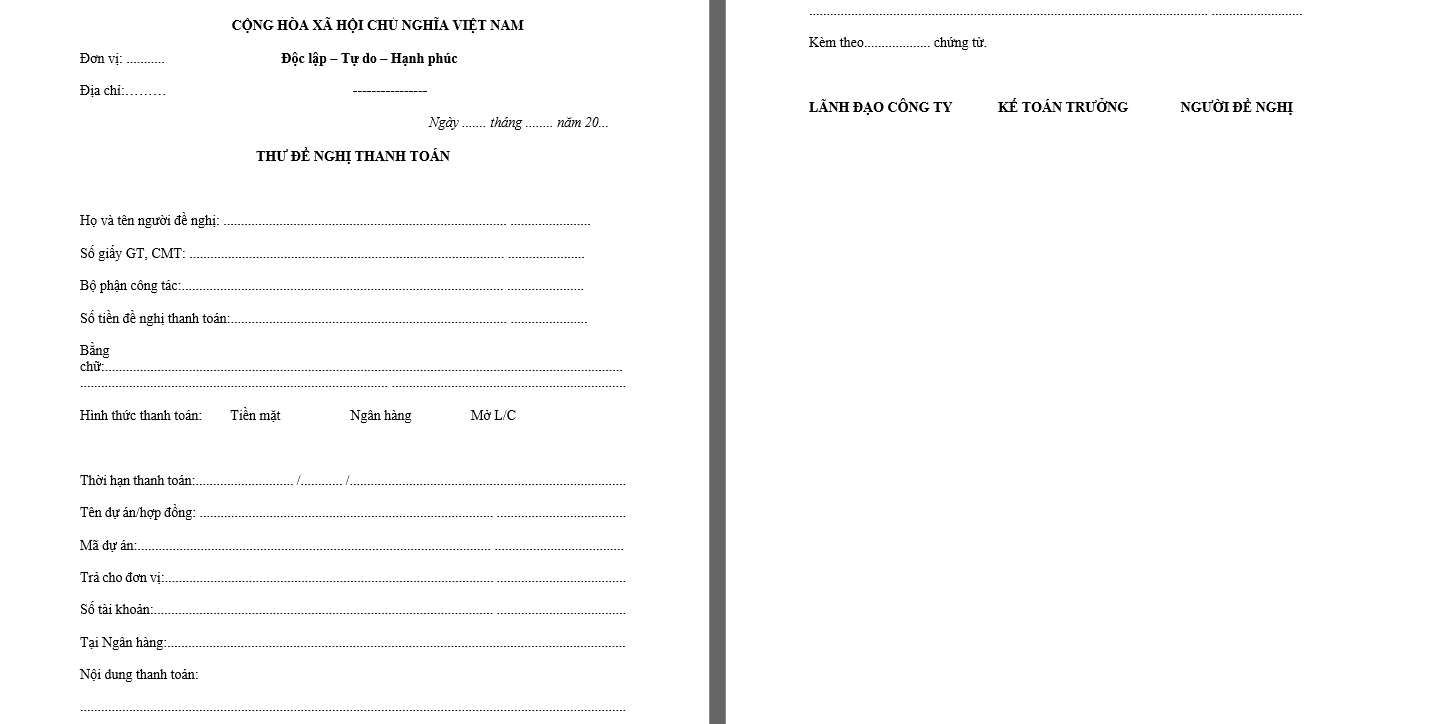
Link to procurement and contracting systems
A standard Payment Request must direct connection with procurement systems and contract data to ensure consistency, avoid errors and fraud.
| Ingredient | Meaning |
| Contract ID | Determine the legal basis of the payment |
| PO (Purchase Order) Number | Belongs to a previously approved purchase requisition |
| Warehouse receipt code / Acceptance report (GRN / Acceptance Report) | Confirmation of full delivery of goods/services |
| Link to Vendor Master in ERP | Synchronize supplier information, limit wrong entry |
Value delivered
- Avoid payment before delivery / service acceptance
- Eliminate the risk of duplicate payments for the same contract
- Unifying information with ERP helps accountants close books quickly and accurately
Amount & Payment Terms
Financial information must be complete and transparent so that the CFO/Accountant can assess risk and cash flow.
| Information field | Meaning |
| Amount proposed for payment | Total requested value |
| Currency (VND, USD, KRW…) | Support multinational payments |
| Payment Terms | Prepaid / postpaid / in progress |
| Due Date | Avoid interest penalties or disruption of cooperation |
| Payment method | Transfer / cash / corporate card / e-wallet |
Advanced factors
- Applicable exchange rates and exchange rate sources (SBV, bank, ERP system)
- Cash flow impact forecast
Encryption for management accounting
Declaring standard accounting codes helps with multidimensional cost analysis and budget management support.
| Encryption required | Purpose |
| Cost Center | Allocate costs by department |
| Project Code | Attach costs to each project / campaign |
| GL Code / Chart of Account (COA) | Post to the correct accounting account |
| Department / BU / Region | Track expenses by business unit |
Additional applications may include:Tag by campaign / client / customer
- Vendor tier (gold / silver / risk vendor)
- Risk level scoring (by SLA, violation history…)
- Cross charge between internal units
Required documents attached
A valid Payment Request must include complete Policy and legal documents.
| Document | Applicable cases |
| VAT Invoice / Invoice | Supplier |
| Contract / Contract Appendix | Services / Outsourcing / Partnerships |
| Quotation | Shopping goods |
| Minutes of acceptance / handover / GRN | Delivery – service |
| Cost statement | Advance payment - refund |
| Small bills, airline tickets, taxis, food bills | Working expenses |
Advanced elements of payment request when applying technology:
- Invoice Validation
- Automatic OCR + match invoice with PO/Contract
Approval information
This is vital in controlling business expenses.
| Ingredient | Meaning |
| Approval List by Level / Limit | Budgeting rule reviewer |
| Audit trail – approval history | Who approved – When – What action |
| Processing status | Pending approval / Approved / Rejected / Cancelled / Paid |
If technology is applied, it is possible to:
- Auto rerouting when the browser is on a business trip
- Over budget warning before approval
- E-signature & 2-Factor Approval
Request to Pay Process in Business: From Employee Requesting to Accounting for Payment
The complete Payment Request process chain from the time a purchase request arises to payment to the supplier aims to ensure correct purchases - sufficient - reasonable - within budget - following the process - and financial security.
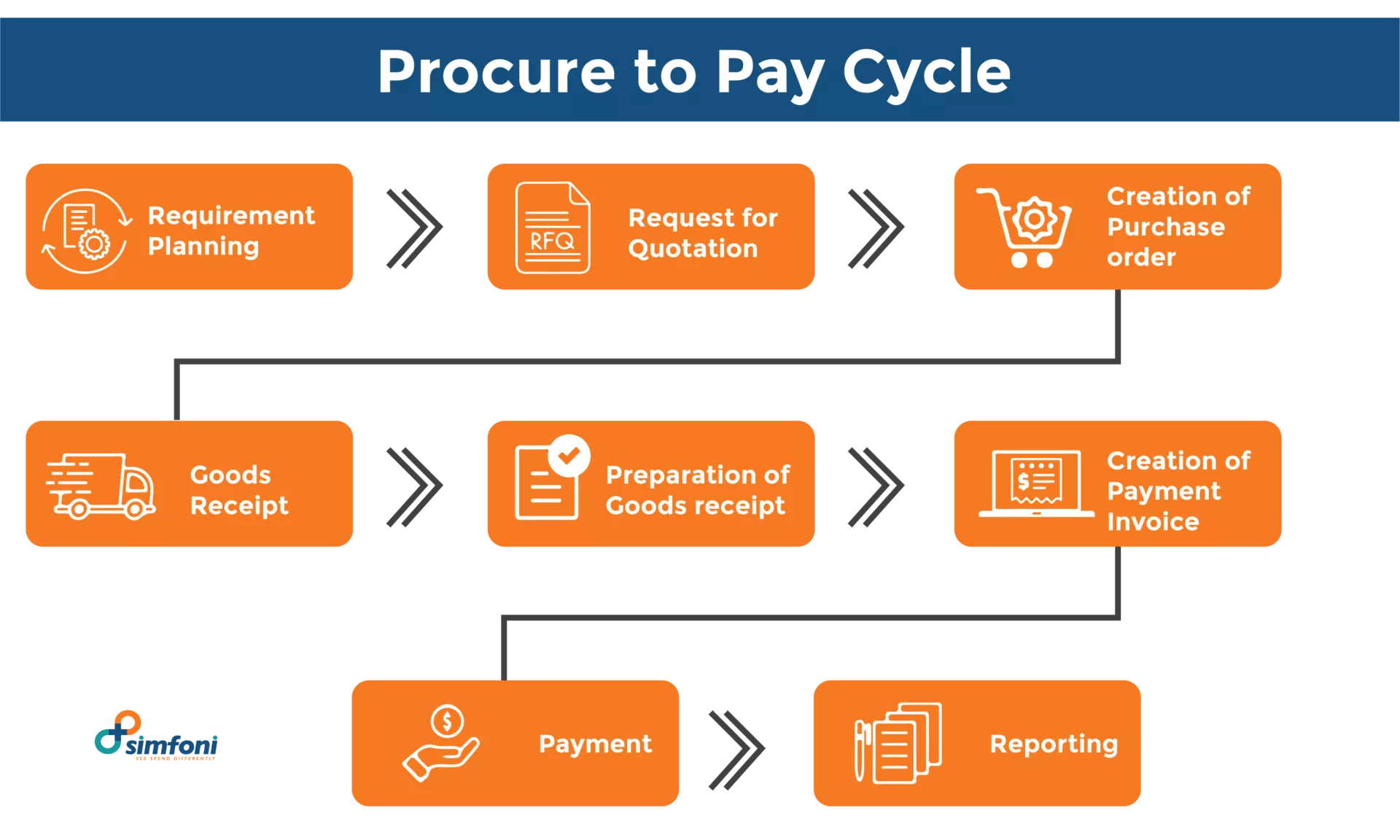
The Big Picture: Payment Request in a P2P (Procure-to-Pay) Chain
In the business purchasing and payment process (P2P), Payment Request is an important link, helping to ensure that spending is always justified and in compliance with policy.
- Relationship: Purchase request → PO → Receive goods/services → Invoice → Payment request → Payment.
- Emphasis: Payment request is bridge between operations and accounting
The Central Role of the Payment Request
- Bridge between operations, accounting and budget management
- Ensure payment only when there is full basis (PO – GRN – Invoice)
- Eliminate the risk of incorrect, duplicate, or legally unsubstantiated payments
Helps businesses control cash flow and compliance.
Steps to create & approve Request to Pay process
A Payment Request is more than just a request for money — it's a financial control tool.
Step 1 – Create a payment request
The service user or department performs:
- Enter expense information
- Attach full documents (contract, invoice, acceptance...)
- Select cost center / project / cost type / vendor
- Clearly state the purpose of payment and payment deadline
Target: Provides full input, reducing back-and-forth when testing
Step 2 – Budget Check
System or moderator checking:
- Are the costs within the approved budget?
- Compare with forecast and spending plan
If over budget → Escalated Approval: Request to go to higher level for special approval (director / CFO)
Step 3 – Check documents & Compliance
The accounting or finance department checks:
- Do you have enough documents? (correct policy & correct tax law)
- Cost code, cost center, project code true or not
- Is the invoice valid? (legal information, VAT, amount, date…)
Target: Limiting tax risks and incorrect accounting
Step 4 – Three-way matching (PO – GRN – Invoice)
Check 3 components before approving payment:
| Ingredient | Test questions |
| PO | Are the quantity, unit price and terms of purchase correct? |
| GRN / acceptance | Have the goods/services been delivered in full? |
| Invoice | PO and GRN joints? Are there any abnormalities? |
🛡 Three-way matching = Shield against wrong / duplicate / fraudulent payments
Step 5 – Payment Approval (Approval Workflow)
Workflow approves the Request to Pay process depending on the size of the business:
- Line Manager approves department expenses
- Budget owner approves according to budget plan
- Finance / CFO approves large or high-risk payments
- Approval rules by limit / expense type / project / vendor
Can combine multi-level approval + e-signature + MFA
Step 6 – Accountant makes payment & accounting
After approval, the accountant:
- Create payment voucher / payment authorization
- Make a transfer or payment using the approved method
- Accounting into accounting system / ERP
- Update Payment Request Status → “Paid”
Target: Close books on time, transparent audit, accurate reporting
Common errors & risks when doing Payment Request process manually
In many businesses, Payment Requests are still being processed via Excel, email, scanned files, and internal chat, leading to a loss of control and potentially significant risks to cash flow and tax compliance. Here are some common error groups:
Business error group
Errors arising from manual and unstandardized data entry processes:
| Common errors | Consequences |
| Wrong cost code, wrong cost center | Incorrect accounting, incorrect cost reporting |
| Not enough documents attached | Process hangs, additional time lost |
| Submit request later than contract due date | Late payment → fined, loss of reputation with vendor |
| Payment request not attached to PO/contract | No legal basis → easy to be rejected |
Seemingly small business errors create a reprocessing loop, increasing the workload for accounting and prolonging cycle time.
Financial Risk & Fraud Group
Without a system to control and automate the Request to Pay process, the risk of financial loss increases.
| Risk | Real life examples / impacts |
| Duplicate invoice | Duplicate payments for the same invoice sent by multiple parties |
| Unauthorized payment | Paying money without proper approval |
| Inflating costs, legitimizing spending outside policy | Turn personal expenses into corporate expenses |
| Virtual Vendor / Vendor Tax Risk | Force payment to risky or non-existent suppliers |
Financial risks directly affect corporate profits, cash flows and transparency.
Compliance & Tax Risk Group
If the payment records do not meet the legal regulations and accounting standards:
| Risk | Consequences |
| Expenses without valid documents | Excluded from deductible expenses when settling corporate income tax → increase tax payable |
| Wrong classification of CAPEX / OPEX | Financial reporting errors affect financial indicators |
| Failure to fully retain Payment Request and documents | Difficulties in internal audit / Big4 audit / tax inspection |
Compliance risks are often only discovered during audits – at which point the cost of correcting errors is very high.
Payment Request Automation Technology & Software
Payment Request automation not only optimizes operations but also lays the foundation for businesses to manage transparent costs, compliance & make accurate financial decisions.
What is payment request workflow automation?
The system digitizes the entire payment request process from create – check – approve – store – reconcile – pay.
Main features:
- Completely replaces separate & manual paper / Excel / email forms.
- Automate approval processes based on expense type, limit, department, approval level.
- Send real-time notifications on App / mobile / email.
- The interface automatically validates information → reduces errors.
- Track approval progress & payment status in real time.
Outstanding benefits:
- Shorten approval time from a few days → a few hours.
- Reduce business errors due to incorrect or missing documents.
- Increase transparency, traceability & compliance audit standards.
Connect to ERP, accounting, AP automation systems
The payment request system can be integrated with:
- ERP (SAP, Oracle, Odoo, Bravo, Misa AMIS…)
- Accounting System & AP (Accounts Payable)
- E-banking & payment gateway
Function when integrated:
| Major | Automation system |
| Push approved PR to AP module | No manual data re-entry |
| Synchronize Vendor Master, COA, Cost Center, Project Code | Ensure standardization & accuracy |
| Three-way matching | Automatic matching PO – GRN – Invoice |
| Check duplicate invoices | Duplicate invoice number or value warning |
| Reconciliation & payment scheduling | Plan your spending by payment deadline |
Payment Request is not just a voucher but also a spending control layer
Payment Request is the bridge between the employee requesting payment, the accounting department and the finance department. Payment Request = payment request form + expense control layer + strategic financial data source. When using solutions like Bizzi Expense + Bizzi IPA, Payment Request becomes an automatic control layer: check budget, check invoice, 3-way matching, multi-level approval.
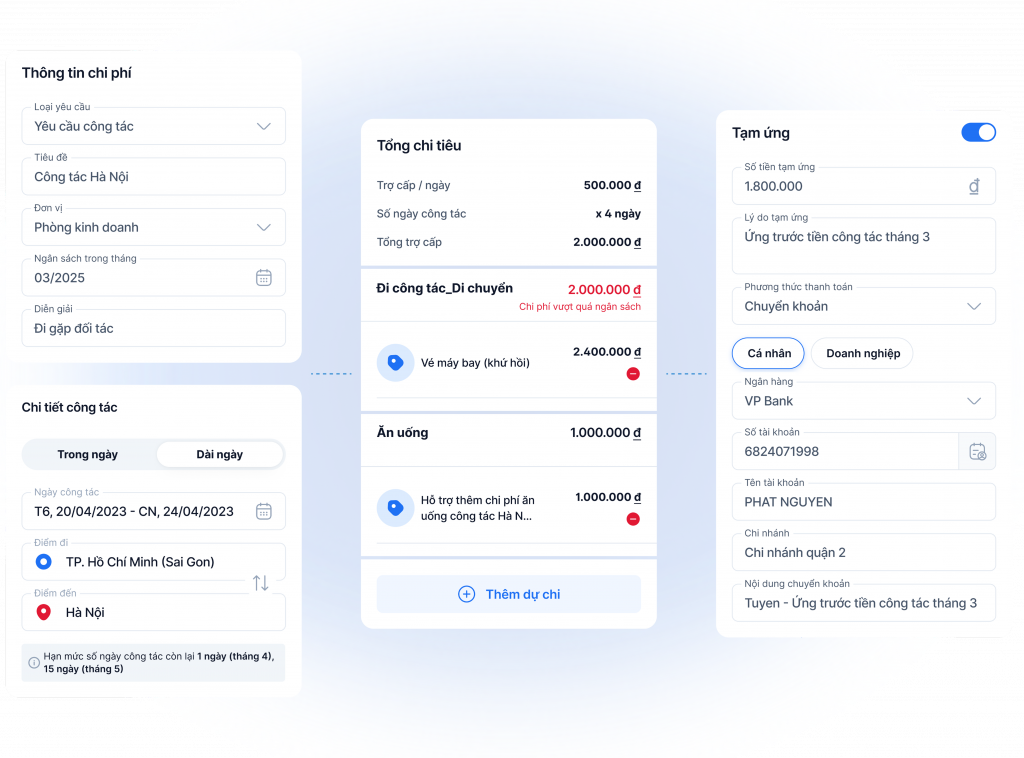
Bizzi Expense – manage payment requests & expenses from the source
Bizzi turns each payment request into a standardized expense control point right from the creation step:
- Employee creates payment request on Bizzi.
- Attach Cost center, Project code, cost type, Vendor right from the start → ensure transparency and accounting standards.
- Check budgets in real time (by department, project, campaign).
- Flexible multi-level approval by quota and department, on web or mobile.
- Automatic reminders when payment is due and real-time status tracking.
The Bizzi Expenses app reduces manual errors, speeds up approvals, and controls spending before invoices are generated.
Bizzi IPA + 3way – check your bill before paying
Bizzi ensures valid expenses, reduces fraud risks & increases tax-accounting compliance through a second layer of control to ensure safe & legal payments:
- Automatically download and read electronic invoices from email, NCC portal or file upload.
- OCR + AI check validity according to General Department of Taxation standards.
- Detect:
- Duplicate invoice
- Wrong tax code, wrong unit price / amount
- Other registered suppliers
- 3-way automatic matching: PO – GRN – Invoice → lock the risk of incorrect payment or no acceptance documents.
From Payment request to FP&A data & rolling forecast
Approved payment requests don't end with accounting, but become a strategic data source for finance leaders:
- Spend visibility: clearly see spending by type, vendor, department, project.
- Budgeting & Forecasting: compare budget – actual expenditure – forecast.
- Rolling forecast connects to EPM systems (like Sactona – Bizzi distribution).
- Tag expenses by:
- Service type (Marketing, Logistics, outsourcing…)
- Project / Campaign / Sales Channel Code
- Customer / product
With Bizzi, it becomes:
- Spending Control Class from the very beginning,
- Certificate authentication layer before payment,
- Financial data layer serve decision making & profit optimization.
What are Payment Requests Frequently Asked Questions (FAQs)?
To better understand the nature of Payment Request and the Request to pay process, below are some questions with related content providing specific information.
1. What is the difference between a Payment request, an Invoice and a PO?
- Purchase Order (PO): purchase order issued by the purchasing department prior to purchase.
- Invoice: document issued by the supplier after delivery of goods/services.
- Payment Request: ballot payment request created by the business to request the accountant to make payments.
PO is order – Invoice is invoice – Payment Request is payment request.
2. Is the payment request legally valid?
Payment request no replacement of invoice or contract, But:
- Has internal value for approval & accountability.
- Is an administrative document in the process of controlling expenses and internal auditing.
- When stored together with invoices, contracts, GRNs, statements… will help prove the validity of the expense.
3. Do small businesses need a Payment Request?
Have. Because whether small or large businesses need:
- Avoid making wrong, duplicate, or over-budget payments.
- Create transparency, decentralization and clear responsibilities.
- Reduce the risk of fraud and cash loss.
Many SMEs start with Excel, but as costs increase or expansion accelerates, should be standardized by automated workflow.
4. Who can create and who can approve Payment Requests?
- Requestor: cost incurring employee / operations department / procurement.
- Approvers: limit level managers, Finance - Accounting department, CFO, CEO (large amount or high risk).
- The Request to Pay approval flow typically depends on:
- Cost Type
- Remaining budget
- Amount
- Project / Department
5. How long should payment requests be retained for audit and tax purposes?
According to regulations on storing accounting documents in Vietnam:
- At least 10 years for important accounting documents (contracts, invoices, payment requests, settlements...).
- At least 5 years with regular business documents.
Software solution helps to store fully electronically, track audit trail and search quickly instead of paper/manual storage.
6. Which software supports Payment Request management and effective expense control?
Businesses can refer to:
- Bizzi Expense & Bizzi IPA – payment request automation + invoice control + 3-way matching.
- Popular ERP systems (SAP, Oracle, Misa, Bravo) – but need to add flexible workflows and OCR for invoices.
Bizzi is the right choice for Vietnamese businesses that need fast deployment speed, reasonable cost, and can handle multi-department processes.
Conclude
Through the analysis of the nature of Payment Request above, it can be seen that Payment Request is not just payment request form but also "Gateway of Control" all cash outflows in the business. In other words, Payment Request is the last risk barrier before money leaves the account.
When the Request to Pay process is well run, businesses will spend smarter, be more transparent and optimize profits better.
To improve cost management efficiency and cash flow control, businesses should:
- Standardize the form and clear Request to Pay process by expense type - limit - department.
- Avoid processing by Excel / email / scanned files, reduce errors, duplication and fraud risk.
- Prioritize workflow automation deployment to digitize the entire Payment Request lifecycle
- Apply digital financial platforms such as:
- Bizzi Expense + Bizzi IPA to:
- Control expenses right from the request stage.
- Check budget in real time.
- Check invoice validity & 3-way matching before payment.
- System connection EPM (Sactona) to:
- Optimize budgeting and rolling forecast.
- Make data-driven decisions.
- Bizzi Expense + Bizzi IPA to:
Pay correct - sufficient - valid - on time and transparent financial data to support growth strategies. Register here to receive advice on solutions specifically for your business: https://bizzi.vn/dang-ky-dung-thu/





