


Odoo is an integrated enterprise management application suite, encompassing CRM, sales, purchasing, inventory, manufacturing, accounting, projects, and many other functions. When these applications are deployed together to connect processes across departments, Odoo can function as an ERP system.
Odoo currently has two main editions: Community and Enterprise, Odoo offers various models with different licensing and feature ranges. Therefore, businesses shouldn't just ask "What modules does Odoo have?" but should evaluate Odoo based on the processes they need to manage, integration requirements, customization capabilities, deployment resources, and total cost of ownership.
This article helps businesses understand how Odoo works, its main application groups, the differences between Community and Enterprise versions, their advantages and disadvantages, and the criteria to consider before deciding to implement it.
What is Odoo software? How is Odoo ERP understood?
Odoo is an integrated enterprise management application suite where applications serving multiple business functions such as CRM, Sales, Purchase, Inventory, Manufacturing, Accounting, Project, Website, and eCommerce can be deployed within a single ecosystem. When used to manage and connect core business processes, Odoo can function as an ERP system.
The key difference is that Odoo and ERP are not synonymous concepts.. ERP is a type of enterprise management system; Odoo is a specific product that provides applications that can be combined to perform that role.
For example, a business can use Sales to manage sales orders, Purchase for purchasing, Inventory for warehousing, and Accounting for finance and accounting. When data from these processes is linked within the same system, the business can reduce the need to maintain completely separate processes and data across departments.
If businesses need a broader understanding of the concept before evaluating Odoo, they can refer to the following article. What is ERP and what benefits does ERP software bring to businesses?.
In short: ERP stands for Enterprise Resource Planning; Odoo is a specific platform/application suite that can be used to implement ERP.
Odoo should also not be simply referred to as "open-source software" without specifying the edition. Odoo 19 Community Edition licensed under LGPLv3, while Odoo 19 Enterprise Edition Use the Odoo Enterprise Edition License and require a valid subscription in accordance with the current licensing terms.
At the enterprise level, therefore, at least three factors need to be distinguished: What is Odoo, which version does the company use, and what applications/features are actually implemented?.
Odoo SA is the company behind the Odoo product. However, for the purpose of evaluating the system, it's more important to understand how this suite of applications supports business processes rather than delving into the company's history.
How does Odoo work and what are its main applications?
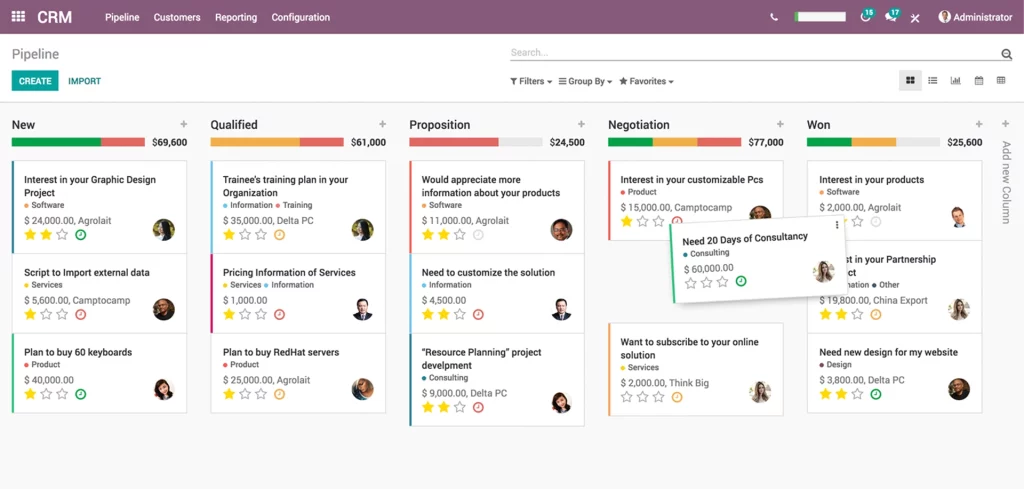
Odoo is organized according to the following model: app Serving each business group, businesses can select the necessary applications and connect them into cross-departmental processes, instead of using a completely separate tool for each function.
The noteworthy aspect of this model is not how many applications Odoo has, but rather... the relationship between data and processes.
For example, in a purchasing process, a business might start with a purchase request or quotation, create a Purchase Order, receive goods into inventory, record supplier invoices, and then move on to accounting and payment. When the relevant applications are configured appropriately, information from one step can become input data for the next.
The process can be visualized simply as follows:
Purchase Order → Receipt → Vendor Bill → Accounting → Payment
Odoo 19 now supports 3-way matching in the purchasing process. According to official documentation, this feature can control vendor bill payments based on purchase order information and quantities received; this feature is used with the Bill Control policy based on quantities received.
This also shows why simply listing "Odoo modules" is not enough to understand the system's essence. The management value lies in... Applications are configured to support a continuous business process., This includes how businesses standardize data, assign permissions, and integrate with other systems.
Popular Odoo application suites
Odoo covers a wide range of business groups, from sales, purchasing, inventory, and manufacturing to finance, projects, websites, and human resources. However, businesses don't necessarily need to deploy the entire application from the start; the actual scope depends on requirements and the edition chosen.
| Operations Team | Typical Odoo application | What can we help businesses with? |
| CRM & Sales | CRM, Sales | Manage leads, opportunities, quotes, and sales orders. |
| Purchase | Purchase | Manage quotation requests, purchase orders, and supplier processes. |
| Warehouse | Inventory | Managing goods receipt, dispatch, inventory, and traceability. |
| Manufacture | Manufacturing | Managing Bill of Materials (BOM), production orders, and manufacturing operations. |
| Finance - Accounting | Accounting, Invoicing | Manage invoices, vendor bills, reconcile and generate reports according to configuration. |
| Project | Project | Project task, schedule, and resource management. |
| Website/eCommerce | Website, eCommerce | Website development and support for online sales activities. |
| Human Resources | HR applications | Manage HR tasks depending on the app and edition. |
In there, Accounting/Invoicing is just one group of applications within the Odoo ecosystem., However, this is not the entirety of Odoo. Odoo 19 Accounting now supports many functions such as account management, invoices and bills, bank reconciliation, financial reporting, taxes, multi-company, and related accounting configurations.
For Vietnamese businesses, the accounting aspect needs further evaluation from this perspective. financial localization. Odoo 19 has a country-specific localization mechanism; the official documentation currently lists it. Vietnam In countries where fiscal localization is supported, however, localization still needs to be configured and checked against chart of accounts, taxes, reporting, and specific business requirements.
Therefore, Odoo has localization for Vietnam. This does not mean that businesses can skip the compliance check and actual configuration step. before putting the system into operation.
What is the difference between Odoo Community and Odoo Enterprise?
Odoo currently has two main editions: Community and Enterprise. Community is an open-source version licensed under LGPLv3; Enterprise uses Odoo's own license and is offered on a subscription model.
The important point is It's not advisable to assume that Community is for small businesses and Enterprise is for large businesses.. The decision should be based on feature requirements, deployment model, support needs, level of customization, and total cost of ownership.
| Criteria to be evaluated | Community | Enterprise | The question businesses need to answer. |
| License | Open-source under LGPLv3 | Enterprise Edition License | What licensing model do businesses need? |
| Feature | Functional scope according to Community | Add applications/features according to the current offering. | Which functions are actually needed? |
| Support | It is necessary to identify the appropriate source of support. | Odoo offers various support services. | Who is responsible for supporting the system? |
| Upgrade | Businesses/partners need to proactively manage according to the deployment model. | There are service upgrade mechanisms depending on the model. | Who is responsible for upgrades and testing? |
| Hosting | There are many options depending on the implementation plan. | There are hosting/service options based on the offering. | Does the business want to manage things in-house or use a service? |
| Customization | Can be developed and customized according to the applicable license. | It is expandable but subject to the Enterprise License conditions. | How much customization is required? |
| TCO | It's not just about the license fee. | Subscriptions are not included in the calculation. | What are the total costs for 3–5 years? |
Special, The feature matrix and offering may change by version., Therefore, businesses should not use a Community-Enterprise comparison table created from an older version of Odoo to make current decisions.
Besides the license fee, you need to consider the costs of deployment, hosting, customization, integration, training, operation, support, and upgrades. A cheaper license option may not necessarily offer better value. TCO The cost is lower if the business has to perform many customizations or maintain many separate integrations.
What are the advantages and disadvantages of Odoo software?
Odoo has an advantage in its model. integrated applications, The system offers relatively flexible scalability and customization options. However, the implementation results depend not only on the feature list but also on the project scope, data quality, configuration methods, level of customization, and the capabilities of the implementation team.
Odoo can be evaluated according to the following categories:
| Characteristic | Value delivered | Things to evaluate |
| Modularization | You can choose the application group according to your needs. | Should the entire system be implemented at once, or in phases? |
| Business integration | Multiple processes can be connected within the same system. | Has the actual process been standardized? |
| Customize | It is possible to meet some specific requirements. | How customized is it, and who is responsible for maintenance? |
| Community/Enterprise | There are many options regarding edition and usage model. | What is the difference between features, support, license, and TCO? |
| Deployment | A suitable deployment model can be selected. | Who is responsible for infrastructure, security, backup, and upgrades? |
Advantages of Odoo
First, the integrated application model. Businesses can connect functions such as Sales, Purchase, Inventory, and Accounting instead of managing them completely separately.
Secondly, the ability to scale as needed. Businesses can start with a specific business group and then evaluate expanding to other applications as the processes and data are ready.
Third, the ability to customize. For businesses with unique processes, configurability and scalability can be an advantage. However, this is also a factor that needs careful control because the deeper the customization, the more significant the maintenance and testing requirements become when upgrading.
Fourth, a wide range of edition and deployment options. Community and Enterprise offer different options in terms of licenses, features, and services. Businesses can evaluate based on requirements rather than starting from an assumption of scale.
Points to consider
Customization does not mean "being able to change everything without cost.". Each change outside the standard flow can create additional requirements for development, testing, documentation, maintenance, and upgrades.
Input data is also an important factor. An ERP system can connect multiple departments, but if the master data is not standardized, the implementation may still create discrepancies or increase subsequent processing workload.
Localization and legal requirements need to be verified on a country-by-country basis. Odoo 19 includes fiscal localization for Vietnam, but the Odoo documentation also notes that the localization packages need to be configured with charts of accounts, taxes, country-specific statements, and related components.
Final, Implementation quality is just as important as the feature list.. A system with many functions but unclear scope, unavailable data, or uncontrolled customization can still result in high TCO and be difficult to operate.
Which businesses are suitable for Odoo?
The decision to choose Odoo shouldn't be based solely on the number of employees or revenue. A business should consider shortlisting Odoo when the need arises. connecting multiple business processes, They want to deploy applications and have the appropriate resources to manage configuration, data, integration, and process changes.
Odoo deserves to be evaluated when businesses:
- We are currently using multiple separate software programs for Sales, Purchase, Inventory, and Accounting.
- We want to link data between departments.
- There is a need to expand the system across different business groups.
- There are specific processes that require configuration or customization.
- There are process owners and project owners who are capable of participating in the implementation.
- Be prepared to standardize the master data before integrating it into the system.
- There is a need to integrate Odoo with other software.
For example, a distribution business might need to connect:
Sales → Purchase → Inventory → Accounting
While businesses providing services may focus more on:
CRM → Sales → Project → Invoicing
Both companies can evaluate Odoo, but The deployment scope and configuration methods can vary significantly..
Careful evaluation is needed when:
- A business with only one very simple operation may not necessarily need ERP.
- No one has been assigned responsibility for the process.
- Master data lacks normalization.
- Requirements are constantly changing.
- I want extensive customization but haven't factored in maintenance and upgrade costs.
- There are specific localization or compliance requirements, but these have not yet been verified on the version of Odoo that is intended for use.
- There are many legacy systems that need to be integrated, but the system of record is not yet clearly defined.
| Current Status | Is Odoo worth a review? | What needs to be checked next? |
| Using multiple separate software programs | High | Integration and data flow |
| More collaborative operations are needed. | High | Module scope and process design |
| Just a simple operation | Weigh | TCO and the need for ERP. |
| Customization is very common. | Consider carefully | Maintain and improve |
| Unnormalized data | Don't make a decision yet. | Data Alert |
| There are many systems that need to be integrated. | It may be suitable | API, mapping, and system of records |
Therefore, a more appropriate question is not: “Is Odoo suitable for SMEs?”, but rather: “"Does Odoo meet the company's requirements in terms of customization, integration, and acceptable TCO?"”
If your business is currently comparing different ERP platforms, you may want to read more in this article. Comparing Odoo with SAP and Oracle To broaden the evaluation, this article should only be used in the next step, as ERP selection should be based on specific requirements rather than comparing features from a list.
What should businesses check before deploying Odoo?
Before choosing an edition or signing up for deployment, businesses should clearly define the scope, data, localization, integration, customization, deployment, support, and TCO.
A practical checklist might start with the following 12 questions:
- Which processes actually need to be moved to Odoo?
- Which modules/apps belong to the first phase?
- Which meets the requirements better: Community or Enterprise?
- What hosting/deployment model does the business use?
- Which master datasets need to be migrated?
- Have fiscal localization and current accounting requirements been validated?
- What systems does Odoo need to integrate with?
- Which parts can utilize standard features?
- Which parts actually need customization?
- Who is the process owner and project owner?
- Who is responsible for support, maintenance, and upgrades?
- What does TCO (Total Cost of Goods Sold) include over 3–5 years?
Especially in finance and accounting, you shouldn't just check the interface or the list of functions. Businesses need to identify... Chart of accounts, tax configuration, master data, document workflow, access control, and reporting. Does it meet practical requirements?.
Odoo 19 allows fiscal localization to be selected based on the company's country and provides country-specific packages. The document also notes that localization needs to be fine-tuned regarding chart of accounts, taxes, reporting, and related requirements.
This is especially important in Vietnam, as requirements for invoices, receipts, and taxes can change according to legal regulations. Businesses need to check. Odoo version, localization being used, and how the system is configured. Instead of assuming that having a package localization means the entire accounting process is pre-configured for all scenarios.
Another principle to keep in mind is The cost isn't just in the license.. The total cost of goods sold (TCCO) should include subscriptions/licenses (if applicable), implementation, hosting, customization, integration, migration, training, support, maintenance, and upgrades.
If your business needs to delve deeper into the ERP implementation process from planning to go-live, you can refer to the following article. ERP implementation process. This part of the Odoo article focuses only on the pre-deployment evaluation checklist and does not replace a complete ERP implementation plan.
Conclusion: Should you use Odoo software?
Odoo deserves to be shortlisted when a business needs an application-based management platform, wants to connect multiple business processes, and has the ability to manage data, configuration, integration, and process changes. Community and Enterprise editions offer different options, but there's no basis for assuming one edition is suitable for every business.
More importantly, choosing Odoo shouldn't stop at comparing the number of features. Businesses need to clearly define their needs. Requirement → Process → Data → Integration → Customization → TCO To determine if the system is suitable for practical operation.
If your business is already using Odoo and wants to conduct a separate process evaluation. Accounts Payable, After clearly defining the needs, consider connecting Odoo with a specialized solution. This is an additional integration and automation challenge, but it doesn't mean Odoo doesn't have the functionality to handle accounts payable.
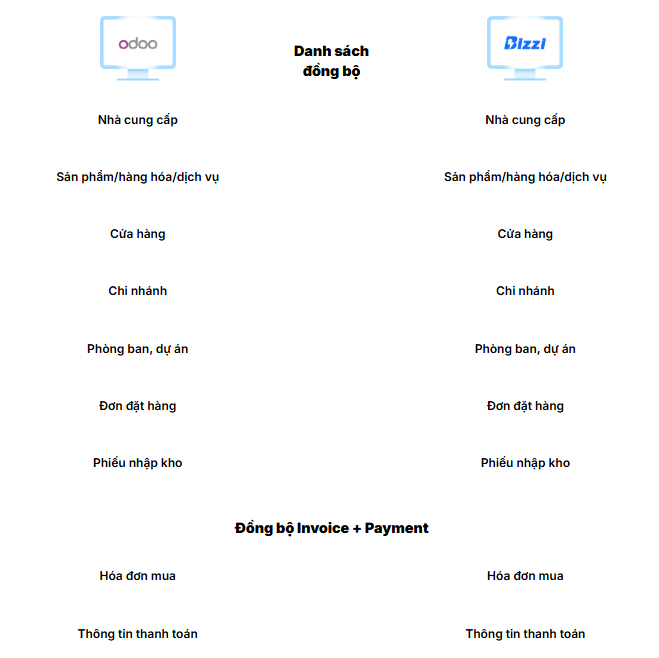
If your business is using Odoo and wants to evaluate how to connect your accounts payable process to your existing system, you can learn more about it. Bizzi integrates with Odoo. Bizzi now offers the ability to synchronize data groups such as Vendor, Product/Item & UOM, PO, GR, Purchase Invoice, and Payment; and supports data exchange mechanisms such as Excel/CSV import/export, SFTP, and API depending on integration needs.
The key point to determine before implementation remains: The current business processes, data synchronization, and system of records are essential.. Only then can we assess whether adding an AP automation layer creates additional value.
Register to schedule a consultation here: https://bizzi.vn/dang-ky-dung-thu/






