SAP boasts significant advantages in data integration, process standardization, control capabilities, and support for large-scale business operations. However, the system also comes with limitations worth considering, such as total cost of ownership, implementation complexity, data requirements, personnel, and change management.
So, Analyzing the advantages and disadvantages of SAP software. The question shouldn't stop at "Is SAP good?". A more important question is: are the benefits of SAP significant enough to offset the costs, complexity, and resources that businesses must invest?
What is SAP software? A brief understanding before evaluating its advantages and disadvantages.
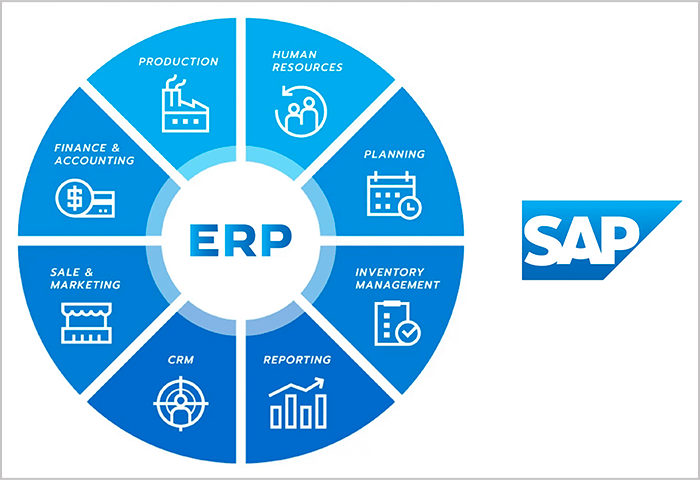
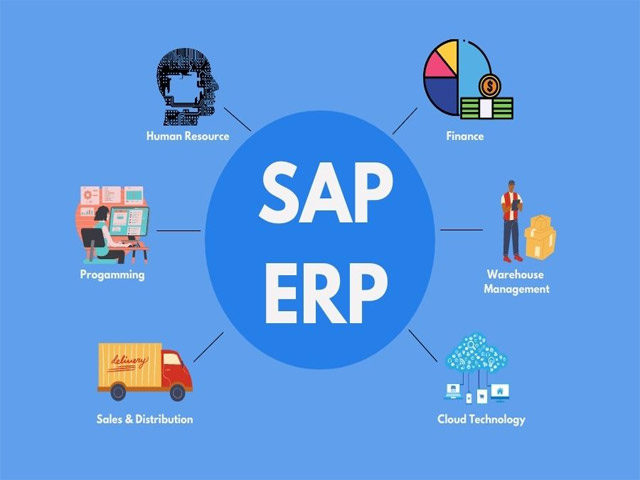
SAP offers a range of enterprise management solutions, with ERP being a core group of solutions. SAP ERP connects processes such as finance, purchasing, sales, inventory, and supply chain on a unified management platform, giving businesses a cohesive view instead of having to aggregate data from multiple disparate systems. SAP currently describes its ERP as consolidating core processes and providing a unified view of business operations.
Therefore, SAP should not be simply understood as "accounting software." Finance is only one part of ERP management. The value of SAP lies much more in its connectivity. data – process – control between parts.
If businesses need to understand the background before conducting a more in-depth evaluation, they can refer to this article. What is SAP ERP software?.
SAP also has many different product lines and deployment models, so the suitability and actual cost depend on the product, business scope, system architecture, and requirements of each business. Therefore, not all SAP projects should be treated as a single deployment model.

7 outstanding advantages of SAP software
SAP's biggest advantage lies in its ability to connect business data and processes within a unified management system. This allows businesses to improve control, reporting, and operational scalability.
However, each advantage only creates real value when accompanied by suitable implementation conditions. A well-integrated system can still create new problems if the input data is not standardized, the processes are inconsistent, or access is not properly managed.
1. Integrate data and processes on a single system.
One of SAP's key advantages is its ability to connect data across multiple business groups such as Finance, Procurement, Sales, and Inventory/Supply Chain, instead of each department operating on a separate data source.
For example, in the purchasing process, information can be linked from the purchase request, Purchase Order (PO), goods receipt, invoice to payment. When these events are recorded within the same architecture, Finance can see the relationship between the purchase transaction, obligations to the supplier, and accounting data instead of having to rely entirely on spreadsheets.
The greatest value here is reduce data silo. When data is connected, a change in the operational process can be reflected to the relevant downstream steps as designed by the system.
However, integration does not automatically mean the data will be accurate. Vendor, product codes, units of measurement, accounts, and related master data still need to be standardized before being incorporated into the system. This is a crucial condition for the benefits of integration to truly materialize.
2. Standardize operational procedures across departments and units.
SAP can help businesses establish more consistent business processes across multiple departments, branches, or subsidiaries through workflows, processing rules, and authorization.
For example, instead of each department handling purchase requests in a different way, a business can establish a process from purchase request and approval to purchase order (PO) using a common process framework.
The value of standardization lies not just in "everyone doing the same thing." For the CFO or internal control department, a unified process makes it easier to identify issues. Who is requested, who is approved, what steps does the transaction go through, and what data is recorded at each point?.
However, businesses need to identify target processes before configuring the system. SAP doesn't automatically turn every existing process into a "best practice." If a business introduces an uncontrolled process into the system and then simply digitizes that process, the old problem may persist on a larger scale.
3. Enhanced control and traceability of business operations.
When transactions are processed within a system with clear access control and workflow, businesses have a stronger basis for controlling access, approvals, and transaction history.
Factors such as:
- User permission management;
- Approval workflow;
- Transaction history;
- The audit trail is at an appropriate level;
- The rule for separating tasks;
It can assist Finance and Internal Control in monitoring business process execution.
For example, a purchase transaction is not only viewed in terms of the final outcome of "payment completed," but can be placed within a business chain including purchase request, approval, purchase order, goods received, invoice, and payment.
This is helpful for CFOs because financial control is not just about checking the ending balance, but also about overall control. origin and validity of the transaction.
However, it should not be understood that SAP can completely eliminate fraud or misconduct. Effective control depends significantly on the design of authorization, workflow, segregation of duties, and corporate governance.
4. Support data-driven reporting and decision-making.
When data from multiple business processes is connected, managers can have cross-departmental visibility instead of having to manually aggregate data from multiple Excel files or independent systems.
This is especially significant for finance. Instead of just viewing a single revenue or expense report, businesses can link financial data to purchasing, sales, inventory, or related operational processes.
The value it delivers lies in three factors:
Visibility → Reporting → Analysis
Consistent data reduces aggregation time and provides a better foundation for management analytics. However, the system can only generate reliable insights when the input data is of sufficient quality, the master data is managed properly, and business rules are configured correctly.
Therefore, this benefit should not be interpreted as a claim that SAP or AI within SAP will automatically make accurate decisions. The support system provides data and analytical capabilities; managerial decisions still depend on human input and the quality of the business context.
5. Supporting businesses operating at a large scale and with high complexity.
SAP is particularly valuable when a business has multiple units, departments, and interdependent processes.
Situations that often increase the need for an integrated governance platform include:
- Many companies or legal entities;
- Multiple branches;
- Many processes involve multiple departments;
- Many types of transactions;
- Complex control and reporting requirements;
- The need to expand operations in the long term.
As complexity increases, continuously adding more disparate systems can make the architecture more difficult to manage. ERP can become a common platform for managing related processes and data.
However, it should not be assumed that SAP is only for extremely large corporations or businesses. SAP currently has many products and models serving different business groups. More importantly, level of complexity and business requirement, It's not just about revenue or the number of employees.
6. A broad functional ecosystem covering many business operations.
Another advantage of SAP is that businesses can manage multiple business groups within the same ecosystem instead of having to build too many separate software programs.
The scope may include:
- Finance;
- Procurement;
- Sales;
- Supply Chain;
- Manufacturing;
- Human Resources.
This allows businesses to design architecture using an end-to-end process instead of optimizing each department individually.
For example, a purchasing operation might involve Procurement, Inventory, and Finance simultaneously. When these business layers are connected, businesses can reduce the number of data entry or reconciliation points required.
If you need to learn more about the functional scope, you can view it here. subsystems in SAP ERP.
It's important to note that the broader the ecosystem, the more complex the architecture and governance can become. Businesses shouldn't add modules simply because they exist; the scope should stem from the business process and business case.
7. Support for long-term governance as the business expands.
For businesses with a long-term expansion strategy, ERP can become a common management platform instead of constantly adding separate systems for each new need.
The three important values include:
Standardization: Standardize processes and data.
Integration: Connecting related business processes and systems.
Expansion: It creates a foundation for expanding the unit, process, or scope of administration.
Along with that comes GovernmentBusinesses need a clear architecture, ownership, and governance principles as the system develops.
SAP doesn't automatically create scalability. This benefit only becomes apparent when a business has a suitable roadmap, limits unnecessary customization, and maintains data quality and governance throughout the system's lifecycle.
7 drawbacks and limitations of SAP software to consider.
In exchange for deep and broad management capabilities, SAP typically requires businesses to invest more in costs, implementation, data, personnel, integration, and change management.
The important point when Analyzing the advantages and disadvantages of SAP software. It's important not to view all limitations as "SAP is flawed." Some are a natural consequence of deploying a broad enterprise platform; others stem from how the company designed and managed the project.
1. Total cost of ownership can be high.
SAP costs aren't just about licenses or subscriptions. When creating a business case, businesses need to look at the total cost of ownership. TCO (Total Cost of Ownership) — throughout the system's lifecycle.
Items to consider include:
- License/subscription;
- Consulting;
- Execute;
- Integration;
- Data migration;
- Training;
- Customization;
- Support;
- Internal resources.
Therefore, two projects using SAP can have very different TCOs if they differ in product, scope, number of processes, level of integration, and customization requirements.
Mini checklist: Items to include in TCO
| Item | An evaluation is needed. |
| Software | License/subscription and usage model |
| Implementation | Configuration, deployment, testing |
| Data | Cleansing, migration, validation |
| Joint | Connecting related systems |
| Military | Consulting, project team, key users |
| Edit | Training, SOP, change management |
| Customization | Development and maintenance costs |
| Run | Support, operation, and upgrades |
Therefore, a single SAP cost figure should not be used for all businesses. Business cases need to be built according to the actual scope.
2. Implementation is complex and requires significant resources.
SAP implementation is not simply about installing software. It's often a project that simultaneously involves process design, configuration, data migration, testing, training, and go-live.
SAP currently uses SAP Activate The deployment framework consists of six phases: Discover, Prepare, Explore, Realize, Deploy, and Run. Explore includes fit-to-standard workshops; Realize focuses on configuration, building, and testing; Deploy brings the system into production; and Run is the phase of continuous operation and optimization.
To put it simply:
Process → Configuration → Data → Testing → Training → Go-live → Run
The actual complexity depends on the scope. A project with few processes and a low level of integration will be significantly different from a project deploying across multiple entities, systems, and departments with numerous inter-departmental processes.
Therefore, a fixed timeline like "SAP always takes 6–18 months" should not be applied. The timeframe must be determined according to the scope, implementation methodology, readiness level, and resources of each project.
3. Input data and master data must be well managed.
SAP cannot fix a problematic data system on its own. If the source data is incorrect, duplicated, or inconsistent, the quality of downstream transactions and reports can also be affected.
Common issues that need to be addressed before migration include:
- Data cleansing;
- Mapping;
- Master data;
- Data ownership;
- Validation.
For example, if the vendor list contains many duplicate records, product codes are assigned according to different rules between branches, or customer data lacks required fields, importing all that data into the new system will not automatically make the data "clean".
Businesses need to clearly define:
Who owns the data? → Which data is standardized? → What are the update rules? → Who approves the changes?
This is why data governance should be considered part of ERP implementation, not a secondary task after go-live.
4. Users need time for training and adaptation.
An enterprise ERP system has many processes, roles, and permissions, so users often need time to become familiar with the new way of working.
The challenge isn't just about learning how to press the buttons. Users may have to change:
- How to perform the task;
- Approval method;
- How to enter and check data;
- Responsibilities between departments;
- SOP;
- How to coordinate with other departments.
Businesses therefore need to combine Training + Key Users + SOP + Change Management.
The user experience also depends on the SAP product, user roles, process design, and configured interface. Therefore, it shouldn't be definitively stated that "SAP interfaces are difficult to use." The key issue to consider is whether users have been provided with appropriate process design, permissions, and training.
5. Excessive customization can make the system difficult to maintain and upgrade.
SAP is capable of handling specific business processes, but custom solutions should not be considered the default choice for every gap between the current process and the system.
There is one important difference between:
Standard → Configure → Extend → Custom
If a business customizes its core system too deeply, its technical debt can increase, and future upgrades may become more complex.
This is also why SAP emphasizes this. Clean coreThe goal is to keep the ERP core as close to standard as possible while using appropriate extensions to meet diverse needs. SAP states that a clean core helps reduce technical debt, simplify maintenance and upgrades, and support the adoption of newer innovations.
That doesn't mean custom is always bad. If the business truly creates a competitive advantage or has specific legal/technical requirements, extensions may be necessary. The key is that the business must have them. business case and architectural rationale Clearly defined for each customization.
6. Integration with existing systems can become a separate project.
Businesses that use SAP often also have other systems such as CRM, banking, electronic invoicing, e-commerce, or specialized software.
In that case, the integration needs to be designed and tested separately, including:
- API/integration;
- Mapping;
- Synchronization;
- Back handling;
- Data ownership.
For example, the architecture might need to connect:
SAP ↔ Electronic Invoice ↔ Bank ↔ Sales System
The issue isn't that SAP "cannot integrate" with external systems. The problem is that each integration creates an additional layer of architecture that needs to be designed, monitored, and maintained.
For businesses with multiple legacy systems, the integration landscape can become a significant part of the overall project cost and effort.
7. Businesses rely heavily on the capabilities of their internal implementation and management teams.
A robust system doesn't guarantee project success if the business lacks people responsible for process, governance, or scope decisions.
An SAP project typically requires the involvement of:
- Executive sponsor: Ensuring direction and decision-making at the leadership level;
- Business/process owner: Responsible for the target process;
- Key users: Business and testing representatives;
- Implementation partner: Support for design, configuration, and deployment;
- Governance: Decision-making mechanisms, scope control, and change.
The key difference is: The limitations of the implementation project do not equate to the limitations of the SAP product..
If the process owner is unclear, the data is ownerless, or governance is weak, even a well-designed system will struggle to deliver value.
Therefore, statements such as "SAP has a deployment failure rate of X%" should not be used without a reliable source and a clear definition of what constitutes "failure".
Summary of SAP's advantages and disadvantages
Most of SAP's advantages come with corresponding implementation or management requirements. Therefore, CFOs should view SAP in pairs. value – trade-off, Instead of simply creating a separate list of advantages and disadvantages.
| Advantage | Value delivered | Corresponding disadvantages/trade-offs |
| Data Integration | A common data source across business processes. | Complex migration and integration |
| Standardize the process | Increased control and consistency | The current approach needs to change. |
| Wide range of functions | Reduce the need to combine too many disparate systems. | Systems and governance are more complex. |
| Reporting/visibility | Data-driven governance support | Depends on data quality |
| Scalability | Supporting businesses in increasing scale and complexity. | TCO and governance requirements may increase. |
| Customization capabilities | Meeting specific operational requirements | Custom deep tissue increases maintenance and technical debt. |
| System control | Governance and better contact tracing | A clear system of delegation of authority, procedures, and operations is needed. |
The key point is that there are no “freebies.” Value from integration requires data governance; value from standardization requires change management; scalability requires architecture and governance; and customization needs to be controlled to avoid creating technical debt.
Which businesses are suitable for SAP?
SAP is best suited when the benefits of integration, standardization, and control are large enough to offset the cost and complexity of the system.
Revenue size alone should not be the deciding factor. A business that is not very large but has multiple legal entities, numerous processes, or high control requirements may still have complex ERP needs.
Businesses have many processes and systems that need to be connected.
SAP is worth considering if your business is experiencing the following:
- Finance, Procurement, Sales, Inventory… use fragmented data;
- Departments have to manually cross-check data;
- Many systems do not share the same source of truth;
- Businesses want to connect end-to-end processes;
- The number of transactions and the level of interdependence between processes are increasing.
In this case, the value of ERP lies in solving the problem. demonstration, It's not simply about the number of users.
Businesses with high control and standardization requirements.
SAP is a better choice for businesses that have:
- Multiple branches or subsidiary companies;
- Complex workflows and access control;
- The need for process standardization;
- Request for transaction tracing;
- The need for cross-divisional reporting.
Especially for the CFO, the value can lie in bringing Finance, Procurement, Sales, and related operational processes under a common control framework.
The company has sufficient resources for long-term implementation and operation.
An ERP project doesn't end on the go-live day. Businesses need to prepare for the entire system lifecycle.
SAP is worth considering if your business has:
☑ Budget is appropriate for scope and TCO.
☑ The project team has sufficient professional representation.
☑ Master data has an owner.
☑ Business/process owner is clear.
☑ Change management and training capabilities.
☑ Governance for architecture, data, and access.
☑ Post-go-live operational and improvement plan.
SAP isn't just for big businesses. Instead, a more appropriate question is: Is the complexity of the business large enough for the value from SAP to outweigh the cost and effort?

When should businesses not rush to implement SAP?
SAP's drawbacks don't necessarily mean it's a bad choice. In many cases, the problem lies in the business itself. Not ready for a large-scale ERP project.
Businesses should exercise caution if they exhibit one or more of the following signs:
☐ There is no clear business case or KPI yet: It is not yet clear what problems SAP needs to solve and how success will be measured.
☐ The process has not yet been standardized: Departments still have different approaches, but there is no single process owner who has decided on the target process.
☐ Master data has no owner yet: No one is responsible for the quality, structure, and update rules of the data.
☐ License budget only: This does not include implementation, integration, migration, training, support, and internal resources.
☐ No internal team: All operational decisions rest with the implementation team.
☐ Want to customize almost the entire old process? Businesses are viewing SAP as a tool to "copy and paste" existing operations instead of evaluating process targets.
If these underlying conditions are not addressed, ERP implementation may digitize existing complexity instead of resolving it.
Conclusion: Should businesses implement SAP?
SAP isn't a good choice just because it's a large ERP platform, nor is it a bad choice just because of cost or implementation complexity.
SAP's value lies in its ability to integrate data, standardize processes, increase control, support reporting, and create a governance platform for businesses with a high level of complexity. In return, businesses must accept significantly higher investments in TCO, implementation, data governance, training, integration, and change management.
So, Analyzing the advantages and disadvantages of SAP software. It should end with a business case question: Are the benefits of an integrated governance platform significant enough to offset the costs, complexity, and resources a business must invest?
If the answer is yes, SAP could become the long-term management platform. If not, the business should continue to clarify its processes, data, KPIs, and architecture before making a decision.
After the SAP assessment, businesses should also clearly define their objectives. Which business processes require ERP handling, and which workflows might need additional layers of automation or specialized integration?. ERP and supporting systems do not necessarily have to be mutually exclusive; the appropriate architecture is one that clearly defines the system of record, workflow, and data responsibilities.
If your business is already using SAP but the process of receiving, reconciling, and processing input invoices still involves many manual steps, you can refer to the following: Bizzi integration solution with SAP S/4HANA. According to information released by Bizzi, the solution can synchronize data such as vendor, product/UOM, purchase order (PO), and gross order (GR), and supports PO–GR–Invoice reconciliation; the integration mechanism can be implemented via import/export, SFTP, or API depending on the architecture and needs.
The key point is that Bizzi plays a role here. additional automation/integration layer, This is not a replacement for SAP or a way to "fix SAP's shortcomings." Integration should only be evaluated after the business has clearly defined its processes, data ownership, and business requirements.
Sign up for a Bizzi demo. This helps accounting teams and CFOs save processing time and improve the efficiency of corporate financial management. https://bizzi.vn/dat-lich-demo/