


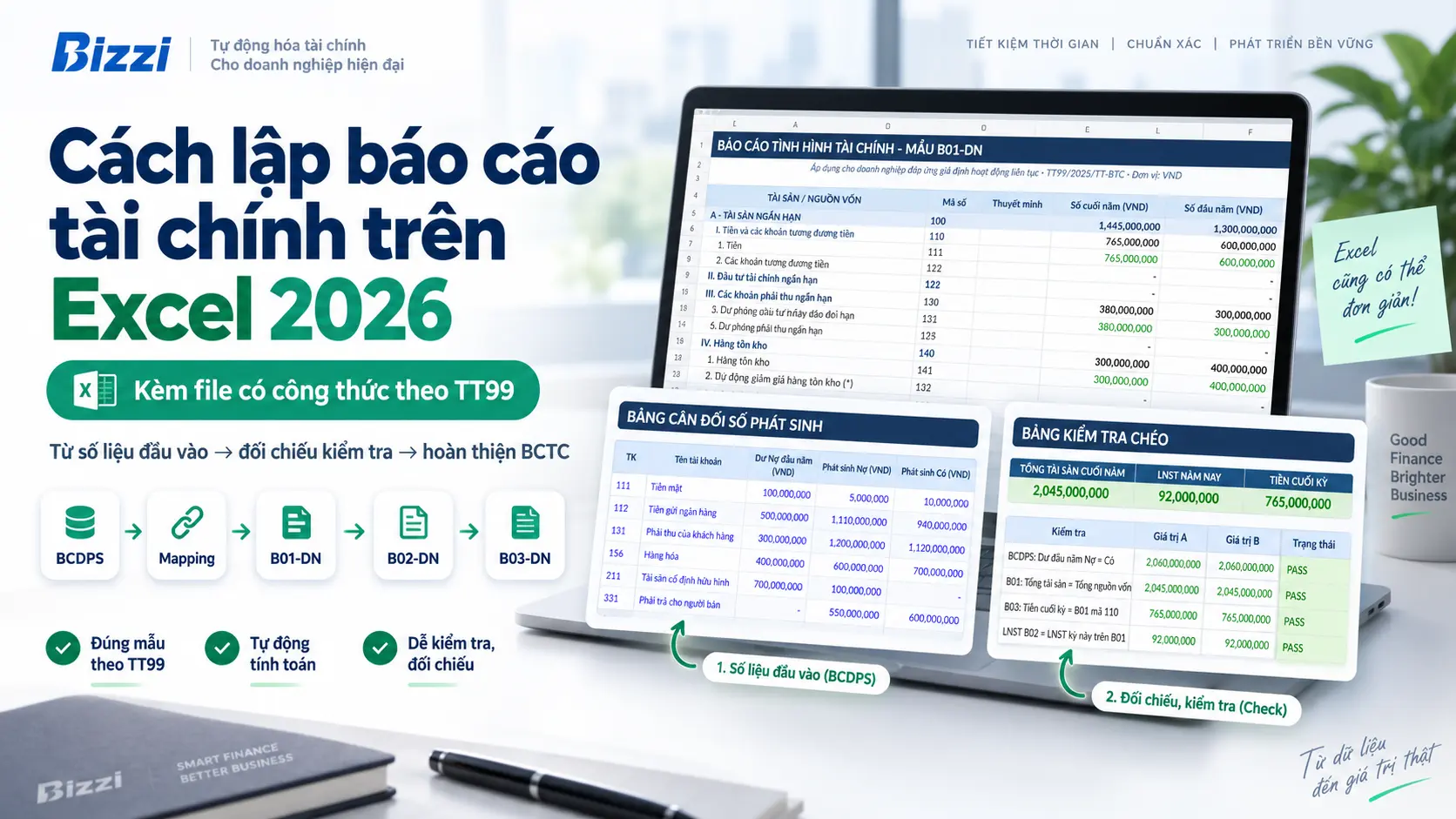
How to create financial reports in Excel It will be easier to manage if you don't start by "typing numbers into a form," but follow a clear flow: closing the books and checking the Trial Balance → mapping accounts to indicators → preparing B02-DN, B01-DN, B03-DN → completing the explanatory notes → cross-checking before finalizing the report.
Download the Excel financial report file with formulas according to Circular 99.
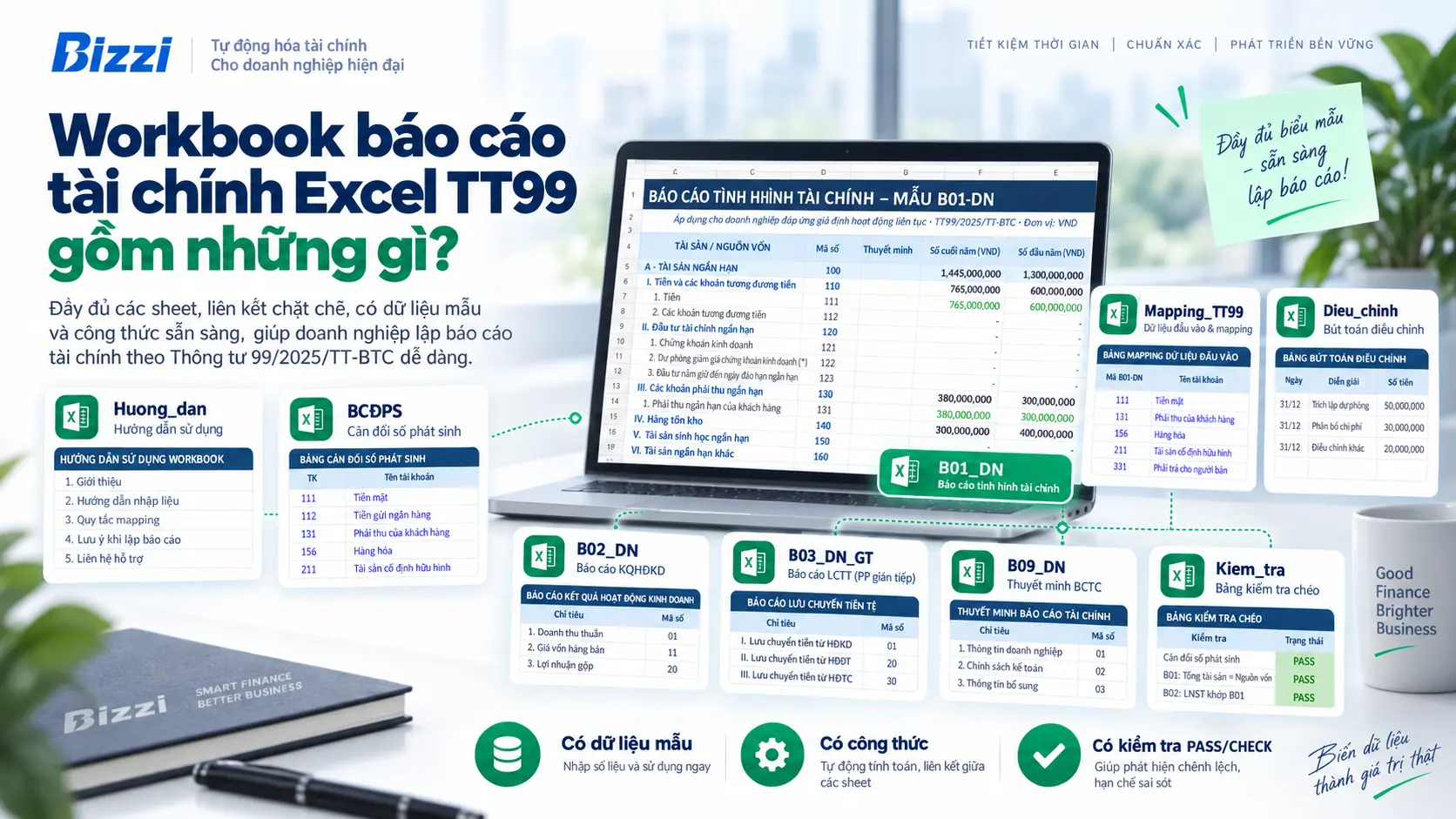
This workbook is designed for learning and practicing how to create financial reports in Excel using a controlled data flow. The file not only contains output templates but also includes BCDPS, mapping tables, adjustments, and cross-checking tables to help users visualize the data's progression.
Before establishment: Is the business applying Circular 99 or Circular 133?
This is a necessary step before building formulas or mapping accounts. Circular 99/2025/TT-BTC guides the Enterprise Accounting System and is effective from... January 1, 2026. For businesses falling within the scope of Circular 99, the financial statements will use the corresponding forms of Circular 99.
In the Bizzi workbook, the main output sheets include:
- B01_DN: Financial statement report.
- B02_DN: Business performance report.
- B03_DN_GT: Cash flow statement using the indirect method.
- B09_DN: Framework for supporting the preparation of explanatory notes to financial statements.
Sheet B09_DN The file provides a framework to help learners understand the data flow and prepare content; it should not be considered the entirety of the business description required for every company. The actual description should reflect the company's own policies, data, and key information.
Legal source: Circular 99/2025/TT-BTC published in the Government Gazette..
What sheets are needed for an Excel financial report file?
For beginners, a common mistake is combining input data, formulas, and final forms into a single sheet. When the data is incorrect, it's difficult to pinpoint whether the error lies in the data, the mapping, or the formula. Workbooks should separate each layer clearly.
| Sheet | Mission | What should users do? |
|---|---|---|
Guide |
Explain the scope and usage of the file. | Read before replacing sample data. |
BCDPS |
Source of input accounting data | Enter the opening balance, debit/credit transactions, and closing balance. |
Mapping_TT99 |
Linking accounts/sub-accounts to financial statement indicators | Check that the mapping matches the nature of the item. |
Adjust |
Import data that cannot be safely inferred solely from BCDPS. | Add cash flow data or make necessary adjustments. |
B02_DN |
Prepare a Business Performance Report | Review revenue, expenses, and profits. |
B01_DN |
Prepare a Statement of Financial Position | Examine assets, liabilities, and equity. |
B03_DN_GT |
Prepare the Indirect Cash Flow Statement. | Reconcile beginning/ending cash and cash flow adjustments. |
B09_DN |
Narrative support framework | Add a detailed explanation of the company's actual situation. |
Check |
Cross-checking | Only finalize the process when all critical tests no longer fail/check. |
How to create financial reports in Excel step-by-step
The procedure below follows the workbook's instructions so you can open the file and work through it step by step, instead of reading the theory and trying to guess the formulas.
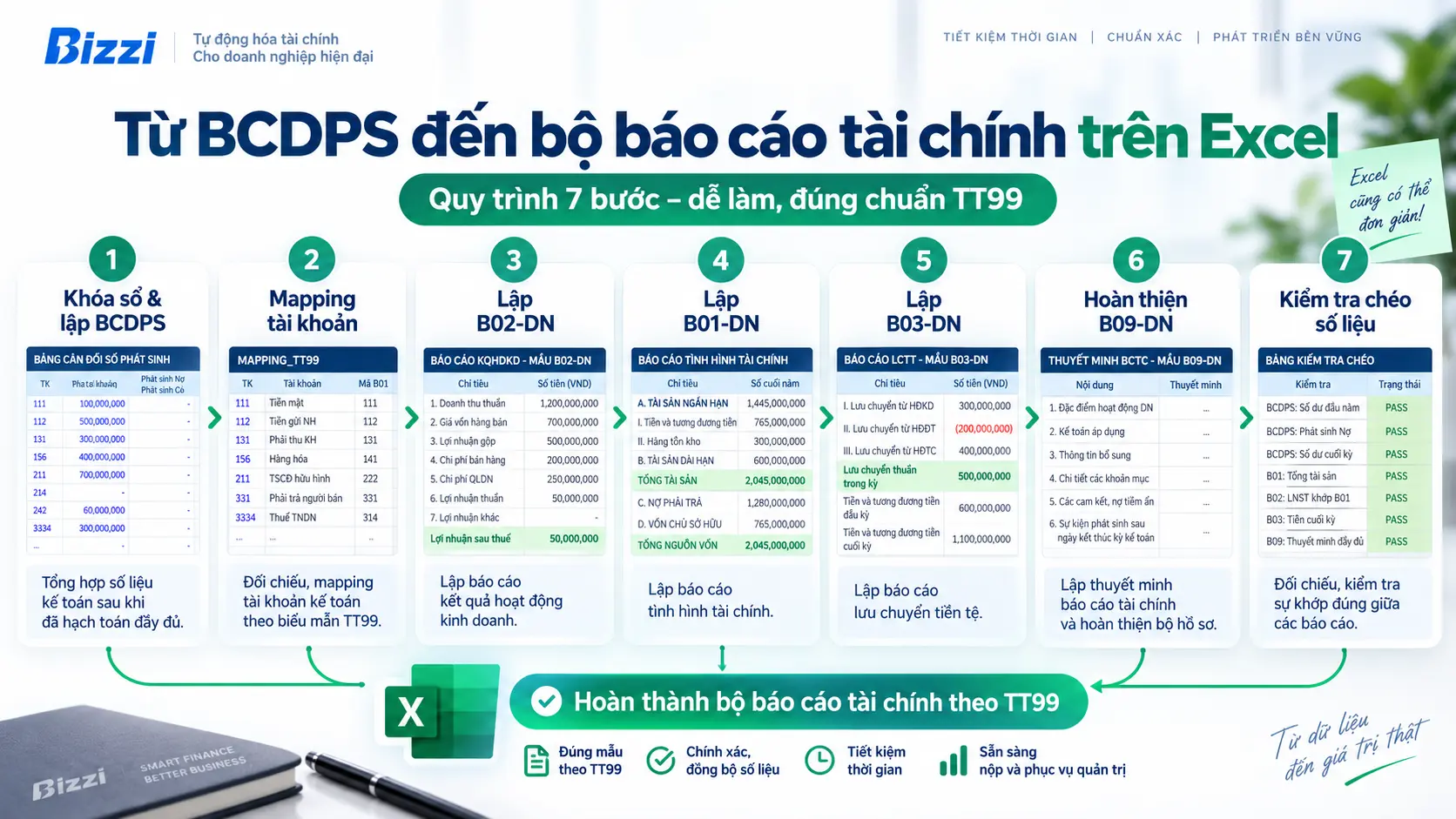
Step 1: Close the books and prepare the Trial Balance.
You shouldn't start preparing financial statements if the accounting data is incomplete. First, you need to review the year-end transactions, necessary adjusting/transferring entries, and check the beginning balance, transactions during the period, and ending balance.
In the sheet BCDPS, The sample data is organized by account with columns for balance and transactions. Before proceeding, at least check the following:
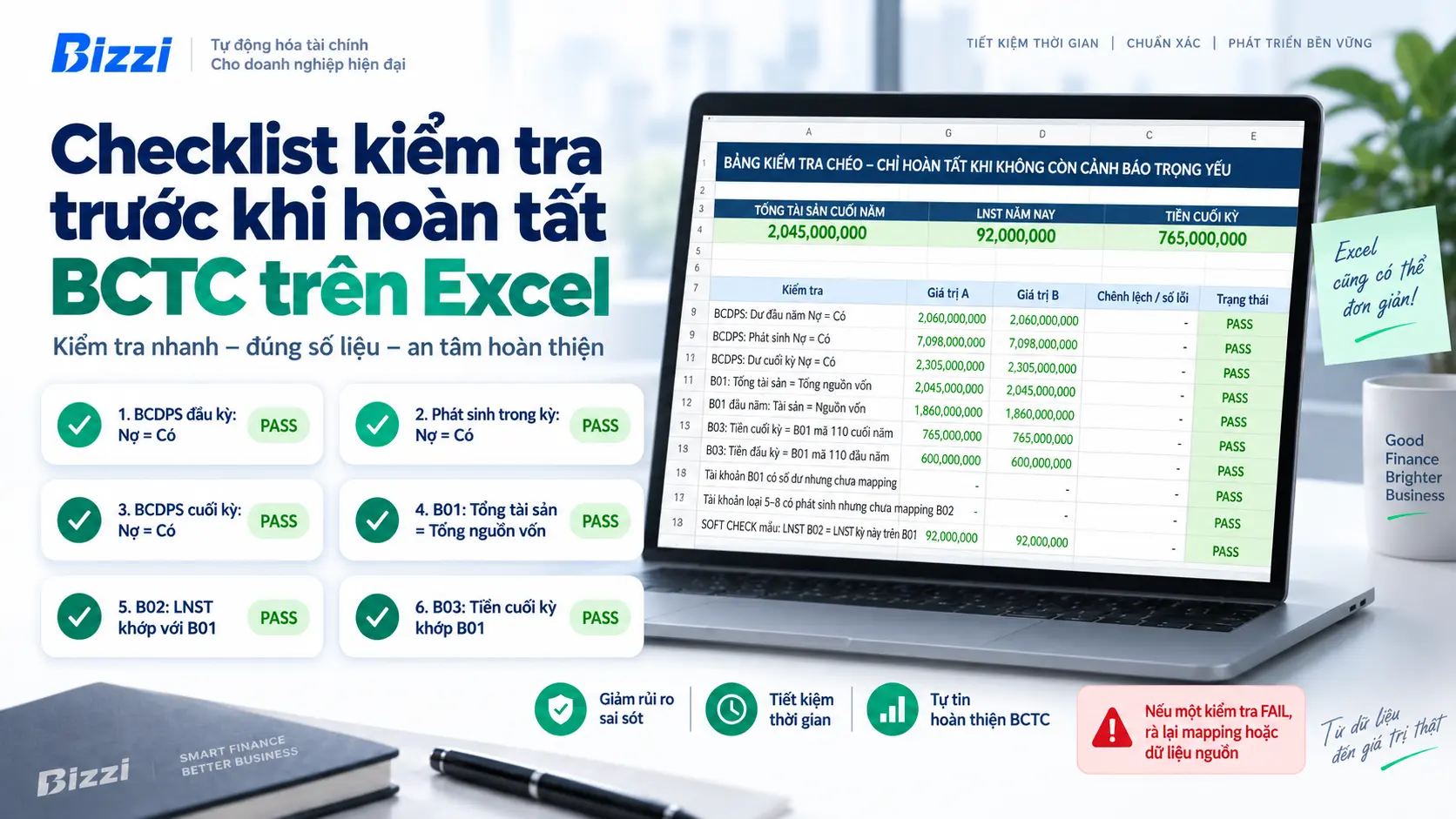
- Total opening debit balances = Total opening credit balances;
- Total debits = Total credits;
- Total ending debit balances = total ending credit balances;
- There are no longer any accounts that have been created but whose nature has not yet been reviewed and classified.
If the BCDPS is not yet balanced or there are still accounts to be processed, modifying the formula in B01/B02 usually does not address the root cause.
Step 2: Map accounts to financial statement indicators.
This is the most important step when creating financial statements using Excel. Don't rely on rote thinking. “"One account = one line of report"” For all cases, an indicator may need to aggregate multiple accounts or sub-accounts; conversely, an account may need to be categorized by term, subject, or nature of the balance.
Sheet Mapping_TT99 Separate this logic from the final form. When you need to modify the classification, you edit the mapping instead of making numerous formula changes on each report.
Account 131 should not be interpreted mechanically as "putting everything into a single accounts receivable line." In practice, accountants must also examine the details of the subject, the term, and the nature of the item to present it correctly. Therefore, the sample workbook uses mapping as a control layer, not treating a VLOOKUP of an account code as the entirety of the financial statement preparation process.
Step 3: Prepare Form B02-DN – Business Performance Report
After mapping revenue, expenses, and business results, check the above indicators. B02_DN. The goal at this stage is not just to obtain a final profit figure, but to ensure that the data is taken from the accounting records after appropriate adjustments and transfers.
It is not advisable to directly transfer after-tax profit from B02 to equity on B01 just for the purpose of preparing a balance sheet. B01 must reflect the book balances of capital items after the closing/transfer process.
Step 4: Prepare Form B01-DN – Financial Statement Report
Sheet B01_DN Summarize assets, liabilities, and equity according to the established mapping. This is where the relationships need to be checked:
Total assets = Total capital
If the two sides don't equalize, don't insert some manual "balancing." Go back and check the balance sheet, mapping, unclassified items, and year-end entries.
Step 5: Prepare Form B03-DN – Cash Flow Statement
This is where mistakes are easily made if you try to deduce the entire cash flow from account balances. The cash flow statement needs to categorize cash flows by operating, investing, and financing activities; some indicators must be based on transactions or detailed ledgers and cannot be safely interpreted solely from the aggregated balance sheet.
Therefore, the workbook has sheets. Adjust To input the data that needs to be separated. With the indirect method, you still need to check if the ending cash and cash equivalents on B03 match the cash figures on B01.
If you need a deeper understanding of the nature of each type of cash flow, please see the separate article. What is a cash flow statement?.
Step 6: Complete Form B09-DN – Explanatory Notes to Financial Statements
The explanatory notes are not merely "attachments to complete the set." This is where accounting policies, significant items, changes, and necessary information are explained to help readers understand the figures on Forms B01/B02/B03.
The workbook provides a supporting framework, but businesses must supplement it with their own specific information. They shouldn't simply copy another company's description or assume a few sample lines are sufficient.
Step 7: Cross-check before finalization
This is an outdated step that lacks depth. The new file has sheets. Check This brings critical checks together in one place, helping users know which sheet to return to when a discrepancy occurs.
Checklist to review before finalizing financial statements in Excel.
Which Excel formulas should be used when preparing financial statements?
There isn't a single function that can "automatically generate financial statements." The appropriate formula depends on the data structure and how the business organizes its mapping. For workbooks with their own mapping layers, the following groups of functions are often useful:
| Function group | What is it used for? | Note |
|---|---|---|
SUMIFS |
Aggregate data by indicator code, account group, or condition. | VLOOKUP is more suitable than `find` when a single metric includes multiple rows of data. |
XLOOKUP/INDEX MATCH |
Retrieve mapping information or reference information. | For reference purposes only; should not replace the business classification step. |
IF/IFERO |
Control display conditions and handle display errors. | Do not use IFERROR to mask a real data error. |
COUNTIF(S) |
Count unmapped accounts or alerts. | Very useful for checklists. |
The more important point than the function name is... Data separation – mapping – reporting – testing. When these four classes are separate, the file is easier to audit the formulas and easier to find errors.
Example of sample data in the Bizzi workbook
The workbook includes a complete sample dataset of weighing results so that beginners can see how the data flows through the sheets before replacing it with real data.
These numbers are just practice data, These are not reference figures to be applied to other businesses. When using the actual file, delete/replace the sample data and review the entire mapping according to the detailed accounting system of the business.
Common mistakes when creating financial reports in Excel
As a result, users edit each item in B01/B02, but the real problem lies in the input data.
This method ignores the requirement to classify objects by nature, term, or details.
When the source data changes, the manually typed numbers don't update and are very difficult to trace.
B01 needs to be taken from the accounting ledger balance after the related capital transfer and change entries.
Many cash flows require actual transaction data/details and classifications.
The file may look "clean," but incorrect mapping or reference areas may still exist.
Users only discover the discrepancies when they have almost completed the report.
When is Excel suitable, and when does it start to become difficult to manage?
Excel is suitable when the person preparing the data understands the accounting data well, the file has a controlled structure, and the processing volume remains manageable. Limitations arise when input data comes from multiple sources, multiple people edit simultaneously, mapping changes frequently, or accountants have to manually reconcile too many documents before closing the books.
The key difference is: Bizzi is not positioned as a replacement for Excel to automatically generate all statutory financial statements.. Bizzi's more suitable role lies in upstream steps such as invoice collection/verification, expense management, approval, and data reconciliation before data is recorded in the accounting system. Bizzi's product documentation currently focuses on automating invoice processing, expense management, and integration with accounting/ERP systems.
If your business is spending a lot of effort processing incoming data before it can close the books, you might want to explore a solution. Bizzi's automated processing of input invoices..
Frequently asked questions
Is Bizzi's Excel financial report file for Circular 99 or Circular 133?
The current file is designed according to Circular 99. If the business applies Circular 133, it needs to use a form system and mapping that is compliant with Circular 133 instead of just renaming the sheets or titles.
Is it possible to use VLOOKUP to generate all financial statements?
No. VLOOKUP is useful for simple lookups but does not replace accounting logic mapping and classification. A single item may aggregate multiple accounts or require conditions based on nature/period.
If the balance sheet is balanced, then the financial statements are definitely correct, right?
No. The Balance Sheet only confirms the debit/credit relationship at the aggregate level. Financial statements can still be incorrect due to mapping, short/long-term classification, lack of adjustments, incorrect disclosures, or incorrect cash flow classification.
If my B01 is unbalanced, where can I get it repaired?
Do not manually enter balances. Check the balance sheet, unmapped accounts, incorrect mapping, closing/transfer entries, and related adjustments.
Can B03 be created entirely from BCDPS?
Not always. Some cash flows require transaction reconciliation or ledger verification to be properly classified as operating, investing, or financing.
Practice with the Financial Statements Excel Workbook TT99
Open the file, read the sheet. Guide, run sample data and observe the flow of data BCDPS arrive Check before replacing it with the actual data.






