


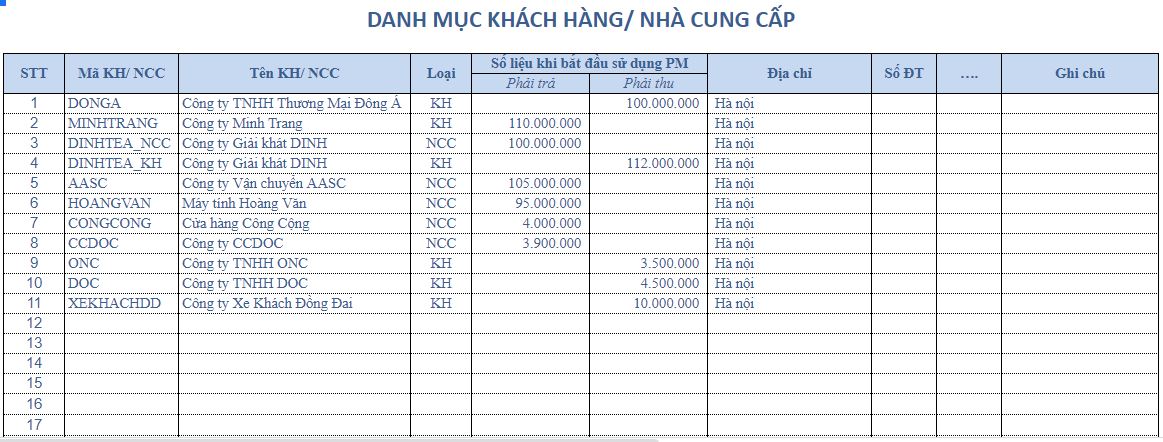
Bizzi has compiled 8 free Excel templates for common needs, ranging from managing accounts receivable, customer accounts receivable, and supplier accounts receivable to tracking overdue payments, aging reports, and accounts receivable reconciliation. You can download the appropriate template and replace the illustrative data with your business's actual data.
Download 8 free Excel templates for managing accounts receivable.
Each file is designed for a different management need. For a newly established business, a general accounts receivable file is an easy-to-implement option. When in-depth management by customer, invoice, or overdue period is required, specialized templates should be used.
| Excel file template | Suitable when | Download file |
|---|---|---|
| 1. Consolidated accounts receivable management file | Track all accounts receivable, accounts payable, transactions, and balances in a single file. | Download Excel file |
| 2. Customer Accounts Receivable Tracking Template | Track how much each customer owes, the amount collected, the payment deadline, and the remaining amount to be collected. | Download Excel file |
| 3. Supplier Accounts Payable Tracking Template | Control the amounts the business needs to pay, including deadlines and balances, for each supplier. | Download Excel file |
| 4. Sample customer accounts receivable ledger | Verify each invoice, transaction details, amounts paid, and balance for a customer. | Download Excel file |
| 5. Sample customer accounts receivable summary table | Quickly view the opening balance, transactions during the period, amounts collected, and closing balance for multiple customers. | Download Excel file |
| 6. Template for tracking due and overdue accounts receivable. | Filter accounts that are not yet due, are about to be due, or are overdue, and identify those that need priority processing. | Download Excel file |
| 7. Aging Report Template | Categorize accounts receivable by the number of days overdue to identify long-standing outstanding debts. | Download Excel file |
| 8. Sample Accounts Reconciliation Statement | Compile data for the purpose of checking and confirming balances with customers or suppliers. | Download Excel file |
Suggest: If the primary goal is to track outstanding customer payments, start with an accounts receivable form. If prioritizing the collection of overdue payments is necessary, incorporate an overdue tracking file and an aging report.
What is an Excel file used for to manage accounts receivable?
An Excel spreadsheet is a document used to record accounts receivable or payable, update payments, and determine the remaining balance for each customer or supplier.
Accounts payable are typically divided into two categories:
- Accounts receivable: The amount of money a customer still owes to a business after purchasing goods or using services.
- Accounts Payable: The amount of money a business still owes to a supplier after purchasing goods or receiving services.
A useful accounts receivable file should help accountants respond quickly:
- Which customers or suppliers still have outstanding debts?
- What is the current balance?
- Which invoice or transaction gave rise to the debt?
- When is the payment deadline?
- Which payments are overdue?
- How much has been paid and how much is left?
To build a more comprehensive control process, businesses can refer to the following: How to manage corporate debt.
What information should a debt tracking file contain?
Whether tracking accounts receivable or accounts payable, the data should be organized sufficiently to identify them. object – transaction – deadline – payment – balance – status.
| Information Group | The data should be | Purpose |
|---|---|---|
| Object | Customer/Supplier Code, Customer/Supplier Name | Accurately summarize the outstanding debts for each entity. |
| Arise | Date of issue, invoice/document, description, value | Know which transactions resulted in the debt. |
| Pay | Payment deadline, payment date, amount received/paid | Control payment progress |
| Balance | Beginning balance, transactions, payments, ending balance | Determine the amount to be collected or paid. |
| Status | Not due, due, overdue, paid | Identify the items that need to be processed first. |
| Age of debt | Number of days overdue, age group of debtors | Assessing the level of outstanding debt |
How should data flows be organized?
Customer/Supplier Directory
↓
Invoice details and related charges
↓
Payment deadline and amount received/paid
↓
Outstanding debt
↓
Debt status and age
↓
Summary report
A consistent customer or supplier code should be used. If the same customer is entered under multiple different names, the aggregated data may be split into multiple objects.
Some examples of actual accounts receivable tracking sheets.
Excel template for managing accounts receivable and accounts payable.
This template helps track balances for each customer or supplier through the opening balance, transactions during the period, amounts paid, and closing balance.

Template for tracking due and overdue accounts receivable
When there are many outstanding invoices, the statement needs to include the payment deadline, remaining balance, and number of days overdue so that the accountant can determine which ones need to be processed first.

Sample customer accounts receivable ledger
The detailed ledger records each invoice or transaction for a customer, helping to check the source of the balance and reconcile outstanding payments.

Sample customer accounts receivable summary sheet
The summary table allows you to view multiple customers on a single report with metrics such as beginning balance, accounts receivable, amounts collected, and ending balance.
Aging Report Template
Aging reports categorize outstanding debts by time period. Businesses can use groups such as:
| Debt age group | Meaning |
|---|---|
| Not yet due | The debt is still within the payment deadline. |
| Overdue by 1–30 days | New overdue payments need to be monitored and payment reminders should be sent. |
| Overdue by 31–60 days | The outstanding amount has been pending for longer and needs to be prioritized. |
| Overdue by 61–90 days | Long-standing debts require close monitoring. |
| Over 90 days | Long-standing backlogs need to be assessed separately. |
The age ranges for accounts receivable can vary depending on a company's management policies. The key point is that the number of days overdue should be determined based on the payment deadline for each individual debt.
Sample debt reconciliation statement
A reconciliation statement is used to summarize data before both parties check or confirm the balances. The data should be taken from audited detailed records to minimize discrepancies.
How to create an accounts receivable management file using Excel
If you want to create your own tables instead of using a pre-made template, you can start with three main sheets: Category – Accounts Payable Details – Summary.
- Create a list of customers and suppliers: Assign a unique code to each object.
- Create a detailed sheet: Each line corresponds to a transaction or invoice, including the date of occurrence, the party concerned, the document number, the value, and the payment deadline.
- Payment update: Record the amount received or paid and the payment date.
- Calculate the remainder: Determine the amount remaining to be collected or paid after the payment is made.
- Determine the state: Classify as paid, not yet due, or overdue.
- Generate a summary report: Aggregate data by customer, supplier, period, or status.
- Compare: Verify the aggregated data against a number of actual transactions before using it for reporting.
See further instructions. How to make customer debt report.
Commonly used Excel formulas for tracking accounts receivable.
| Tools | What is it used for? |
|---|---|
| SUMIFS | Summarize accounts payable by customer, supplier, time period, or status. |
| IF / IFS | The payment status can be categorized as paid, not yet due, or overdue. |
| TODAY | Use the current date to compare with the payment deadline. |
| XLOOKUP / VLOOKUP | Retrieve the name, code, or other information from the catalog table. |
| COUNTIFS | Count the number of accounts payable that meet multiple conditions. |
| PivotTable | Quickly summarize data by customer, month, debt status, or age group. |
Formula for determining overdue debts
Suppose:
- E2: payment deadline
- F2: remaining balance
=IF(F2=0,"Paid",IF(TODAY()>E2,"Overdue","Not due yet"))
Result:
| Payment deadline | Balance | Status |
|---|---|---|
| 10/07/2026 | 20,000,000 | Overdue |
| 15/08/2026 | 12.000.000 | Not yet due |
| 05/07/2026 | 0 | Payment has been made. |
Formula for calculating the number of overdue days
=MAX(0,TODAY()-E2)
If the debt has been fully paid, an additional condition regarding the remaining balance should be applied to prevent further overdue days from being counted.
Checklist for reviewing accounts receivable files before use.
- Each customer or supplier has a unique code.
- Each line clearly represents a transaction or liability.
- The date of occurrence and the payment deadline are entered in the correct format.
- The amount paid was not recorded as a duplicate.
- The aggregated balance matches the detailed data.
- The formula is not overwritten when new data is added.
- You can filter by due and overdue payments.
- The file is backed up and has editing rules in place for shared use by multiple people.
Advantages and disadvantages of managing accounts receivable using Excel.
| Advantage | Limit |
|---|---|
| Easy to deploy: Suitable for those already familiar with Excel.
Flexible: Columns, formulas, and reports can be customized to suit your needs. Low initial cost: if the business already uses spreadsheet tools. Suitable for simple processes: It's convenient when the data and the number of users are easy to control. |
Depending on data quality: Incorrect formulas or inconsistent data entry can lead to inaccurate reports.
Easy to distribute data: when multiple people use different versions of the file. Complex processes require a lot of steps: Debt collection, reconciliation, and status updates often require additional processing steps. Difficult to manage coordination: when multiple people are responsible for managing accounts receivable. |
Excel can still generate aging reports, use PivotTables, conditional formatting, and other data processing tools. Therefore, the assessment should not only consider whether Excel can do it, but also the amount of work required to maintain accurate and up-to-date data.
When should you switch from Excel to accounts receivable management software?
There isn't a fixed number of customers that applies to every business. Excel remains suitable if the data is simple, the number of users is small, and the control process is clear.
A centralized management system should be considered when:
- Multiple people are involved in entering or processing accounts receivable.
- Accounts payable are spread across multiple files or data sources.
- Regular manual verification is required.
- It's difficult to quickly determine which bills are due or overdue.
- HR personnel must create a separate debt reminder list.
- Compiling aging debt reports takes a lot of time.
- It's difficult to know who is responsible for each individual debt.
- Centralized processing and reconciliation procedures need to be monitored.
With accounts receivable, businesses can combine aging reports with DSO index To track the payment collection time.
Centralized accounts receivable management with Bizzi
When tracking with Excel becomes dependent on multiple files, multiple people, and numerous manual operations, businesses may consider... Bizzi debt management solution.
Bizzi supports tracking accounts receivable by invoice, contract, and customer; managing accounts receivable status; monitoring aging reports and DSOs; and assisting with debt reminder and payment reconciliation processes.

Follow up and remind people about outstanding debts according to the established procedure.
The person in charge can track payments based on status and due dates instead of maintaining separate debt reminder lists across multiple files.

Reconcile and update accounts receivable status.
Centralized payment management and reconciliation helps to reduce the problem of payment statuses being scattered across multiple tracking boards.

Frequently Asked Questions about Accounts Receivable Management Files in Excel
What sheets should an Excel file for managing accounts receivable include?
For basic needs, three sheets can be used: a customer or supplier list, accounts payable details, and a summary table. If you need to manage overdue payments, you should add an aging report.
Is it possible to track overdue debts using Excel?
Yes. The payment deadline, remaining balance, and current date can be used to determine the overdue amount and calculate the number of days overdue.
Should accounts receivable be tracked by customer or by individual invoice?
It's best to record details for each invoice or transaction and then summarize them by customer. This way, you can both view the total balance and trace the source of the debt.
How does the accounts receivable file differ from the accounts receivable summary file?
Accounts receivable files focus on the amount of money customers still owe the business. Summary files may include both accounts receivable and accounts payable depending on the management structure.
What is the purpose of an aging report for debt?
Aging reports categorize outstanding debts by time, helping to identify those that have been pending for longer periods so they can be prioritized for follow-up.
Should we use a single file for both accounts receivable and accounts payable?
It can be used interchangeably if the process is simple and the data is clearly categorized. As trading volume increases, detailed data should be separated and then aggregated in the reporting layer.
When is an Excel file no longer suitable?
When businesses need to maintain multiple files, have multiple people working on them, require frequent manual reconciliation, or need a centralized debt collection and reporting process, they should evaluate a dedicated solution.
When data and processes are still streamlined, Excel remains a practical tool. However, once file maintenance begins to become time-consuming, businesses may consider alternative solutions. Sign up for a free trial of Bizzi or Schedule a demo to explore centralized management options.






