


In the context of tax authorities tightening control over electronic invoices, the Automatically check invoice validity It's no longer an option but a mandatory requirement for every business. Even a small error in the XML file or supplier information can lead to the risk of expense disallowance, VAT arrears, and corporate income tax arrears.
This article by Bizzi will provide a detailed guide on how to verify the validity of electronic invoices from a CFO's perspective, while also analyzing automation solutions to help businesses control risks and optimize cash flow.
See more content about: How to handle input invoices after output invoices (Tax Standards - Cost Standards - Document Standards) here
Criteria for determining valid electronic invoices according to Circular 32/2025/TT-BTC
A valid electronic invoice is a document that fully meets three core criteria: legality, validity, and reasonableness. "Legality" is demonstrated by the invoice being prepared in the correct XML format as prescribed and having an authentication code from the tax authority; "validity" requires all mandatory elements such as tax identification number, digital signature, and seller-buyer information; and "reasonableness" is a managerial factor, ensuring the invoice accurately reflects the nature of the economic transaction and has complete internal documentation.
From a financial perspective, these three criteria are the first "filter" before an expense is recorded in the ledger. If any of these elements are missing, the business risks having the expense disallowed during tax settlement, leading to the collection of VAT and Corporate Income Tax, and even administrative penalties. Importantly, the tax authorities only check the "legality" and "validity" aspects, while the "reasonableness" is not. It is becoming increasingly controlled according to Circular 99. It relies entirely on the company's internal control system. This is precisely the point that many businesses overlook when implementing it. check valid electronic invoice.
XML formatting requirements and tax authority authentication code
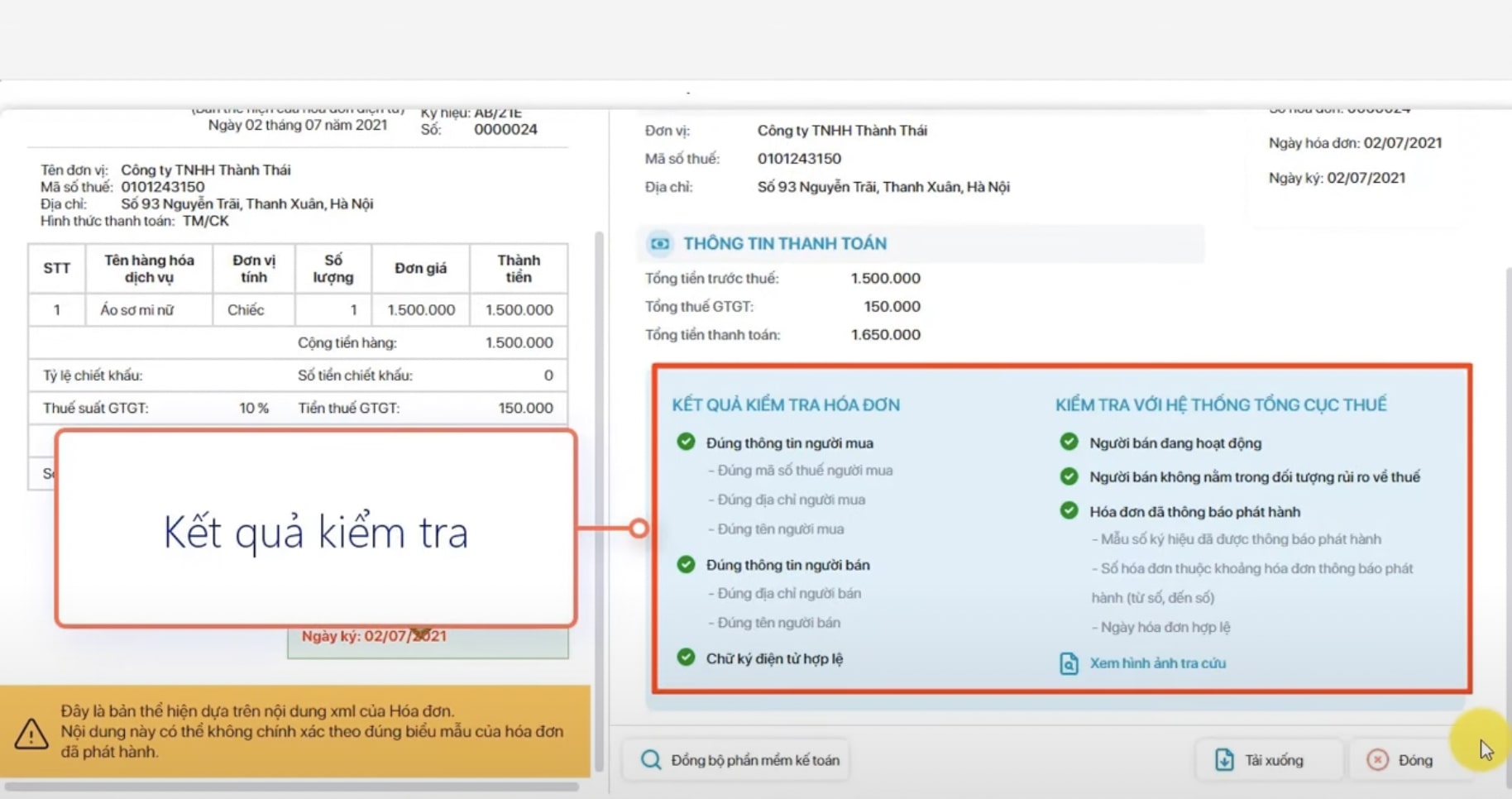
XML files are the legally valid format for electronic invoices, containing all encrypted data and linked to an authentication code from the tax authorities. Meanwhile, PDF files are for display purposes only and cannot replace XML during inspections and audits.
A common mistake is that accountants only store PDF files and ignore the rest. electronic invoice XML fileThis can lead to the loss of original documents. Furthermore, storing XML data scattered across multiple systems causes data fragmentation, making it difficult to retrieve when reconciliation or explanation is needed. More dangerously, if the digital signature and operational status of the supplier are not verified at the time of receiving the invoice, the business may inadvertently record expenses from risky entities.
The automated invoice processing solution consolidates all XML data into a single source, while validating its validity right from the input. This not only ensures compliance with the 10-year archiving requirement but also allows accountants to access data instantly when needed.
Hidden costs and legal risks of manual invoice reconciliation.
Manually checking invoices may seem simple, but it creates a significant "hidden cost." When each invoice requires entering a captcha and looking up each line, the total processing time can reach tens of hours per month. If converted to personnel costs, this represents a considerable waste that many businesses fail to assess.
Furthermore, the biggest risk lies in human error. Just one forged invoice or a supplier on the risk list being overlooked can lead to the entire related expense being disallowed. This not only impacts profits but also disrupts cash flow due to the need to readjust accounts payable.
Comparing current methods for verifying electronic input invoices.
Currently, businesses can choose from three main methods to check valid electronic invoiceManual lookup on the tax authority system, semi-automatic verification via accounting software, or full automation using AI and RPA.
Each method represents a different operating model. Manual methods rely entirely on human intervention and are difficult to scale as the number of invoices increases. Accounting software improves speed but still doesn't fully address data extraction and supplier risk detection. Meanwhile, comprehensive automation allows for the processing of thousands of invoices in real time, ensuring accuracy and scalability for the finance department.
Verify the legitimacy of invoices on the General Department of Taxation's portal and synchronize the data with the ERP system.
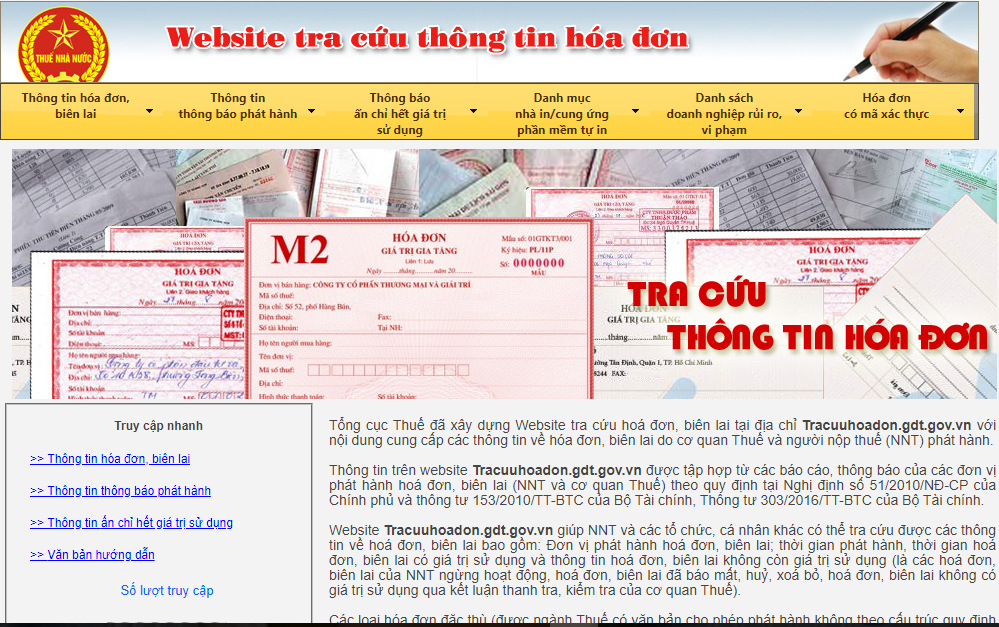
The most common method is to look up the information directly on the tax authority's portal. Accountants need to enter each invoice code and verify it using a captcha to check its existence status. However, this method only provides basic information and does not assess the risk level of the supplier.
Integration into ERP systems reduces manual operations, but limitations remain regarding delays and anomaly detection capabilities. In practice, many businesses only detect risks after accounting has been completed, leading to complex retrospective handling.
Automatically verify invoice validity using AI Bizzi Bot
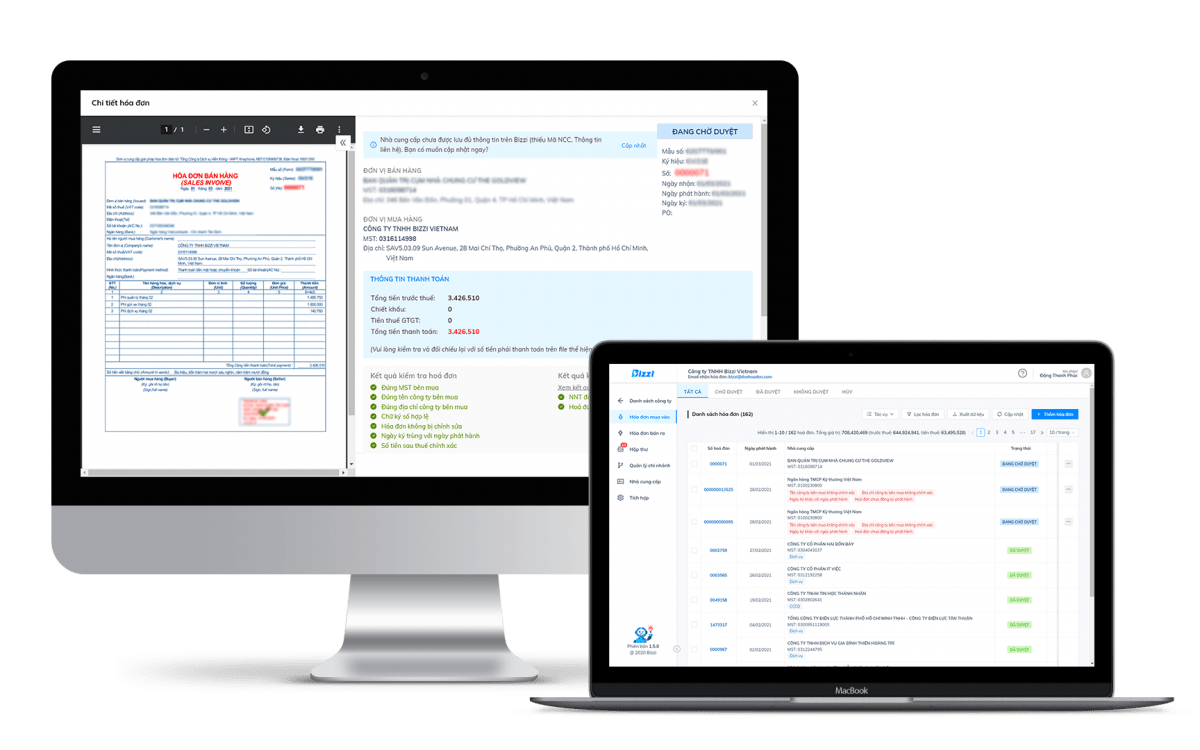
AI solutions enable Automatically check invoice validity As soon as the documents are received, the system uses RPA technology to collect XML files from emails, then directly compares them with tax authority data in real time.
The biggest difference lies in its anomaly detection capabilities. Beyond simply checking if an invoice exists, the system assesses the supplier's operational status and provides immediate alerts. This allows businesses to prevent errors at the "entry point," rather than dealing with the consequences later.
Integrate invoice verification into the Procure-to-Pay process.
When invoice verification is integrated Procure-to-Pay (P2P) processIn this system, invoices are no longer simply tax documents but have become "payment orders." This helps CFOs tightly control cash flow and ensure that all payments are legitimate.
Automating this process reduces approval delays and optimizes DPO (Demand Processing Order) by proactively adjusting payment timing. This represents a significant shift from "record-based accounting" to "proactive financial management."
Automatic 3-Way Matching Solution
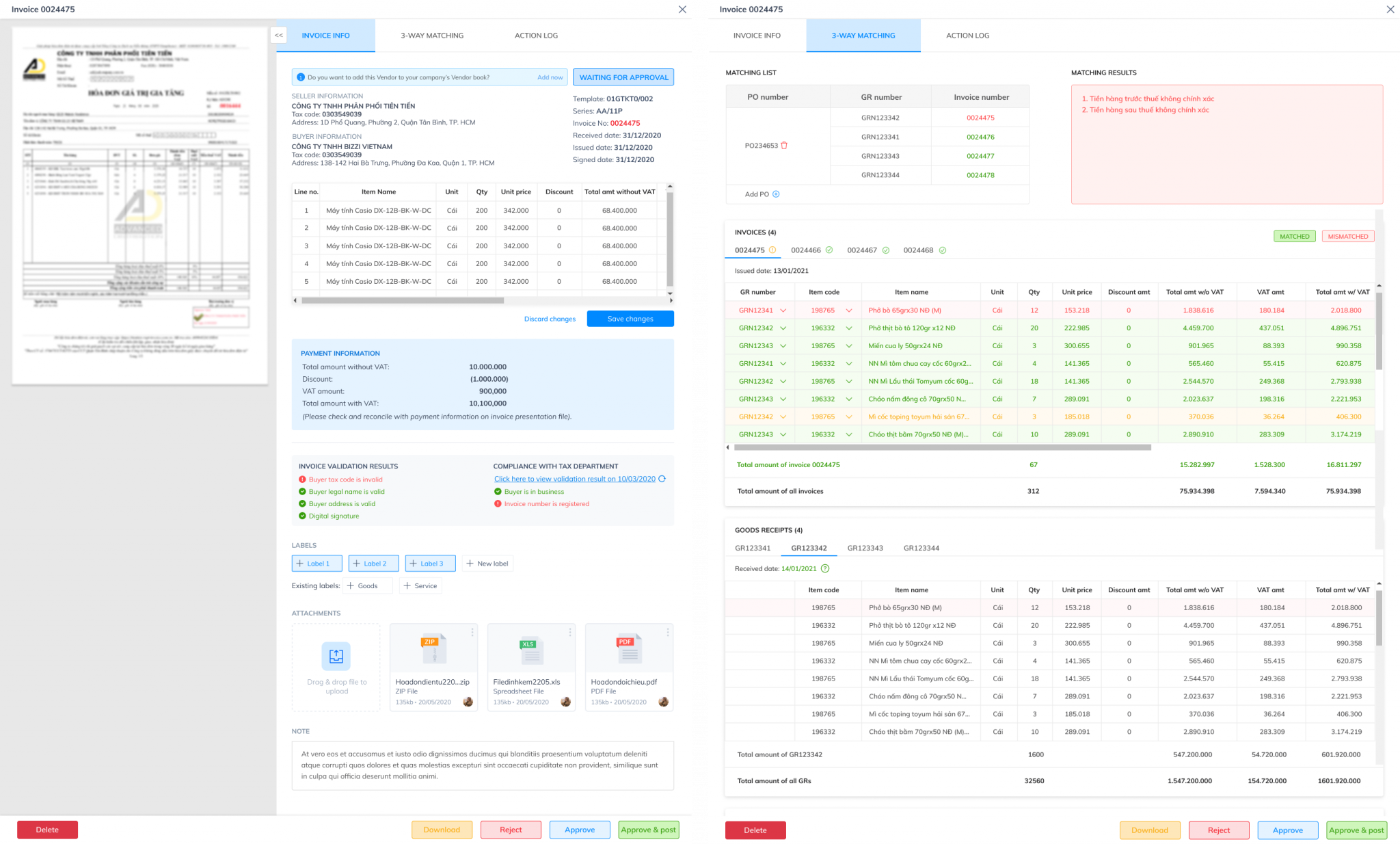
Three-way reconciliation is a method of matching data between invoices, purchase orders, and warehouse receipts. When performed at the detailed level for each item, the system can immediately detect discrepancies in quantity or unit price.
This mechanism acts as a "firewall" against fraud, ensuring that businesses only pay for what they actually receive. It also forms the basis for automating accounting entries and minimizing errors in the accounting process.
Automatic invoice rejection mechanism via the Bizzi IPA system.
In the event of a discrepancy, the system automatically triggers the exception handling process. Invoices that do not meet the standards will be flagged and forwarded to the accounting department for processing, instead of continuing through the payment process.
This approach significantly reduces manual workload while speeding up the processing of valid transactions. Instead of checking all invoices, accountants can focus only on high-risk cases.
Procedure for handling invalid invoices after accounting.
When an invalid invoice is discovered after it has been recorded in the accounting system, the business faces a form of retrospective risk that can directly affect financial statements, tax obligations, and cash flow.
1. Identify the error and classify the level of impact.
The first step is to identify the cause of the invalid invoice. If the error does not affect the amount of money (such as incorrect address or company name), the processing procedure will be simpler than for errors affecting the amount of goods and taxes (such as incorrect unit price or tax rate). The accountant needs to check whether this invoice has already been declared for tax purposes to decide on the appropriate adjustment method according to current regulations (Circular 32/Decree 70).
2. Perform adjusting entries in ERP.
After identifying the error, the accountant performs the necessary adjustments on the ERP system to clean up the ledger data.
- In case of invoice cancellation: Perform a reverse entry (record a negative) on the entire previously recorded value to completely eliminate the incorrect transaction.
- Adjustment case: Make adjusting entries to increase/decrease the difference between the correct value and the incorrectly recorded value. This helps to return the balances of related accounts (such as Accounts Payable to Suppliers, Input VAT) to the correct state before recording new documents.
3. Complete the set of legal documents.
Businesses and suppliers must cooperate to establish Invoice Cancellation or Invoice Adjustment Record, which clearly states the reason for the error and is digitally signed by both parties. The supplier will then issue a replacement or adjusted invoice. This is the most important legal basis for explaining the situation to the Tax authorities and replaces the original invalid invoice in the payment documentation.
4. Data Update and Supplementary Declaration
The new invoice (replacement or adjustment) will be pushed into the automated processing workflow (RPA) to extract data and re-enter it into the ERP system. If the error is discovered after the tax return has been filed, the accountant must take action. Supplementary VAT declaration of the period in which the invoice was issued to adjust the deductible tax amount, avoiding the risk of being subject to back taxes and late payment penalties during tax settlement.
In-depth Q&A on electronic invoice risk management
Electronic invoice risk management is the process of identifying, analyzing, and controlling errors and fraud (fictitious invoices, incorrect content, incorrect timing) to ensure compliance with regulations.Businesses need to proactively review the K coefficient, compare data with tax authorities, verify the legitimacy of suppliers, and use automated tools to prevent the risk of having their electronic invoice usage suspended.
See more content about What is the invoice risk assessment criteria? How to assess it and solutions for businesses.
What is the difference between a tax-valid invoice and an payable (AP) valid invoice?
An invoice is considered tax-valid when it fully meets the requirements for XML format, digital signature, and other specified criteria. However, to be accepted for payment in the Accounts Payable system, the invoice must also pass a three-way reconciliation process with the Purchase Order (PO) and General Receipt (GR), as well as meet the requirements of the contract… This ensures that the invoice is not only legally correct but also accurately reflects the actual commercial transaction.
How does integrating an invoice verification solution into ERP improve DPO (Demand Point of Presence) scores?
When the invoice verification process is automated using RPA and directly integrated into the ERP system, the time required for processing and approving documents is significantly shortened. This allows businesses flexibility in choosing payment timing: taking advantage of early payment discounts or extending payment periods in a controlled manner. As a result, the DPO (Demand Payment Order) is optimized, contributing to improved working capital efficiency.
What is the biggest risk of saving only the PDF file and ignoring the XML file?
According to Decree 70/2025/ND-CP, XML files are the only legally valid original electronic invoices because they contain encrypted digital signatures, while PDF files are merely image representations and have no value as proof of business transactions. Storing only PDFs puts businesses at risk of having all deductible expenses rejected by the Tax authorities and being denied input VAT deductions due to the lack of original documentation. Furthermore, it eliminates the ability for accurate automatic reconciliation, easily leading to data discrepancies between accounting records and the General Department of Taxation's system.
How does the system detect a defunct supplier?
Modern systems utilize data analytics technology and API connections with tax authorities to continuously update the operational status of suppliers. When a tax identification number is detected as high-risk or inactive, the system automatically flags it as a warning. This allows businesses to promptly stop transactions and avoid recording invalid invoices.
How do I set up an auto-reject feature for invoices with incorrect unit prices?
Businesses can set tolerance limits in their control systems. When the data on an invoice exceeds the allowed margin compared to the purchase order (PO) or general reference price (GR), the system will automatically reject it or switch to manual verification. This mechanism helps tightly control the risk of overbilling without relying entirely on human intervention.
What should an AP accountant do when the 3-Way Matching system reports a discrepancy?
When the system reports a 3-Way Matching discrepancy, the AP accountant must immediately review and identify the cause of the difference at one of three points: Purchase Order (PO), Goods Receipt (GR), or Invoice. After identifying the source of the error in quantity or unit price, the accountant must coordinate with the purchasing department (to correct the PO), the warehouse department (to re-verify the actual receipt), or contact the supplier (to request an adjusted/replacement invoice). Only after this information matches correctly within the allowable error limit can the system approve payment to ensure the accuracy of expenses and avoid cash flow losses.
Does Bizzi's input invoice processing solution store data?
Bizzi's solution stores all invoice data (including both original XML files and PDF versions) on a cloud computing platform for a minimum of 10 years, strictly complying with the regulations on electronic document storage under the Vietnamese Accounting Law. The system automatically extracts and organizes information in metadata format, allowing users to easily search, retrieve, and centrally manage all input data on a single interface. This ensures security, confidentiality, and readiness for tax settlements without the risk of loss or damage associated with traditional storage methods.
Conclude
Job Automatically check invoice validity This not only helps businesses comply with Circular 32/2025/TT-BTC and Decree 70/2025/ND-CP, but also serves as a crucial foundation for managing financial risks and optimizing cash flow. When the verification process is digitized and integrated into the Procure-to-Pay chain, businesses can completely eliminate manual errors, shorten processing time, and improve operational efficiency.
In the context of an ever-increasing volume of invoices, implementing automation solutions like Bizzi not only helps check valid electronic invoice This not only provides real-time data but also ensures clean data right from the input stage. This is a crucial transformation that helps CFOs protect costs, optimize working capital, and build a sustainable financial system.
To receive advice on effective corporate financial management solutions, schedule an appointment with Bizzi here: https://bizzi.vn/dat-lich-demo/





