


Managing input and output invoices is not just about storing documents, but about controlling the entire invoice lifecycle from receipt, issuance, verification, reconciliation, accounting to payment or collection. When properly structured, businesses can reduce tax risks, minimize accounting errors, control cash flow, and improve the quality of data for financial decision-making.
In many growing businesses, Regulations regarding input and output invoices This process is typically handled by different departments such as purchasing, sales, accounting, inventory, or finance. If each department manages things according to its own procedures, the data will be scattered, making it difficult to reconcile accounts payable, control VAT, and assess the efficiency of working capital utilization.
In reality, the issue isn't about how many invoices a business issues each month, but rather its ability to control the entire process. An input invoice lacking supporting documents can lead to incorrect payments or loss of tax deductions. Conversely, an output invoice issued at the wrong time can impact recorded revenue, accounts receivable, and cash flow planning.
In this article, we will cover the concept and process of managing input and output invoices, common risks of manual management, and criteria for evaluating when a business should automate its invoice processing workflow.
What is input and output invoice management?
Manage input invoices, The output is a system of processes and control measures that helps businesses manage the entire lifecycle of purchase and sales invoices, from receiving or issuing, checking validity, reconciling documents, accounting, archiving to tracking payments or collection.
Unlike the traditional view that invoices are merely documents for accounting and tax declaration purposes, businesses today consider invoice management as part of their Financial Operations system to ensure the accuracy of financial data, reduce operational risks, and improve cash flow control.
Essentially, input invoices and output invoices represent two different but closely related lines of business transactions.
| Criteria | Input invoice | Output invoice |
| Related to the process | Procure-to-Pay (Accounts Payable) | Order-to-Cash (Accounts Receivable) |
| Reflection | Costs of goods and services | Revenue from sales and services |
| Cash flow impact | Money out | Money coming in |
| Main risks | Incorrect payment, loss of tax deduction rights, invalid invoice. | Incorrect timing of shipments, incorrect revenue recording, delayed payment collection. |
| Relevant department | Purchasing, Inventory, Accounting, Finance | Sales, Accounting, AR, Finance |
| KPIs are commonly tracked. | Invoice Processing Time, First-pass Match Rate, Exception Rate | DSO, Collection Rate, Aging Report |
As can be seen, managing input invoices focuses on ensuring that businesses only pay for legitimate expenses, in accordance with contracts and for the goods or services received. Meanwhile, managing output invoices aims at recording revenue at the right time, tracking accounts receivable, and facilitating the collection of payments from customers.
From a CFO's perspective, these two processes should not be viewed as independent operations. Input invoice data directly impacts costs, cost of goods sold, and accounts payable; while output invoice data determines revenue, accounts receivable, and cash flow. When managed on the same system, businesses will have a more complete view of their financial performance and working capital efficiency.
Note: Managing input and output invoices does not simply mean saving them as PDF or XML files. An effective management system must also ensure the ability to verify invoice validity, track processing (audit trail), reconcile related documents, and synchronize data with accounting software or ERP.
Although many businesses have separate processes for incoming and outgoing invoices, managing these two data streams separately still poses significant risks related to taxes, accounts payable, and cash flow. This is also why many CFOs struggle to achieve a unified, real-time financial picture.
Why shouldn't businesses manage input and output invoices separately?
Managing input and output invoices across separate systems or processes fragments cost, revenue, accounts payable, and cash flow data, increasing the risk of financial reporting inaccuracies and reducing the business's operational control.
On a small scale, storing invoices in email, internal folders, or Excel spreadsheets may still meet daily processing needs. However, as a business expands its number of suppliers, customers, or branches, this management method quickly reveals many limitations.
For input invoices, the lack of a link between the invoice, purchase order (PO), warehouse receipt, or acceptance report makes it difficult for the accounting department to verify whether the business has actually received the goods or services before payment. This increases the risk of double payments, incorrect payments, or inaccurate expense recording.
Conversely, if outgoing invoices are not linked to sales data and accounts receivable, businesses will face difficulties in tracking receivables, assessing customer payment status, and controlling the Days Sales Outstanding (DSO) metric. When DSO is prolonged, cash flow is affected even if reported revenue continues to grow.
Furthermore, fragmented management leads to several other consequences:
- Revenue and expense data are not consistently reconciled across departments.
- It is difficult to detect cases of issuing invoices at the wrong time or recording revenue inappropriately.
- There is a lack of audit trail to trace the history of invoice processing during the audit.
- The accounting closing process is prolonged due to the need to consolidate data from multiple sources.
- The CFO lacks immediate reporting to assess the impact of the invoice on cash flow and working capital.
| Consequences | Impact on businesses |
| Distributed data | It takes a lot of time to compile and cross-reference. |
| No AP and AR integration | It is difficult to evaluate the Cash Conversion Cycle. |
| Lack of audit trail | Difficult to trace during audits or tax settlements. |
| Tracking loose accounts receivable | Increased DSO impacts cash flow. |
| Manual comparison | Increased risk of errors and fraud. |
From a financial management perspective, input and output invoices are essentially two links in the same operational cycle. One reflects the outflow of cash for purchasing goods and services, while the other reflects the inflow of cash from business operations. Only when both are managed in sync can a business accurately assess the efficiency of capital utilization and make decisions based on reliable data.
After understanding why managing input and output invoices as a unified process is necessary, the next step is to build a systematic process for handling input invoices. This is the crucial stage in determining whether a business can control costs, accounts payable, and tax risks from the outset.
What are the steps involved in the input invoice management process?
An effective input invoice management process needs to cover the entire invoice lifecycle, from receipt, validity verification, document reconciliation, approval, accounting, payment, to archiving. When these steps are standardized, businesses not only reduce tax risks but also better control costs, accounts payable, and cash flow.
In practice, many businesses only begin checking invoices when it's time to file taxes or just before making payments. However, this approach leads to errors being discovered too late, increasing the risk of late payments to suppliers, incorrect expense recording, or loss of VAT deduction rights.
A standard input invoice management process should include the following steps:
Step 1. Receive invoice from supplier
Invoices can be received through various channels such as email, electronic invoicing portals, ERP systems, or directly from suppliers. It's crucial for businesses to centralize all invoices under a single management system instead of having each employee store them independently.
The information that needs to be collected right from the start includes:
- Original XML file.
- PDF file or a physical copy of the invoice.
- The contract or related purchase order.
- Supplier information.
- The purchasing department.
Control objective: to ensure that no invoices are missed and that each document is traceable.
Common mistakes when managing manually: invoices scattered across personal emails, lost XML files, or sent to the wrong department.
Step 2. Extract and standardize invoice data.
After receipt, the data on the invoice needs to be standardized to facilitate subsequent verification and accounting steps.
The information to be extracted includes:
- Supplier name.
- Tax identification number.
- Invoice number.
- Invoice symbol.
- Date established.
- Value before tax.
- Value Added Tax (VAT).
- Total payment.
- Payment terms.
Manual data entry is often time-consuming and prone to errors, especially for businesses processing hundreds or thousands of invoices each month. The application of OCR and AI technology automatically extracts data from XML or PDF files, reducing manual data entry and increasing consistency.
Control objective: normalize data from the outset to reduce errors in subsequent steps.
Step 3. Verify the validity of the invoice.
This is an important step to ensure that the invoice meets legal and accounting requirements before it is recorded.
Businesses need to check:
- Tax identification numbers of the seller and the buyer.
- Name and address information.
- Invoice number and symbol.
- Invoice date.
- Tax rate and tax amount.
- Supplier operational status.
- Tax authority code (for invoices with codes).
- Original XML file.
- Digital signature (if applicable).
In addition to checking the information on invoices, businesses should also verify the operational status of suppliers to limit transactions with entities showing signs of risk.
Control objective: to detect invalid invoices early, before tax declaration or payment.
Step 4. Compare with business documents (3-way matching)
After a valid invoice is issued, businesses need to compare it with related documents to verify that the goods or services were actually provided.
A modern process is commonly applied. 3-way matching, include:
- Purchase Order (PO).
- Goods Receipt Note (GRN) or Acceptance Note.
- Supplier invoice.
If all three documents agree on the quantity, unit price, terms, and payment value, the expenditure will proceed to the approval stage.
Key control point: 3-way matching is a common practice in the Accounts Payable (AP) process, helping businesses limit payments for goods not received, services not accepted, or invoices that differ from the contract.
Common mistakes when doing things manually: accountants only check invoices without comparing them with purchase orders or warehouse receipts, leading to incorrect or duplicate payments.
Step 5. Internal approval process
After the reconciliation is complete, the invoice needs to be moved through the approval process in accordance with the company's financial policy.
Typically, the process will clearly define:
- The person offering payment.
- Department head confirmed.
- The accounting department will conduct an audit.
- The Finance Manager or CFO approves expenditures exceeding the allocated budget.
Implementing an approval workflow helps ensure that all payments are reviewed before funds are disbursed.
Control objective: to prevent expenditures that are outside the budget or not authorized.
Step 6. Record the transaction in the accounting system or ERP.
Once approved, the invoice data is recorded in the accounting software or ERP system for the following purposes:
- Cost accounting.
- Record input VAT.
- Track accounts payable.
- Financial report.
- Management report.
If data has to be re-entered multiple times between systems, the risk of errors increases. Therefore, many businesses choose to automate data synchronization to reduce manual operations.
Step 7. Pay the supplier.
Only invoices that have completed the verification and approval process will be included in the payment plan.
Before making a payment, businesses need to review the following:
- Payment terms in the contract.
- Payment deadline.
- The amount to be paid.
- The supplier's bank account.
- Debt status.
Paying on time not only helps maintain relationships with suppliers but also contributes to optimizing cash flow and limiting costs incurred due to late payments.
Step 8. Store invoices and related records.
After payment, all records must be fully archived to facilitate accounting, auditing, and tax inspection processes.
The application package should include:
- XML file.
- PDF file.
- Contract.
- Order.
- Warehouse receipt or acceptance report.
- Payment voucher.
- Approval history.
Centralized data storage makes it easier for businesses to retrieve information and meet regulatory requirements when needed.
Summary of the input invoice management process
| Step | Control objectives | Risks of doing it manually |
| Reception | Don't miss any invoices. | Lost documents |
| Data normalization | Reduce manual data entry. | Incorrect invoice information |
| Validity check | Ensure the conditions for declaration and payment are met. | Incorrect invoice, loss of tax deduction rights. |
| 3-way Matching | Verify the actual transaction. | Incorrect or duplicate payments |
| Approve | Control spending power | Off-budget expenditures |
| Accounting | Synchronize financial data | Accounting errors |
| Pay | On time, to the right recipient | Incorrect or late payment |
| Storage | For auditing and research purposes. | Lack of documentation makes auditing difficult. |
While the input invoicing process focuses on controlling expenses and accounts payable, the output invoicing management process aims to ensure revenue is recorded on time, track accounts receivable, and shorten the time it takes to collect payments from customers.
What are the steps involved in the outgoing invoice management process?
The process of managing outgoing invoices needs to ensure that invoices are issued on time, with accurate transaction information, sent to customers in full, and that the collection process and accounts receivable reconciliation are closely monitored. This is a crucial factor in helping businesses protect revenue, optimize cash flow, and improve the efficiency of accounts receivable management.
Unlike input invoices, the objective of output invoices is not only to meet tax requirements but also directly linked to the speed of debt collection. A poorly controlled process can lead to businesses issuing invoices at the wrong time, overlooking receivables, or prolonging the Days Sales Outstanding (DSO) index.
A standard outgoing invoice management process typically includes the following steps:
Step 1. Receive sales data or contracts.
Input data may come from orders, contracts, acceptance reports, or sales systems. The accounting department needs to verify that the transaction qualifies for invoicing according to current regulations.
Step 2. Check the conditions and timing for issuing the invoice.
Businesses need to review information about customers, tax identification numbers, goods or services, transaction value, and the time when the invoicing obligation arises in order to minimize the risk of issuing invoices at the wrong time or with incorrect content.
Step 3. Issue electronic invoices.
After the data is verified, the electronic invoice is created and issued in accordance with regulations, and simultaneously recorded in the invoice management system.
Step 4. Send the invoice to the customer.
Invoices must be sent in full and to the correct address of the customer. Businesses should also monitor the delivery status to promptly address cases where customers have not received the invoice or request adjustments.
Step 5. Record revenue and output tax.
Invoice information is synchronized with the accounting system to record revenue, output VAT, and accounts receivable in accordance with the accounting period.
Step 6. Monitor payment deadlines.
After invoices are issued, the accounts receivable department needs to monitor contractual payment deadlines, update the debt status, and proactively remind customers when the deadline is approaching.
Step 7. Debt collection and handling exceptions
Cases of late payments, disputes, or underpayments need to be handled through a clear process to minimize overdue debt and its impact on cash flow.
Step 8. Verify payments and archive records.
After receiving payment, businesses need to cross-check it with bank statements and accounts receivable to confirm that the transaction is complete, and simultaneously store all records for accounting and auditing purposes.
Output Invoice Process Control Sheet
| Step | Risk | Control methods |
| Invoice | Wrong timing, wrong information | Test the data before release. |
| Send invoices | The customer has not received it. | Track sending status |
| Record revenue | Incorrect accounting period | Synchronize with ERP/accounting software |
| Track debt | Overdue payments | Aging Report and automatic debt reminders |
| Payment reconciliation | Payment collected but not yet deducted. | Compare with your bank statement. |
Once both the input and output invoicing processes are standardized, the next step is not to operate the two processes independently, but to connect them in a seamless workflow. This forms the foundation for businesses to build a modern invoicing management system, synchronizing data between purchasing, sales, accounting, and finance, and laying the groundwork for large-scale automation.
How should a workflow for managing incoming and outgoing invoices be designed?
An efficient invoicing workflow not only helps businesses control documentation but also creates a seamless data flow between purchasing, sales, inventory, accounting, and finance. When the entire process is connected, businesses can minimize errors, shorten processing time, and increase control over cash flow.
Instead of each department managing invoices in its own way (email, Excel, or internal folders), businesses should establish a unified process from the moment an invoice is created or received until payment is completed or collected.
Invoice input/output management workflow model
| Workflow | Target | Tools/Checkpoints |
| Capture | Centralized invoice collection | Email parser, OCR, XML ingestion, API |
| Validate | Checking for validity | Verify the tax identification number (MST), tax authority code, digital signature, and required information. |
| Match | Business comparison | Purchase Order (PO), contract, warehouse receipt (GRN), order form, acceptance certificate. |
| Approve | Approve | Workflow based on budget, management level, and department. |
| Post | Accounting entries | Synchronize ERP or accounting software |
| Pay / Collect | Payment or collection of money | Track payment status, send payment reminders, and reconcile bank statements. |
| recorded | Archiving and auditing services | XML, PDF, audit trail, access control. |
1. Capture – Centralized invoice reception
The first step is to collect all invoices from various sources such as email, electronic invoicing portals, APIs, or vendors.
If invoices are scattered across multiple mailboxes or assigned to multiple individuals, businesses are very likely to encounter the following problems:
- Omitted invoices;
- Handle duplicates;
- Lost documents;
- It is difficult to control the processing progress.
Centralizing all invoices into a single system helps businesses create a unified "entry point" for the entire process.
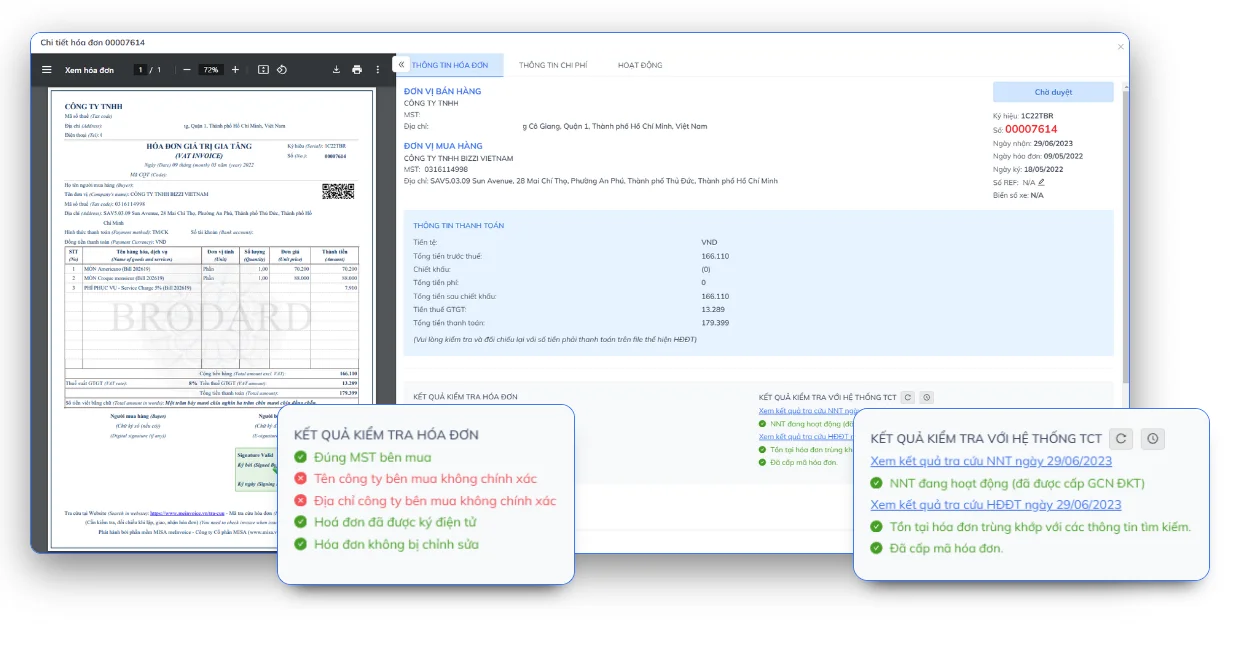
2. Validate – Check for validity
After receiving the invoice, it needs to be checked before proceeding to the next processing steps.
The criteria that are typically checked include:
- Tax identification numbers of the seller and the buyer;
- Invoice symbol and number;
- Invoice date;
- tax authority code (for invoices with a code);
- digital signature;
- the operational status of the business issuing the invoice;
- Completeness of the XML file.
Early verification helps to limit the entry of invalid invoices into the accounting system, avoiding potential impacts on tax declarations or settlements later on.
3. Match – Compare documents
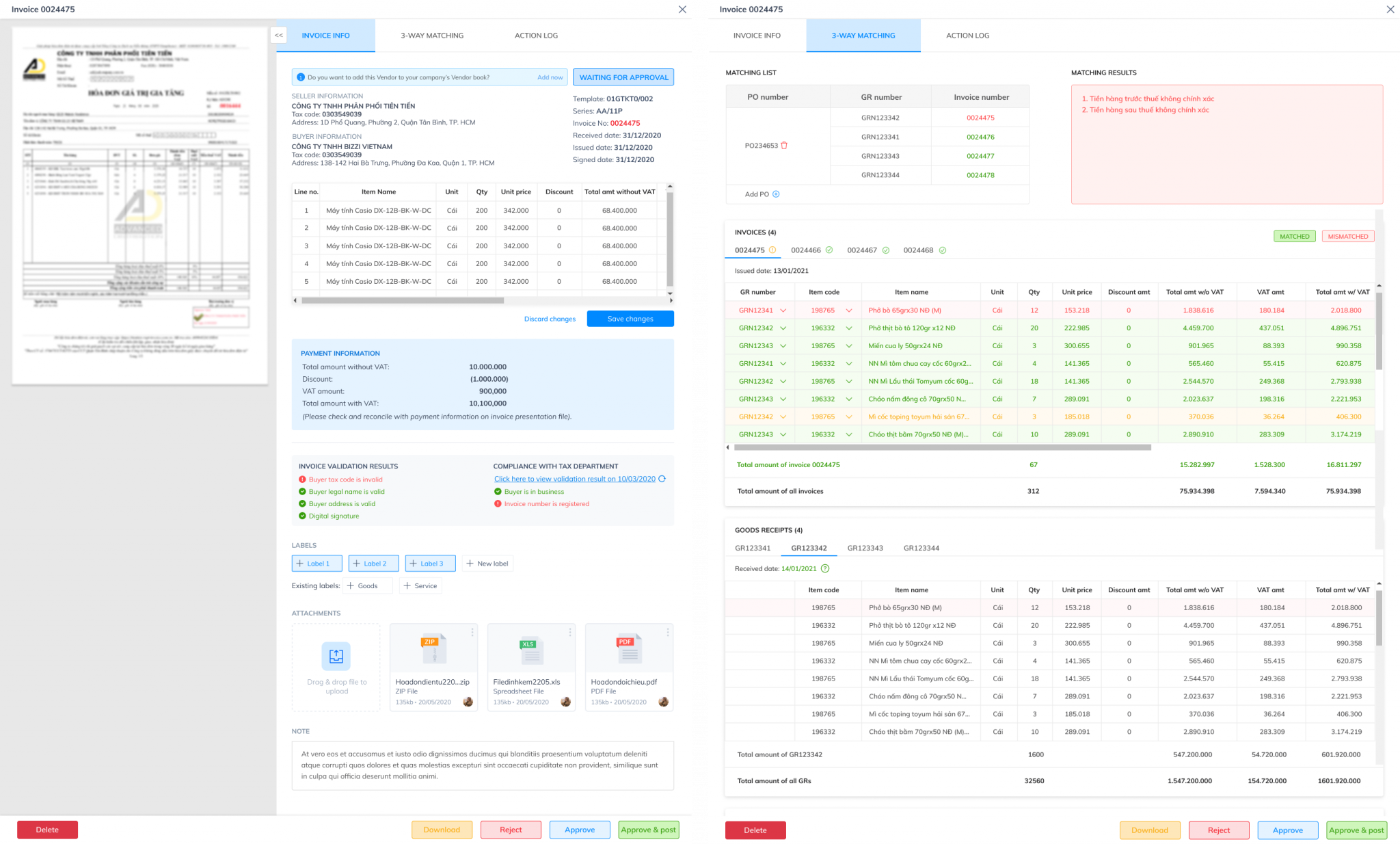
This is the most important step in the entire input invoice management process.
Instead of simply checking the content on the invoice, businesses need to compare it with related documents to ensure that the transaction actually occurred.
Typically, the comparison process will include:
- Purchase Order (PO)
- Goods Receipt Note (GRN)
- Supplier invoice
This is the 3-way matching method – a common practice in Accounts Payable management.
When the three data sources match, businesses can significantly reduce risk:
- Payment for goods not yet received;
- Incorrect amount paid;
- Incorrect unit price was charged;
- Duplicate invoices;
- Fraud from the supplier.
For outgoing invoices, the Match step is typically performed by comparing invoice data with contracts, sales orders, and delivery documents before recognizing revenue.
4. Approve
After passing the verification and reconciliation step, the invoice will be sent to the approval process.
An efficient workflow should allow for the establishment of approval rules as follows:
- invoice value;
- department;
- project;
- cost center;
- management level.
For example:
- Under 20 million VND: Department head approves;
- From 20–100 million VND: Approved by Finance Manager;
- For amounts over 100 million VND: Approval by CFO or Board of Directors.
Electronic workflows allow for the complete recording of the approval history (audit trail), facilitating internal auditing and control.
5. Post – Accounting Record
Once approved, invoice data needs to be synchronized to the accounting software or ERP system.
If data entry is still done manually, businesses may encounter many problems such as:
- Incorrect data entered;
- Duplicate invoices entered;
- Data discrepancies between multiple systems;
- Extend the deadline for closing the books at the end of the month.
Direct integration with ERP systems ensures consistent data recording, reduces repetitive tasks, and minimizes human error.
6. Pay / Collect – Payment or collection of money
This is the step of transforming documents into actual cash flow.
For input invoices, businesses need:
- Monitor payment deadlines;
- Monitor payment status;
- Avoid duplicate payments;
- Update accounts payable.
For outgoing invoices, businesses need to:
- Monitor accounts receivable;
- Send payment reminders on time;
- Compare bank transactions;
- Handling overdue payments.
Effective management of this step helps improve working capital turnover and reduce the DSO (Days Sales Outstanding) ratio.
7. Archive – Archiving and auditing support
After the transaction is completed, all related documents should be stored centrally.
In addition to PDF invoices, businesses should keep complete records of:
- original XML file;
- payment documents;
- contract;
- PO;
- warehouse receipt;
- acceptance report;
- Approval history;
- Edit history.
A centralized record-keeping system makes it easier for businesses to retrieve records during audits, tax inspections, or when resolving disputes with customers and suppliers.
Note: A workflow is only truly effective when each step has clear control criteria. Therefore, in addition to the processing procedure, businesses need to build a checklist to verify invoices before accounting or payment.
Checklist for verifying invoice validity before accounting or payment.
Before recording an invoice in the accounting books or making a payment, businesses need to verify the validity of the document. A standard checklist helps detect errors early, limit tax risks, avoid incorrect payments, and ensure complete documentation for audits.
Invoice verification checklist
| Content to be checked | Purpose |
| Name, address, and tax identification number of the seller and buyer. | Verify the correct party to the transaction. |
| Invoice number, symbol, and date of issue. | Verify the validity of the invoice. |
| Goods, services, quantity, unit price | Compare with the contract and order. |
| Tax rate, VAT amount, total payment | Ensure accuracy when submitting declarations. |
| Tax authority code (for invoices with a code) | Check for legality |
| Original XML file | For archiving and comparison purposes. |
| Supplier operational status | Limit transactions with risky businesses. |
| Purchase Order (PO), contract, warehouse receipt, acceptance report | Business comparison |
| Non-cash payment conditions (if applicable) | Ensure that the tax deduction conditions are met as prescribed. |
| Accounting, declaration, and archiving status | Avoid omissions or duplicate entries. |
In addition to checking the information on invoices, businesses should also periodically review the status of suppliers and compare it with related documents before making payments. This is especially important for businesses with many suppliers or those processing hundreds of invoices each month.
Legal Note: From June 1st, 2025, Circular 32/2025/TT-BTC guiding the implementation of certain regulations on invoices and documents under the Law on Tax Administration and related decrees has come into effect. Simultaneously, Decree 70/2025/ND-CP amends and supplements some provisions of Decree 123/2020/ND-CP on invoices and documents. Businesses need to update their invoice verification procedures to ensure compliance with current regulations.
Common risks associated with manual invoice management.
Many businesses still manage invoices using Excel, email, or distributed storage across departments. This method may be suitable when the number of invoices is small, but it will reveal many limitations as the business expands.
| Risk | Occurs in | Affect |
| Incorrect data entered. | Input and output | Discrepancies in accounting records and tax declarations. |
| Missing invoices | Input | Lack of legitimate expenses affects tax declarations. |
| Issuing invoices at the wrong time. | Output | Risk of penalties, incorrect revenue recognition. |
| Duplicate Payment | Input | Cash flow loss |
| Do not compare the purchase order and the warehouse receipt. | Input | Payment for goods not received or received incomplete |
| Failure to track accounts receivable. | Output | Increased DSO, slow collection of funds. |
| Distributed storage | Both | Difficulty retrieving records increases audit time. |
In addition to the risks mentioned above, manual management also causes businesses to waste a lot of time on repetitive tasks such as data entry, document verification, and reconciliation between systems. As the number of invoices increases, the workload of the finance department also increases, while the ability to control decreases.
That's also why many businesses are starting to consider switching from Excel to invoice management solutions and automating document processing workflows.
When should businesses switch from Excel to invoicing software?
Not every business needs to invest in software right from the start. For small businesses with a low number of invoices and simple processes, Excel combined with accounting software can still meet basic needs.
However, as operations expand, the number of invoices increases, and more departments are involved in processing them, manual management methods quickly reveal their limitations. Time-consuming document retrieval, scattered data, opaque approval processes, and difficulty in tracking edit history are common problems.
At this time, businesses should consider using in-process and out-of-process invoice management software to automate processes and improve operational efficiency.
Signs that Excel is no longer suitable
| Token | Does Excel/email still work? | Should I use software? |
| Fewer than 50 invoices per month, fewer suppliers. | ✓ Yes | Not mandatory |
| There are many branches or subsidiary companies. | Difficult to manage | ✓ Recommended |
| Multiple levels of approval | Limit | ✓ Recommended |
| The purchase order, warehouse receipt, and invoice need to be compared. | Very difficult | ✓ Recommended |
| The vendor status needs to be checked automatically. | Not suitable | ✓ Recommended |
| The processing history (audit trail) needs to be saved. | Limit | ✓ Recommended |
| Want financial ERP integration or accounting software | Not suitable | ✓ Recommended |
In addition to the signs above, businesses should also consider switching when facing situations such as:
- The accounting department spends a lot of time on manual data entry.
- At the end of each accounting period, several days must be spent reconciling documents.
- We frequently discover missing or duplicate invoices.
- Searching for records needed for audits or tax settlements is time-consuming.
- The management lacked real-time data to track accounts receivable and cash flow.
A modern invoicing management system not only replaces Excel but also helps standardize processes, increase internal control, and create a foundation for digital transformation in financial management.
Before choosing software, businesses should reassess their entire current process to accurately identify which steps are consuming the most time or generating the most risks. This helps in selecting the most suitable solution instead of digitizing the entire process in a piecemeal fashion.
How does Bizzi support the management of incoming and outgoing invoices within the Financial Operations framework?
Managing incoming and outgoing invoices is not just about document storage; it's also part of Financial Operations – where purchasing, payment, sales, collection, and accounting processes are connected into a unified system.
In that vision, Bizzi focused on automating the most time-consuming processes in the finance department, particularly the Accounts Payable process.
Bizzi Bot – Automated Invoice Processing
Instead of manually entering each invoice, Bizzi Bot assists businesses. Automate input invoice processing There are many steps in the document processing procedure, including:
- Receive invoices from email or various other sources.
- Extract data from XML and PDF files using OCR combined with AI.
- Verify the invoice information before processing it.
- Compare the invoice with the purchase order, contract, and warehouse receipt (3-way matching).
- Set up approval workflows based on departments or quotas.
- Synchronize data to ERP or accounting software.
As a result, the accounting department can significantly reduce the time spent on repetitive tasks, while increasing accuracy and transparency throughout the accounts payable process.
Bizzi ARM – Supporting accounts receivable and cash flow management
Conversely, sales invoices are not only related to revenue but also directly affect accounts receivable and the company's ability to collect payments.
Bizzi ARM supports businesses. effective debt management by:
- Track accounts receivable in real time.
- Manage debt aging reports.
- Support for timely payment reminders.
- Improve your ability to control the DSO (Days Sales Outstanding) metric.
- Providing data to support cash flow forecasting.
Combining input invoice management with output accounts receivable management gives businesses a more comprehensive view of the cash conversion cycle, rather than just tracking each transaction individually.
Synchronized with the financial ecosystem
A key advantage of automation platforms is their ability to connect with existing enterprise systems.
Through integration with ERP systems and accounting software, invoice data can be synchronized throughout the entire process, from receipt, verification, and approval to accounting and reporting, minimizing repeated data entry and reducing discrepancies between systems.
For CFOs and Finance Managers, this not only helps shorten closing times but also enhances the ability to track cash flow, accounts payable, and operational efficiency in real time.
If your business is processing hundreds or thousands of invoices each month, now is a good time to reassess your current processes and identify steps that can be automated to improve financial management efficiency.
FAQ on managing input and output invoices
How does managing input and output invoices differ from managing electronic invoices?
Electronic invoice management primarily focuses on issuing, receiving, and storing invoices in accordance with legal regulations. Meanwhile, managing input and output invoices has a broader scope, encompassing the entire process of receiving, verifying, reconciling, approving, accounting, paying or collecting money, and archiving documents.
Is it necessary to save both the XML and PDF files of the electronic invoice?
Yes. XML files are the original data of electronic invoices and have legal validity. PDF files make it easier for users to read and look up invoice content. Businesses should store both formats along with related documents for convenient auditing and reconciliation.
Will there be penalties for undeclared input invoices?
Failure to declare input invoices may result in businesses losing the right to deduct value-added tax or affect the recognition of legitimate expenses, depending on the specific case. Businesses should declare and store invoices in accordance with current regulations to minimize tax risks.
What are the risks of issuing output invoices without input invoices?
The law does not mandate that input invoices must be issued before output invoices. However, if the purchase and sales data do not match the actual transactions or if there is insufficient supporting documentation, businesses may face risks during tax audits, especially in cases related to inventory or supply chains.
In what situations is 3-way matching applied?
Three-way reconciliation is commonly applied in business purchasing processes to compare three types of documents: purchase order (PO), goods receipt note or delivery note (GRN), and supplier invoice. This is an important control measure to help limit incorrect payments or fraud.
Can invoice management software replace accounting software?
No. Invoice management software and accounting software serve different purposes. Invoice management software focuses on processing, verifying, reconciling, and approving documents, while accounting software handles transaction recording, financial reporting, and tax reporting. The two systems are often integrated to form a complete operational process.
What KPIs should a CFO track in invoice management?
In addition to the number of invoices processed, CFOs should monitor metrics that reflect the operational efficiency of the process, including:
- Invoice Processing Time.
- First-pass Match Rate.
- Exception Rate.
- Duplicate payment rate.
- The closing date for accounting records at the end of the period.
- DSO (Days Sales Outstanding) for accounts receivable.
- Aging Report (Accounts Payable and Receivables Aging).
These KPIs help evaluate not only the effectiveness of the accounting department but also reflect the company's ability to control cash flow and the quality of its financial operations.
Conclude
Managing input and output invoices is not simply about storing documents or meeting tax requirements. It's a comprehensive financial management process that directly impacts costs, revenue, accounts payable, cash flow, and a company's decision-making capabilities.
A standardized process should encompass the entire invoice lifecycle, from receipt, verification, reconciliation, and approval to accounting, payment, and archiving. As businesses grow, maintaining manual processes using Excel or email increases risks and operational costs.
Implementing automation solutions like Bizzi Bot and Bizzi ARM helps businesses standardize invoice processing, enhance internal control, connect data with ERP systems, and gradually build a modern Financial Operations platform. Instead of digitizing everything at once, businesses should start by evaluating current processes to identify areas that can be automated, thereby optimizing operational efficiency and improving financial management capabilities in the long term.
To receive advice on effective corporate financial management solutions, schedule an appointment with Bizzi here: https://bizzi.vn/dat-lich-demo/






