An electronic invoice is an invoice created in electronic data format to record the sale of goods or provision of services. The seller prepares and sends the invoice; the buyer receives, checks, and stores the data for use in accounting, tax, and transaction reconciliation.
To use them correctly, it's necessary to distinguish between the type of invoice, whether it has a tax authority code or not, and the invoice data versus the PDF file used for reading. An emailed file or a receipt is not sufficient to conclude that it is a legally valid electronic invoice.
What information is recorded in an electronic invoice regarding a transaction?
Electronic invoices record information about the sale of goods or provision of services in accordance with applicable regulations. The data typically links the seller, buyer, goods or services, transaction value, tax, and invoice identification information. The electronic format allows parties to send, receive, search, and process data without having to circulate a paper invoice.
For example: a business purchases 10 sets of tables and chairs. The supplier issues an invoice for the transaction; the purchasing department confirms receipt of the goods, and the accounting department checks the invoice against the purchase order and delivery documents. The invoice is part of the record; receiving the invoice does not automatically prove that the goods have been delivered in full or that all tax deduction conditions have been met.
In a financial system, invoices can be integrated into accounting software or ERP to reduce data re-entry, track accounts receivable and payable, and reconcile accounts. The ability to connect depends on the software, configuration, and business processes; it's not an automatic feature present in every invoice.
What criteria should be used to classify electronic invoices?
The type of document, the tax authority's code management method, and the error processing status are three different criteria. A value-added tax invoice can also be a coded invoice; the replacement invoice must still be correctly identified in terms of type and application format.
Differentiate invoice types based on transaction type and user.
Common types of invoices include value-added tax invoices, sales invoices, and e-commerce invoices. In addition, there are other types of documents and invoices serving specific business purposes, such as the sale of public assets, the sale of national reserves, stamps, tickets, or electronic cards. The choice of type must be based on the specific subject and business, not simply on the appearance of the template or the presence of a VAT line.
| Common groups | Understanding and points to check |
|---|---|
| Value Added Tax Invoice | Depending on the subject and activity to which this type of invoice is used, it is necessary to check the tax calculation method and regulations of the transaction. |
| Sales invoice | Unlike VAT invoices, which differ in terms of the intended recipient and the way tax obligations are expressed, VAT invoices are not automatically considered illegal. |
| Electronic commercial invoice | They have their own specific scope of use as stipulated; not all documents titled “Commercial Invoice” are the same as electronic invoices registered in Vietnam. |
| Stamps, tickets, and other specialized service items. | Check the type of document, its content, and the circumstances under which it applies, instead of forcing everything to conform to a standard sales invoice template. |
Receipts with codes, receipts without codes, and receipts from cash registers.
The invoice has a tax authority code. The tax authorities issue a code before the seller sends the item to the buyer. Invoice without a code The data sent by the seller to the buyer does not have a tax authority code; this does not mean the seller is exempt from the obligation to transfer data or can choose the format regardless of applicable conditions.
Electronic invoice generated from cash register These are connected to a point-of-sale system that transmits data to the tax authorities. According to Article 3 of Decree 254/2026/ND-CP, this group may include invoices with codes, without codes, or data for buyers to retrieve and declare invoice information as prescribed. Therefore, point-of-sale systems should not be classified as a completely separate category from those with and without codes.
A bill, order slip, or internal receipt can be used to verify transactions, but it does not automatically become an electronic invoice simply because it was printed from a POS machine.
Original, adjusted, and replacement invoices
This is a method for identifying the relationship between issued invoices and invoices for erroneous corrections, not a classification system to replace VAT invoices or sales invoices. The "serious error" level should not be used to arbitrarily decide on replacement; the nature of the error, the buyer, and the permitted corrective action must be identified.
If errors occur, you can refer to the instructions. Handling incorrectly issued electronic invoices Before requesting the seller to make adjustments or replacements, keep a link between the original invoice, the processing invoice, and the corresponding agreement or notification document.
What are the differences between XML files, PDFs, and printed invoices?
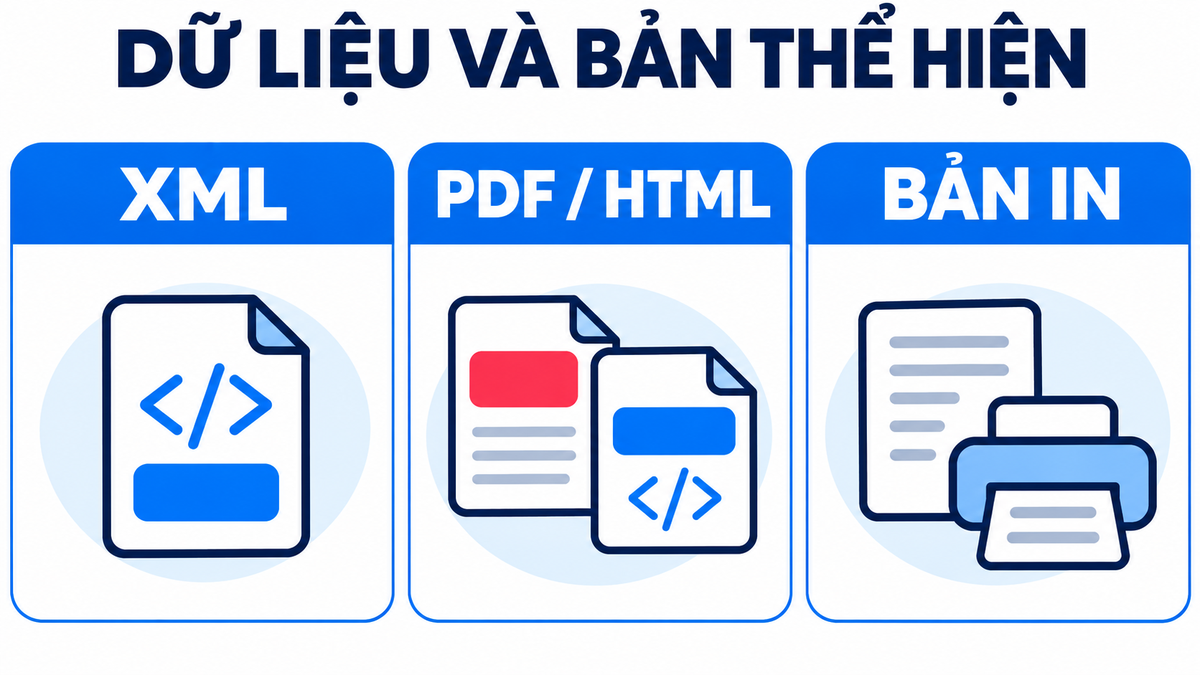
XML is the data format for electronic invoices; PDF or HTML are typically the ways users display the information. According to Article 3 of Circular 91/2026/TT-BTC, the invoice format uses XML language, containing business data and digital signature data; invoices with codes include additional data related to the tax authority's code. The displayed content must be complete, accurate, and not misleading.
| Received form | What is it used for? | Needs to be kept or further inspected. |
|---|---|---|
| XML file | Transmit, store, and process invoice data; verify information, signatures, and codes as applicable. | Integrity, source, readability/retrievalability, and relevance to transactions. |
| PDF or HTML invoice | Read, compare, and present information conveniently. | Compare it with the invoice data; don't just look at the form, logo, or displayed markings to conclude its legitimacy. |
| Printed or paper-based version | To serve operational needs or inspection requirements within the limits permitted by law. | Ensure electronic data consistency; verify the specific conditions and purpose of the conversion. |
For example, an email from a supplier with only a PDF attachment might help an accountant read the amount, but it's not enough to fully verify the digital signature and electronic invoice storage. Request the data file or download link for the invoice from the seller's channel, then compare the invoice number, symbol, date, and value between the versions.
Do not modify XML files or PDFs and then consider them as valid corrected invoices. When invoice content is incorrect, it must be handled through the invoice error processing procedure and relevant documentation must be recorded.
What information should I check on the invoice?
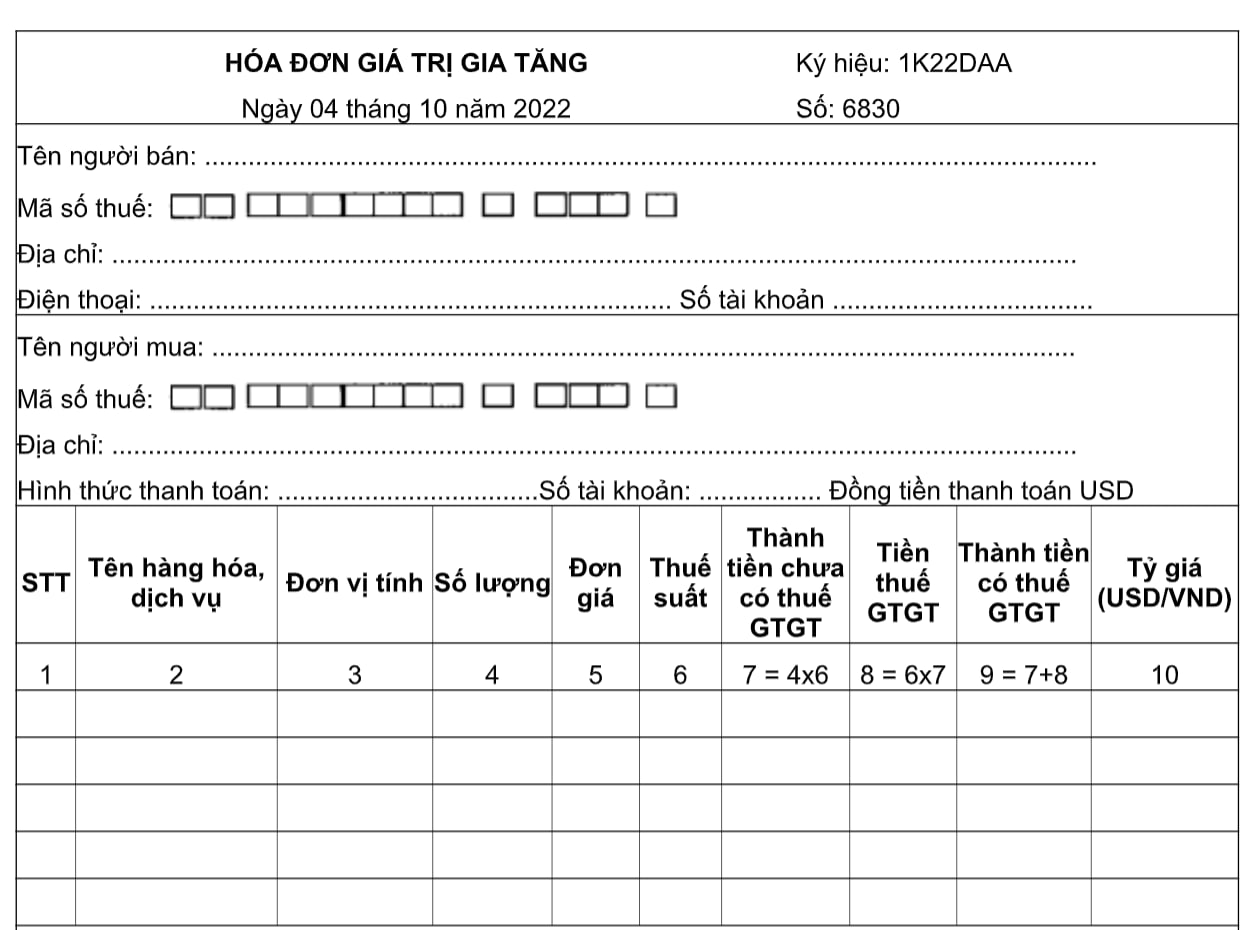
Please verify the identification information, parties involved, transaction details, and authentication data against the invoice type. Some cases have specific regulations or do not require all the information fields to be included as on a regular invoice; the absence of one field on the display is not enough to automatically conclude that the invoice is invalid.
- Identification: Invoice name, form number symbol, invoice symbol and number.
- Seller, buyer: Name, address, and tax identification number or identifying information as applicable.
- Transaction: Goods or services, unit of measurement, quantity, unit price, and corresponding total amount.
- Taxes and total amount: Tax rate, tax amount, adjustments or fees, if any; a single fixed tax rate should not be used for all services.
- Time and verification: Date of issue, time of signing, digital signature/electronic signature, and tax authority code as required by the invoice type.
- Processing relationship: The invoice information will be adjusted or replaced if this is an invoice that addresses an error.
The invoice number, symbol, and invoice number have different functions. When entering information for lookup, use the correct fields; you can see how to do it. Read the template number, symbol, and serial number of the electronic invoice. To avoid accidentally combining or omitting characters incorrectly.
How do sellers begin registering for and using electronic invoices?
The seller needs to determine the applicable method, prepare the solution, and register its use in accordance with regulations before issuing the invoice. The old process of "decision to apply, notification of issuance, and sending of sample invoices" should not be used as a general guideline for businesses today.
- Identify the needs and target audience. Clarify the sales activities, tax calculation method, invoice type, coded/uncoded invoice format, or suitable cash register. The output should be a list of transactions to be configured, not just the number of invoices expected to be purchased.
- Prepare the data and assign personnel. Verify tax registration information, authorized users, required digital signatures, notification email addresses, and system connections. Differentiate between the creator, the checker, and the authorized issuer.
- Registration procedures apply. Proceed through the appropriate channel and monitor notifications from the tax authorities; process additional requests or rejections instead of the default settings used immediately after submission.
- Establish and test the process. Verify buyer data, product catalog, taxes, creation date, signing authority, code issuance or data transmission, and sending channel. Test the ability to download, read, and retrieve data according to the solution's process.
- Create, send, and store invoices in operations. Establish the transaction at the correct time; check the signing status, issue codes, or transmit data as applicable; send to the buyer and store the data along with the relevant notification.
- Track errors and make changes. There should be a designated point of contact for receiving feedback, maintaining a processing history, and updating registration information when changes are required. Employees should not be allowed to delete invoices or modify issued files on their own.
The timing of invoice issuance depends on the goods and services traded and specific circumstances. It's not always a matter of waiting for payment or issuing invoices immediately upon receiving any money. Businesses should incorporate actual transactions into their review process before implementation.
What should the buyer do when they receive an electronic invoice?
The buyer should receive all the necessary data, verify the transaction, and record the verification results before including the invoice in their payment, accounting, or tax files. Checking information on the tax portal helps verify details; it does not replace verifying actual transactions and the conditions for using invoices for each purpose.
- Receive invoices from a defined channel. Save the seller's email or link, download the invoice data and manifest if provided; be wary of strange links or requests for account information.
- Compare the identification fields. Compare the seller, buyer, symbol, number, date, and total amount with the purchase record. Check if the invoice is duplicated or has been replaced/adjusted.
- Look up and verify data. Use the correct information from the official channels; verify the signature and code data as applicable. If you don't see results, review the entered data and contact the seller; do not assume the transaction does not exist.
- Handle the discrepancies. Clearly indicate the incorrect field, the correct value according to the records, and the person needing confirmation; request the seller to handle the matter according to regulations instead of correcting the internal PDF document.
- Save and manage access permissions. Maintain electronic data, representations, and related transaction documents; ensure they can be retrieved when 담당 personnel or software changes.
If you need to perform actions on the tax portal, see Instructions for looking up electronic invoices. Some functions are account-dependent and based on authorized access; not everyone can access all invoices from other businesses.
What precautions should be taken when storing and securing invoices?
Data needs to be stored securely, completely, and in full, and be searchable within the timeframe applicable under accounting law. Don't just save screenshots or rely on an employee's email; nor assume the software provider will retain and restore all data indefinitely.
- Specifies the directory or data repository, identification code, and how invoices are linked to transactions.
- Grant permissions to create, sign, download, and modify configuration information; revoke permissions when personnel change.
- There are plans in place for backing up, restoring, and testing data retrieving capabilities.
- Test the ability to export data upon contract termination or software migration.
- Save the history of error handling and related notifications along with the invoice to avoid using the wrong version.
Digital signatures, tax authority codes, and security measures help control authenticity and integrity, but do not guarantee that every transaction is genuine or that a business is free from tax risks.
Which invoicing solution should you choose?
First, separate the need to issue invoices to customers from the need to process invoices for suppliers. Both parties use the same invoice data, but they have different people in charge, input sources, and control points.
For the seller, it's important to check the supported invoice types, signing methods, code issuance or data transmission processes, data export capabilities, access control, error support, and usage-based costs. For retailers, it's crucial to thoroughly examine the workflow from the cash register to the invoice and how customers receive or access data.
B-Invoice supports the needs of creating and issuing electronic invoices. Businesses can discuss... B-Invoice invoicing solution Based on the volume of invoices and the system being used, it is necessary to confirm the configuration, scope of deployment, and legal requirements of each business process.
If the primary need is to receive and process supplier invoices, define the collection, verification, reconciliation, and entry of accounting data separately. Do not treat the software's output generation and input processing tools as a single function.
Frequently Asked Questions about Electronic Invoices
Are electronic invoices always VAT invoices?
No. "Electronic" describes the data format, while a VAT invoice is a type of invoice. The type of invoice and the intended recipient need to be considered; the right to deduct tax cannot be inferred solely from receiving an electronic invoice.
Is an invoice incorrect if it lacks the buyer's signature?
Do not draw conclusions based solely on this sign. The required signatures and information fields depend on the type of invoice, the recipient, and the applicable circumstances. Refer to the regulations for the specific transaction before requesting the seller to resubmit it.
If the invoice has a code, has all the information been checked and confirmed correct?
The tax authority code does not replace the verification of actual goods and services, sales records, and accounting data. The buyer still needs to check the details of the transaction and handle any discrepancies found.
Is it possible to keep only the PDF file and discard the XML file?
You shouldn't just keep the physical copy when storing electronic invoice data. Have a plan in place to receive, store, and retrieve invoice data in the correct format, retain a readable copy for verification, and ensure integrity during storage.
Can electronic invoices replace contracts or delivery receipts?
An invoice records the sale of goods or services, while contracts, purchase orders, and delivery documents explain other aspects of the transaction. Records should be organized by business process; an invoice does not automatically replace all related documents.