


OCR invoices Optical character recognition (OCR) technology converts the content on invoices (images, scans, or PDFs) into data that software can read and process, such as supplier name, tax code, invoice number, date, pre-tax amount, tax amount, and total amount.
For accountants, the value of OCR lies not in simply "converting images to text," but in its capabilities. Reduce data re-entry. However, OCR does not automatically prove the legitimacy of an invoice, nor does it replace business verification, document reconciliation, or pre-accounting and payment approval steps.
This article focuses on three practical questions: How does OCR for invoices work, when should it be used, and what should businesses check when choosing OCR software?.
How does OCR for invoices work?
A typical invoice OCR process consists of four steps:
- Receive the document: Users upload images, PDFs, or scans to the system; some solutions can receive documents from email or shared folders.
- Content recognition: OCR technology identifies text areas and converts characters in images into digital data.
- Extracting data fields: The system identifies the tax identification number, invoice number, date of issue, amount, tax rate, and product/service lines.
- Check and export data: The data can be verified by the user, then exported to Excel/CSV or transferred to accounting software, ERP, or invoicing processes if integrated.
The quality of the results depends not only on the OCR engine but also on the image quality, invoice layout, Vietnamese language recognition capabilities, how the system understands the line item table, and the mechanism for handling low-confidence fields.
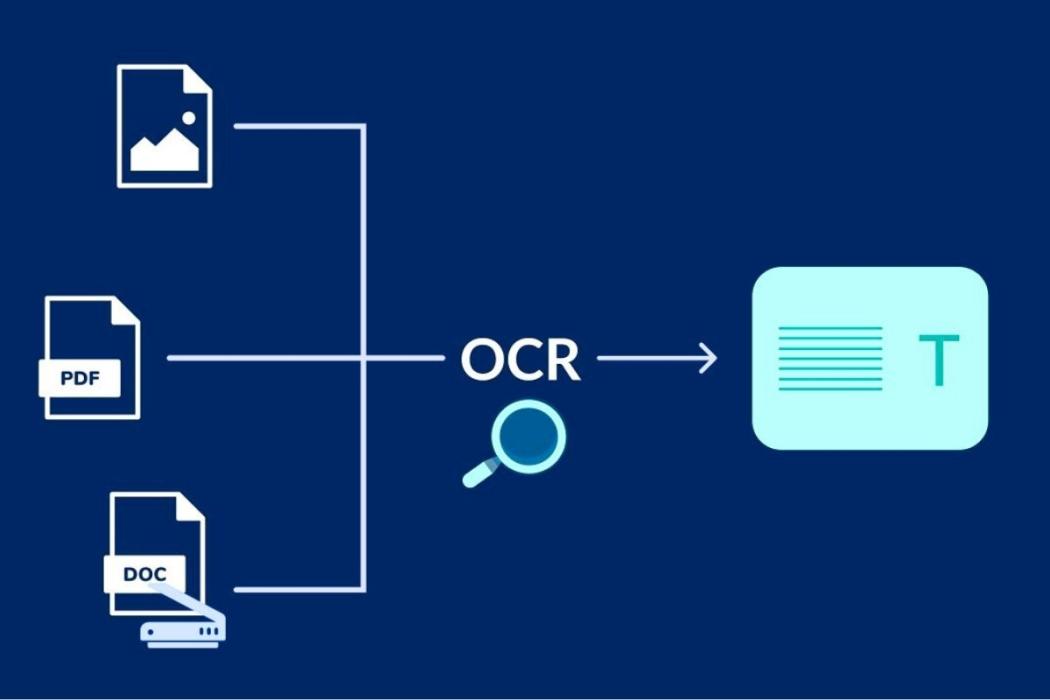
How is OCR different from scanning invoices and reading XML files?
| Method | Result | When appropriate |
| Scan/take photos | Create an image or PDF file to save and view; the data inside will not automatically become structured fields. | Electronic copies of paper documents should be saved. |
| OCR | Read content from images/PDFs and extract it into structured data. | We need to reduce data entry from documents that do not have pre-readable data. |
| Read XML | Directly retrieve structured data from the XML file. | Electronic invoices already have original XML files, and the system supports reading this format. |
This is an important point when evaluating a project: Not all invoices require OCR.. If a business has received an electronic invoice XML with structured data, the system can directly read the XML instead of using OCR to "re-read" the PDF. OCR is more useful when the data comes from photos, scans, paper invoices, or unstructured PDF documents that are not suitable for direct system extraction.
If your need is to open and inspect XML files, please refer to a separate article. How to open an electronic invoice XML file.
What types of data can invoice OCR software read?
Depending on the solution and document type, the system can extract data groups such as:
- Seller information: Business name, tax identification number, address.
- Billing information: Form number/symbol (if available), invoice number, date of issue.
- Money information: Cost of goods, discount, tax rate, tax amount, total payment.
- Goods/services line: Item name, unit of measurement, quantity, unit price, total amount.
- Additional information: contract number, order number, or reference data if the document shows it and the system is configured to recognize it.
Reading ability line-item Reading the fields at the top of an invoice is often more difficult because the itemized list has many different presentation styles. If a business needs to cross-reference details with a purchase order or warehouse receipt, it's advisable to separately check the ability to extract each line item instead of just looking at a demo that reads the invoice number and total amount.
How does an OCR engine differ from invoice processing software?
OCR engine It is a layer of technology for data recognition and extraction. Invoice processing software OCR can be used as a component, but it also adds business layers such as document reception, data verification, exception handling, approval, reconciliation, and synchronization with accounting/ERP systems.
| Capacity | OCR engine | Invoice processing platform |
| Character recognition from images/PDFs | Have | It can be integrated. |
| Extract invoice data fields | Yes, it depends on the model. | Have |
| OCR school review is uncertain. | Depending on the product | This is common if it's designed for invoicing purposes. |
| Check the business rules. | Not a core function | There may be |
| Compare the Purchase Order/Gr/Contract. | Are not | There may be |
| Workflow approval | Are not | There may be |
| ERP/accounting synchronization | An integration layer needs to be added. | It can be supported by default or configured. |
Therefore, if the goal is simply to digitize a small amount of documents, an OCR engine or a simple OCR application may suffice. If the goal is to reduce the number of operations throughout the payment process, the business needs to further evaluate the business layers behind OCR.
Does OCR automatically verify the validity of invoices?
OCR should not be equated with invoice validation. OCR only helps in reading and extracting data. Verification of invoices depends on the original data, applicable regulations, and additional system functionalities.
An invoice processing platform can use OCR data to support steps such as:
- Check required fields according to the configured rules;
- Compare the total amount with the total of all items.;
- Compare the tax identification number or supplier information with the connected data source;
- Detecting duplicate invoices by number, symbol, supplier, or value;
- Match the data with the purchase order (PO), general store (GR), contract, or internal data.
But the steps above are validation, matching and workflow, This is not the OCR technology itself. When viewing a product demo, businesses should ask the vendor to clearly indicate which parts are performed by OCR and which come from a rule engine, API, or other system integration.
Factors affecting the accuracy of invoice OCR
There is no single level of accuracy that applies to all types of invoices. Results vary depending on the input data and how the system is trained/configured. Factors to check include:
- Image quality: Blurry, distorted, shadowed, missing corners, or low-resolution images increase recognition errors.
- Layout: Invoices with complex tables, multiple lines, or multiple pages are more difficult to process than simple invoices.
- Language and font: We need to assess the ability to recognize Vietnamese text with diacritics, symbols, and number sequences.
- Document type: Printed invoices, photos taken with phones, scanned files, and handwritten documents all have varying levels of difficulty.
- Learning/Adaptability: Does the system allow for improvements to the identification pattern or rules after deployment?.
- Human-in-the-loop: Are fields with low confidence flagged for human verification before synchronization?.
Instead of asking "What percentage of OCR accuracy is it?" based on a general number, you should run tests on a sample. A set of genuine invoices representing the business.Multiple vendors, multiple formats, clear and blurry invoices, one-page and multi-page invoices, with and without line item tables.
7 criteria for choosing OCR invoice software for businesses
1. Read the correct type of invoice your business is receiving.
Check the actual file: image, scanned PDF, text PDF, or XML. If the majority of documents already contain XML, a good XML reading system can be more valuable than trying to OCR every single document.
2. Extract data at the level required by the business.
If you only need to enter the total amount, the header fields may suffice. If you need to reconcile purchases, you must check the readability of line-items.
3. There is an exception handling mechanism.
The software should show users which fields the system is unsure about and allow them to correct them directly before the data proceeds, instead of forcing accountants to review the entire invoice.
4. Clearly separate OCR and business logic testing.
Ask the supplier how their system checks for duplicate invoices, supplier status, tax rules, or purchase orders/retailer agreements. These capabilities require specific mechanisms and cannot be inferred simply from the fact that the product has OCR.
5. Connects to accounting or ERP systems.
If, after OCR, accountants still have to download Excel and re-import the data into the ERP system, the benefits of automation will be limited. It's necessary to check the API, file mapping, synchronization mechanisms, and how to handle discrepancies in master data.
6. Appropriate security and access control.
Invoices can contain financial data, supplier information, and transactions. Businesses should evaluate access rights, storage, operation logs, data retention periods, and mechanisms for post-OCR document processing.
7. Measure efficiency using performance indicators.
Instead of just measuring the number of OCR pages, you should track invoice processing time, the percentage of fields needing correction, the percentage of invoices requiring exception handling, and the number of remaining manual operations.
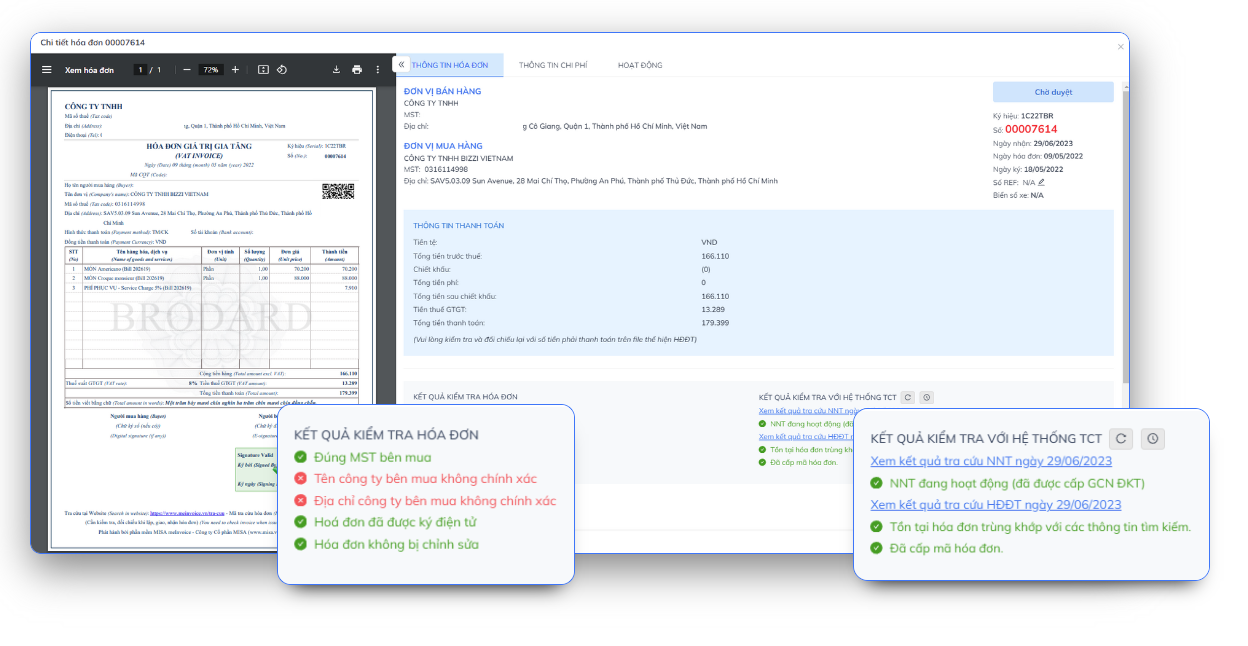
OCR testing process before widespread deployment.
- Select a representative data sample: Retrieve invoices from multiple vendors and in various formats.
- Identify required fields: For example, MST, invoice number, date, tax amount, total amount, and line-items.
- Measure errors by field: Instead of using just one general accuracy rate.
- Check the review time: If accountants have to correct too many fields, OCR may not be as cost-effective as expected.
- Check the output: Can the data after OCR go directly into the target system, or does it still need to be re-entered?.
- Try the exceptions: Blurry images, multi-page invoices, long tables, invoices missing fields, or mismatched master data.
This testing method allows businesses to evaluate OCR using their own data instead of relying entirely on pre-optimized demos.
How does OCR work in conjunction with 3D matching?
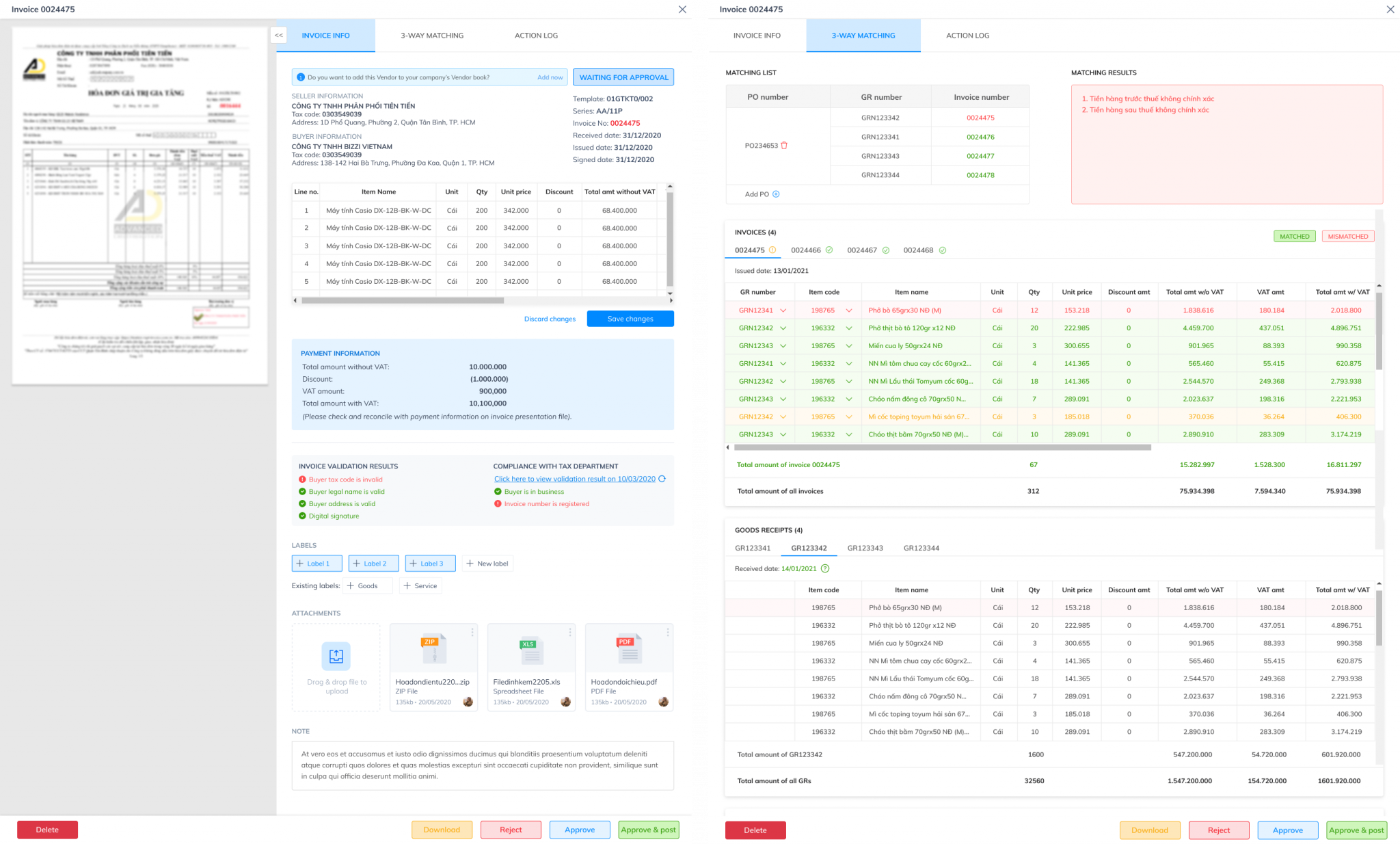
If a business has a purchase order (PO) process, OCR data can become an input source for this step. 3D comparison.
For example, the system reads the purchase order number, item code, quantity, and unit price on the invoice; then a separate matching module compares these fields with the purchase order and the warehouse receipt. If there is a discrepancy outside the configured threshold, the invoice is moved to the verification stream.
It is important to emphasize that OCR provides the data for matching; OCR does not perform the entire matching logic itself. This is why, when choosing a product, businesses should look at the entire flow from invoice receipt to accounting, not just the recognition screen.
When should you use a standalone OCR system, and when do you need an invoice processing platform?
| Demand | Appropriate direction |
| Digitizing documents for searching/storage | Basic OCR might be sufficient. |
| Quickly import invoice data into Excel/accounting software. | OCR includes invoice templates and export/integration capabilities. |
| Receiving multiple invoices from various sources, requiring duplicate and data verification. | The invoice processing platform includes OCR and validation. |
| A comparison of purchase orders/receipts, approval workflows, and ERP systems is necessary. | AP/invoice automation platforms have OCR as a layer in the process. |
Bizzi belongs to the third and fourth groups: OCR is part of input invoice processing procedure, This includes data validation, exception handling, reconciliation, and system integration according to the deployment configuration.
FAQ about invoice OCR
Can OCR read PDF invoices?
This is possible, especially with scanned PDFs or image documents. However, if the PDF/invoice includes XML or structured data, businesses should evaluate the ability to directly read the original data instead of relying on OCR by default.
Can OCR read multiple product lines?
It's possible, but the readability of line-items depends on the solution and the complexity of the table. It's advisable to test on a real invoice with many lines before deployment.
Can OCR replace accountants in checking invoices?
No. OCR reduces data entry, while decisions about validity, accounting, exception handling, and approval require other layers of control or human intervention.
Can OCR replace XML electronic invoice files?
No. XML is the structured data of an electronic invoice. When the XML is valid and the system can read it, extracting data directly from the XML is usually more logical than OCR re-enacting the representation.
What metrics should be used to evaluate OCR?
It is advisable to monitor accuracy by field, the percentage of fields requiring human correction, the processing time per invoice, the exception rate, and the level of automation in the data transfer step to the accounting/ERP system.
Conclude
OCR for invoices effectively solves the problem of converting image or PDF documents into structured data. But to choose the right software, businesses need to look beyond just "reading": the actual document types, line-items, review mechanisms, validation, security, and the ability to integrate data into accounting systems.
If the goal is to automate the entire invoice input process, OCR should be viewed as a layer in the chain of ingest → extract → check → match → exception handling → synchronize, rather than as a standalone solution for every AP problem.