



In many B2B businesses, the sales department receives dozens to thousands of Purchase Orders (POs) from customers every day. If employees have to read each PO and manually enter the information into the system to create Sales Orders (SOs), this process is not only time-consuming but also prone to errors in product codes, quantities, unit prices, or customer information.
Automatically generate Sales Order (SO) from Purchase Order (PO). This method utilizes OCR, AI, and system integration to automatically extract data from Purchase Orders and convert it into Sales Orders on ERP or sales management software. This solution helps businesses shorten order processing time, reduce data entry errors, and increase operational efficiency from order placement to delivery.
For businesses with high transaction volumes, automatically converting purchase orders (PO) to sales orders (SO) is not only a solution for saving manpower but also a foundation for building a modern and scalable Order-to-Cash (O2C) process.
How do purchase orders (PO) and sales orders (SO) differ in the B2B sales process?
In the B2B sales process, the purchase order (PO) is typically the starting point of the transaction, while the sales order (SO) serves as the basis for the selling business to carry out operational activities such as warehousing, delivery, invoicing, and revenue recognition. Therefore... What is a Purchase Order (PO)??
What is a Purchase Order (PO)?
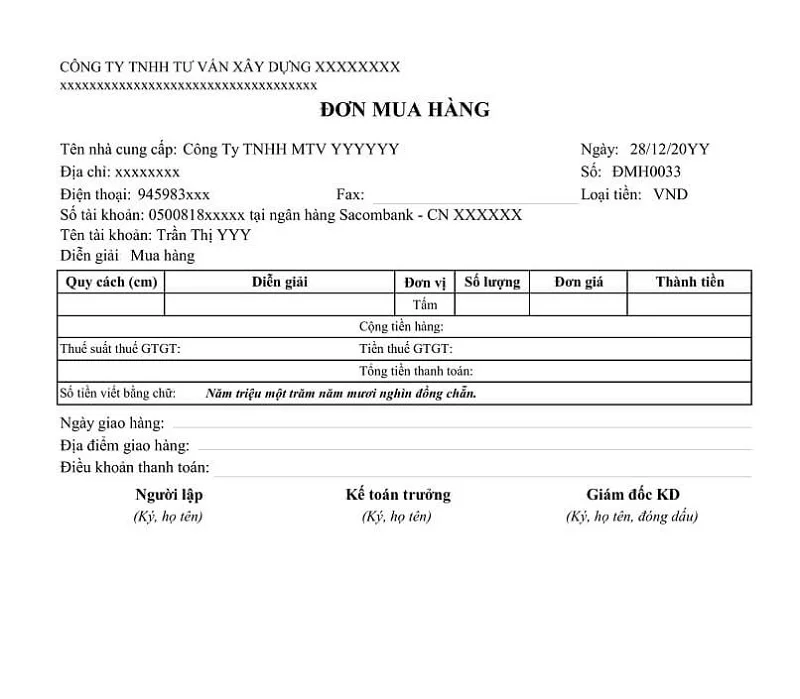
A Purchase Order (PO) is a document issued by the buyer to the supplier when there is a need to purchase goods or services.
A purchase order (PO) typically includes information such as:
- Product or service code
- Quantity ordered
- Unit price and total order value
- Delivery conditions
- Delivery location
- Delivery time
- Payment terms
In a B2B environment, a purchase order (PO) serves as a formal request for purchase and represents the customer's commitment to buy under the agreed-upon terms.
What is a Sales Order (SO)?
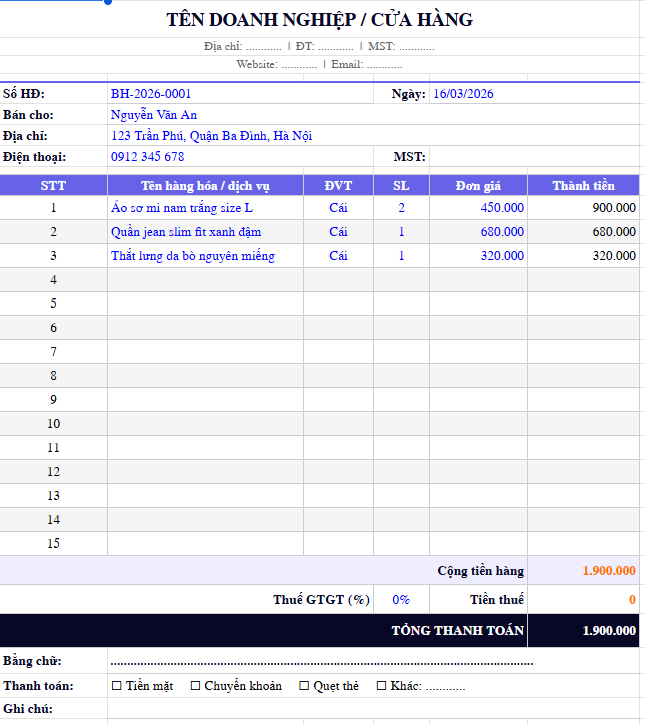
A Sales Order (SO) is a document created by the seller after receiving and checking a Purchase Order (PO) from the customer.
Unlike purchase orders (POs) which are part of the buyer's system, sales orders (SOs) are internal operational documents of the selling company and are typically managed within an ERP or order management system (OMS).
SO is the basis for:
- Check inventory and order fulfillment capacity.
- Plan inventory withdrawals.
- Confirm delivery
- Invoice
- Track debt
- Record revenue
- Sales report summary
In other words, if the Purchase Order (PO) represents the customer's purchase request, then the Sales Order (SO) is the starting point for the entire order fulfillment process of the selling business.
The PO → SO process in B2B sales
In most B2B businesses, the order processing flow typically follows this sequence:
- The customer issues a Purchase Order (PO).
- The selling company receives the purchase order (PO).
- The sales or customer service department checks the purchase order information.
- The seller creates a Sales Order (SO) in the ERP or order management system.
- The Sales Order (SO) triggers subsequent steps such as inventory management, shipping, invoicing, payment tracking, and sales reporting.
Accurately transferring data from the Purchase Order (PO) to the Sales Order (SO) is crucial because all information in the SO will be used throughout the subsequent operational stages.
Compare PO and SO
| Criteria | Purchase Order (PO) | Sales Order (SO) |
| Creator | Buyer | Seller |
| Purpose | Place an order / make a purchase request | Confirm sales and process orders. |
| Main data | Product, quantity, price, purchase conditions | Product, quantity, price, stock, delivery |
| Processing system | Customer's purchase order system or PO file | Seller's ERP or OMS |
| Role in the process | Initiating demand | Initiate the order fulfillment process. |
| Risks if wrong | Order disputes | Incorrect delivery, incorrect invoice, incorrect revenue. |
When the Purchase Order (PO) is the input point and the Sales Order (SO) is the starting point for order processing in the seller's ERP system, any errors in transferring data from the PO to the SO can lead to errors in delivery, invoicing, and revenue recognition. This is why more and more businesses are implementing automated solutions to convert POs to SOs in order to reduce manual data entry, minimize errors, and speed up order processing.
See more: Automated order processing solution for supermarket suppliers.
Why do businesses encounter difficulties when creating Sales Orders (SO) from Purchase Orders (PO) manually?
In many manufacturing, distribution, and wholesale businesses, purchase orders (POs) from customers typically come through several different channels:
- PDF attached
- Excel file
- EDI system
- Customer Ordering Portal
- Scanned file or photograph
After receiving the purchase order (PO), the employee must:
- Open the PO file.
- Verify customer information.
- Compare the product codes.
- Check the selling price.
- Import data into ERP.
- Create a Sales Order.
- Transfer to warehouse or delivery department.
As the number of purchase orders (POs) increased, this process created several problems:
Data entry takes a lot of time.
An order can contain dozens or hundreds of product lines.
If each purchase order (PO) takes 5–15 minutes to enter, a business processing 500 POs per day would waste tens of hours just on data entry.
Data errors
Common errors include:
- Incorrect product code.
- Incorrect quantity.
- Incorrect unit price.
- Incorrect customer entered.
- Lack of product lines.
- Incorrect delivery terms.
These errors can lead to:
- Incorrect item delivered.
- Return the item.
- Disputes with customers.
- Loss of revenue.
Difficult to scale
As sales increase, businesses often hire more staff to process orders instead of optimizing the process.
Operating costs are rising rapidly, but productivity is not increasing proportionally.
What does it mean to automatically create a sales order (SO) from a purchase order (PO)?
Automatically generating Sales Orders from Purchase Orders is a process that uses technology to:
- Read the Purchase Order.
- Extract data.
- Standardize information.
- Compare customer and product data.
- Create a sales order on your ERP system or sales software.
Instead of manually re-entering all the data, the system will perform most of the work automatically.
General process: Purchase Order → OCR/AI → Data Verification → Data Mapping → Sales Order Generation → ERP → Delivery
Businesses only need to handle exceptions instead of entering each order line by line.
What is the difference between a Purchase Order (PO) and a Sales Order (SO)?
Many people often confuse purchase orders (PO) and sales orders (SO). However, these are two documents belonging to two different sides of a transaction.
| Criteria | Purchase Order (PO) | Sales Order (SO) |
| Creator | Client | Supplier |
| Purpose | Purchase request | Sales confirmation |
| Time | Before the transaction | After receiving the purchase order. |
| Role | The order | Sales Order |
| Management system | Procurement | Sales Management |
| Relate to | Purchase-to-Pay | Order-to-Cash |
Purchase Order (PO)
A purchase order (PO) is a document sent by a customer to a supplier to request the purchase of goods or services.
Typically, a purchase order (PO) contains:
- Customer name
- PO Code
- Product list
- Quantity
- Unit price
- Delivery conditions
- Payment terms
Sales Order (SO)
A Sales Order (SO) is a document created by the selling company after receiving a Purchase Order (PO).
SO is the basis for:
- Out of warehouse
- Delivery
- Invoice
- Track revenue
- Managing customer accounts receivable
What are the steps involved in the automated process of converting purchase orders (PO) into sales orders (SO)?
An automated PO to SO conversion process typically consists of six main steps.
Step 1: Receive the Purchase Order (PO) from the customer.
The purchase order (PO) can come from:
- Excel
- Customer gateway
- EDI
The system will automatically collect documents from various sources.
Step 2: OCR reads the PO content.
OCR (Optical Character Recognition) technology converts data in PDFs or images into structured data.
The identified information includes:
- Customer name
- PO Code
- Order date
- SKU
- Quantity
- Unit price
Step 3: AI extracts and normalizes data.
After OCR, AI will:
- Identify the data field.
- Format standardization.
- Remove noisy data.
- Determine the PO structure.
This is especially useful when each customer uses a different purchase order (PO) template.
Step 4: Compare with company data
Inspection system:
- Do customers exist?.
- Is the SKU valid?.
- Is the selling price correct?.
- Are the payment terms suitable?.
If there is any discrepancy, the system will issue a warning.
Step 5: Automatically generate Sales Orders
After verifying the data, the system generates a Sales Order (SO) on the ERP system.
Data fields are automatically mapped from Purchase Order (PO) to Sales Order (SO).
Step 6: Proceed to the order fulfillment process.
Once generated, the SO (Solutions) will proceed through the following process:
- Out of warehouse
- Picking
- net
- Document
- Invoicing
- Collect money
What data needs to be checked before creating a Sales Order?
Not all purchase orders (POs) can be converted directly into sales orders (SOs). Businesses need to verify some critical data.
| Data field | Purpose of the inspection |
| House Code | Identify the customer |
| SKU | The right product |
| Items | the correct quantity |
| Unit Price | The correct selling price |
| Delivery Date | On-time delivery |
| Payment Terms | Payment terms |
| Shipping Error | Delivery address |
| Tax Information | Tax rate |
Checking data before creating a Sales Order (SO) significantly reduces shipping and invoice errors later on.
What roles do OCR, AI, Master Data, and ERP Integration play?
To efficiently automate the conversion of purchase orders (PO) to sales orders (SO), businesses typically need to combine multiple layers of technology.
OCR
OCR helps read data from:
- Scan
- Photograph
- Electronic fax
OCR is the first step in digitizing data.
AI Document Understanding
AI helps:
- Understand the PO structure.
- Identify the data field.
- Document classification.
- Learn from the new purchase order (PO) templates.
Thanks to AI, businesses no longer need to create separate templates for each customer.
Master Data Management
Master Data guarantees:
- Standardized customer code.
- Identical SKUs.
- The exact selling price.
- Payment terms are agreed upon.
If the source data is not accurate, automation will be difficult to implement effectively.
ERP Integration
ERP integration allows:
- Generate sales orders automatically.
- Synchronize inventory.
- Synchronize accounts payable.
- Synchronize revenue.
Common ERP systems that are often integrated include:
- SAP
- Oracle
- Microsoft Dynamics
- Odoo
- NetSuite
- Bravo
- Car
- MISA
Benefits of automatically converting PO to SO
Automatically converting Purchase Orders (PO) to Sales Orders (SO) saves data entry time, eliminates manual errors, and speeds up order processing.
Specific benefits include:
Reduce order processing time.
Many businesses have reported a reduction in purchase order processing time from a few minutes to just a few tens of seconds.
This helps speed up the entire Order-to-Cash process.
Reduce data entry errors.
The system minimizes errors:
- I typed the wrong SKU.
- Incorrect unit price.
- Incorrect quantity.
- Wrong customer.
The accuracy can be significantly higher compared to manual data entry.
Increase employee productivity
Instead of entering data, employees can focus on:
- Customer service.
- Handle exceptions.
- Track your order.
- Increase sales.
Improve the customer experience.
Orders are processed faster.
Customers receive:
- Confirm your order earlier.
- Faster delivery.
- Fewer errors.
Scaling Support
Businesses can increase the number of orders without correspondingly increasing the number of data entry staff.
When should a business automate its purchase order-seller (PO-SO) process?
Not every business needs to invest in an automated sales order generation solution from purchase orders right away. For small businesses with a low number of orders and a simple product catalog, manual data entry can still meet operational needs.
However, as transaction volumes increase, the manual process of importing Sales Orders from Purchase Orders often becomes a bottleneck, causing businesses to waste time, increase operating costs, and generate numerous uncontrollable errors.
Below are common signs that indicate a business should consider automating its purchase order-and-sell (PO-SO) process.
Large amount of PO
In the early stages, sales staff or the Customer Service department can handle a few dozen purchase orders per day without much difficulty.
However, as businesses expand their market or sign contracts with larger clients, the number of orders can increase from a few dozen to several hundred, or even thousands of purchase orders (POs) per month.
At this time, businesses often face the following problems:
- Staff had to work overtime to process the orders.
- The application confirmation process takes a long time.
- Orders accumulate at the end of the day or the end of the month.
- Operating costs increase with the number of orders.
One easily recognizable sign is that the business has to constantly hire more employees just to process purchase order data instead of supporting revenue-generating activities.
If each purchase order takes an average of 7 minutes to enter and the business receives 500 purchase orders per day, the total processing time could amount to nearly 60 working hours per day. This is where automation begins to deliver a clear ROI.
Many business customers
In a B2B environment, each customer typically has a unique Purchase Order form.
Some sent:
- PDF file.
- Excel.
- Scan the paper.
- Photograph.
- EDI file.
- Purchase Orders (POs) from the Procurement Portal system.
This forces employees to read and search for information in various formats.
As the number of customers increases, manual processing becomes increasingly complex and difficult to standardize.
AI-powered OCR platforms can recognize various purchase order (PO) templates, automatically extract data, and standardize it to a single format before creating a sales order.
The product catalog is large and data entry errors are frequent.
Manufacturing or distribution companies typically own thousands of SKUs.
In this case, manual data entry can easily lead to errors such as:
- Incorrect SKU entered.
- There is a shortage of products in the order.
- Incorrect unit of measurement entered.
- Incorrect packaging.
- Incorrect unit price.
If a business frequently has to handle order-related complaints or edit sales orders after they've been created, that's a sign that the current process needs to be automated.
Order processing times are impacting the customer experience.
In many industries such as FMCG, distribution, or logistics, order processing speed is a crucial competitive advantage.
Customers have increasingly high expectations:
- Quick order confirmation.
- Delivery was on schedule.
- Accurate inventory information.
However, the manual SO entry process often prolongs the time from receiving the PO to the order being entered into the system.
This leads to:
- Order confirmation was delayed.
- Delayed shipment from the warehouse.
- Delayed delivery.
- Increased risk of losing orders to competitors.
If a business is aiming to shorten Order Cycle Time or improve SLAs with customers, automating PO-SO is often one of the projects that yields results the fastest.
The Sales, Customer Service, and Operations departments are spending too much time on data entry.
One of the clearest signs is that the operations team is spending most of their time on repetitive tasks. These tasks don't create new value for customers but consume a large portion of the company's resources.
Meanwhile, employees can spend their time on:
- Upsell.
- Customer service.
- Inventory management.
- Track your delivery.
- Exception handling.
Automation helps shift the role of employees from "data entry" to "operational control and optimization".
The company already has an ERP system, but input data is still being entered manually.
Many businesses have invested in ERP systems but are still facing the following problems:
Purchase Order (PO) → Excel → Manual Entry → ERP
This creates an “automation gap” in the process.
ERP helps manage data after a sales order is created, but it doesn't solve the problem of data entry.
If the business has already implemented:
- SAP
- Oracle
- Microsoft Dynamics
- Odoo
- NetSuite
- Bravo
- FAST
Therefore, automatically generating Sales Orders (SOs) from Purchase Orders (POs) is often the next step in maximizing the value of an ERP investment.
Businesses want to build a fully digitized Order-to-Cash (O2C) process.
Automatically generating Sales Orders (SOs) from Purchase Orders (POs) is not the ultimate goal. This is just the first step in the journey. Develop a modern Order-to-Cash process.:
Purchase Order (PO) → Sales Order (SO) → Goods Issued → Delivery → Invoice → Accounts Receivable → Cash Collection
If data is digitized and standardized right from the purchase order (PO) stage, businesses can continue to automate:
- Process the order.
- Invoice creation.
- Track debt.
- Collect the money.
- Revenue report.
This is also why many CFOs and COOs view PO-SO Automation as a foundational project for their operational digital transformation program.
How does Bizzi support the automatic creation of sales orders (SOs) from purchase orders (POs)?
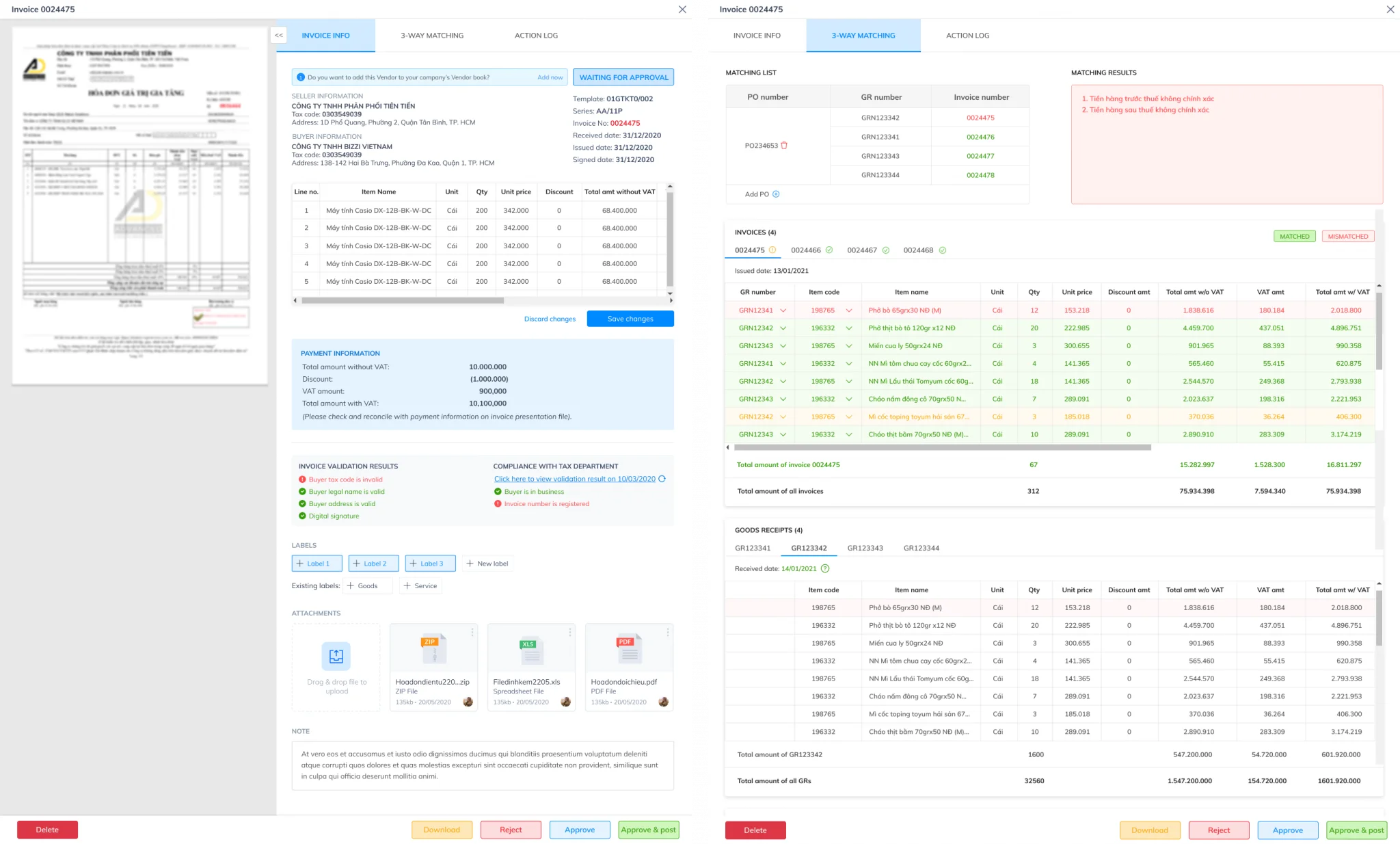
In many businesses, purchase orders (POs) received via email or PDF file are still being processed manually before being imported into the ERP system.
Bizzi automates this process by incorporating:
- OCR
- WHO
- Workflow Automation
- ERP integration
- RPA
Automatic purchase order collection
Bizzi can receive documents from:
- Shared folder
- Portal
- Third-party systems
OCR and AI data extraction
Automatic reading system:
- Customer name
- PO Code
- SKU
- Quantity
- Selling price
- Payment terms
Data reconciliation
Bizzi assists with the inspection:
- Client
- Product
- Selling price
- Trade policy
before creating the Sales Order.
Automatically create transactions on ERP.
Once the data is verified, the system can generate the Sales Order directly on the ERP system or proceed to the approval step, depending on the business process.
Exception monitoring and handling
Purchase orders (POs) with unusual data will be placed in a processing queue for staff to review instead of being processed entirely manually.
This helps businesses build faster, more accurate, and more scalable order processing workflows as sales grow.
Learn more about:
FAQ about automatically creating sales orders (SO) from purchase orders (PO)
Automatically generating Sales Orders (SO) from Purchase Orders (PO) is a software feature that allows ERP/CRM systems to automatically convert partner purchase orders into your sales orders. This completely eliminates manual data entry, reduces errors, and speeds up order processing.
Below are the frequently asked questions (FAQs) about this process:
What does it mean to automatically generate a Sales Order (SO) from a Purchase Order (PO)?
This is a process that uses OCR, AI, and system integration to convert data from Purchase Orders into Sales Orders without manual data entry.
Can PO be automatically converted to SO?
Yes. If the purchase order (PO) data is correctly identified and successfully matched with customer data, product data, and sales policies, the system can automatically generate a sales order.
Is OCR sufficient to automatically generate SO (Social Media) data?
No. OCR only helps to read data. Businesses often need to combine it with AI, master data, and ERP integration to complete the process.
What risks can be reduced by automating PO-SO (Point of Sale and Service)?
Common risks that have been mitigated include:
- Incorrect item code
- Quantity error
- Incorrect unit price
- Slow order processing
- Incorrect delivery
- ERP data discrepancies
Which businesses should implement PO-SO Automation solutions?
This solution is particularly suitable for businesses:
- Manufacture
- Distribution
- FMCG
- Logistics
- B2B Wholesale
- B2B e-commerce
There is a large volume of purchase orders and a need for fast order processing.
Conclude
Automatically generating Sales Orders (SOs) from Purchase Orders (POs) is not simply a replacement for manual data entry, but a crucial step in the process. Digitizing the Order-to-Cash process. of the business. When Purchase Orders are automatically converted into Sales Orders, businesses can shorten order processing time, reduce data errors, enhance customer experience, and create a foundation for business expansion without correspondingly increasing operational resources.
However, to achieve real effectiveness, businesses need a solution that can combine OCR, AI, workflow automation, and ERP integration to ensure that data is checked, verified, and accurately transformed before being recorded in the system.
Bizzi provides an automated platform for processing business documents and data, enabling automatic document collection, AI-powered information extraction, data reconciliation, and integration with existing ERP systems. With its intelligent document processing capabilities and automated operational processes, Bizzi helps businesses reduce manual data entry, accelerate transaction processing, and build end-to-end digital workflows.
If your business is looking to automate the conversion of purchase orders to sales orders or wants to optimize large-scale order processing, learn more about Bizzi's automation solutions to improve operational efficiency and data control throughout your entire business process.
See also the following documents: Reduce order processing time (PO-SO) by 80%.