


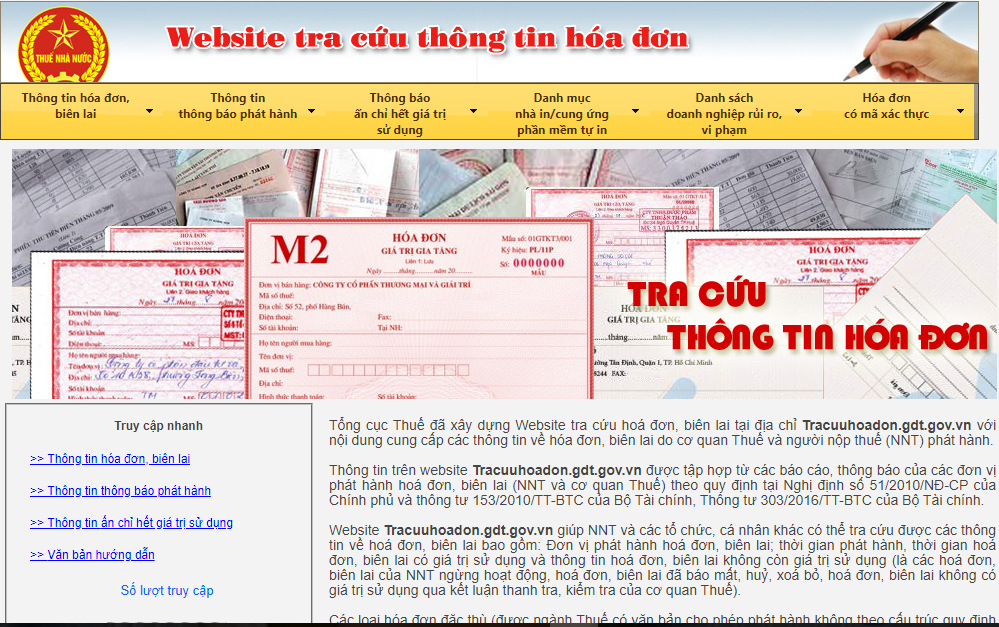
A valid electronic invoice is one that fully meets the requirements regarding content, data format, digital signature, and status as stipulated by law. To ensure that invoices are eligible for accounting, tax declaration, and archiving, businesses should not only check the searchability on the tax authority's system but also compare the XML file, transaction documents, and data consistency.
For businesses with a large number of input invoices, manually checking each invoice is both time-consuming and prone to errors. Combining lookup on the Electronic Invoice Portal with automated invoice validity verification solutions will help accountants detect risks early and reduce errors before accounting, payment, or tax filing.
What constitutes a valid electronic invoice?
A valid electronic invoice is one that simultaneously meets the legal requirements, content requirements, data format requirements, digital signature requirements, and recording status requirements with the tax authorities.
Many businesses believe that simply being able to verify an invoice in the tax authority's system is sufficient for it to be valid. However, in reality, this is only one verification step. An invoice recorded in the system may still contain errors regarding buyer information, product data, digital signatures, or may not match the actual transaction.
To accurately assess whether an electronic invoice is eligible for use, businesses need to check three groups of factors simultaneously:
- The legal validity of the invoice is subject to current regulations.
- Accuracy and integrity of invoice data.
- The degree of consistency between the invoice and the actual purchase and sale transaction and internal documents.
Thoroughly checking these layers of information helps reduce the risk of incorrect invoice recording, minimizes risks during tax settlement, and increases transparency in the input invoice management process.
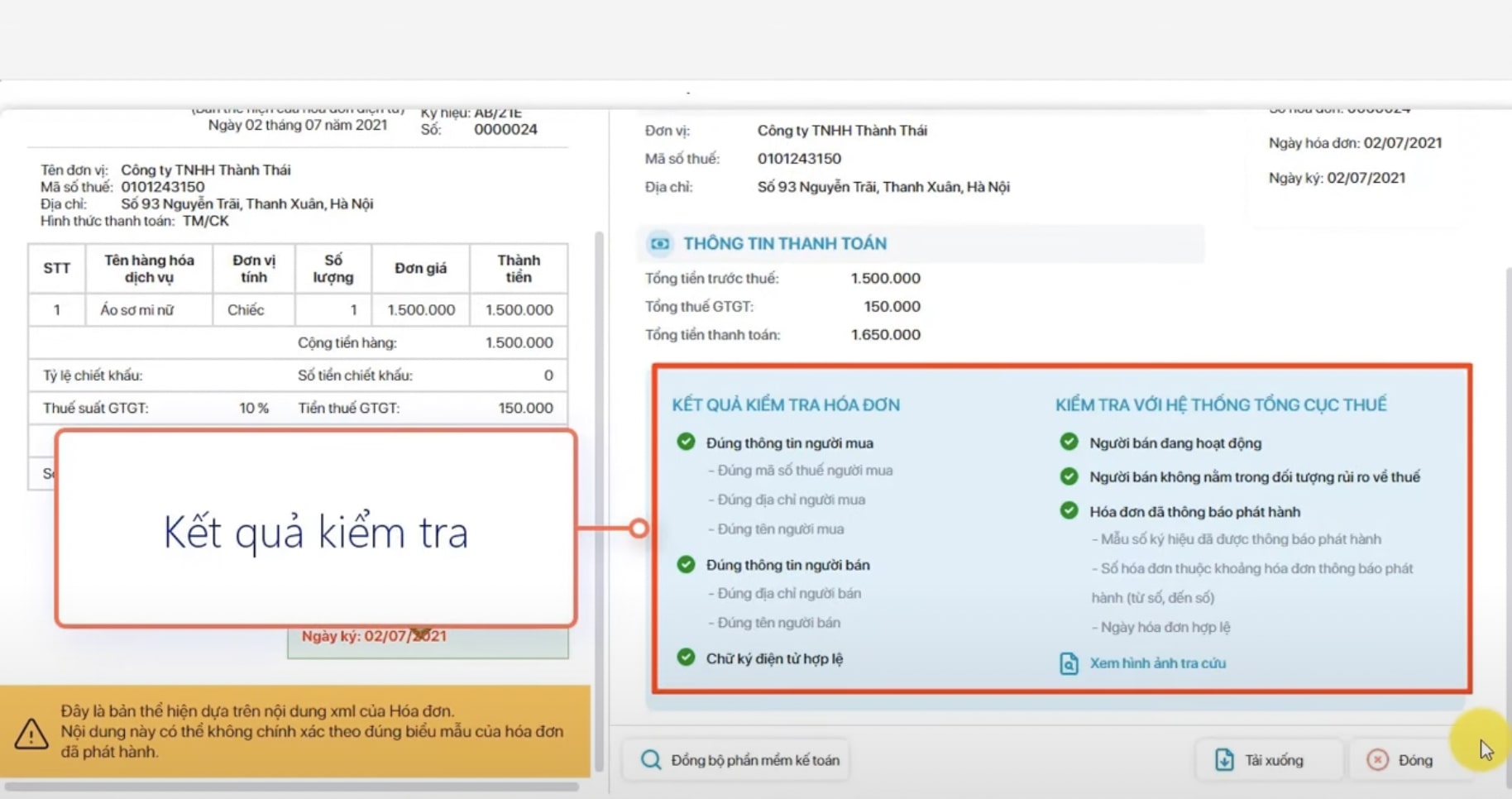
What is the difference between a legal, valid, and reasonable invoice?
Three concepts legal, valid and reasonable They are often used interchangeably, but they actually reflect three different aspects of an invoice.
| Criteria | Legal | Valid | Reasonable |
| Meaning | Prepared and published in accordance with legal regulations. | All required information, data, and technical specifications are met. | Reflecting transactions that serve the production and business activities of the enterprise. |
| Based on the assessment | Legal regulations regarding electronic invoices | Invoice content, digital signature, XML file, invoice status | Contract, purchase order, delivery receipt, payment document, intended use |
| Target | Ensuring legal compliance | Ensure the data is accurate and complete. | Ensure that all accounting and tax filing requirements are met. |
| It can be looked up on the tax system. | Maybe | Maybe | Not an evaluation criterion |
| The expense is eligible for recognition. | Doubt | Doubt | All required conditions must be met. |
As you can see, a bill legal Not necessarily valid If data is missing or there are errors in the digital signature. Similarly, a technically valid invoice is not necessarily a valid one. reasonable if the actual transaction cannot be proven or does not serve the production or business activities of the enterprise.
Therefore, accountants should not only check the issuance status of invoices but also conduct a comprehensive assessment before recording them in the accounting system.
3 layers of electronic invoice verification for businesses
To minimize risks in the accounting and tax filing process, businesses should adopt this model. 3 layers of testing for all input invoices.
| Test Class | Content to be checked | Target |
| Legal | Invoice status, issuing entity, tax identification number, legal basis, right to use the invoice. | Ensure that invoices are issued legally. |
| Data | XML file, digital signature, invoice number, symbol, date of issue, tax rate, amount, data integrity. | Ensure the data is accurate and processable on the system. |
| Major | Compare with the purchase order (PO), contract, warehouse receipt (GR), acceptance report, and payment documents. | Ensure that invoices accurately reflect actual transactions. |
In practice, many errors are only discovered when businesses compare invoices with internal documents such as purchase orders (PO), goods receipts (GR), or contracts. Therefore, invoice verification needs to be done in multiple layers instead of just looking up information on the tax authority's system.
For businesses that process many incoming invoices each month, performing all three layers of verification manually would consume significant time and resources. This is also why many businesses choose a different approach. input invoice processing software To automate the process of reading XML data, checking invoice status, and comparing it with internal documents before recording accounts receivable.
How do I check if an electronic invoice is valid on the Electronic Invoice Portal?
You can verify the validity of an electronic invoice by accessing the Electronic Invoice Portal, entering the invoice information, and comparing the search results with the data on the invoice.
This method is suitable when businesses need to verify one or a few individual invoices. However, the search results only reflect information recorded in the tax system and do not replace checking the invoice content, XML file, or related transaction documents.
Therefore, even after a successful verification, businesses should continue to compare the data on the invoice with their sales records to ensure the invoice is eligible for use.
Step 1: Access the Electronic Invoice Portal
Access Tax authority's electronic invoice portal and select the electronic invoice lookup function.
The lookup interface may be updated periodically, but the process generally remains unchanged: users enter invoice information as requested by the system to verify the data.
Step 2: Enter the invoice information you want to search for.
To conduct an accurate search, businesses need to prepare the following information:
- The seller's tax identification number.
- Invoice type.
- Invoice symbol.
- Invoice number.
- Total payment amount.
- A verification code (Captcha) will be provided if required by the system.
It is important to enter each data field correctly according to the electronic invoice to avoid the system returning inaccurate results due to incorrect input information.
Step 3: Read the search results.
After the lookup is complete, the system will return the invoice status. Each result needs to be correctly interpreted in order to take appropriate action.
| Search results | Interpretation | Actions that should be taken |
| Invoice information is available. | Invoice data is recorded in the system. | Continue comparing the invoice content, XML file, and internal documents. |
| No invoice exists. | There may be incorrect information entered or the invoice may show signs of risk. | Double-check the data and contact the supplier for verification. |
| The information doesn't match. | The input data does not match the data already in the system. | Do not record the transaction immediately; double-check the invoice and XML file. |
| The invoice has been adjusted or replaced. | The original invoice has been adjusted according to regulations. | Verify the adjustment invoice or replacement invoice before recording it. |
A successful verification does not guarantee that the invoice is eligible for accounting. Accountants still need to check the digital signature, XML file, supplier status, and compare it with the contract, purchase order, or delivery documents to ensure the invoice accurately reflects the actual transaction.
What legal basis is being applied when auditing electronic invoices?
When verifying electronic invoices, businesses should refer to Decree 123/2020/ND-CP, Decree 70/2025/ND-CP, and Circular 32/2025/TT-BTC.
These are three important legal documents governing the creation, management, use, and verification of electronic invoices in Vietnam. Understanding these regulations helps businesses accurately assess the validity of invoices and minimize risks when filing taxes, accounting for expenses, or dealing with tax authorities.
In there:
- Decree 123/2020/ND-CP Regulations on invoices and supporting documents; principles for the creation, management, and use of electronic invoices; and the responsibilities of sellers and buyers in the process of issuing and using invoices.
- Decree 70/2025/ND-CP (effective from date) 01/06/2025This amends and supplements several articles of Decree 123/2020/ND-CP to update regulations on electronic invoices, expand the scope of application, and improve the management mechanism according to practical realities.
- Circular 32/2025/TT-BTC (effective from 01/06/2025This Circular provides guidance on the implementation of certain provisions of Decree 123 and Decree 70, and replaces Circular 78/2021/TT-BTC. This Circular specifies in more detail the electronic invoice data, format, principles for handling errors, and responsibilities of relevant parties.
Since regulations on electronic invoices may be updated periodically, businesses should regularly monitor new legal documents and compare them with internal procedures to ensure that invoice verification always complies with current regulations.
What information needs to be checked to determine if an electronic invoice is valid?
Businesses need to verify the seller's information, buyer's details, invoice symbol, invoice number, date, amount, tax rate, digital signature, XML file, and invoice status on the tax system.
In reality, an invoice may be verifiable in the tax authority's system, but errors can still exist, putting businesses at risk when accounting for or filing taxes. Therefore, verification should be done in groups of information rather than just checking a few basic data fields.
Below are the accounting details that need to be reviewed before recording input invoices.
Seller and buyer information
The first piece of information that needs to be verified is the identification information of the two parties involved in the transaction.
Businesses should check:
- Name of the seller's business.
- Seller tax identification number.
- Seller's address.
- Name of the buyer's business.
- Buyer's tax identification number.
- Buyer's address (if included in the invoice information).
In addition, accountants should verify the supplier's operational status to ensure the business is still legally operating at the time the transaction occurs. If the supplier shows signs of ceasing operations, abandoning their business address, or receiving a risk warning from the tax authorities, the business needs to thoroughly review all transaction records before proceeding with accounting.
In addition to cross-referencing with tax registration data, the information on the invoice must also be consistent with the contract, purchase order, and other transaction documents to avoid discrepancies regarding the parties involved in the transaction.
Billing information
After verifying the business information, the accountant needs to check the important data fields on the electronic invoice.
The information that needs to be reviewed includes:
- Invoice form number symbol.
- Invoice symbol.
- Invoice number.
- Invoice date.
- Name of goods or services.
- Unit of measurement.
- Quantity.
- Unit price.
- Total amount.
- VAT rate.
- VAT tax.
- Total payment amount.
These are data that directly affect the recording of revenue, expenses, input VAT, and reconciliation with internal documents. Even a small discrepancy in unit price, quantity, or tax rate can lead to invoice adjustments or explanations to the tax authorities later on.
For businesses using a purchasing process with Purchase Orders (PO) and Goods Receipts (GR), the information on the invoice should be compared with the purchase order and goods receipt to detect discrepancies before payment.
XML file and digital signature
One of the important principles when check valid electronic invoice always check XML file instead of just viewing the PDF.
PDF files are merely a visual representation of the invoice content for user readability, while XML files are the original electronic data, created according to tax authority standards and containing complete information for verification and processing on accounting systems, ERP systems, and invoice management software.
When reviewing XML files, businesses should verify the following:
- Is the XML file complete and openable?.
- The XML data matches the content in the PDF.
- The seller's digital signature is still valid and legitimate.
- The XML file was not edited or modified after release.
- It is possible to read and input data into accounting software or ERP systems.
If the XML file is corrupted, missing data, or inconsistent with the PDF version, businesses should contact the supplier for verification before recording accounts payable or filing taxes.
Invoice status in the tax system
In addition to the data on the invoice, businesses also need to check the invoice status on the tax authority's system.
Some common conditions include:
| Status | Meaning | Solution |
| Invoice code has been issued. | The invoice has been assigned a code as per regulations. | Continue checking XML and business documents. |
| No invoice found. | The data doesn't match, or the invoice shows signs of risk. | Double-check the information and verify it with the seller. |
| Invoice is adjusted | The original invoice has been adjusted. | Check the adjustment invoice and related documents. |
| Invoice replaced | The old invoice is no longer valid. | Recorded according to the replacement invoice. |
| The invoice was canceled. | The invoice is no longer valid. | Not for use in declarations or accounting. |
| Electronic invoices without codes | It may still be valid if it falls under the category of permitted users. | Check the applicable conditions according to current regulations. |
Tracking invoice status helps businesses detect early instances of invoices being adjusted, replaced, or canceled, thereby avoiding incorrect accounting data recording and reducing risks during tax settlement.
Is it possible to verify an electronic invoice using an XML file?
Yes. The XML file is the original data of the electronic invoice and should be used to verify the invoice content, digital signature, data integrity, and its ability to be recorded in the accounting system.
Many businesses still store and check invoices primarily in PDF format because it's easier to read and convenient to share. However, from a legal and technical standpoint, XML files are the most important component of an electronic invoice.
Direct verification of XML files helps businesses accurately verify the released data, while also enabling accounting systems and management software to automatically read, compare, and process information without manual data entry.
Why is XML more important than PDF?
PDFs are designed to display invoice content in a visually appealing format for easy viewing, printing, or storage. However, PDFs are not the original data and do not always contain all the information needed for automated verification.
Meanwhile, XML is the standard data file for electronic invoices, containing all the information that is digitally signed and issued in a prescribed format. This is also the data that accounting software, ERP systems, and automation platforms use to read, verify, and record documents.
Therefore, businesses should not only save or check PDFs but also store the complete XML file for accounting, auditing, and retrieval purposes when needed.
When should businesses automate invoice validation?
Businesses should automate invoice validation when dealing with a large volume of incoming invoices, when manual validation causes delays, or when needing to reconcile invoices with purchase orders (POs), general ledgers (GRs), contracts, and accounting data.
On a small scale, accountants can check each invoice by searching on the Electronic Invoice Portal, opening the XML file, and comparing it with related documents. However, when the number of invoices increases to hundreds or thousands each month, this method is no longer effective. Not only is it time-consuming, but manual processing also increases the risk of missing duplicate invoices, invoices with incorrect information, or invoices that do not meet accounting requirements.
In the context of businesses increasingly expanding their supplier base and adopting multi-tiered purchasing processes, automating invoice verification has become a solution to standardize processes, reduce risks, and improve the operational efficiency of the accounting department.
In what situations is manual inspection appropriate?
Manual verification remains a suitable option for small businesses or those with a low volume of incoming invoices.
Specifically, this method usually works well when:
- The business only generates a small number of invoices each month.
- The suppliers are few and rarely change.
- Invoices are mostly processed individually, without the need for cross-referencing with multiple supporting documents.
- The Purchase Order (PO) or Goods Receipt (GR) purchasing process has not yet been implemented.
- We have not yet implemented an ERP system or integrated management software.
In these cases, accountants can check each invoice individually by searching the tax authority's system, comparing the XML file, and verifying the information against the contract or payment document.
However, as businesses grow, this method will quickly reveal many limitations in terms of processing speed and risk control.
In what situations is automated testing appropriate?
For businesses with a large volume of invoices or complex purchasing processes, Automatically check invoice validity This significantly reduces manual workload and improves control.
Automated solutions are particularly suitable when businesses:
- Receive hundreds or thousands of input invoices each month.
- Working with multiple suppliers in various regions.
- Receive invoices from multiple sources such as email, vendor portals, electronic invoicing software, or ERP systems.
- It is necessary to detect duplicate invoices before making payment.
- I want to automatically check invoice status and supplier information.
- The invoice needs to be compared with the purchase order (PO), warehouse receipt (GR), contract, and payment documents.
- We want to save the entire history of inspections and processing for use in tax audits or inspections.
Instead of having accountants check each data field, the system can automatically detect invoices with unusual characteristics and only forward cases requiring processing to the responsible person. This allows the accounting department to focus on higher-value transactions instead of repeating manual verification procedures.
If your business is processing a large number of input invoices each month, using input invoice processing software This will help automate the verification process, reduce data entry, and improve the ability to detect risks before recording liabilities.
What are the differences between manual and automated inspection?
The difference between the two methods lies not only in processing speed but also in the ability to control risks and the consistency of the process.
| Criteria | Manual inspection | Automated testing |
| Processing volume | Fewer bills | Hundreds to thousands of invoices |
| Reading XML data | Open each file | Automatic batch reading |
| Check invoice status | Look up each invoice | Check multiple invoices simultaneously. |
| Duplicate invoices detected. | Easily overlooked | Automatic alerts |
| Check supplier information | Do it manually | Automatic verification based on updated data. |
| Compare purchase orders (PO), general outlines (GR), and contracts. | Do it by hand | Automatic matching according to rules |
| Save processing history | Distribute it in email or Excel. | Centralized storage on the system |
| Scalability | Limit | Suitable for businesses that are growing. |
Not every business needs automation right from the start. However, as the volume of invoices increases, shifting from manual to automated verification helps reduce the workload for the accounting team while increasing transparency and control throughout the entire incoming invoice processing process.
How does Bizzi automatically verify the validity of invoices?
Bizzi automatically validates invoices by reading invoice data, checking status, detecting errors or duplicates, verifying suppliers, and comparing invoices with internal documentation.
In many businesses, verifying input invoices goes beyond simply checking the information on the invoice itself; it also involves cross-referencing with purchase orders, warehouse receipts, contracts, payment documents, and accounting data. If this entire process is done manually, accountants will waste a lot of time and struggle to ensure consistency as the volume of invoices increases.
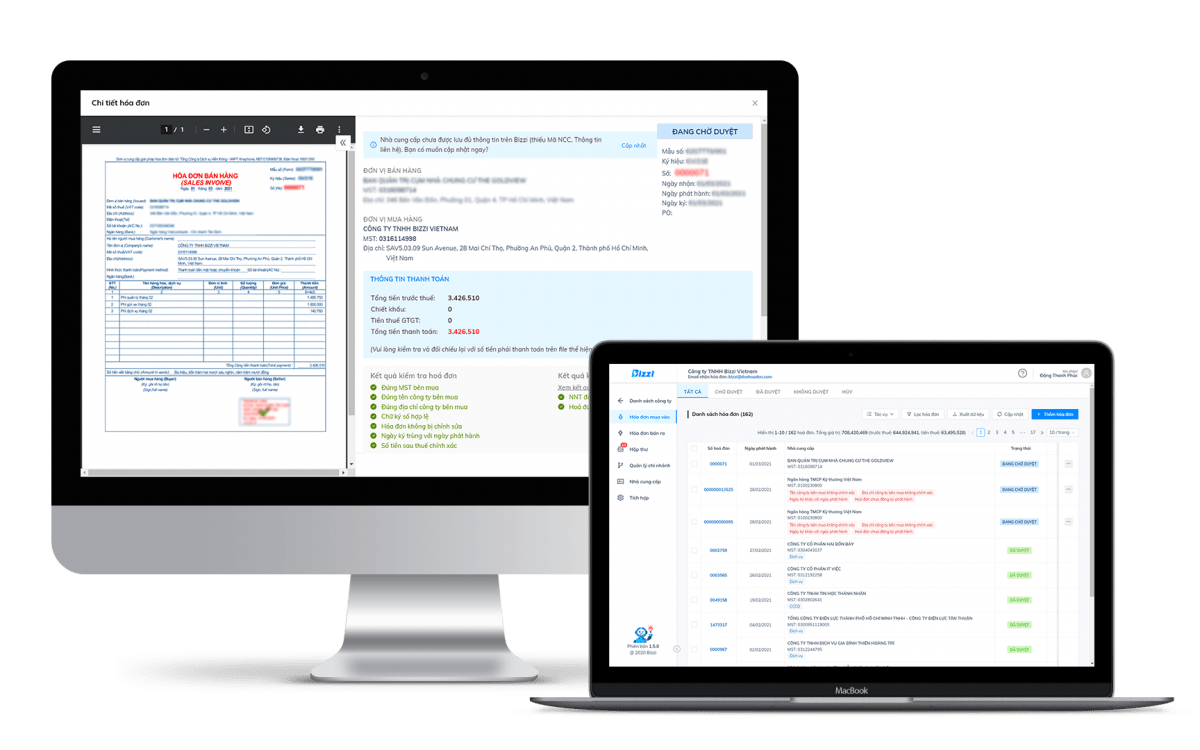
Bizzi supports the automation of incoming invoice verification processes by combining AI, OCR, and process automation technologies to read, verify, and compare data as soon as invoices are received.
Automatically read data from invoices and XML files.
Instead of manually entering data from each invoice, Bizzi automatically extracts data from XML, PDF, or image invoices.
The system can identify and standardize important information fields such as:
- Names of the seller and the buyer.
- Tax identification number.
- Invoice number.
- Invoice symbol.
- Invoice date.
- A list of goods or services.
- Value before tax.
- Value Added Tax (VAT).
- Total payment amount.
After extraction, the data is standardized to prepare it for subsequent verification and comparison steps, minimizing errors caused by manual data entry.
Automatically check invoice status and data.
After reading the data, the system continues to perform verification steps to detect invoices with unusual characteristics early on.
Bizzi supports:
- Check the status of the invoice.
- Compare the data between the XML file and the information displayed on the invoice.
- Duplicate invoices have been detected.
- Detecting discrepancies in the amount, date, or tax identification number.
- Warnings may be issued if required data fields are missing or if the data is inconsistent.
This allows accountants to identify invoices that need review before recording them, instead of only discovering errors during the settlement or auditing process.
Automatic vendor verification
In addition to checking invoices, Bizzi also assists in verifying supplier information to mitigate risks right from the start of the process.
The system can:
- Check the supplier's tax identification number.
- Compare the business information with the registration data.
- Check the business's operational status if supporting data is available.
- Identify suppliers showing signs of risk so that accountants can review them more closely before making payments or recording expenses.
Early verification helps businesses reduce the risk of receiving invoices from suppliers who are no longer operating or show signs of irregularities.
Automatically reconcile invoices with purchase orders (PO), general merchandise (GR), and contracts.
This is the most valuable step in the process of automating incoming invoice processing.
An invoice taxable This does not necessarily mean that eligible for payment or expense recognition. Before approval, businesses also need to verify that the invoice accurately reflects the purchase transaction that took place.
Bizzi supports data reconciliation on invoices with:
- Purchase Order (PO).
- Goods Receipt (GR).
- Sales contract.
- Acceptance report.
- Integrating ERP with the invoicing process. or accounting software.
Through this comparison process, the system can quickly detect discrepancies such as:
- The quantity of goods does not match the order.
- The unit price differs from the contract price.
- The tax rate is incorrect.
- The suppliers don't match.
- The invoice was issued in the wrong recording period.
- The goods have not been confirmed as received, but the invoice has already been issued.
Detecting discrepancies before payment significantly reduces the risk of incorrect payments, misrecorded liabilities, or having to adjust documents later.
Automatically generate alerts and track action progress.
After completing the verification and reconciliation steps, Bizzi automatically records the processing results for each invoice.
The system can:
- Send an alert to the accountant when discrepancies are detected.
- Forward the request for processing to the supplier if invoice adjustments are needed.
- Track the status of each invoice at each processing step.
- All inspection, approval, and exchange history is stored on a single system.
An invoice can be assigned statuses such as:
- Waiting for inspection.
- Currently being compared.
- Valid.
- Adjustments are needed.
- It has been replaced.
- Payment refused.
- Processing complete.
Tracking the entire process not only helps increase transparency in managing accounts payable It also helps businesses easily provide documentation when needed for internal audits, inspections, or explanations to tax authorities.
If a business receives hundreds or thousands of incoming invoices each month, manual verification will struggle to ensure all necessary steps are taken to verify the data, status, and related documents. An automation solution like Bizzi helps shorten processing time, reduce errors, and improve control before accounting or payment.
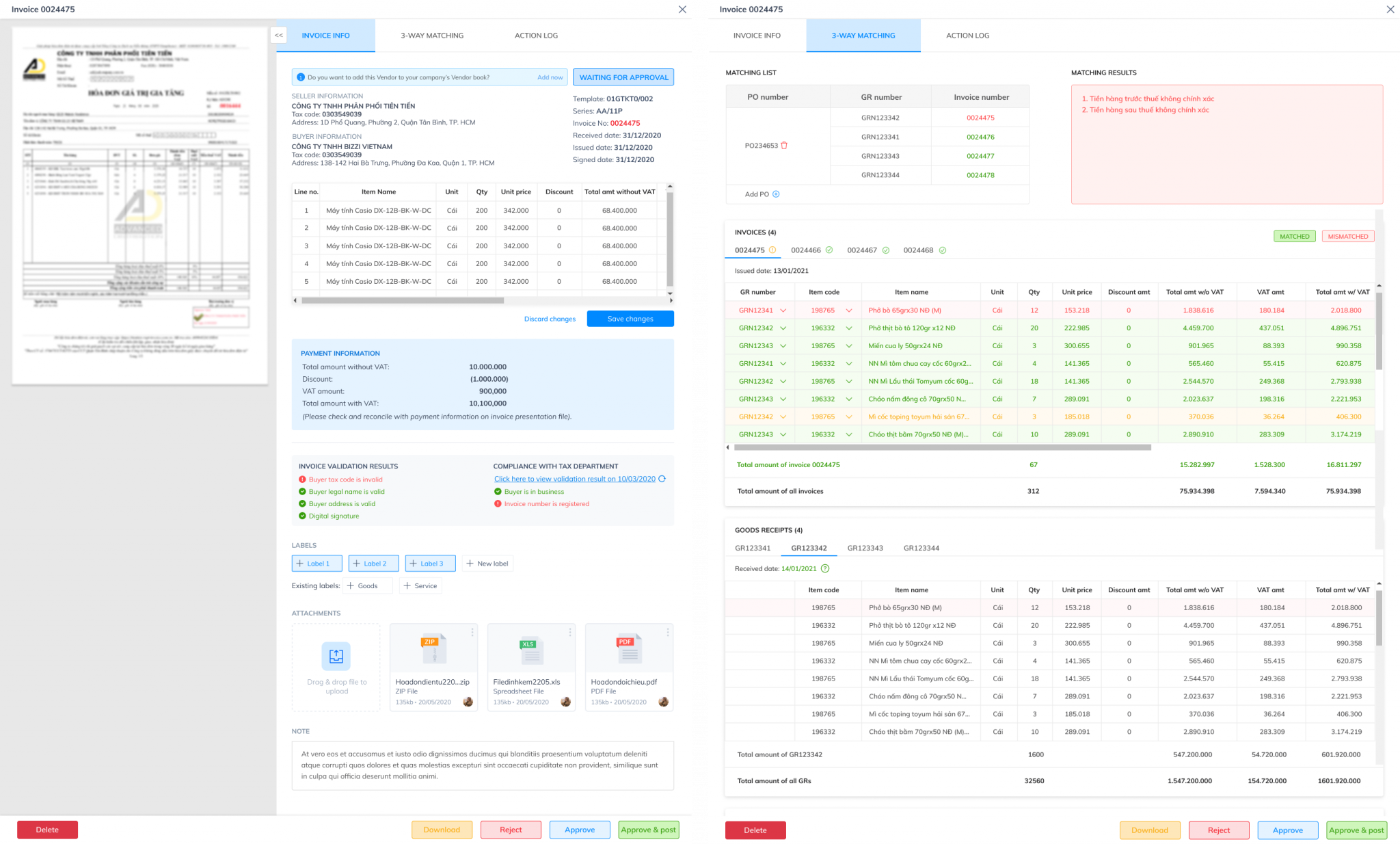
Checklist for verifying the validity of electronic invoices for accountants.
Accountants should use invoice verification checklists to ensure that each incoming invoice is fully verified for legal information, original data, and business documentation before being recorded. Following a standardized audit process helps to minimize the omission of important information, reduce the risk of accounting errors, incorrect tax declarations, or disputes arising during tax settlement.
Checklist of 12 points to verify the validity of electronic invoices before accounting.
| Content of the test | Purpose |
| □ 1. Check the business name, tax identification number, and address of the seller. | Verify the correct supplier and operational status. |
| □ 2. Verify buyer information | Ensure the business information receiving the invoice is accurate. |
| □ 3. Check the sample number symbol, invoice symbol, and invoice number. | Detecting errors or duplicate invoice numbers. |
| □ 4. Check the invoice date | Compare with the transaction date and accounting period. |
| □ 5. Check the name of the goods/services, quantity, and unit price. | Ensure the content is relevant to the actual transaction. |
| 6. Check the tax rate, VAT amount, and total payment. | Detecting discrepancies in value and tax. |
| 7. Check the invoice status on the Electronic Invoice Portal. | Verify that the invoice exists, has been assigned a code, or was issued correctly. |
| 8. Verify the XML file and digital signature. | Ensure the original data is complete, intact, and verifiable. |
| 9. Compare the content between XML and PDF files. | Detecting instances of mismatched displayed data. |
| □ 10. Compare the invoice with the purchase order (PO), goods receipt note (GR), contract, or acceptance report. | Verify the actual transaction and payment terms. |
| □ 11. Check if the invoice is duplicated, adjusted, replaced, or canceled. | Avoid incorrect recording or duplicate payments. |
| □ 12. Store complete XML, PDF, and related documents. | For use in audits, tax inspections, and subsequent traceability. |
Completing all 12 steps above helps businesses not only check valid electronic invoice It is not only legally sound but also verifies the accuracy of data and business transactions before recording liabilities or filing tax returns.
If a business has to check this checklist for dozens, hundreds, or thousands of invoices every day, doing it manually would be time-consuming and prone to errors. Bizzi can automatically read XML files, check invoice information, detect errors or duplicates, verify suppliers, and compare them with purchase orders (POs), general merchandise reviews (GRs), and related documents before recording accounts payable.
Frequently Asked Questions about Checking the Validity of Electronic Invoices
A valid electronic invoice is one that fully meets the following standards: form, content and legality According to Decree 123/2020/ND-CP, invoices must be prepared in the correct standard format, displaying all mandatory information (Tax Identification Number, company name, address, tax rate, etc.) and showing no signs of erasure or alteration.
Are electronic invoices without a tax authority code valid?
It may be valid. Some businesses are eligible to use electronic invoices without a tax authority code according to current regulations. In this case, the invoice is still legally valid if it is prepared correctly, contains all mandatory information, has a valid digital signature (if required), and meets the applicable conditions.
If the invoice cannot be found in the records, does that mean it's definitely fake?
Don't jump to conclusions yet. The inability to retrieve an invoice can stem from various causes, such as incorrect search information entry, recently issued invoices not yet synchronized with the data, or errors in the invoicing process. Businesses should double-check the search information, compare it with the XML file, and contact the supplier for verification before drawing conclusions or performing accounting entries.
Is checking invoices using a PDF file sufficient?
Insufficient. The PDF file is merely a representation of the invoice content for easy reading and storage by the user. The original legal data of the electronic invoice is located in the PDF file. XML file, which contains all the structured information and digital signatures used for authentication. Therefore, businesses should check the XML file, digital signature, and invoice status on the tax authority's system instead of relying solely on the PDF.
Can invoices with incorrect buyer information be recorded in the accounting system?
It shouldn't be accounted for immediately. When an invoice contains incorrect buyer information, the accountant needs to determine the extent of the error, compare it with current regulations, and request the supplier to correct or replace the invoice according to the correct procedure if necessary. The invoice should only be accepted after the information has been properly processed.
How should businesses with many input invoices check their records?
For businesses that process a large number of input invoices each month, manually checking each invoice is often time-consuming and makes it difficult to detect all potential risks. A more effective solution is to use... Software for automatically checking invoice validity capable:
- Automatically read data from XML and PDF files.
- Check the invoice status on the tax system.
- Detecting duplicate invoices, incorrect information, or missing data.
- Verify the supplier's information.
- Compare the invoice with the purchase order (PO), general receipt (GR), contract, and accounting data.
- The entire process is tracked to facilitate auditing and internal control.
As a result, the accounting department can shorten invoice processing time, improve accuracy, and reduce risks before accounting, payment, or tax filing.
Conclude
Job check valid electronic invoice It's not just about looking up information on the tax authority's system. Businesses also need to verify data in XML files, detect duplicate or incorrect invoices, check supplier status, and compare it with purchase orders (PO), general ledgers (GR), contracts, and accounting data before recording liabilities or making payments.
As the number of incoming invoices increases, the manual verification process can easily become a bottleneck, increasing the risk of missed discrepancies and prolonging processing time. Bizzi This helps businesses automate the entire process by reading invoice data from XML/PDF, checking validity, detecting erroneous or duplicate invoices, verifying supplier information, and automatically matching it with purchase orders (PO), general merchandise (GR), and related documents. As a result, accounting teams can significantly reduce verification time, improve accuracy, and enhance risk control before accounting, tax filing, or payment processing.
Register for a Bizzi solution demo here: https://bizzi.vn/dat-lich-demo/






