



To look up a tax identification number, first determine whether you are looking for a business, subsidiary, or your own file, and whether it has a tax identification number, legal name, or unique identifier. If you already have a business registration number, start by checking the tax authority's lookup portal; if you only have the name, find the correct legal entity on the business registration portal and then compare it with the tax portal. Individuals can check their records through the official tax channels, or use the old registration number on the publicly available form when needed for verification.
The use of personal identification numbers instead of tax identification numbers has been implemented since July 1, 2025. From July 1, 2026, Article 11 of the Tax Administration Law 108/2025/QH15 stipulates that the tax identification number of individuals, households, and business households and individuals is the personal identification number within the scope of the law; Circular 90/2026/TT-BTC provides detailed regulations on registration, transition, and status of tax identification numbers. The search results should include the name, address, status, and time of display; a single number found does not automatically prove a valid transaction or invoice.
Select the search portal based on the information you have.
Choose the channel based on the available information and the purpose of the verification. Do not speculate on the possibility of obtaining the identifier for an input field simply from the label "Tax ID"; follow the instructions directly on the current form and compare the results with the records of the correct entity.
| You have | Where to begin | Need to check after finding |
|---|---|---|
| Corporate tax code | Look up taxpayer information from the Tax Department. | Do the name, address, and operating status match the partner? |
| Business name, registration number unknown. | National portal on business registration | Select the correct legal entity; verify the name and business registration number. |
| Personal tax identification number has been issued. | Look up information for individual taxpayers. | Verify the full name and address; correct any discrepancies if found. |
| Personal identification number; please check your file. | Electronic Tax Account or eTax Mobile app of the tax authority | Verify that the identification data matches the tax records. |
Look up a business when you know its tax identification number.
The Tax Department's public form requires a tax identification number and a verification code. The name and address are for verification purposes only and do not replace the required identification number in the current interface.
- Step 1: Open Business taxpayer lookup page. Check the browser address.
tracuunnt.gdt.gov.vn. - Step 2: Enter the tax identification number in the field marked with an asterisk. *; Enter the verification code displayed on the page. You can add a name or address to narrow it down as needed.
- Step 3: Submit the search request, open the correct results, and compare the name, address, code, and operational status with the documents or partner information. If no results are found, double-check the entered characters and confirmation code before drawing any conclusions.
For comparison: You received an invoice from a branch but the contract lists the parent company. Check the issuing entity's code, name, and address in the results instead of just assuming they match based on the brand name. According to Article 5 of Circular 90/2026/TT-BTC, the code issued by the tax authority may consist of 10 digits for independent organizations and 13 digits for dependent units, among other cases; the number structure is only a guide to selecting the correct record, not a replacement for verifying the legal entity.
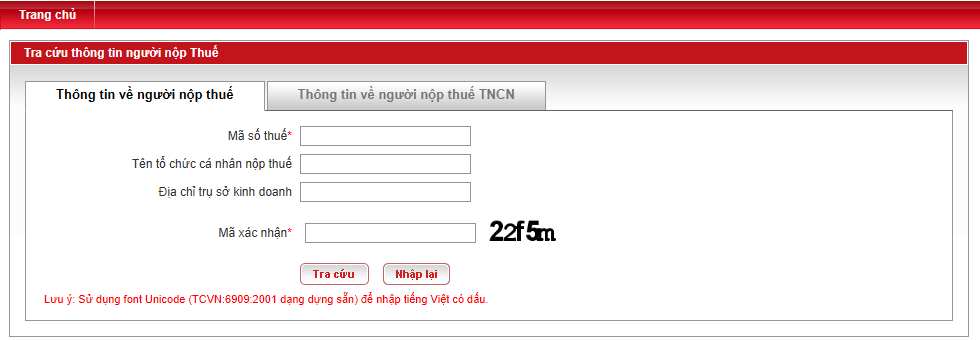
If the results have multiple lines, open the record associated with the entered code and compare them sequentially. Code number → Legal name → Address → Status. Save the source name and search date in the partner's file when making decisions based on the results. The "active" status at the tax authority only refers to the tax registration status and does not confirm any contract information, receiving accounts, or invoices. If you are currently checking purchase documents from this partner, continue. Look up electronic input invoices on the Tax Portal. To compare the data with the invoice itself.
Finding a business registration number when only knowing the company name.
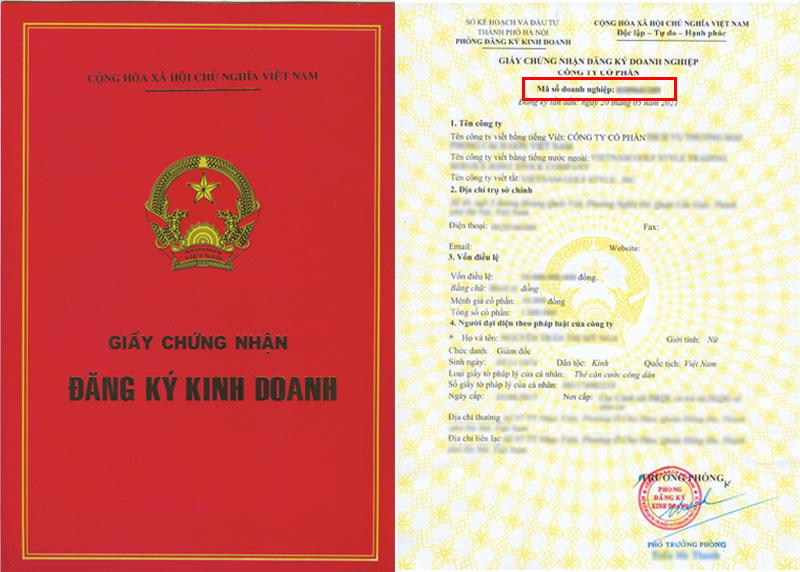
If you don't have a code, use the function. “"Find a business"” on the National Business Registration Portal. The business registration number is also the business tax code. Article 8 of Decree 168/2025/ND-CP.
- Step 1: Open National portal on business registration and select "Find businesses" in the search bar.
- Step 2: Enter the name of your business. If there are many similar names, compare the address, type of business, or other identifying information in the results before making a choice.
- Step 3: Record the correct business registration number of the legal entity and then check the tax authority's website if needed to verify the taxpayer's status. A trade name or brand name may not match the legal name.
For example: The document states "Minh An," but the search results show many businesses with similar names. Use the address, type, and legal name on the document to select the correct file, then record the business registration number. If the transacting party is a branch or subsidiary, check the unit's registration number and its relationship to the main business before including it in the accounting records. Do not assign the registration number of the first legal entity in the list to a trade name.

Look up your personal tax information after a change in your identification number.
The current rules are located at Clause 1, Article 11 of Law 108/2025/QH15: The personal identification number is the tax code of individuals and other entities mentioned in the provisions, effective from July 1, 2026. Article 5 of Circular 90/2026/TT-BTC still states that the 10-digit code is issued by the tax authority to individuals with foreign nationality or Vietnamese citizens living abroad who do not yet have a personal identification number established from the population database. Therefore, do not apply a single lookup method or number format to everyone. Those who already have a number before the conversion need to check their own data integration status.
- Step 1: If you already have an account, go to Electronic tax Or use the official eTax Mobile app to view your tax registration information. Only log in through the tax authority's channel.
- Step 2: If you have an old personal tax identification number, open a new one. personal lookup form; Enter the tax identification number and verification code in the fields marked with an asterisk. *. The full name and address are helpful for verification, but the currently checked public interface does not show a separate ID card field.
- Step 3: Compare your full name and identifying information in your records. If the system reports a mismatch or requires updating, follow the update instructions on the tax portal or contact your tax authority; do not create a new identification number just because the search results are not available.
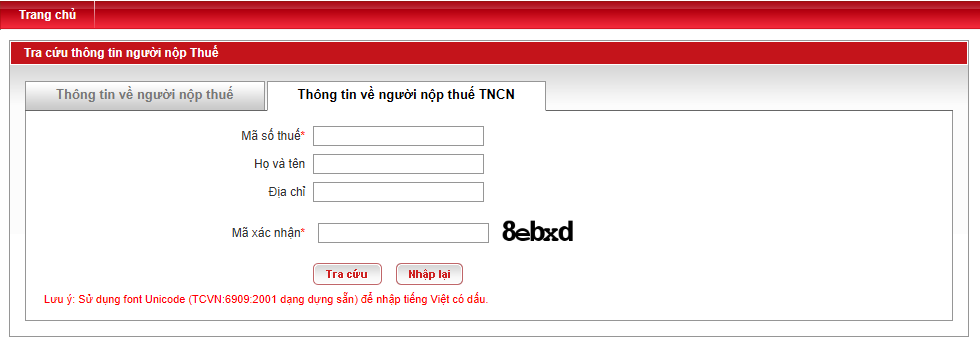
If the publicly available results only show an old code or a status indicating the identification number is pending update, compare your full name and tax registration information with your own identification documents, then check on your eTax Mobile account or the tax authority's support channel. The login screens are account-dependent and may change; follow the displayed instructions and do not rely on screenshots of publicly available forms to infer the contents.
According to Clauses 3 and 5 of Article 37 of Circular 90/2026/TT-BTC, if the personal identification number issued before July 1, 2025, has data that does not match or is incomplete with the population database, it will be in status 10 and requires adjustment of tax registration information before using the identification number. Taxpayers can check the verification status on the National Public Service Portal, the tax management information system, or their electronic transaction account; if the data is incorrect, they should contact the directly managing tax authority or the local tax office where they reside. This is for checking one's own records, not for publicly accessing the private information of others.
Read the results and handle discrepancies.
Read the results as follows correct subject, correct code, and correct display status. The tax identification number status is tax administration information and does not constitute a comprehensive conclusion regarding legal status, outstanding obligations, or the validity of an invoice. Appendix I of Circular 90/2026/TT-BTC The regulations specify the status categories; below are some codes commonly encountered when cross-referencing partners or personal records.
| Code | Meaning in the category | The next step is appropriate. |
|---|---|---|
| 00 | The taxpayer has been issued a code; the detailed reason could be that the business is not yet operational, is operational, or the individual has not yet incurred any tax obligations. | Read the detailed reason and compare it with the name, address, transaction unit, and supporting documents. |
| 01 | The company has ceased operations and has completed the procedures for terminating its tax identification number. | Do not use this result as an active code; verify the transaction timing. |
| 03 | The company has ceased operations but has not yet completed the procedures for terminating its validity. | The subject is required to clarify the situation and contact the relevant tax authority. |
| 05 | Temporarily suspending operations and business activities. | Check the suspension period and the trading time. |
| 06 | Not operating at the registered address. | Verify the address and request clarification/update from the tax authorities; do not confuse it with code 03. |
| 09 | Awaiting verification of operational status at the registered address. | Wait for the verification results; avoid concluding prematurely that the code has terminated. |
| 10 | Waiting for the personal identification number to be updated. | Individuals should verify their identification data and make updates through the official tax channels. |
If the page only displays text and not the code, read the status on the page verbatim. Do not infer from a status to recovery procedures, code closing, or invoice verification; those steps depend on the specific case and the tax authority's instructions.
| What you see | Check beforehand. | When should you ask the tax authorities? |
|---|---|---|
| No results | Verify that the correct portal is used for the individual/business, and that the entered code and characters are correct; for company names, test the legal name on the registration portal. | The code and name on the paperwork are correct, but the official gate still has no record. |
| Incorrect verification code or error page | Review the confirmation image, reload according to the portal's instructions, and try again later; do not consider form errors as tax status issues. | The error persists and requires document verification to complete the transaction. |
| Other name/address as per document | Verify the document's date, legal name, and subsidiary entity; request clarification from the document provider. | The individual in question needs to update their registration information or suspects they have entered the wrong code. |
| Individuals have many old codes or status 10 | Check your own records on the tax channel, comparing your identification number and assigned codes. | The data did not merge, or the identifying information still doesn't match even after following the official instructions. |
If it is necessary to review the conditions regarding purchase and sales documents after the taxpayer has been correctly identified, compare them separately with... regulations on input and output invoices. The status code does not replace the data and conditions of the invoice.
Frequently Asked Questions when looking up tax identification numbers
Is it possible to enter a personal identification number in the "Tax ID" field?
Article 11 of Law 108/2025/QH15 defines the relationship between the identification number and the tax code for the entities mentioned in the law. The publicly available form photographed on October 8, 2026, does not have a separate Citizen Identification Number (CCCD) field, but the field label is insufficient to conclude whether the system accepts or rejects the merged identification number. Follow the instructions displayed on the portal; if there is no result, check through your official tax account or the tax authority.
Are tax identification numbers 03 and 06 the same?
No. According to Appendix I of Circular 90/2026/TT-BTC, 03 means the business has ceased operations but the code termination process is not yet complete; 06 means the business is not operating at the registered address. Please read the detailed reasons and check with the tax authority before processing the transaction.
Can I find the tax identification number and use it to prove the validity of the invoice?
No. This result helps identify the taxpayer and registration status. Invoices must be checked separately against invoice data and applicable regulations.






