Electronic invoicing accounts are often locked when users enter incorrect login information multiple times. However, messages such as “"The account has been locked because the user entered incorrect information too many times."”, “"The account does not exist"”, “"Account disabled"” The inability to access the electronic invoice page does not necessarily have the same cause and solution.
Therefore, before attempting to reset the password again, you should accurately identify the error. If your account on the tax authority's Electronic Invoice Portal is locked due to incorrect information entry, the main solution is to use the password recovery function. If the Electronic Invoice Portal is still working normally but the invoicing software is not functioning, you need to check your account, permissions, or connection on the software instead of continuing to reset the password.
- Access the correct Electronic Invoice Portal at hoadondientu.gdt.gov.vn.
- Verify the message accurately: incorrect password, locked, non-existent, or system error.
- If your account is locked or you've forgotten your password, use the function. Forgot password to restore access.
- If the account is reported as non-existent or disabled, identify the primary account or the secondary user account before proceeding.
- If you successfully log in to the e-invoice portal but the invoicing software is still malfunctioning, check your account and connection on the software or contact your provider.
What causes an electronic invoicing account to be locked?
In practice, the phrase "electronic invoice account locked" can be used by users for various situations. Most commonly, it means the tax authority's Electronic Invoice Portal login account is no longer allowed to log in after multiple incorrect login attempts.
But there are also cases that users generally refer to as being "locked" when:
- Incorrect username or password entered.
- The system notified me that my account had been locked because I had entered incorrect information too many times.
- Forgot your password and can't log in.
- The system reports that the account does not exist.
- The secondary user account no longer has access.
- The website hoadondientu.gdt.gov.vn is inaccessible.
- I can log in to the e-invoice portal, but the invoicing software still shows an error.
- The account connecting the software to the tax authority's system is no longer usable.
These situations need to be differentiated before addressing them. Continuously trying passwords when the actual cause is that the account doesn't exist, permissions have been lost, or the software has lost connection will not solve the problem.
Identify the correct error before unlocking your electronic invoice account.
The table below will help you quickly determine the course of action based on the situation you are experiencing.
| Status | The likelihood of it happening | First course of action |
|---|---|---|
| Incorrect username or password | Incorrect login information | Check your username, password, and verification code before trying again. |
| The account has been locked due to entering incorrect information too many times. | The account was locked after multiple unsuccessful login attempts. | Stop trying passwords and switch to the Forgot Password function. |
| Forgot password | No longer have correct login information. | Perform the password recovery procedure. |
| The account does not exist. | Incorrect username, secondary user deleted, or account status changed. | Identify the account type and check with the administrator. |
| Account disabled | Account status needs to be verified; do not assume it's a password error. | Check your account and contact the authorized administrator or support unit. |
| Unable to access hoadondientu.gdt.gov.vn | This could involve the website, network, browser, or system. | Check accessibility before resetting the password. |
| I can log in to the e-invoice portal, but the software is still malfunctioning. | Account errors in the software, permissions, or connection. | Check the configuration in the invoicing software. |
The account on the tax authority's electronic invoice portal and the login account for the electronic invoice software provided by the vendor are not always the same. It is necessary to accurately identify the system error before changing the password.
How to unlock a locked e-invoice account due to incorrect password entry.
If the system notifies you that your account has been locked after entering the wrong information too many times, you should not continue trying different passwords. Proceed to the login recovery process.
-
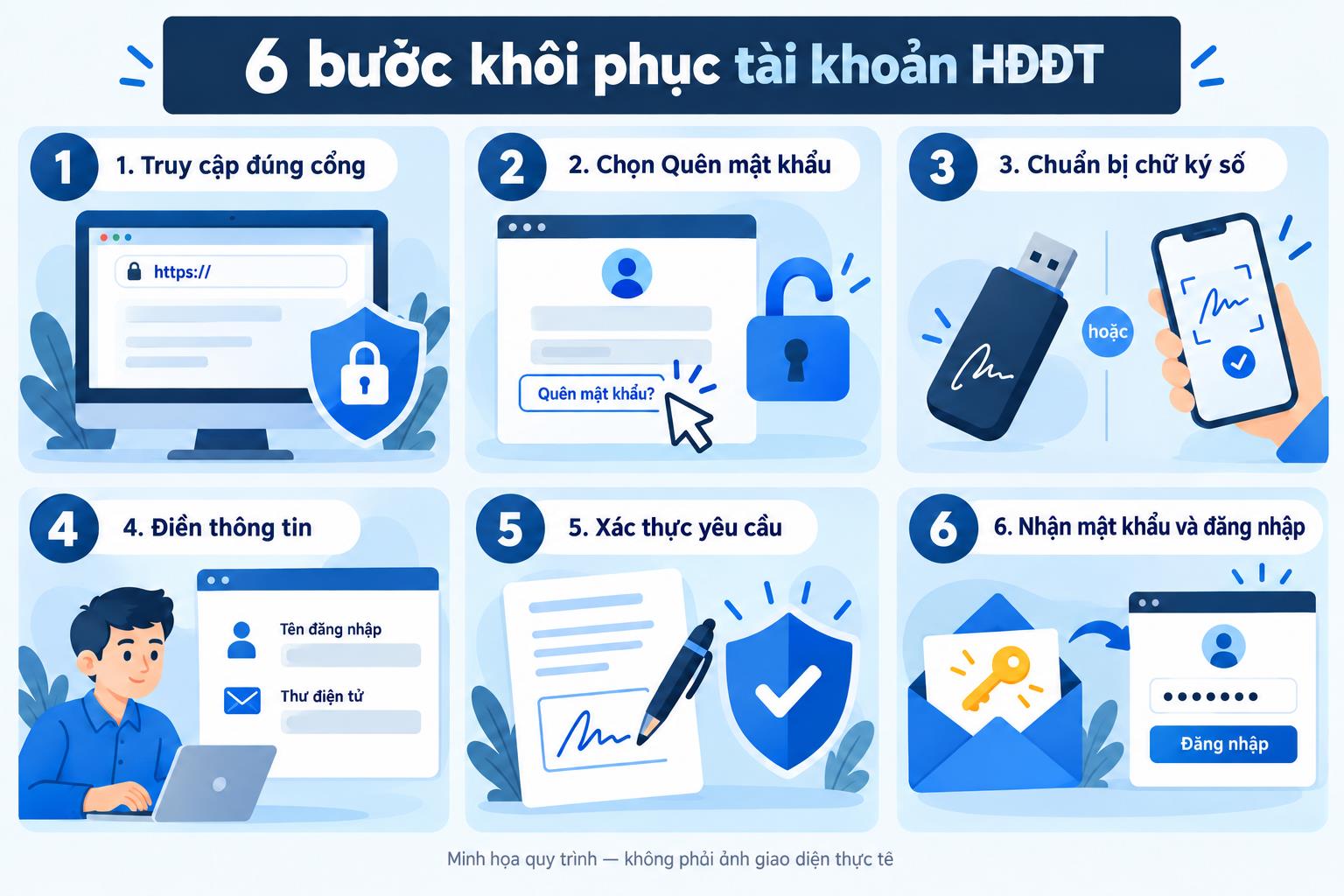
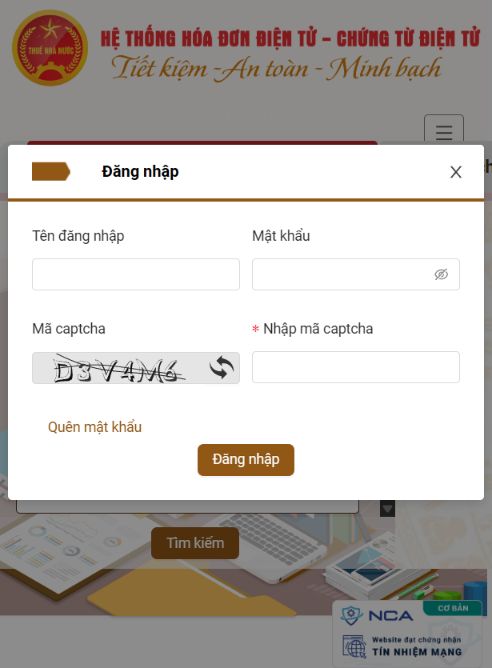
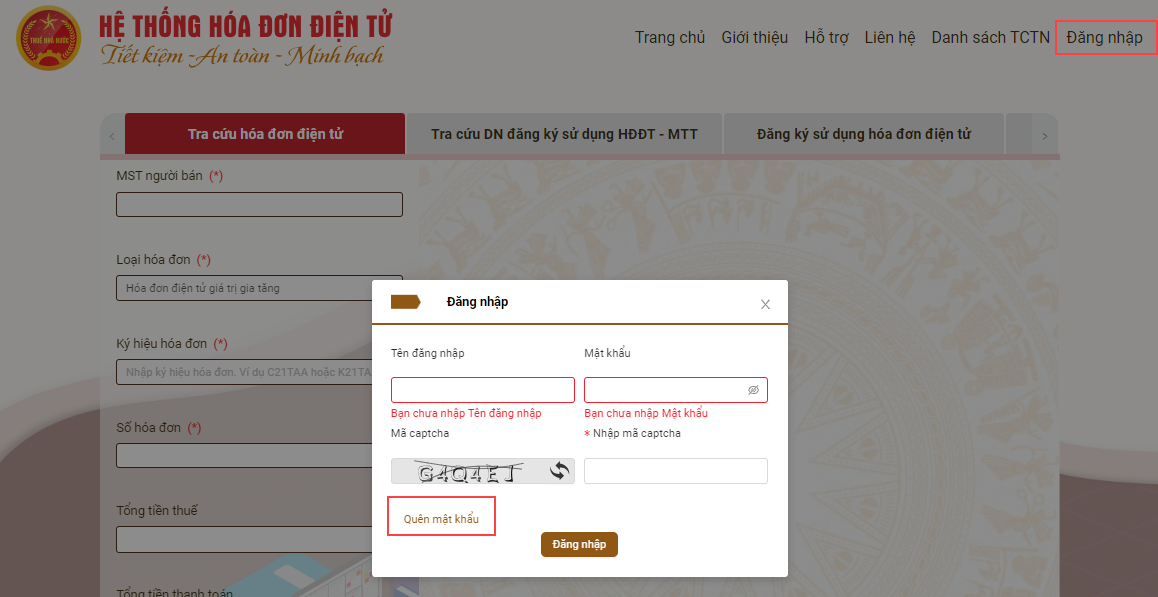
Step 1: Access the Electronic Invoice Portal
Access hoadondientu.gdt.gov.vn and open the login screen. It's advisable to double-check the domain name before entering account information or performing any actions related to digital signatures.
-
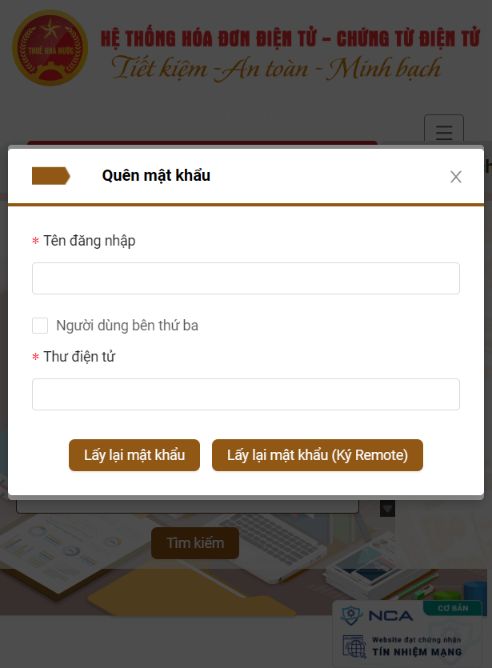
Step 2: Select Forgot password
If your account is locked or you are unsure of your current password, use the password recovery feature instead of continuing to try logging in.
-
Step 3: Enter account information
Fill in the information requested by the system to verify your account. For a primary business account, the tax identification number is often crucial information during the login and verification process.
-
Step 4: Perform the required verification step.
Depending on the authentication method being used, businesses may need to perform actions related to digital signatures or supporting system components. Please follow the instructions displayed on the E-Invoice Portal.
-
Step 5: Check your registration email.
After completing the recovery request, check the email address registered with the account. You should also check your Spam or Junk folder if you don't see the notification.
-
Step 6: Log in again using your new information.
Use the most recent password you were given or set to log in again. Do not continue using old passwords that are saved in your browser or software.
If you don't remember your password exactly, trying multiple variations can complicate the process. After a few reasonable attempts, you should use the password recovery procedure.
How long does it take for a locked electronic invoicing account to be unlocked?
It should not be assumed that a locked e-invoice account will automatically unlock after 15 minutes, 30 minutes, or any other fixed period of time. The handling mechanism depends on the system and the account status at the time the error occurs.
If the Electronic Invoice Portal has clearly indicated that your account has been locked due to entering incorrect information too many times, the proactive approach is to initiate the password recovery process instead of simply waiting and trying to log in again.
- Did the system actually report "account locked" or just an incorrect password?
- Are you logged in with your primary account or a secondary user account?
- Is the email address I registered with still receiving emails?
- Have you performed the "Forgot Password" action, or are you still waiting for the system to unlock automatically?
What should I do if my electronic invoicing account is disabled?
It shouldn't be set to default. “"Account disabled"” and “"Account locked due to incorrect password entry"” It's the same error.
When the system displays a disabled status, the following should be determined first:
- Is this the company's primary account?.
- Is this account a user account created specifically to grant permissions to employees?.
- Is the login information correct?.
- Does the account still exist and is it still granted access?.
- The error appears on the e-invoicing portal or on the provider's software.
If it's a secondary user account, check with the administrator account to see if the user still exists and has access. If it's the primary account and the unusual status persists after checking the information, use the official support channel to verify the account status.
First, it's necessary to identify the cause and current account status to avoid creating additional accounts or unnecessary configurations.
What should I do if my electronic invoice account is reported as non-existent?
Notification “"The account does not exist"” This needs to be handled differently from a wrong password error.
First, check if the username is correct. If the business uses multiple accounts or sub-users, you need to identify which account the user is currently logged in with.
| Account type | Needs to be checked | Solution |
|---|---|---|
| The company's main account | Username, business information, contact email | Check the account recovery information and procedures. |
| Secondary user account | Does the user still exist and have the necessary permissions? | Contact the administrator account to check or re-grant permissions. |
| Account on the e-invoice software | Is the software user still active? | Check with your administrator or software vendor. |
If the secondary user has been deleted, using the "Forgot Password" function will not resolve the issue because the problem lies in the account status, not the password.
If I can't access hoadondientu.gdt.gov.vn, does that mean my account is locked?
Are not. Inability to access a website and having your account locked are two different situations.
If the browser fails to load the page, displays an error, or the connection is interrupted before reaching the login screen, there is no basis to conclude that the business account has been locked.
- Is the access address hoadondientu.gdt.gov.vn correct?.
- Is the device's internet connection working properly?.
- Can the website be opened on different browsers or devices?.
- Did the error occur before or after entering the username and password?.
- Is there a specific notification about the account being locked or is it just that the website is unloadable?.
If the website is inaccessible, changing your password may not be necessary. Only proceed with account processing once the system has received your login information and returned an account-related error.
What should I do if my electronic invoice lookup account is locked?
If the account used to log in to the e-invoice portal and look up invoices is locked, it is first necessary to restore account access. After successfully logging in, users can then continue with the lookup operations on the system.
The basic process includes:
- Confirming the error is related to the login account.
- If your account is locked or you've forgotten your password, proceed to recover it.
- Log back into the Electronic Invoice Portal.
- Check if the account has permission to access the functions it needs to use.
- Continue checking your invoices after your account is functioning normally.
If your goal is to check your invoices after logging in, please refer to the instructions. Look up electronic invoices on the tax authority's portal..
What should I do if the HDDT Plugin isn't found when I try to recover my password?
During the authentication process or while working with the Electronic Invoice Portal, users may encounter situations where the system does not recognize the necessary supporting components on their computer.
If the system requests the HDDT Plugin but cannot find it, you should resolve this issue before attempting the account recovery process again.
- Access the Electronic Invoice Portal from the correct official address.
- Check the support section or installation instructions for the component that the system requires.
- Check if the supporting application is installed and running on your device.
- Check your digital signature device if the current step requires the use of a digital signature.
- After the support component is active, repeat the password recovery process.
Do not download installation files, plugins, or digital signature tools from unknown links simply because they have names similar to system components.
What should I do if I've recovered my password but still can't log in?
This is a case where a re-diagnosis is needed instead of repeatedly changing the password.
- Make sure you're using your most recent password.
- Delete any old passwords that the browser automatically fills in, if any.
- Verify that the username or tax identification number is correct.
- Check Caps Lock, keyboard language, and special characters.
- Confirm that you are logged into the correct system.
- If it's a secondary user, check if the user still has access rights.
- If the system reports a plugin error, resolve the plugin issue first.
- Try logging in directly to the Electronic Invoice Portal to differentiate between a Tax Portal error and a software error.
The final point is especially important. If you successfully log directly into the e-invoice portal but the invoicing software still reports an incorrect account, a connection loss, or is unable to retrieve data, the problem is most likely no longer related to the locked status of your e-invoice portal account.
I can log in to the e-invoice portal, but the invoicing software is still malfunctioning. How do I fix this?
Businesses often use both the tax authority's e-invoice portal and their own e-invoice software simultaneously for daily operations. Therefore, successfully logging into one system does not necessarily mean the configuration on the other system is correct.
If the e-invoice portal logs in normally but the software still reports an error, please check:
- Is the username or password saved on the software the most recent information?.
- Is the user account on the software still active?.
- Does the user have sufficient permissions to perform the operation they are currently performing?.
- Is the connection between the software and the related systems working?.
- Error messages appear during the login, billing, signing, or invoice submission steps.
You should not change your E-Government Portal password repeatedly if you have successfully logged in directly. Instead, send the specific error message or code to the administrator or software vendor to pinpoint the exact source of the problem.
If a business uses B-Invoice, what should they check when encountering account errors?
B-Invoice This is Bizzi's electronic invoicing solution. For businesses using B-Invoice, when encountering the "electronic invoice account locked" situation, it is necessary to identify the error that occurred. Tax authority's e-invoice portal good Accounts/processes on B-Invoice.
A simple way to differentiate them is to examine each layer directly:
| Check | Result | Next direction |
|---|---|---|
| Log in to hoadondientu.gdt.gov.vn | Unable to log in, the system reports that the account is locked. | Process the e-invoice portal account first. |
| Log in to hoadondientu.gdt.gov.vn | Login successful | Do not continue resetting your e-invoice portal account unless necessary. |
| Log in to B-Invoice | User account is experiencing errors. | Check users and permissions on the system. |
| B-Invoice is accessible but the transaction is experiencing errors. | The error occurred at a specific step. | Record the error message and check it according to the proper procedure. |
Clearly identifying the error within each system helps the accounting department avoid changing the e-invoice portal password when the actual cause lies in an internal account or another step in the software usage process.
How to prevent your electronic invoice account from being locked.
After a successful recovery, businesses should standardize their account management practices to prevent the account from being locked again.
- Avoid trying multiple passwords repeatedly if you are unsure of your login credentials.
- Store account information according to the company's security procedures.
- Do not share passwords through public or difficult-to-control channels.
- Maintain access to the email address used to receive account information.
- If multiple people are using the account, prioritize assigning separate accounts and permissions instead of using a single user account when the system allows it.
- When changing your password, update any systems that are using the old connection information if necessary.
- Distinguish between e-invoice portal accounts, software accounts, and sub-user accounts.
For businesses with multiple accounting staff or a large volume of invoices, centralized account management, access control, and invoice processing procedures help reduce dependence on a single account or individual.
Frequently Asked Questions when an e-invoice account is locked
What should I do if my account has been locked due to entering incorrect information too many times?
Stop trying the password repeatedly and use the "Forgot Password" function on the Electronic Invoice Portal to recover your login information. Once you have a new password, use the latest information to log in again.
How long will my electronic invoicing account be locked?
You shouldn't set a fixed unlock time by default. If the system has notified you that your account is locked, you should proactively use the password recovery process instead of waiting a while and then trying to log in again.
What should I do if my hoadondientu.gdt.gov.vn account is locked?
Access the correct Electronic Invoice Portal, check for error messages, and select "Forgot Password" if your account is locked or you don't remember your password correctly.
How to recover a locked electronic invoice password?
Using the "Forgot Password" function on the E-invoice Portal, enter the account information as requested, complete the verification step if required, and check your registered email to receive or reset your login information.
Is it possible to recover the password for a disabled e-invoicing account?
First, determine the reason the account was disabled. Don't assume it's a password error. If it's a secondary user, check the status and permissions with the administrator account.
If my account is reported as non-existent, does that mean it's been locked?
Not necessarily. "Doesn't exist" could refer to the login name, user status, or the deletion of a secondary user account. You should verify the account before attempting a password reset.
If I can't access the electronic invoice page, does that mean my account is locked?
No. If the website fails to load before the system verifies your login information, the problem could be with your connection, browser, or system. Only conclude that your account is locked if you receive a notification related to the account.
If my electronic invoice lookup account is locked, can I still look up my invoices?
If the search function requires logging in with a locked account, you need to restore your access first. Then log in again and continue searching.
What should I do if my account is still locked even after changing my password?
Verify that you are using the most recent password, the correct username, and the correct system. If it still doesn't work, identify the account type, user status, and specific error message instead of continuing to change the password.
Are the e-invoice portal account and the invoicing software account the same?
They should not be assumed to be the same account. The tax authority's e-invoicing portal and the vendor's e-invoicing software may use different account systems and permissions. Therefore, it is necessary to identify where the error originated before troubleshooting.
Are blocked electronic tax accounts handled the same way as blocked electronic invoice accounts?
Do not apply the same procedure mechanically. "Electronic tax account" may refer to a different system than the Electronic Invoice Portal. Identify the exact system you are logging into and follow that system's recovery procedure.
What if the device is unlocked but I still can't issue invoices?
If you have successfully logged into the e-invoice portal but are still unable to perform transactions on the invoicing software, you need to check for software errors, user permissions, digital signatures, and related connections. At this point, the problem is no longer necessarily an e-invoice portal account error.
Manage your electronic invoicing process centrally with B-Invoice.
Unlocking accounts helps businesses regain access, but for the accounting department, the ultimate goal remains ensuring the smooth running of the invoice creation, processing, and management process.
Especially when a business has many users, multiple invoice points, or needs to connect its invoicing operations with other systems, clearly identifying accounts, access rights, and error points will help reduce troubleshooting time.
B-Invoice supports businesses in performing electronic invoicing tasks within the Bizzi solution ecosystem. Instead of handling individual login issues, businesses can standardize how they operate invoicing, manage users, and coordinate between departments on a clearer process.
Businesses struggling with their invoicing process or looking for suitable solutions can find more information here. B-Invoice electronic invoice solution.
If your current need is simply to check a bill after recovering your account, see the instructions. How to look up electronic invoices. If you need to look up the information directly on the tax authority's system, please see the instructions. Look up electronic invoices on the tax authority's portal..
Conclude
When Electronic invoice account locked, The most important thing is to correctly identify the situation before taking action. If the account is locked due to multiple incorrect password attempts, proceed to the password recovery process instead of continuing to try logging in. If the account is disabled, non-existent, or a secondary user has lost privileges, check the account status and administrator. If you cannot access the website, separate the system access error from the account error.
If you have successfully logged into the e-invoice portal but the invoicing software is still not working, please check your account, permissions, and connection on the software. Identifying the correct source of the error will help accountants resolve the issue faster and avoid unnecessary changes to account information.