



Duplicate payment This refers to situations where a business makes more than one payment for the same payment obligation. The most common instance is a supplier invoice being processed and paid twice, but errors can also occur when the same advance payment, payment request, or transaction is entered into two different processing streams.
The key difference to distinguish right from the start is duplicate invoices and duplicate payments They are not exactly the same. An invoice may be received or recorded twice, but that doesn't necessarily mean the money has been transferred twice. Double payments only occur when the same obligation has actually been paid multiple times.
Therefore, to effectively manage this risk, businesses need to look at it from the very beginning. Receive invoice → Record → Approve → Create payment order → Reconcile after payment, instead of just checking the invoice number in a separate step.
What is duplicate payment?
Duplicate payments This refers to situations where the same payable is paid two or more times due to the same document being processed multiple times, inconsistent data entry, a supplier existing under multiple codes, transactions being approved in multiple flows, or a manually paid amount continuing into a recurring payment period.
For example, a supplier sends an invoice via email to both the purchasing and accounting departments. Both departments then upload the invoice to the system under two different filenames. If the process doesn't recognize this as the same obligation, the business could create two payment requests and disburse funds twice.
What is the difference between duplicate invoices and duplicate payments?
| Criteria | Duplicate invoice | Duplicate Payment |
| Nature | The same invoice is received, uploaded, or recorded multiple times. | The same obligation has been paid for multiple times. |
| Has the money left the business? | Doubt. | Have. |
| Where can it be found? | When receiving, entering, and checking invoices. | Before the payment run, during bank reconciliation, or when reviewing accounts receivable. |
| Solution | Identify the correct record, type or mark the duplicate, and investigate the cause. | Confirm the overpayment, contact the supplier for a refund/offset, and correct the relevant accounting data. |
If your business's problem lies in duplicate entries, please refer to a separate article. How to handle duplicate invoices. This article focuses on the following step: how to prevent the same obligation from being paid twice.
Common causes of duplicate payments
1. Invoices enter businesses through multiple channels.
The supplier may send the same invoice via email, the supplier portal, in paper form, or resend it if no response is received. If each copy goes through a separate processing stream, the system may treat them as different documents.
2. The invoice numbers entered are inconsistent.
Variations such as INV-00125, INV00125 or 00125 This could cause the exact match-based duplicate checking mechanism to fail to detect the same document.
3. The supplier exists under multiple codes.
If a vendor has two vendor IDs or is created multiple times under different names, checking for duplicates within each vendor record may miss the same invoice.
4. Payments outside the standard procedure.
An urgent payment can be made manually in advance, but the invoice will still remain on the system's payment queue and will be processed in a later payment run.
5. The approval flow is fragmented.
When the same document is sent to multiple departments or approved via email, chat, and parallel systems, it becomes difficult for businesses to know which transactions are complete and which are still pending.
6. Retry or payment integration error
In some systems, if the payment response status is delayed or fails, users may attempt the transaction again even if the first attempt was successful. Therefore, a mechanism is needed to verify the actual status before retrying.
How do duplicate payments affect businesses?
The most obvious risk is More cash was spent than was actually required.. But the impact doesn't stop at the amount of overpayment.
- Incorrect accounts payable: Supplier balances may be negative or may not match counterparty statements.
- Bank reconciliation is more complex: Accountants must trace the reasons for the discrepancies and determine which amounts need to be recovered.
- Late closing: Misappropriation of funds may carry over to the next period if it is not detected and corrected.
- Time-consuming to retrieve: The AP department must contact the supplier, cross-check the documents, and track refunds or compensation.
- This reveals a loophole in the control system: Duplicate payments often reflect problems with the invoice intake, vendor master, approval, or payment release.
Checklist detects duplicate payments before funds leave the account.
Before each payment period, accountants can check the following data layers:
| Test Class | The school should compare | Signs that need reviewing |
| Supplier | Tax ID, vendor ID, name, bank account | A single tax identification number (MST) can have multiple vendor records; the same bank account can have unusually different names. |
| Bill | Invoice number, symbol, date, total amount | Similar numbers; same vendor + amount + date; same file submitted multiple times. |
| Payment request | Request ID, applicant, cost center, attached documents | The same invoice appears in multiple requests. |
| Payment history | Invoice ID, payment reference, date, and amount | The invoice already has a paid status but still appears in the payment batch. |
| Exception | Emergency payment, manual payment, retry | Off-channel transactions have not yet been synchronized back into the main system. |
The 5-step process for controlling duplicate payments.
Step 1: Centralize invoices into a single receiving stream.
Businesses should have a central point of contact or platform for receiving invoices instead of having documents scattered across personal emails, chat, and shared folders. The goal is for each invoice to have a clear processing status.
Step 2: Normalize data before checking for duplicates.
Invoice numbers, supplier codes, dates, and amounts need to be standardized before reconciliation. This helps reduce instances where the same document is considered different by the system simply because of hyphens, spaces, or spelling of names.
Step 3: Check for duplicates and near-duplicates
In addition to exact matches, businesses should check combinations such as: vendor + similar invoice number + amount + invoice date. Cases with a high degree of similarity should be flagged for accounting confirmation rather than automatically concluded as duplicates.
Step 4: Double-check before payment release.
Even if the invoice has passed the data entry stage, the payment batch should still be compared against the payment history. This is an important layer of protection for cases where invoices are paid manually or go through an exception flow.
Step 5: Post-payment reconciliation
Comparing bank statements, accounts payable records, and vendor statements helps detect duplicate payments that may have slipped through previous control layers. The results of post-audits should also be used to correct the root cause rather than just recovering the money.
Can 3-way matching prevent completely duplicate payments?
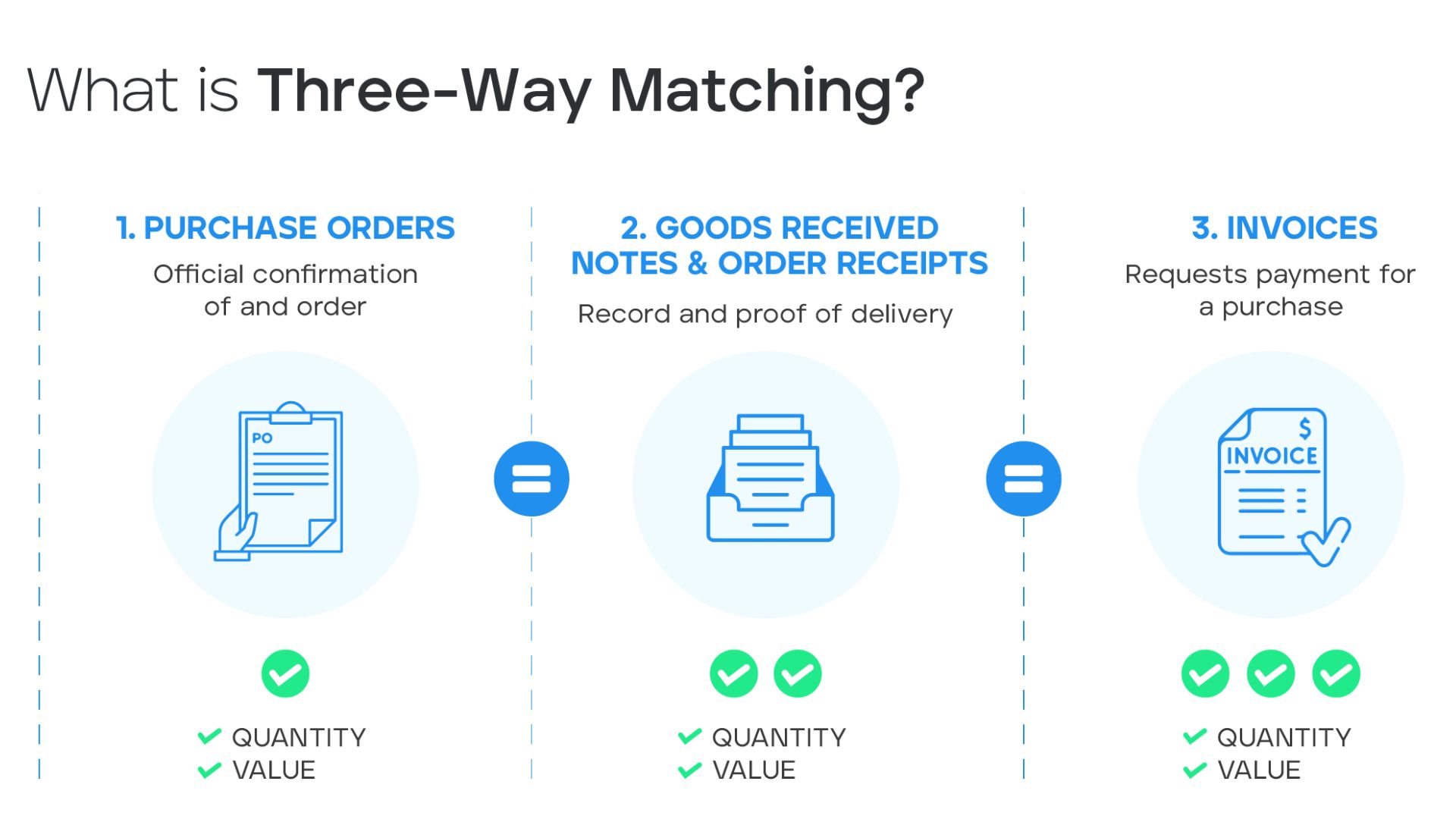
Are not. 3-way comparison This helps verify invoices against purchase orders (POs) and delivery/acceptance documents, thereby reducing many discrepancies in quantity, unit price, or unfounded transactions. However, this mechanism does not replace checking payment history.
An invoice may perfectly match the purchase order (PO) and the gross receipt (GR), but still be paid a second time if the system doesn't verify that the obligation has already been paid. Therefore, 3-way matching should be a layer of control In the AP process, it's not the only mechanism.
What is the difference between exact match and near-duplicate detection?
Check for exact matches when data is entered consistently. For example, the system might flag an alert if the same vendor, invoice number, and amount appear twice.
But in reality, duplicates can be merged into one. INV-2026-1008 and INV20261008, Or the supplier's name may have different abbreviations. In that case, approximate comparison algorithms can help. ranking of duplication likelihood Based on multiple data fields.
It is important that near-duplicate detection is created. Warning for review, It's important not to automatically assume every similar record is invalid. Some valid transactions may have the same amount, the same date, or a very similar description.
Where in the process does Bizzi help control duplicate payments?
In an incoming invoice processing workflow, Bizzi can assist businesses in centralizing documents, standardizing data, verifying information fields, cross-referencing with purchase documents, and directing anomalies to a separate processing flow according to the deployment configuration.
The value of this layer of control lies not in a single alert but in linking the steps together. invoice intake → validation → matching → approval → payment handoff → audit trail on the same data stream. Businesses can learn more at input invoice processing solution and business cost management.
What should be done if there are duplicate payments?
- Confirmation of duplicate transactions: Compare the invoice, payment reference, bank statement, and accounts receivable ledger.
- Stop the related payment batches: If the same invoice is still in a different payment stream.
- Contact the supplier: Agree on a refund or offset the amount against the next payment.
- Adjusting the accounting records: Accurately record the nature of the receivable/deduction or adjust it according to the actual records.
- Identify the root cause: Check why the duplicate copy passed the intake, approval, or payment check.
If the issue stems from the same invoice being recorded multiple times, please process the supporting document data first according to the instructions in this article. duplicate invoices.
FAQ about duplicate payments
Are duplicate payments always due to accounting errors?
No. Errors can arise from multiple sources: invoices passing through multiple channels, duplicate vendor masters, parallel approvals, payment retry, manual payments outside the system, or data not being synchronized across platforms.
Does ERP automatically block duplicate payments?
This assumption should not be made. The ability to perform checks depends on the system configuration, the data fields being compared, and the cleanliness of the vendor/invoice master. Near-duplicate transactions or out-of-flow exceptions may still require an additional layer of control.
Can 3-way matching replace duplicate payment checks?
No. 3-way matching checks the relationship between the purchase order (PO), receipt/acceptance, and invoice. Duplicate payment check requires additional document history and payment history to determine whether that obligation has been paid before.
Should we automatically block all similar invoices?
No. Similar records should be rated or flagged for review. Two valid invoices can have the same amount or the same date, so multiple attributes are needed to determine the risk of duplication.
When should you review the vendor master?
Regular reviews are recommended, especially after system mergers, ERP migrations, master-data process changes, or when unnecessary codes/accounts are found to be from the same vendor.
Conclude
Controlling duplicate payments shouldn't rely on a single feature. A more effective approach is to establish multiple layers of control: centralized receipt, data standardization, duplicate/near-duplicate checking, document reconciliation, payment history verification, and post-payment audit.
When these steps are connected on the same data stream, the AP department can focus on the exceptions that truly need processing instead of manually reviewing the entire transaction. If the business has a large volume of invoices or multiple approval streams, this is also a point to consider when evaluating the suitability of an AP automation platform like Bizzi.






