


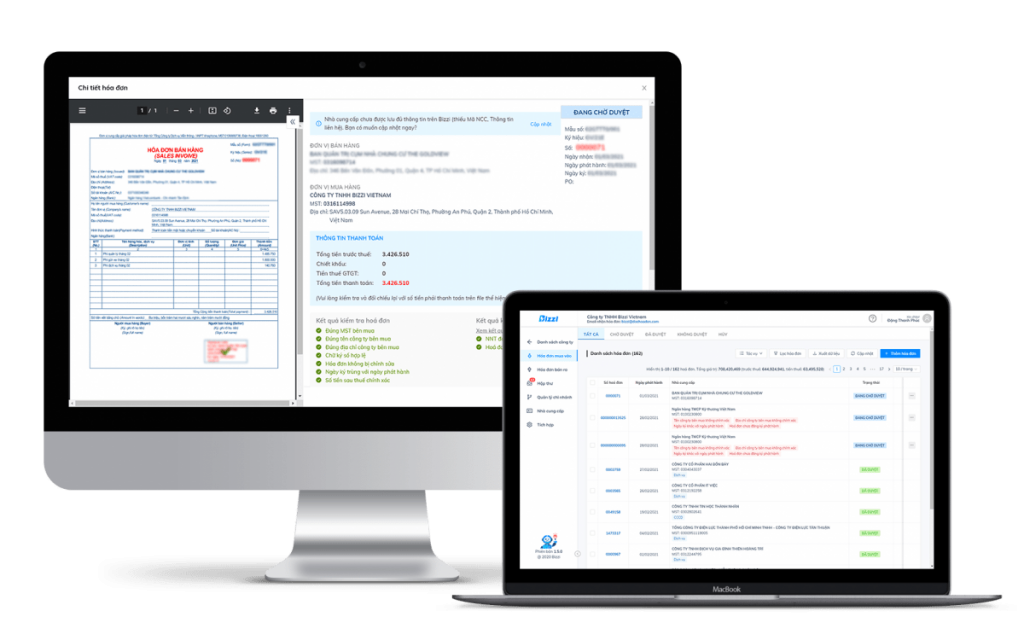
Automate input invoice processing This involves reducing repetitive operations in the chain of invoice receipt, data extraction, verification, reconciliation, exception handling, and data transfer to the accounting/ERP system. The goal is not to completely eliminate human involvement in the process, but rather to have the system process transactions according to clear rules and forward the correct exceptions to the person who needs to make the judgment.
For businesses with a large volume of invoices, this approach helps reduce data re-entry, clarify the status of each document, and create a seamless audit trail from invoice receipt to readiness for accounting or payment. However, the actual level of automation depends on data quality, invoice type, level of PO/GR standardization, approval rules, and ERP integration scope.
This article focuses on 5-step process, This includes the necessary control points and how to evaluate an AP Automation system. If you are looking for current Bizzi product features, see the separate page. Solutions for processing and matching input invoices.
What is automated invoice processing?
An automated input invoice process typically connects multiple layers of workflow:
- Inadvertent intake: Collect invoices from configured sources.
- Data extraction: Retrieve data from XML, PDF, scanned images, or other formats.
- Validation: Check the data structure, required fields, and established rules.
- Matching & Exception: Compare with the purchase order (PO), goods receipt/acceptance documents, or internal data if the process includes these documents.
- ERP/accounting handoff: Transfer the verified data to the accounting step or target system.
Not every business needs all five layers, and not every invoice can follow the same workflow. Invoices without purchase orders, employee costs, logistics, recurring services, or transactions with discrepancies often require separate processing rules.
“How should "zero-touch" be understood?
Zero-touch This should be understood as a design goal: that fully qualified transactions can go through multiple steps without requiring user re-entry or manual approval at each point. This does not mean that 100% invoices are always completely automated.
A typical process usually falls into three groups:
| Group | Appropriate handling |
| Matching transaction | It is possible to continue automatically according to the configured workflow. |
| The trade has a spread within the range. | Tolerance and approval authority may be applied according to policy. |
| The real exception | Forward to accounting/purchasing/approval person for verification. |
Therefore, more useful KPIs than a single “zero-touch rate” are: the percentage of invoices requiring data correction, the exception rate, the exception handling time, the number of data re-entry attempts, and the time from receipt to readiness for accounting.
5-Step Automated Process for Handling Input Invoices
Step 1: Collect invoices from controlled sources.
Invoices can come from email, vendor portals, XML/PDF files, shared folders, or other integrated sources. The goal of the intake step is to bring documents into a clear, stateful flow, rather than having multiple copies scattered across individual emails.
Centralizing input helps reduce the risk of processing the same document across multiple threads, but It does not automatically guarantee that no copies will be missed or duplicates will be generated.. Businesses still need rules for identifying duplicates, audit logs, and exception handling procedures.
Step 2: Extract data according to the correct document type.
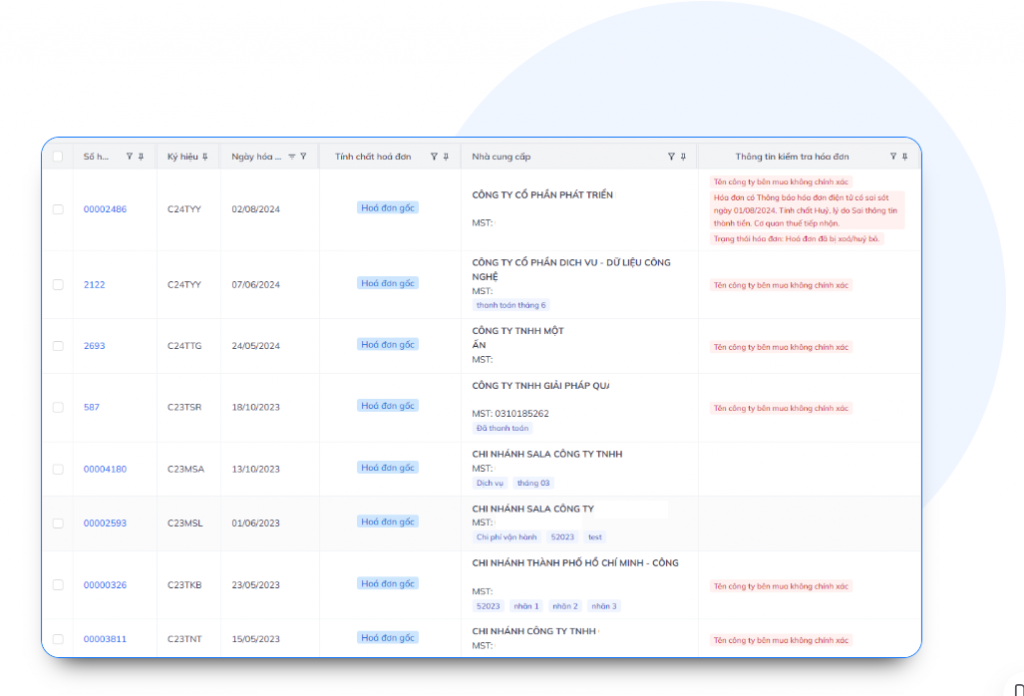
Not all input requires OCR. If a business has XML files with structured data, the system can read the original data directly. For scanned images or PDFs, OCR and other document extraction techniques can help retrieve fields such as:
- Supplier's name and tax identification number;
- Invoice number, symbol, and date;
- Pre-tax price, tax rate, tax amount, and total amount;
- lines of goods/services if the solution supports line-item extraction;
- PO code or reference data if the document shows it.
The ability to read line-items, multi-page invoices, foreign invoices, or complex tables needs to be tested on genuine business documents. Accuracy should not be inferred solely from a demo with a few standard invoice templates.
See more articles What is invoice OCR and how to evaluate OCR software? if you need to delve deeper into the extraction layer.
Step 3: Inspect the data and flag exceptions.
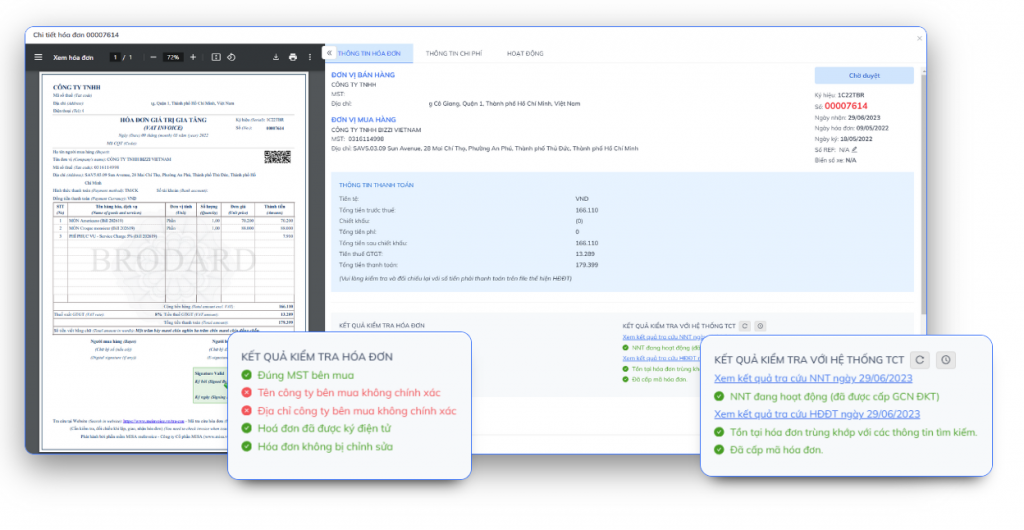
After extraction, the system can apply rules to check data fields, perform arithmetic calculations, detect duplicates, or compare information with connected data sources.
It is necessary to distinguish clearly:
- Extraction Answer the question, "What does the system read from the document?".
- Validation Answer: "Does the data satisfy the configured rules?".
- Legal/Accounting Judgment This is a decision about how to handle business processes and should not be equated with an automated alert.
Therefore, a warning about a digital signature, vendor status, or near-identical record should be viewed as input for the testing step, This does not mean that the invoice is definitively valid, illegal, or fraudulent.
Step 4: Compare documents and handle discrepancies.
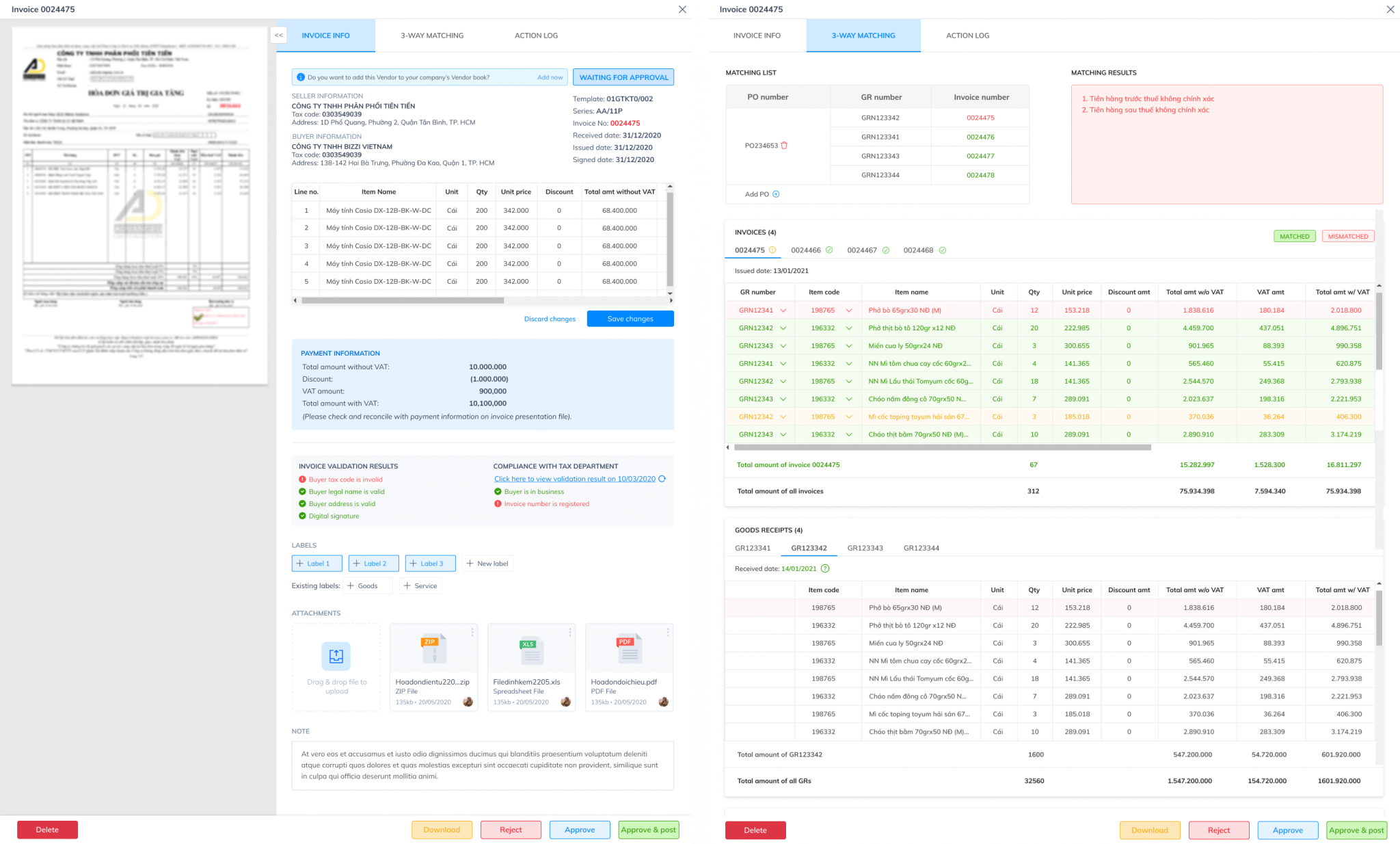
With purchase transactions that include a purchase order (PO) and delivery/acceptance data, businesses can use 3-way matching To compare Invoice – Purchase Order – GR/GRN.
The fields typically compared include supplier, item code, quantity, unit price, and value. If there is a discrepancy, the system can:
- Check if the difference falls within the approved tolerance.;
- flag the discrepancy type;
- Forward the exception to the correct person in charge;
- Save the history of approvals and processing decisions.
3-way matching does not guarantee the complete elimination of fraud, duplicate invoices, or duplicate payments. It's a transaction control layer. Businesses still need to check duplicate invoices, payment history, permissions, and other controls within the AP.
Step 5: Transfer data to ERP or accounting software
After the data that meets or exceeds the rules has been processed, the system can transfer the necessary fields to the accounting/ERP software according to the designed integration scope.
At this stage, the business should check:
- One-way or two-way synchronization;
- Mapping of suppliers, accounts, cost centers, and project codes;
- How to handle situations where master data does not exist or does not match;
- The right to create, review, and post journal entries;
- A retry mechanism when the API or the target system fails;
- Audit trail between invoice data and recorded data.
Integration should not be described as simply "plugging in an API and it's automatic." Effectiveness depends on the ERP structure, master data, accounting processes, and approval authority of each business.
How to measure effectiveness before and after automation.
Instead of using a fixed benchmark like "x minutes/invoice" or "reduce costs by x%" for every organization, businesses should measure their own baseline.
| Index | How to measure | Meaning |
| Processing time | From the moment the invoice is received until it is ready to be processed. | Indicate whether the bottleneck lies in intake, validation, or approval. |
| Revision/Revision Rate | Invoice number requiring data correction / total invoice | Reflects the quality of data extraction and mastering. |
| Exception rate | Number of transactions requiring user processing / total transactions | Indicates the degree of suitability of the rule and its matching. |
| Costs on the invoice | Total cost of personnel + systems + operations / number of invoices | Used for before/after comparisons within the same company. |
| Rate of duplicate/incorrect invoices slipping through. | Number of cases detected after the screening step | Evaluate control effectiveness, not just speed. |
| Exception handling time | From the moment the issue was flagged until it was resolved. | Reflects the quality of workflow and ownership. |
If there is an internal case study or pilot, businesses should use that before/after data to calculate ROI instead of applying a generic savings figure from the supplier.
7 criteria for choosing AP Automation software
1. Matches the actual document type.
We test XML, PDF text, PDF scans, images, multi-page invoices, and various types of business line items.
2. There is an exception review mechanism.
The system should display which fields are uncertain or mismatched and allow authorized personnel to take action, instead of simply returning a "true/false" result.
3. Control duplicate and near-duplicate entries.
In addition to exact matches, the ability to detect near-duplicate records should be evaluated based on multiple attributes. Near-duplicate alerts should support review rather than automatically concluding that all similar records are duplicates.
4. Flexible matching based on transaction type.
Not all transactions require a purchase order (PO) or a general store of origin (GR). The system needs to allow for 2-way, 3-way, or no-PO workflows according to company policy.
5. ERP integration with audit trail
It is necessary to check the mapping, API, master data, post permissions, and the ability to trace data from the original document to the record in the ERP system.
6. Security and Access Control
Businesses should verify the certifications, privacy policies, encryption methods, role-based access, audit logs, data storage locations, and actual access rights of the product being evaluated. They should not rely solely on generic marketing claims.
7. TCO and Scalability
The total cost of goods sold (TCO) should include licensing fees, deployment, integration, customization, training, operation, and process change costs. For businesses with seasonal demand, it's necessary to test the load at levels close to the actual peak volume and review the vendor's SLA.
What is the difference between AP Automation, OCR, and 3-way matching?
| Class | Main task | Not a substitute for |
| OCR / Data extraction | Read data from images/PDFs | Validation, matching, workflow |
| Validation | Check the rules and data. | Legal/accounting judgment in all situations |
| 3-way matching | So Invoice – PO – GR | Duplicate payment check, non-PO workflow |
| AP Automation | Connect intake → extraction → validation → matching → exception → ERP handoff | Internal policies and approval authority of the enterprise |
This layered approach helps businesses avoid purchasing an OCR feature and expecting it to handle the entire AP process automatically.
Where does Bizzi fit into the process?
Bizzi provides layers for processing incoming invoices and matching documents, and can connect to accounting/ERP workflows depending on the deployment scope. Depending on the project, businesses can evaluate capabilities such as invoice collection, data extraction, duplicate checking, matching, exception workflow, and system integration.
It is important to verify it in person. The functional scope, document types, ERP, rules, and SLAs applicable to your project., instead of inferring results from a general automation rate or accuracy.
Current product information is concentrated at Bizzi input invoice processing software.
Frequently asked questions
Can invoice automation replace accounting?
No. The system can reduce repetitive tasks and automate rule-compliant cases, but exceptions, accounting policies, approvals, and many business decisions still require human intervention.
Is 3-way matching mandatory for all bills?
No. 3-way matching is suitable for transactions with purchase orders (POs) and delivery/acceptance data. Transactions without POs require a different workflow.
Does the software handle logistics invoices or multi-line invoices?
This may vary depending on the extraction engine, document structure, and solution configuration. Businesses should pilot on real invoices rather than relying solely on feature descriptions.
How long should invoice data be stored?
There isn't a single 10-year retention period that applies to all accounting documents. According to the Accounting Law, some documents used for management must be retained for at least 5 years; documents used directly for recording entries and preparing financial statements fall into the category of at least 10 years; and some documents may be required to be retained permanently or according to specialized regulations. Businesses should determine the retention period based on the type of document and applicable regulations.
How many "zero-touch" KPIs should be set?
A single standard rate shouldn't be applied to all businesses. Measure a baseline, categorize invoices that can be automated and exceptional, and then set targets based on actual data and rules.
Conclude
Automating the processing of incoming invoices efficiently is a process design problem, not simply a matter of buying an AI tool. Businesses need to properly connect the layers of intake, extraction, validation, matching, exception workflow, and ERP; and measure effectiveness using their own before/after data.
“"Zero-touch" might be the goal for standard transactions, but a good system still needs to clarify exceptions, approval authority, and audit trail. That's where automation helps accountants reduce repetition without sacrificing control.






