


AP automation is the use of software, AI, OCR, RPA, and workflows to automate the accounts payable process from invoice receipt, data extraction, verification, PO/GR reconciliation, approval, debt recording, to payment. For businesses with a large volume of invoices and distributed purchasing, approval, and payment processes, AP automation helps reduce manual data entry, increase control over accounts payable, and improve visibility into payment obligations and cash flow.
What is AP automation?
AP automation is the process of using technology to digitize and automate tasks in the accounts payable workflow, from invoice processing to supplier approval and payment.
AP stands for Accounts Payable, which is usually understood as payable or accounts payable. This is the process of managing a company's payment obligations to suppliers after purchasing goods or using services.
In the traditional process, accountants typically have to:
- Receive invoices from email, suppliers, or internal departments.
- Enter invoice data into the software.
- Check the supplier information and invoice.
- Compare the invoice with the purchase order and delivery receipt.
- Submit the invoice to the relevant authorities for approval.
- Record the outstanding debt.
- Prepare a payment request.
- Track your payment status.
AP Automation automates the invoice-to-pay cycle., From receiving the invoice to the time the invoice is approved and ready for payment.
However, it is important to understand that AP Automation is more than just invoice OCR.. A fully automated accounts payable solution could cover:
- Invoice capture: Automatically collect invoices.
- Data extraction: Data extraction using AI/OCR/RPA.
- Invoice validation: Validate and detect discrepancies.
- Matching: Compare the invoice with the purchase order (PO), general receipt (GR), or other relevant documents.
- Approval workflow: Automatic routing approval.
- ERP/accounting posting: Synchronize data to the accounting system or ERP.
- Payment: Monitor and support the payment process.
- Newspaper: Report on accounts receivable, processing progress, and cash flow.
In the context of Vietnam, AP Automation also needs to address specific characteristics such as: electronic invoices, XML data, tax identification number information, suppliers, purchase orders, warehouse receipts, and internal accounting/ERP systems..

What does the manual payment process typically look like?
Manual payment processes typically begin with creating and approving a purchase request, then continue through steps such as placing the order, receiving the goods, receiving and verifying invoices, reconciling documents, preparing a payment request, recording the debt, and making the payment via email, Excel, or other separate systems.
In practice, the scope of the accounts payable process can be viewed in two ways. If we only consider... Invoice-to-Pay, The core process begins when a business receives an invoice and ends when the payable is paid. However, with the expanded AP/P2P model, accounts payable data is generated before the invoice even appears, starting from the purchase request, approval, order placement, and receiving process.
Therefore, a fully manual payment process typically includes: 7 main stages:
Phase 1: Create and approve purchase requests
The process typically begins when the employee or department needing the purchase creates a purchase request via email, Excel spreadsheet, form, or other individual systems.
The request may include information about:
- Goods or services to be purchased.
- Quantity and delivery time required.
- Expected supplier.
- Budget or cost center.
- Purpose of use.
- Terms and conditions of purchase, if any.
The request is then forwarded to management or the relevant department for approval. In a manual process, this often happens via email or other individual communication channels. It can be difficult for the person handling the request to track its current stage, identify those awaiting approval, and determine if the request has been fully approved.
When the number of purchase orders increases, businesses may encounter the following situations:
- The request was sent to the wrong person for approval.
- The approval process is lengthy.
- The budget was not properly controlled before the transaction occurred.
- It is difficult to retrieve the approval history.
- The staff must re-enter the information when moving to the order placement step.
Phase 2: Initialize Purchase Orders and Standardize Purchase Data
After the purchase request is approved, the purchasing department can create Purchase Order (PO) to send to the supplier.
In the manual process, much of the information from the purchase order may need to be re-entered, for example:
- Supplier name and information.
- Product or service code.
- Quantity.
- Unit price.
- Payment terms.
- Delivery time.
- Delivery and pickup location.
Re-entering data at multiple steps increases the risk of discrepancies between the purchase order and the purchase order. Furthermore, supplier information, item codes, units of measurement, and payment terms may be inconsistently stored between the purchasing, warehouse, and accounting departments.
This is why standardization is necessary. master data This plays a crucial role in the AP/P2P process. Supplier data, product codes, unit prices, units of measurement, and payment terms need to be standardized for consistent use throughout the subsequent steps.
Phase 3: Receiving goods, acceptance testing, and checking receiving documents.
When a supplier delivers goods or completes a service, the business needs to record the receipt of the goods or acceptance of the service.
The relevant documents may include:
- Delivery slip.
- Warehouse receipt or Goods Receipt (GR).
- Acceptance report.
- Packing list.
- Bill of lading.
- Import/export documents, if any.
- Document confirming completion of service.
In a manual process, these documents may be stored in various departments. The warehouse department might manage the goods receipt notes, the purchasing department might keep the purchase orders, while accounting only receives a portion of the documentation when the invoice is sent.
This makes it difficult to determine:
- Have all the items been delivered?.
- Does the actual quantity received match the purchase order?.
- Has the service been approved?.
- Are the delivery documents complete?.
It became time-consuming and heavily reliant on communication between departments.
Phase 4: Collect, enter, and verify invoices.
After goods are delivered or services are completed, the supplier sends an invoice via email, portal, data exchange platform, or other channels.
In some cases, the invoice may be sent directly to:
- Purchasing staff.
- The department that uses the service.
- Project management.
- Operations Department.
instead of a centralized point of contact within the Finance and Accounting department.
The accountant then has to gather the invoices and enter the information such as:
- Supplier name.
- Tax identification number.
- Invoice number.
- Invoice date.
- Value before tax.
- Value Added Tax (VAT).
- Total payment amount.
- Payment terms.
into Excel or electronic invoice processing software, accounting software.
This is one of the stages where errors are most likely to occur, especially when businesses have to process a large number of input invoices. Even a small error in the invoice number, tax code, or payment value can affect the recording of accounts payable, reconciliation, and payment.
In addition to data entry, businesses also need to check for issues such as:
- Are there any duplicate invoices?.
- Does the supplier information match the purchase record?.
- Does the invoice contain all the necessary information?.
- Does the invoice value match the actual transaction?.
- Does the invoice relate to the corresponding purchase order (PO) or contract?.
Phase 5: Document reconciliation and exception handling
This is one of the biggest bottlenecks in the manual AP process.
Accountants often have to open and audit separately:
- Purchase Order (PO).
- Goods Receipt (GR).
- Invoice.
The information can then be cross-referenced as follows:
- Product code.
- Name of goods or services.
- Quantity.
- Unit price.
- Tax rate.
- Total amount.
- Supplier.
- Payment terms.
Essentially, this is a process. 3-way matching between PO – GR – Invoice.
However, in reality, the relationship between documents is not always as simple as the 1 PO – 1 GR – 1 Invoice model. Businesses may encounter situations such as:
- 1 Purchase Order – 1 Invoice – 1 General Receipt.
- 1 Purchase Order – Multiple Invoices – Multiple General Receipts.
- Multiple Purchase Orders – 1 Invoice – Multiple General Receipts.
- Multiple Purchase Orders – Multiple Invoices – Multiple Grand Orders.
When discrepancies arise, accountants typically need to contact the purchasing department, warehouse, service users, or suppliers for verification.
Common exceptions may include:
- The invoice shows a larger quantity than the quantity received.
- The unit price on the invoice is different from the purchase order (PO).
- The invoice does not include the corresponding delivery receipt.
- The invoice does not match the supplier on the purchase order.
- An invoice shows signs of being entered or paid for twice.
If the reconciliation is performed across multiple Excel files, emails, or separate systems, the processing time can be significantly extended.
Phase 6: Prepare payment request, check documents, and record accounts payable.
After the invoices and related documents have been checked, the accountant compiles the file to prepare a payment request.
A complete application package may include:
- Bill.
- PO.
- GR or acceptance report.
- Contract.
- Request to purchase.
- Approval results.
- Other relevant documents.
The accountant needs to check if the file is complete according to internal regulations, then:
- Prepare a payment request.
- Submit your application through the approval process.
- Record the payable amount.
- Determine the payment due date.
- Update the data in the accounting software or ERP system.
In a manual process, data from invoices, purchase orders, delivery notes, and approvals may need to be compiled multiple times. This increases the risk of:
- Missing documentation.
- Duplicate data entered.
- Incorrect account or expense item.
- Incorrect timing was recorded.
- Delays in including invoices in the payment process.
Phase 7: Scheduling, processing payments, and updating status
After the accounts payable are approved, the accountant prepares a list of payments based on:
- Due date.
- Payment terms.
- Priority level.
- The company's cash flow.
- Payment policies for each supplier.
In a manual process, accountants may have to:
- Create a payment list.
- Create a payment order on online banking.
- Double-check the beneficiary information.
- Execute the transaction.
- Check the status of the money transfer.
- Update the payment status in Excel or accounting software.
If accounts receivable, approvals, and bank transaction data are not linked, businesses may have to update information in multiple places.
Then, the task is to determine:
- Which bill has been paid?.
- Which invoices are awaiting approval?.
- Which payments are due soon?.
- Which payments are overdue?.
- Which payments have been made but the status hasn't been updated yet?.
This may rely heavily on Excel and manual comparison processes.
Common bottlenecks in manual payment processing.
| Stage | Common risks | Affect |
| Purchase order and approval | Dispersed requests, incorrect approval levels, lack of budget control. | Delayed purchases, resulting in unplanned expenses. |
| Create a Purchase Order | Re-enter data, incorrect supplier information, or incorrect unit price. | Discrepancies between requirements and purchase orders. |
| Receiving goods and inspection. | The delivery receipt is not consistent with the purchase order. | It is difficult to determine whether the goods have been received in full or the service has been completed. |
| Collect invoices | Invoices sent through multiple channels, lost, or sent to the wrong person. | Delayed recording of liabilities |
| Data entry | Incorrect invoice number, tax code, date, or value | Incorrect accounting data, reports, and payments. |
| Compare the Purchase Order/Gr/Invoice. | Multiple files or systems need to be checked. | Time-consuming, slow exception handling. |
| Approve and prepare payment requests. | Status and responsible party are unclear. | Backlog of files, delayed payments |
| Recording accounts payable and payments | Unlinked accounts receivable and bank data. | Overdue or delayed payments |
| Update status | Manual updates are required on multiple systems. | The data is inconsistent and difficult to retrieve. |
As the number of transactions and incoming invoices increases, these limitations tend to become more pronounced. The Accounting Department not only has to process more data but also has to manage the points of contact between the purchasing department, purchasing, inventory, suppliers, approvers, accounting, and banks.
Therefore, the problem with the manual payment process isn't just slow data entry. The bigger bottleneck is... Purchasing data, purchase orders, deliveries, invoices, approvals, accounts payable, and payments are scattered., This makes it difficult for businesses to establish a comprehensive control process from purchase order to payment.
In a scalable automation model, the payment process doesn't just start when a bill arrives. Data is interconnected throughout. The process involves purchasing orders (PR), purchase orders (PO), receiving goods, processing invoices and reconciling documents, accounting, payment, and updating status..
This is also why the solutions AP Automation Nowadays, the focus is not just on reading and extracting invoice data. A comprehensive automation process can connect purchasing, receiving, and invoice data; performing reconciliation between them. PO – GR – Invoice; classify and handle exceptions; support payment request generation; and connect data with accounting systems, ERP systems, and appropriate payment channels.
If we only consider the scope Invoice-to-Pay, The core process begins with collecting invoices and ends when the invoices are paid. But if we consider the entire model... P2P/AP, The scope needs to be broader: from purchase requests, approvals, purchase orders, contracts, receiving goods and acceptance testing to invoices, reconciliation, accounting, payment and status updates.
How does AP Automation work in the invoice-to-pay process?
AP Automation operates by automatically collecting invoices, extracting data, checking validity, reconciling documents, routing approvals, recording accounts payable, and supporting payments.
An automated invoice-to-pay process typically consists of 7 steps:
1. Invoice capture – Collect invoices
The system collects invoices from multiple sources such as:
- E-mail.
- Supplier portal.
- File upload.
- Electronic invoicing system.
- Internal systems.
Instead of having invoices scattered across multiple emails or folders, the data is brought together in a centralized process.
2. Data extraction
AI, OCR, and RPA help extract data fields such as invoice number, tax identification number, date, amount, and tax rate.
The data that can be extracted includes:
- Supplier's name and tax identification number.
- Invoice number.
- Invoice date.
- Value before tax.
- Tax rate.
- Taxes.
- Total payment amount.
- Information about goods or services.
3. Invoice validation – Invoice verification
Invoice validation helps detect invoices that are missing data, have incorrect supplier information, duplicate invoice numbers, or do not match internal control rules.
The system can support testing:
- Are there any duplicate invoices?.
- Does the provider information match the registered data?.
- Is the data on the invoice complete?.
- Is there a discrepancy between the invoice and the purchase data?.
H3. 4. Matching – Document Comparison
The invoice was compared with:
- Order.
- Warehouse receipt or confirmation of receipt of goods.
- Contract.
- Acceptance report, if any.
This step helps determine whether the invoice accurately reflects the actual purchase transaction.
5. Approval Routing
The approval workflow automatically forwards invoices to the appropriate approver based on department, budget, expense type, or vendor.
For example:
- Invoices below a certain limit: 1 level of approval.
- Large-value invoices require multiple levels of approval.
- Expenses related to a specific department should be forwarded to the department head.
- Expenses exceed budget: additional approval required.
6. ERP/accounting posting – Synchronizing accounting data
ERP integration helps synchronize verified and approved invoice data to the accounting or ERP system.
This helps reduce data re-entry between multiple systems and limits errors caused by duplicate data entry.
7. Payment & Reporting
Once the invoice is approved, the business can:
- Track your payment status.
- Manage due dates.
- Track accounts payable.
- Prepare a report on accounts receivable.
- Track projected cash flow.
In a scalable automation model, the accounts payable process doesn't just begin when an invoice arrives. Data can be interconnected throughout, from purchase order, purchase order, receiving goods, invoice processing, document reconciliation to accounting and payment.
How does AP Automation differ from invoice OCR and the AP module in ERP?
AP Automation differs from OCR in its automation capabilities and from the AP module in ERP in its ability to flexibly process invoices, approve, reconcile, and integrate multiple data sources.
| Criteria | OCR invoices | ERP AP Module | Specialized AP Automation |
| Main role | Read the data on the invoice. | Managing AP business processes in ERP | Automate a large part of the invoice-to-pay process. |
| Starting point | When you have the invoice file | When a document is created in ERP | You can start with email, portal, upload, or many other sources. |
| Data extraction | Have | Depending on the system | AI/OCR/RPA |
| Compare PO/GR | Usually not | There may be | Can support 2-way/3-way matching |
| Workflow approval | Limit | Have | It can be configured according to rules. |
| Exception handling | Limit | There may be | Focus on addressing discrepancies. |
| Integration | Usually limited | It is the central system. | Integrate with ERP, accounting, banking, or purchasing systems. |
| Fit | Read data | ERP Business Management | AP Process Automation and Management |
In other words:
- OCR It helps businesses read data.
- ERP AP Module It helps businesses manage AP operations within their ERP system.
- AP Automation It helps automate and streamline the accounts payable process from start to finish.
When should businesses automate their payment processing?
Businesses should automate their accounts payable process when the number of invoices increases, approval processes are slow, purchasing data is scattered, or accounting departments spend a lot of time reconciling invoices with purchase orders (POs), general merchandise orders (GRs), and contracts.
Four common bottlenecks include:
| Bottleneck | Impact |
| Distributed purchasing data | It is difficult to determine whether the invoice matches the actual transaction. |
| Manual Invoice Reconciliation – Purchase Order – Retail Price | Time-consuming, prone to errors in unit prices, quantities, and taxes. |
| Approve discrete costs | Delayed payments make it difficult to control accountability. |
| Payments are out of sync. | Risk of duplicate payments, late payments, or loss of early payment discounts. |
Businesses should consider AP Automation if:
- There are many input invoices each month.
- The invoices come from multiple sources.
- Accountants still have to enter data manually.
- Approval via email or chat.
- Invoices often contain duplicate, incorrect, or missing supporting documents.
- The payment obligations are not visible in real time.
- Cash flow is difficult to predict.
- Suppliers frequently report delayed payments.
What benefits does AP Automation bring to businesses?
AP Automation helps businesses reduce manual data entry, shorten invoice processing time, increase control over accounts payable, and improve visibility into cash flow.
1. Reduce manual data entry.
AP Automation reduces manual data entry by extracting invoice data and synchronizing information into the accounting system.
AP staff can reduce repetitive tasks such as:
- Enter the invoice number.
- Enter your tax identification number.
- Enter a value.
- Enter supplier information.
- Enter accounts receivable data.
2. Increase control over accounts payable.
AP Automation improves accounts payable control by centrally tracking invoice status, approvals, and payments.
Finance can easily tell you:
- What stage is the invoice currently at?.
- Who is approving it?.
- Which invoice is incorrect?.
- Which payments are due soon?.
- Which amount has been paid?.
3. Reduce the risk of duplicate payments.
Checking invoice data and transaction history helps businesses identify potential risks:
- Duplicate invoice numbers.
- Duplicate supplier.
- Duplicate transaction.
- Making multiple payments for the same obligation.
4. Increase control over cash flow.
When accounts payable and payment schedules are displayed centrally, businesses can better control their working capital.
Businesses can gain a clearer perspective:
- Total amount payable.
- The payments are due soon.
- Payment by supplier.
- Cash flow needs to be prepared during the period.
5. Shift the AP accounting role from data entry to control.
When repetitive tasks are automated, AP accountants can focus more on:
- Exception handling.
- Control payment policies.
- Supplier management.
- Data reconciliation.
- Cash flow analysis.
What are the key features of an AP Automation solution?
An AP Automation solution should have core features such as automated bill collection and data extraction., check valid electronic invoice, PO/GR reconciliation, approval workflow, ERP integration, and AP reporting.
| Feature | Role |
| Invoice capture | Receive invoices via email, upload, or portal. |
| AI/OCR/RPA data extraction | Automatically read invoice data |
| Invoice validation | Check for errors, duplicates, and missing data. |
| Vendor validation | Check supplier information |
| 2-way/3-way matching | Match Invoice – PO – GR |
| Approval workflow | Automatically forward invoices to the approver. |
| Exception handling | Handling incorrect invoices |
| ERP/accounting integration | Synchronize data after approval. |
| substantial tracking | Track your request and payment status. |
| Dashboard & reporting | Monitor AP performance and accounts receivable. |
| Audit trail | Track actions, approvals, and edits. |
A good system shouldn't just answer the question. “"Has the invoice been entered yet?"”, which needs to help businesses answer:
- Does this invoice reflect the purchase transaction?
- Who needs approval?
- Does the invoice exceed the policy limit?
- When is this payment due?
- Why is the invoice pending?
- How many invoices require exception processing?
What is 3D reconciliation in AP Automation?
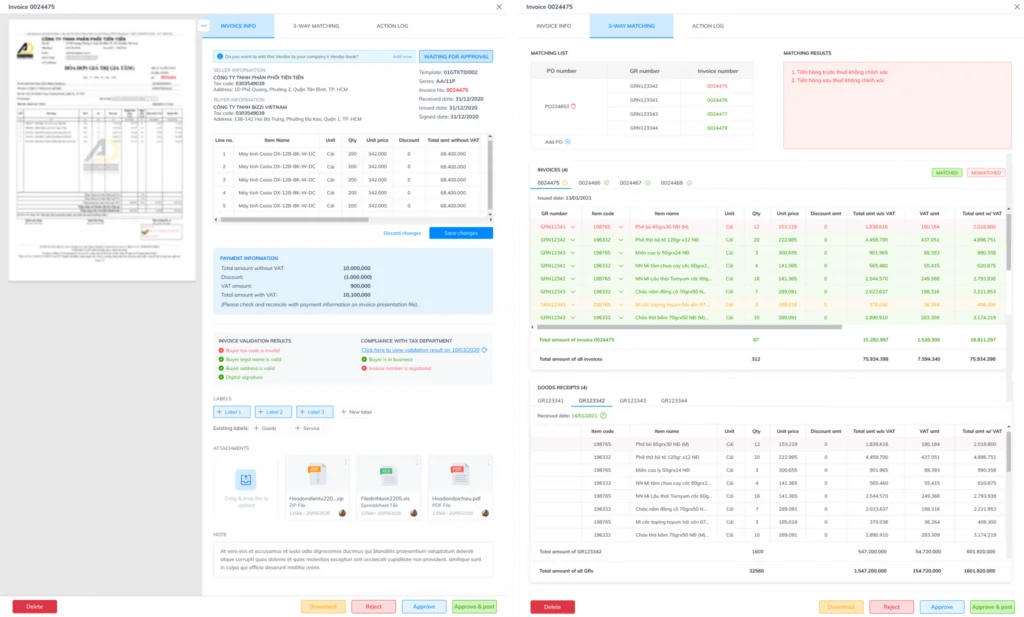
Three-way reconciliation is the process of matching data between invoices, purchase orders, and warehouse receipts to determine if the invoice matches the actual purchase transaction.
The three data sources include:
| Ingredient | Meaning |
| Invoice | Supplier invoice sent |
| PO – Purchase Order | The order has been approved. |
| GR – Goods Receipt | Receipt or confirmation that the goods have been received. |
The system can check:
- Supplier.
- Product or service code.
- Quantity.
- Unit price.
- Tax rate.
- Total amount.
For example
The company placed the order. 100 products with unit price 100,000 VND/product.
Upon receiving the invoice:
- Purchase Order (PO): 100 products.
- GR: 100 products received.
- Invoice: 100 products.
If the data matches, the invoice can be forwarded to the approval process.
Conversely, if the invoice records 120 products while businesses only place orders and receive deliveries. 100 products, The system can group the transaction. exception Let the accounting department or the relevant department handle it.
The important point is 3-way matching eliminates the need for accountants to manually check all invoices., which focuses on transactions with discrepancies that need to be resolved.
How can we measure the effectiveness of AP Automation deployment?
Businesses should not evaluate AP Automation based solely on... “"Reduce data entry"”. Efficiency should be measured by processing speed, automation rate, data quality, and the ability to control cash flow.
| KPI | Meaning |
| Invoice cycle time | The time from receiving the invoice to being ready to pay. |
| Cost per invoice | Average processing cost per invoice |
| Touchless processing rate | Percentage of invoices processed without manual intervention. |
| Exception rate | Percentage of invoices requiring exception processing. |
| Duplicate payment rate | Duplicate payment rate |
| On-time payment rate | On-time payment rate |
| Early payment discount captured | The value of the early payment discount can be taken advantage of. |
| First-pass match rate | Rate of matching PO/GR invoices on the first try. |
| Approval SLA | Average approval time |
These KPIs help CFOs and Finance Managers assess whether the system is actually improving processes or simply shifting data entry from one tool to another.
What are the steps involved in the AP Automation deployment process?
The AP Automation deployment process should begin with a current situation assessment, data standardization, solution selection, testing, user training, and post-deployment performance measurement.
However, with accounts payable processes, businesses shouldn't simply implement software in a "install and use" manner. AP Automation involves multiple data sources and departments, from suppliers, purchasing, warehousing, accounting to approvals. Therefore, it's crucial to clearly define the current process, standardize input data, and design processing rules before automating.
An implementation process can consist of six main phases, which can be expanded into more specific control steps:
1. Assess the current status and needs of the AP process.
Businesses should start by auditing their current accounts payable process to identify bottlenecks before choosing a solution.
Some of the areas that need to be evaluated include:
- From what sources do businesses receive invoices: email, supplier portal, electronic system, or paper copy?.
- Average number of input invoices per day/month.
- Average processing time from receipt of invoice to payment.
- Manual data entry steps.
- Current approval process.
- How to reconcile invoices with purchase orders (PO), general merchandise (GR), or contracts.
- The percentage of invoices that were returned or required additional documentation.
- Common errors encountered when entering data.
- The number of duplicate invoices or invoices with unusual information.
- The accounting department's time is dedicated to reconciliation and handling exceptions.
At this stage, the business should establish Prototype AP – that is, current data used as a basis for comparison before and after implementation.
For example, the baseline might include:
- Average processing time per invoice.
- Total number of invoices processed each month.
- The percentage of invoices that require manual data entry.
- Percentage of invoices with errors or missing information.
- Average approval time.
- Percentage of invoices processed on time.
Without baseline data, businesses will find it difficult to determine how much AP Automation actually helps shorten processing times, reduce manual operations, or improve quality control.
2. Standardize processes and design AP workflows.
After understanding the current situation, the business needs to identify the target AP process.
This is a transition from the question. “"How is the business handling invoices?"” luxurious “"How should the process be operated after automation?"”
The content that needs to be standardized includes:
- Who receives and processes the invoices?.
- What criteria are invoices classified by?.
- Which expenses need to be reconciled with the purchase order (PO)?.
- When should you check the GR (Gr) or confirm receipt of goods?.
- Who has the authority to approve each type of expense?.
- Approval limits are based on invoice value.
- When is multi-level approval required?.
- What conditions cause an invoice to be returned?.
- How to handle invoices with discrepancies.
- How to handle invoices without a purchase order (PO).
- When does an invoice move to the accounts receivable and payment stage?.
Businesses also need Approval process mapping based on factors such as department, expense type, transaction value, cost center, or approval level.
The result of this phase is one AP productivity Clearly, this means each invoice can be tracked throughout the entire process, from receipt to approval, recording, and payment.
3. Standardize invoice sources and master data.
Automation is only effective when the input data is sufficiently consistent. Therefore, businesses need to identify and standardize the data sources related to their APs.
Mapping invoice source
Businesses need to create a list of current invoice receiving channels, for example:
- Email from the accounting department.
- Email addresses for each employee or department.
- Supplier portal.
- Electronic invoicing system.
- Paper invoices need to be digitized.
- Purchasing systems or platforms.
The goal is to identify where invoices are entering the system and how to streamline them into a centralized processing flow.
Normalize vendor master data.
Master data from a provider may include:
- Supplier name.
- Tax identification number.
- Supplier code.
- Bank account information.
- Payment terms.
- Supplier group.
- Contact information.
Inconsistent supplier data can make it difficult to reconcile invoices, check for duplicates, or schedule payments.
Mapping PO, GR, and ERP
Businesses need to identify what data is stored in:
- Purchasing system.
- Warehouse management system.
- Accounting software.
- ERP.
- Excel files or other internal system files.
The goal is to establish a clear data flow between Invoice – Purchase Order – Retail Price – ERP/Accounting, This, in turn, lays the groundwork for automatic matching and reduces duplicate data entry.
4. Solution selection and integration planning
After clearly defining the processes and data, businesses should then choose the appropriate AP Automation solution.
The criteria to be evaluated may include:
- Automatic invoice collection capability.
- The ability to extract invoice data.
- The ability to check and verify information.
- Ability to reconcile invoices with purchase orders (PO) and general merchandise (GR).
- The ability to set up an approval workflow.
- Ability to handle exceptions.
- Ability to integrate with accounting software or ERP systems.
- The ability to store and retrieve records.
- The ability to report and track KPIs.
In addition, businesses need to develop a specific implementation plan, including:
- Scope of deployment.
- Departments involved.
- The system needs to be integrated.
- The data needs to be normalized.
- Implementation timeline.
- The person in charge of each category.
- User training and conversion plan.
The result of this phase is data flow And a clear implementation plan helps businesses avoid digitizing a process that is not yet standardized.
5. Define exception rules and run tests (Pilot)
Not all invoices can be processed using the same procedure. Therefore, businesses need to identify them in advance. exception rules – that is, the rules for handling exceptions.
For example:
- The invoice does not have a purchase order (PO).
- The invoice value differs from the purchase order (PO).
- The quantity of goods on the invoice differs from the GR (Gr) value.
- Duplicate invoice numbers.
- The vendor is not yet in the master data.
- The invoice is missing information.
- The invoice exceeds the approved limit.
- The invoice does not comply with the purchasing policy.
Then, the business should implement it. mine with limited scope, for example:
- A group of suppliers.
- A department.
- A type of expense.
- A specific purchasing process.
The pilot's objective was to test:
- Is the data accurately identified?.
- Is the workflow working correctly?.
- Do the purchase/return (PO/GR) data match the invoice?.
- Do the exception rules cover real-world scenarios?.
- Can users operate it conveniently?.
The result of this phase is test results, This helps businesses detect errors and refine processes before large-scale deployment.
6. Training, rollout, and user support
After completing the pilot program, businesses can expand the deployment to other departments, suppliers, or transaction types.
However, AP Automation is not just a technology project. Accounting, purchasing, warehousing, management, and supplier staff may all be involved in the new process.
Therefore, businesses need to prepare:
- User manual.
- New invoice processing procedure.
- Instructions for handling exceptions.
- User permission management.
- Support channel when problems arise.
- Internal communication plan.
Training should focus on helping users understand:
- Where should the invoice be sent?.
- Who is responsible for handling each step?.
- When is approval required?.
- How to handle returned invoices.
- How to track your profile status.
Once these steps are standardized, businesses can move from pilot to full operation. AP Automation live on a broader scale.
7. Monitoring, measuring, and optimizing performance.
After implementation, businesses need to continue monitoring effectiveness instead of considering the project finished as soon as the system goes live.
Some KPIs that can be tracked include:
- Average processing time per invoice.
- Time from receipt of invoice to approval.
- Time from approval to payment.
- The percentage of invoices processed automatically.
- The percentage of invoices that require manual data entry.
- The percentage of returned invoices.
- The percentage of invoices that generate exceptions.
- Duplicate invoice rate.
- On-time payment rate.
- Number of staff hours saved.
Businesses can compare these metrics to the baseline established during the audit phase to assess the actual effectiveness of the project.
| Stage | What to do | Output |
| Current status audit | Measure cycle time, volume, errors, and exceptions. | Baseline AP |
| Standardize the process | Define the approval workflow and processing rules. | AP productivity |
| Data normalization | Standardize suppliers, purchase orders (PO), product codes (GR), and product codes. business cost management | Master data |
| Integration | Connect ERP, accounting software, email, or related systems. | Data flow |
| Pilot | Test with a group of vendors or transaction range. | Test results |
| Rollout | Expand deployment to departments and processes. | AP Automation live |
| death | Monitor KPIs and continuously improve. | Performance report |
Overall, implementing AP Automation should be viewed as a phased operational improvement process. Businesses should not automate entire processes from the outset without a thorough understanding of their existing data, workflows, and exceptions.
A suitable approach is to start by Audit current status → standardize processes and data → run pilot → rollout → measure and optimize. This approach helps businesses reduce change risk, verify effectiveness at each step, and build a foundation for automating accounts payable on a larger scale.
What criteria should businesses use when choosing an AP Automation solution?
Businesses should implement AP Automation when incoming invoices increase, approvals are slow, manual reconciliation is time-consuming, payments are difficult to control, or there is a need to increase visibility for cash flow.
Implementation may be considered when a business experiences one or more of the following signs:
- The volume of invoices is increasing rapidly.
- There are many suppliers.
- The invoices come from multiple sources.
- There are many branches or member units.
- Approval via email or chat.
- Accountants spend a lot of time entering data.
- Manually compare Invoice – Purchase Order – Retail Price.
- There is a risk of double payment.
- Unable to track payment obligations in real time.
- CFOs find it difficult to forecast cash flow.
- Suppliers frequently report delayed payments.
Before implementation, businesses should evaluate:
- Current AP process.
- Number of invoices.
- The degree of normalization of PO and GR.
- Quality of the provider's master data.
- The accounting/ERP system currently in use.
- Points that need to be integrated.
- KPIs need improvement.
How does Bizzi support the automation of the accounts payable process?
Bizzi helps businesses automate their accounts payable processes by combining AI, RPA, electronic invoicing, 3D reconciliation, approval workflows, payment request management, and integration with accounting/ERP systems.
| Business needs | Bizzi support |
| Receive multiple input invoices | Automatically collect and process invoices. |
| Manual data entry | AI/RPA support for data extraction |
| Incorrect or duplicate invoices | Error and duplicate warnings |
| Compare PO/GR | 3-way matching |
| Delayed approval | Workflow approval |
| Difficult to track payments | Manage requests and processing status. |
| Distributed data | ERP/accounting integration |
| Lack of transparency | Test trail and report |
With this approach, Bizzi can assist Vietnamese businesses in automating their AP processes, from electronic invoice processing, data verification, and document reconciliation to approval and data integration with accounting/ERP systems..
Notably, the solution doesn't just focus on "reading invoices." The process can be extended to:
- Automatically receive and process invoices.
- Data extraction using AI/RPA.
- Check the invoice.
- Compare Invoice – Purchase Order – Retail Price.
- Warning about misleading information.
- Automatic routing approval.
- Prepare and approve payment requests.
- Track your payment status.
- Connect with your accounting or ERP system.
According to Bizzi's solution documentation, capabilities such as AI/RPA, electronic invoice verification, 3-way matching, approval workflow, and ERP integration These are core components in AP automation strategies. Effective metrics such as data extraction rates or processing time reductions need to be used in the correct context of case studies and should not be interpreted as benchmarks applicable to all businesses.
Frequently Asked Questions about AP Automation
Can AP Automation replace accounts payable?
Are not. AP Automation helps reduce data entry and repetitive tasks, but accountants still need to manage exceptions, payment policies, supplier relationships, data reconciliation, and cash flow analysis.
Do small businesses need AP Automation?
It may be necessary, especially when a business has many invoices, multiple suppliers, or complex approval processes. Businesses don't necessarily have to wait until they are very large to start automating.
Does AP Automation integrate with ERP?
Yes, it's possible. An AP Automation solution should be able to integrate with ERP or accounting software to synchronize invoice, accounts receivable, approval, and payment data.
The specific integration capabilities depend on the ERP/accounting system and the connection method the business is using.
How is AP Automation different from electronic invoicing?
Electronic bill It is a document that is created and issued in electronic form.
AP Automation It is an automated process for handling invoices within accounts payable, including checking, reconciling, approving, recording, and tracking payments.
Is 3-way matching required for all bills?
Not necessarily. 3-way matching is best suited for trades with complete data. Invoice – Purchase Order – GR. For expenditures without purchase orders or warehouse receipts, businesses can design different control workflows depending on their policies.
Can AP Automation handle incorrect invoices?
Support is available. exception handling, This means removing invoices with missing, incorrect, or mismatched data from the automated processing flow so that responsible personnel can review and make decisions.
When should AP Automation be implemented?
Businesses should consider factors such as rising input invoices, slow approval processes, time-consuming manual reconciliation, difficulties in controlling payments, or the need to increase cash flow visibility.
Conclusion: AP automation should start with the process, not just the technology.
AP automation is how businesses shift their accounts payable processes from manual processing to a data stream capable of automatically collecting, verifying, reconciling, approving, recording, and tracking payments. The value of AP automation lies not only in reducing data entry, but also in its ability to help businesses gain a clearer view of their payable obligations, handle exceptions faster, and proactively control cash flow.
However, effective AP automation implementation shouldn't begin with immediately introducing a tool into the process. Businesses should start by assessing the current AP process, standardizing vendor data, identifying control points, unifying the approval workflow, and selecting the steps that can be automated first.
For Vietnamese businesses dealing with a large volume of electronic invoices, scattered purchasing data, and manual reconciliation between invoices, purchase orders, and gross orders, Bizzi can be considered a platform to support the automation of accounts payable processes through AI/RPA, invoice verification, 3-way matching, approval workflows, payment request management, and integration with accounting/ERP systems.
Instead of having the AP accountant spend most of their time on manual data entry and verification, businesses can move towards a model where the system handles routine transactions, while the accounting team focuses on exceptions, controls, cash flow analysis, and supplier management. This is a more practical approach to gradually upgrade from a Manual AP to an Automated AP and eventually to an Intelligent AP model.
Register here to experience the solution and receive advice from Bizzi's team of experts: https://bizzi.vn/dang-ky-dung-thu/






