



Digitizing task and expense management. This is the process of transferring the entire workflow of work requests, service bookings, approvals, expense recording, invoicing, payments, and reconciliation to a controlled system. For B2B businesses, the goal is not only to reduce paperwork but also to improve real-time expense tracking (visibility), budget control, standardize spending policies, and reduce operational and financial risks.
In the context of increasingly expanding businesses, the number of business trips, advances, invoices, and reimbursement requests is rapidly increasing. Managing these tasks using Excel, email, or paper documents is no longer sufficient to meet the requirements for speed, transparency, and data accessibility. This is why many businesses are shifting to a modern business model. Travel & Expense Management To control the entire workflow and costs on a unified platform.
What is digitalization of work and cost management?
Digitizing travel and expense management is how businesses standardize the entire travel and expense lifecycle on a unified system, from pre-trip to post-trip settlement. This is not just about replacing paper documents with electronic data, but about building a comprehensive control process to ensure that all business trip expenses are properly documented, approved according to policy, and traceable when needed.
Many businesses still understand the digitization of business expenses simply as:
- Scan the receipt for safekeeping.
- Use the app to create a reimbursement request.
- Convert Excel forms to electronic forms.
In reality, these are just small steps in the overall process. A complete Travel & Expense management system needs to cover all activities:
- Inquiry: Create a job request.
- Approval: Approval based on policy and budget.
- Booking: Book flights, hotels, or related services.
- Allowance: Manage advances or spending limits.
- Expense: Record the incurred expenses.
- Invoice: Collect and verify invoices.
- Payment: Payment or reimbursement.
- Reconciliation: data reconciliation.
- Newspaper: Cost reporting and analysis.
To properly understand the scope of digitalization, businesses also need to distinguish between the three layers of governance in the Travel & Expense model:
| Ingredient | Role |
| Travel Management | Control the work plan before expenses are incurred: work requirements, schedule, bookings, budget, and policies. |
| Expense Management | Record, approve, advance, reimburse, settle, and account for expenses after they are incurred. |
| Payment Systems | Managing payments, reconciling transactions, and increasing the transparency of cash flow. |
These three layers do not operate independently but complement each other within the same process. If only the refund step is digitized, but ticket booking is still done via email, approval via chat, and payment is done manually, businesses will still face fragmented and difficult-to-control data.
In reality, the biggest problem isn't a lost invoice or a delayed reimbursement, but the fragmentation of business trip data across multiple systems and departments. When information from business trip requests, approvals, bookings, expenses, and payments isn't linked, the finance department struggles to track budgets in real time and retrieve the full processing history of each expenditure.
Why are manual workflows and costs causing the finance department to lose control?
Manual processes result in the separation of work data, expenses, invoices, and payments, increasing processing time and reducing budget control. When each department uses a different tool such as email, Excel, messaging apps, or paper documents, businesses will struggle to build a comprehensive picture of business travel costs.
It's not just the finance department; almost every department involved in the process is affected:
| Role | Common problems | Impact |
| Staff | I took an advance from my own pocket, lost the receipt, and am waiting for reimbursement. | Poor experience, wasted time. |
| Manage | Reviewing emails/chats reveals missing budget information. | Easy to approve the wrong policy. |
| HR/Admin | Booking tickets and hotels haphazardly makes it difficult to track the itinerary. | Difficult to control trip status |
| Accountant | Manual data entry, invoice verification, and reconciliation. | Late closing of accounting periods increases errors. |
| CFO/Finance Manager | No visibility by cost center or project | It is difficult to optimize costs and adjust policies. |
For employees, having to advance personal funds for extended business trips not only creates financial pressure but also leads to numerous manual reimbursement steps afterward. Meanwhile, managers often only see the requested amount without having complete information about the remaining budget, spending limits, or the employee's work history.
From an accounting perspective, the biggest challenge is the fragmentation of data. Work requests might be in emails, bookings stored on a different platform, invoices sent via messaging apps, and expense reports created in Excel. Reconciling these data sources is time-consuming and increases the risk of accounting errors.
For CFOs and Finance Managers, a more serious consequence is the lack of real-time monitoring of expense flows. When reports are only compiled at the end of the period, businesses cannot promptly detect overspending, unusual spending trends, or bottlenecks in the process.
Therefore, digitalization should not begin with a single electronic reimbursement form, but should be viewed from a broader perspective. Managing the entire Travel & Expense lifecycle.. Only when all data, from work requests to final payments, is connected within a single process can businesses shift from manual processing to proactive control.
Download the document: Regulations on travel expenses according to Circular 99/2025/TT-BTC at This
How should a digitized Travel & Expense process operate?
A digitized Travel & Expense process should encompass everything from business trip requests and policy approvals to service bookings, expense recording, invoice collection, reconciliation, and reporting, all within a single data stream. This allows businesses to maintain complete control before, during, and after a business trip, rather than simply processing documents once employees submit them.
Establish a standardized business trip procedure. It usually consists of 7 steps:
1. Create a work request.
The employee creates a request on the system with complete information:
- Purpose of the work.
- Time and place.
- Department or cost center.
- Related projects.
- Estimated budget.
Right at the time of request creation, the system can check work policies and remaining budget to limit inappropriate requests.
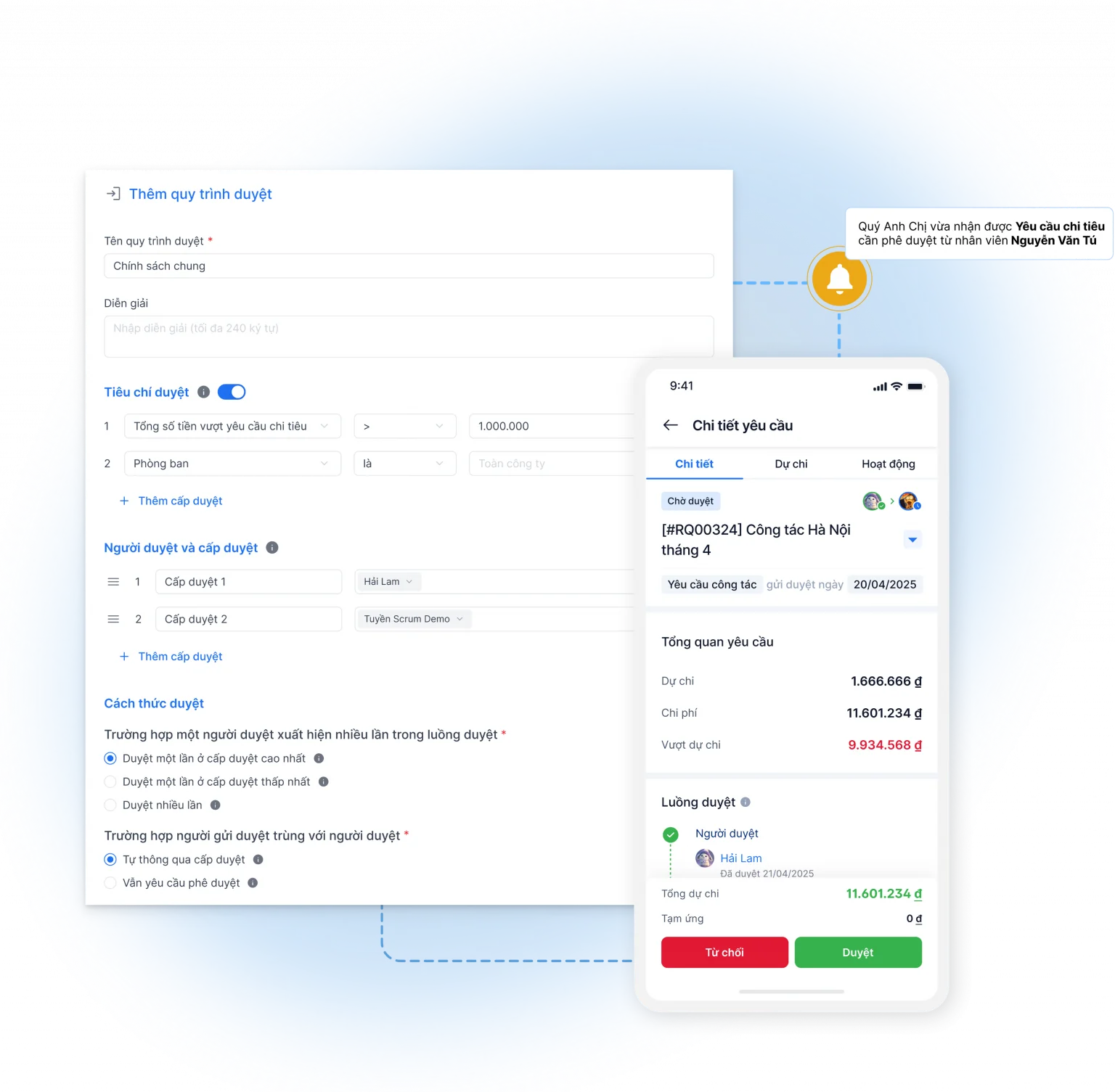
2. Approve the request
Direct management or authorized levels can approve via web or mobile device.
In this step, the system needs to issue a warning if:
- Exceeding budget.
- Exceeded the target.
- Required information is missing.
- This is not in accordance with work regulations.
3. Booking tickets, rooms, or business travel services.
Once approved, the HR/Admin department or Travel Coordinator proceeds with booking flights, hotels, or related services.
Each booking should be linked to a specific job requirement and have a clear status, such as:
- Awaiting approval.
- Approved.
- Tickets have been issued.
- Cancelled.
- Overdue.
4. Granting credit limits or processing payments
Depending on the management model, a business may:
- Cash advance.
- Transfer.
- Set spending limits.
- Use a card or electronic payment method.
Linking payments to approved work requests helps reduce unplanned expenditures.
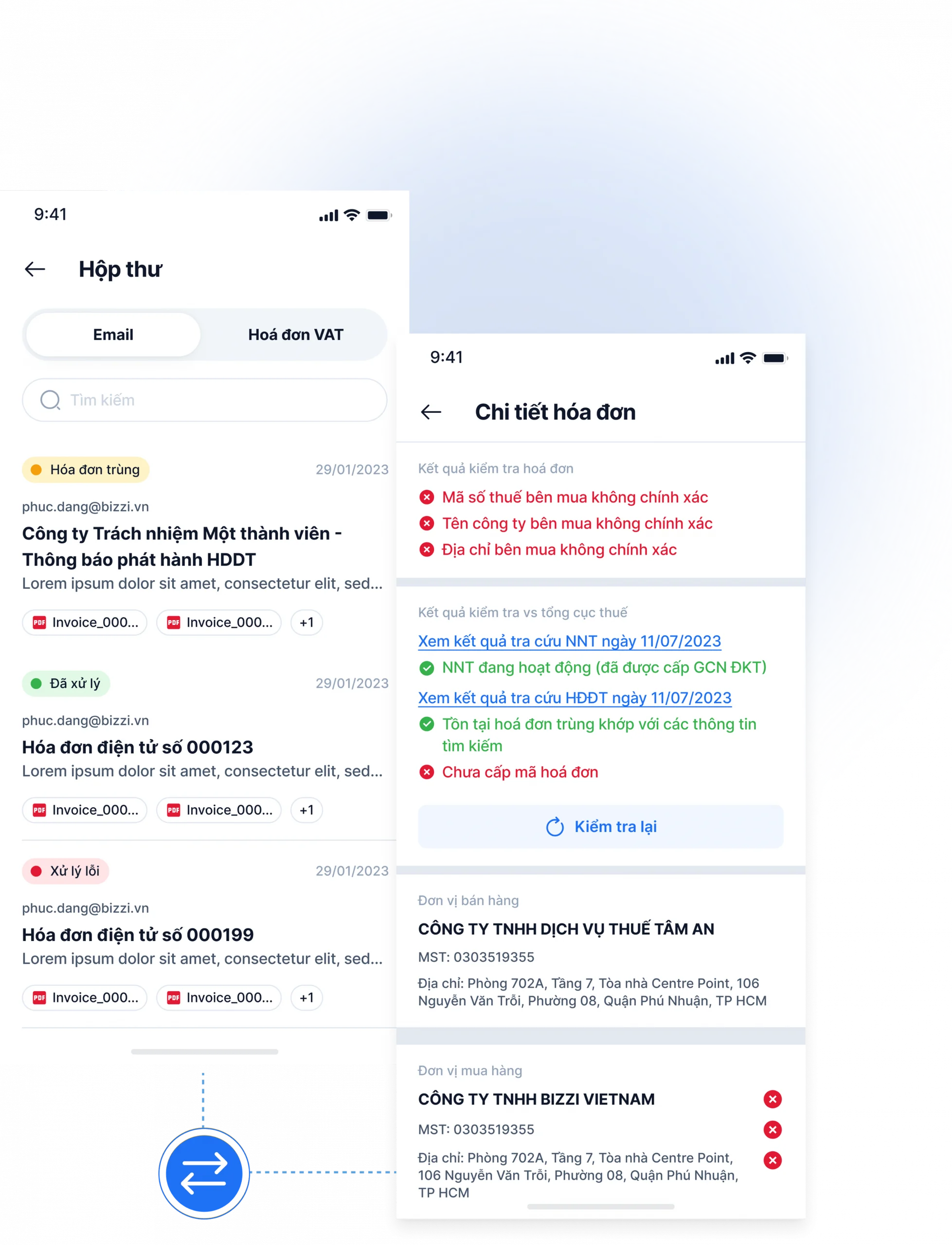
5. Record expenses and invoices.
During the course of their work, employees collect:
- Electronic invoices.
- Receipt.
- Payment voucher.
These documents are uploaded directly to the system and linked to the corresponding business trip to reduce loss and facilitate the settlement process.
6. Create a payment request or settlement.
After the trip is over, the staff or accountant prepares the final settlement documents, the most important of which is to create a file. sample request for payment of business expenses.
All data is linked to:
- Job requirements.
- Advance payment.
- Bill.
- Budget.
- Actual cost.
This significantly reduces the time spent on data reconciliation compared to manual data entry.
7. Reconciliation and Reporting
Finally, the finance department performed the following:
- Verify the booking against the work requirements.
- Compare invoices and make payments.
- Cost accounting.
- Compile reports by department, project, or cost center.
| Step | Person in charge | Data/Documents | Checkpoint |
| Create a request | Staff | Work plan | Policy, budget |
| Approve | Manage | Comment | Limits, approval levels |
| Book a service | HR/Admin | Cabinet | Matches approved requests |
| Payment/Advance Payment | Finance | Payment order | Cash flow control |
| Record the expense. | Staff | Invoices, receipts | Complete documentation |
| Settlement | Accountant | Work records | Cost comparison |
| Report | Finance/CFO | Dashboard | Analysis and control |
When all these steps are run on a single platform, businesses not only shorten processing time but also shift from a post-incident verification model to control at the point of request and approval. This is a crucial foundation for enhancing transparency and optimizing operational costs in the long term.
10 essential features for digitizing task and expense management.
An effective work and expense management system needs to combine pre-expenditure controls, automated expense recording, and post-expenditure management reporting. Instead of simply assisting employees in submitting requests or storing invoices, a modern Travel & Expense platform needs to cover the entire lifecycle of a business trip: from planning, budget control, approval, service booking, payment, settlement to data analysis for management purposes.
In particular, as businesses expand, the number of business trips increases, and costs are incurred across multiple departments, having all the features below will help Finance Managers and CFOs optimize the user experience while enhancing real-time cost control.
| Feature group | Required | Value for the business |
| Job requirements | Create, review, and track work requests on a unified platform. | Standardize input, ensuring all business trips are justified and approved before expenses are incurred. |
| Spending policy | Set limits based on rank, department, expense type, geographical area, or work route. | Reduce regulatory violations and automatically control improper expenditures. |
| Budget | Manage budgets by cost center, department, project, or program. | Control spending according to plan, and receive alerts when budget is exceeded or depleted. |
| Book tickets/rooms | Search, select, approve, and book flights, hotels, or business services. | Control travel costs before they arise, and limit bookings outside of the established policy. |
| Bill | Collect, scan, OCR, and verify electronic invoices. | Reduce document loss, minimize data entry errors, and speed up the settlement process. |
| Approve | Multi-tiered approval flow, mobile approval support. | Reduce processing time and ensure all expenditures are approved by the appropriate authority. |
| Pay | Manage spending limits, business cards, e-wallets, or synchronize payment transactions. | Increased transparency in cash flow, reduced out-of-pocket advances, and enhanced transaction control. |
| Reconciliation | Compare the work request with the booking, invoice, payment, and settlement. | Reduce manual reconciliation, quickly detect discrepancies between plan and reality. |
| Dashboard | Reports can be generated by cost center, department, project, trip, supplier, or expense type. | Providing visual data helps CFOs track spending trends and optimize budgets. |
| Integration | Connect API/SFTP with ERP, accounting software, HRM, and master data. | Synchronizing data between systems reduces repetitive data entry and minimizes errors. |
Not every business needs to implement all features from the outset. However, when these functions are connected within a unified system, data will flow seamlessly from the planning stage to the final settlement. This helps businesses shift from a management model based on fragmented documents to one based on real-time data.
Furthermore, modern Travel & Expense platforms allow for flexible configuration tailored to each business's specific needs, such as different spending limits for employees and managers, separate budgets for each project, or automated approval flows based on expense value and risk level. This helps businesses maintain compliance while avoiding additional bottlenecks in the approval process.
However, technology is only effective when built upon a foundation of clear policies and processes. Businesses need to standardize regulations on business expenses, spending limits, and pre-approval models, and then configure corresponding features on the system to ensure proper digitization rather than simply converting from paper documents to electronic forms.
How does digitalization help control budgets, policies, and cost risks?
Digitizing work and expense management helps businesses control costs even before money is spent, instead of only discovering errors when invoices have been generated or when the settlement period arrives. This is the major difference between a modern Travel & Expense process and manual management using Excel, email, or paper documents.
In a corporate environment with multiple departments, projects, and business trips running concurrently, simply checking documentation after employees have reimbursed expenses is often insufficient for effective budget control. When all data is digitized and linked on a single platform, Finance Managers and CFOs can track the entire lifecycle of each expense, from the initial need to accounting and reporting.
1. Policy Control
Regulations on travel expenses and spending policies are only effective when they are translated into automated control rules within the system.
Businesses can configure:
- Limits are based on employee rank.
- Limits based on expense category (airfare, hotel, taxi, allowances, etc.).
- The policy is based on domestic or international work routes.
- Conditions apply to each department or job title group.
- Rules for handling exceptions.
As a result, as soon as an employee creates a work request or payment request, the system can alert them if the expenditure is inconsistent with internal regulations, significantly reducing instances of incorrect approvals or payments that violate policy.
2. Budget Control
One of the major limitations of the manual process is that the approver often doesn't know the remaining budget of the department or project at the time of approval.
When digitizing processes, each work requirement can be associated with:
- Cost center.
- Department.
- Project.
- Budget code.
- Corresponding budget period.
The system will compare the proposed amount with the available budget before proceeding to the approval step. If the expenditure exceeds the limit or the budget is nearly exhausted, the approver will receive a warning to reconsider before approving.
For Bizzi Travel & Expense, Businesses can set budgets for each item. Cost Center, This allows for real-time updates on usage and alerts when expenses are exceeded or budget is exhausted, right from the moment a request is created. This helps Finance shift from a "post-check" to a "pre-control" model, limiting the number of budget overruns only discovered at closing time.
3. Invoice Control
A business trip expense is only truly completed when all the necessary valid documents are available for accounting, auditing, and tax settlement purposes.
If managed manually, businesses often encounter problems such as:
- Lost the paper receipt.
- Submitted documents late.
- The invoice contains incorrect information.
- The invoice is a duplicate.
- Missing payment or booking documents.
When the process is digitized, invoices can be collected and checked immediately after they are generated. Employees simply need to photograph or upload the document, and the system will handle the rest:
- Verify the information on your electronic invoice.
- Duplicate invoices detected.
- Compare the data with the expenses and business trip.
- Warning: Documents are missing or invalid.
Standardizing documents from the outset significantly reduces the workload for accountants during the end-of-month settlement process.
See also the article: Are business trip expenses subject to personal income tax? This
4. Approval Control
In many businesses, approvals via email or chat applications make it very difficult to verify:
- Who approved it?
- When should I browse?
- Based on what information?
- Is this within their jurisdiction?
Digitalization systems help to fully track the entire approval process (audit trail), including:
- Request creator.
- Levels of approval.
- Processing time.
- Content edited.
- Reasons for refusal or requests for additional information.
As a result, businesses can both increase transparency and shorten the time spent explaining their actions during audits or internal reviews.
5. Reconciliation Control
A complete Travel & Expense process goes beyond just payment; it also requires reconciliation of all data after the business trip.
The verification process typically includes:
- Booking based on work requirements.
- The invoice compared to the actual cost.
- Advance payment compared to final settlement.
- Payment against documentation.
- Actual costs compared to the approved budget.
When this data is on a single platform, accountants no longer have to consolidate information from multiple Excel files or separate systems, thereby reducing errors and shortening closing times.
6. Data Control
For CFOs, the greatest value of digitalization lies not in saving a few hours of data entry, but in the ability to see the full cost picture in real time.
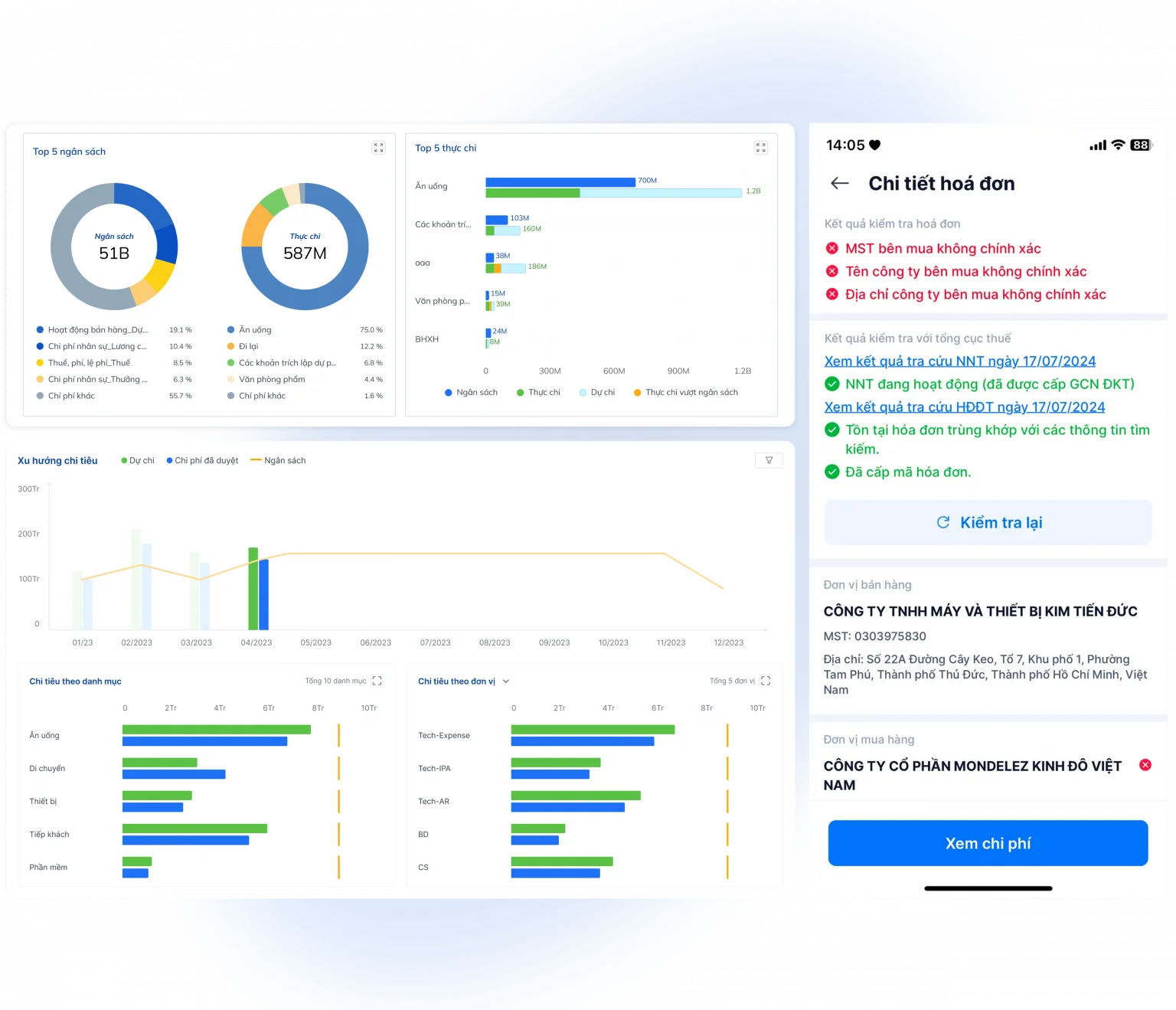
The admin dashboard can provide many different perspectives, such as:
- Business trip expenses by department.
- Project-based costs or Cost Center costs.
- Expenses based on business trip.
- The percentage of budget overruns.
- Refund/cancellation/exchange rates for tickets.
- Spending trends on a monthly or quarterly basis.
- On-time repayment rate.
- Processing time for work requests.
This data helps management not only control current expenditures but also adjust standards, work policies, and budget plans for subsequent periods based on actual figures rather than subjective judgments.
As can be seen, digitizing Travel & Expense not only helps businesses process information faster but also creates a multi-layered control system, from policies, budgets, and approvals to invoices, reconciliation, and management data. This also provides a foundation for CFOs to shift from a cost-checking role to proactively managing budget utilization and optimizing business spending.
When should businesses switch from Excel/email to Travel & Expense software?
Businesses should consider implementing Travel & Expense software when the number of business trips, expenses, and approvals exceeds the capacity for efficient management using Excel, email, and separate documents. At this stage, the problems are not only the time-consuming processing but also the reduced ability to control the budget, increased risk of errors, and a lack of data for management purposes.
In small businesses with a low number of business trips, tracking using spreadsheets may still meet basic needs. However, as the scale expands, more departments generate business expenses, and processes involve multiple parties such as employees, managers, HR/Admin, accounting, and finance, manual management will reveal many limitations.
Signs that indicate a business should digitize its Travel & Expense processes.
- □ There are many departments, branches, or units that frequently generate work.
- □ Employees frequently need to receive advances or advance payments from personal funds for business trips.
- □ Accountants spend a lot of time checking invoices, receipts, and reconciling documents.
- □ Management still approves via email or chat applications, making it difficult to track the status and processing history.
- □ Regular business trip expenses exceed the allocated limit or are difficult to allocate. Cost Center, department or project.
- □ HR/Admin made flight and hotel bookings, but the booking data was not linked to the business trip request and the accounting system.
- □ CFOs or Finance Managers often lack real-time dashboards to track budgets, spending trends, and performance.
- □ The end-of-month reconciliation process takes several days because it requires aggregating data from Excel, email, and various other sources.
If even a few of these signs appear, businesses could face risks such as slow approvals, budget overruns, lost documents, or extended accounting periods.
However, Software deployment should not be the first step.. Before digitizing, businesses need to standardize fundamental elements such as:
- Regulations on travel expenses and expenditure policies.
- The standards are determined by rank, location, and type of expense.
- Multi-level approval process.
- Budget management mechanisms based on Cost Center or project.
- List of required documents and reimbursement deadlines.
Once policies and procedures are clearly defined, Travel & Expense software will translate those regulations into automated control flows, enabling businesses to operate faster while maintaining transparency and compliance. This also lays the groundwork for Finance and CFOs to build a data-driven expense management system instead of manual processing after each accounting period.
How to implement digital management of tasks and costs in stages.
Implementing Travel & Expense should be done in stages to both manage change and avoid digitizing an unstandardized manual process. Many businesses expect software to immediately solve problems related to business expenses, but in reality, if internal processes lack consistency or policies are unclear, digitization will only transfer these shortcomings from paper documents to the digital environment.
Instead of implementing everything at once, businesses should develop a step-by-step roadmap to reduce risks, easily assess effectiveness, and scale up later.
Phase 1. Audit the current process.
The first step is to assess the entire existing Travel & Expense process to identify bottlenecks and opportunities for improvement.
Some questions need clarification, including:
- Where are work requests currently being created: Excel, email, or paper forms?
- Who approves it, and is the approval process standardized?
- What types of expenses require invoices or supporting documents?
- How long does it take to complete a work expense settlement file?
- How is the reconciliation between work requests, bookings, invoices, and payments being handled?
- Which processes are taking the most time to complete?
This review helps businesses gain a comprehensive understanding of the current situation and avoid deploying technology on a process that already has many shortcomings.
Phase 2. Standardizing work and expenditure policies.
After assessing the current situation, businesses need to standardize their internal regulations to serve as the basis for system configuration.
The points that should be agreed upon include:
- Travel expense allowances are determined based on rank, region, or type of trip.
- List of expenses that are and are not reimbursable.
- Budget limits are set by department, project, or cost center.
- Approval levels correspond to the value of each expenditure item.
- Conditions apply to cases exceeding limits or arising from exceptions.
- Deadlines for advance payments, reimbursement, and settlement of travel expenses.
When policies are standardized, the system can automatically check for compliance instead of relying entirely on manual review by accountants or finance professionals.
Phase 3. Setting up Master Data
Master Data is the foundation for ensuring operational data consistency across the entire system.
Businesses should standardize categories such as:
- List of employees.
- Departments and business units.
- Cost center.
- Project.
- Personnel hierarchy.
- Travel service providers, airlines, hotels.
- Categories of expenses and related accounting accounts.
Standardizing data from the outset helps to minimize data entry errors, reduce information duplication, and facilitate integration with ERP or accounting software in the future.
Phase 4. Digitizing Requests and Approvals in Advance
This is the most effective stage because it helps businesses achieve results quickly. T&E cost control right before it happens.
Instead of sending emails or communicating via chat applications, employees will create work requests directly on the system with complete information:
- Purpose of the work.
- Time and place.
- Department or project.
- Cost center.
- Estimated budget.
- Expenses that require advance payment or settlement.
The system will automatically:
- Check the remaining budget.
- Compare this with the spending policy.
- Determine the correct approval level.
- Send notifications and track processing status.
Digitalization at this stage helps businesses transition from check after spending luxurious Control from the moment the need arises..
Phase 5. Digitizing Invoices, Expense Claims, and Payments
After controlling the input, businesses proceed to digitize the expense recording and settlement phase.
Instead of gathering paper invoices at the end of the month, employees could:
- Take a picture of or upload the electronic invoice to the system.
- Link each expense to its corresponding business trip.
- Declare your Expense Claim on the same platform.
- Monitor processing status in real time.
On the Finance side, the support system includes:
- Verify the validity of the invoice.
- Cost classification.
- Compare with the limits and budget.
- Prepare payment or reimbursement documents more quickly.
This significantly reduces document processing time and minimizes loss or repeated data entry.
Phase 6. Automated Reconciliation and Dashboard
Once data is digitized throughout, businesses can automatically reconcile data between:
- Job requirements.
- Booking flights and hotels.
- Advance payment.
- Bill.
- Pay.
- Settlement of accounts.
Instead of manually compiling data from multiple Excel files, Finance Manager can monitor the entire processing status in real time on a dashboard.
Management reports can be analyzed from various perspectives, such as:
- Department.
- Project.
- Cost center.
- Staff.
- Work route.
- Supplier.
- Type of expense.
As a result, CFOs not only know how much the business has spent, but also understand where the expenses came from, whether they are in line with policy, and how spending trends are changing.
Phase 7. Measuring and improving policies
Digitalization is not the ultimate goal, but rather a foundation for businesses to continuously optimize their processes and management policies.
Operational data will help Finance and CFO answer questions such as:
- Which department frequently exceeds its operational budget?
- Which business trip routes have a high rate of refunds, cancellations, or ticket changes?
- What is the average approval time?
- How many applications were returned due to missing documentation?
- Is the current policy still relevant to the current situation, or does it need adjustment?
Through continuous measurement, businesses can update benchmarks, optimize approval flows, and improve budget efficiency instead of just dealing with emerging issues.
Implementing in phases helps businesses reduce transition risks and easily demonstrate the effectiveness of each step before scaling to a full Spend Management model. This is also an approach adopted by many businesses to ensure that the digitalization process delivers real value, rather than just changing work tools.
How does Bizzi Travel & Expense support the digitalization of workflows and costs?
Bizzi Travel & Expense is suitable for businesses that want to centrally manage business requests, expenses, budgets, policies, approvals, invoices, and reconciliation on a single platform. Instead of having data scattered across emails, Excel spreadsheets, accounting software, and travel service providers, Bizzi connects the entire Travel & Expense process into a unified workflow, helping businesses control expenses from the moment they arise until final settlement.
| Management needs | Bizzi Travel & Expense support |
| Work request management | Create, approve, and track work requests centrally on the system, linked to departments, projects, and cost centers. |
| Manage bookings/reservations | Search for suitable flights based on policies, book individual or group tickets, and manage booking status (pending approval, approved, ticketed, refund/cancellation/change). |
| Policy control | Establish spending policies based on department, rank, expense type, or work route; automatically alert when requests do not meet internal regulations. |
| Budget control | Set budgets by cost center or project, update costs in real time, and receive alerts when budget is exceeded or depleted right from the request creation stage. |
| Record the expense. | Create a cost estimate on the web or mobile, linking each expense item to the trip, cost center, and corresponding expense code. |
| Bill | Automatically collects, checks, and verifies incoming electronic invoices, helping to reduce document loss and minimize data entry errors. |
| Approve | Build an automated approval flow based on expenditure value, department, or hierarchy; support approval anytime via mobile application. |
| Reconciliation | Compare work requests, bookings, invoices, and payments to quickly detect discrepancies and reduce manual reconciliation. |
| Dashboard | Provide reports and dashboards by department, project, cost center, cost trends, refund/cancellation/exchange rates, and budget efficiency to support CFO decision-making. |
Bizzi Travel & Expense goes beyond simply digitizing individual business processes; it also connects them all. Travel Management, Expense Management and Payment Solutions in a unified system. This ensures that all data, from work requests and service bookings to payments, invoices, and final settlements, is seamlessly linked, creating a seamless workflow. audit trail Fully equipped to support auditing, post-auditing, and financial management.
For businesses that are expanding or have multiple departments, branches, and projects, the ability to control according to cost center, Tracking budgets in real time and analyzing spending trends will help Finance Managers and CFOs proactively adjust policies instead of only discovering problems at the end of the accounting period.
If a business is currently processing travel expenses via email, Excel spreadsheets, and separate invoices, the first step should be to reassess the travel request, approval, invoicing, and reconciliation processes. After standardizing policies and processing flows, Bizzi Travel & Expense can become a platform that digitizes entire processes, increases control, reduces manual operations, and creates a foundation for transparent, real-time data-driven, and long-term scalable corporate expense management.
FAQ on digitizing task and expense management
1. How does digitizing work and expense management differ from accounting software?
Digitalization of work and expense management focuses on controlling the process before, during, and after expenses are incurred, while accounting software primarily serves to record and account for financial transactions.
A Travel & Expense (T&E) system manages the entire workflow, including request creation, approval, booking, advance payments, expense recording, invoice collection, settlement, and reconciliation. Meanwhile, accounting software receives data after the expense has been approved to perform accounting, payment, and financial reporting. The two systems complement each other and are often integrated to reduce manual data entry.
2. What is the difference between Travel Management and Expense Management?
Travel Management handles pre-trip planning and operations, while Expense Management manages expenses and settlements after costs are incurred.
Travel Management includes:
- Create a work request.
- Trip approval.
- Book flights and hotels.
- Control the schedule and budget.
Expense Management focuses on:
- Record the actual costs.
- Collect invoices and supporting documents.
- Advance payments, reimbursements, and final settlements.
- Reconciliation and expense report.
When two business functions are connected on the same platform, businesses can track the entire lifecycle of each business trip instead of managing them in a fragmented way.
3. Do small businesses need expense management software?
Have, Challenges in managing travel expenses. This often happens with small businesses. This is especially true if the business has frequent tasks or wants to standardize processes right from the start.
For businesses with infrequent business trips, Excel can still meet basic needs. However, as the number of employees, departments, or expenses increase, handling them with email and spreadsheets can easily lead to:
- Delayed approval.
- Lost documents.
- Budget tracking is difficult.
- End-of-period reconciliation takes a lot of time.
Implementing software early helps businesses establish standardized processes and limit switching costs as they scale.
4. How can we control employees from exceeding their work-related spending limits?
Businesses should combine travel expense regulations with automated control mechanisms instead of just checking expenses after they have been spent.
Some effective measures include:
- Set limits based on hierarchy, department, or expense type.
- Review the budget before approving it.
- Warning when expenses exceed the limit.
- The regulations clearly specify the level of approval for exceptions.
- Reconcile the work requirements, booking, and actual costs.
This approach helps reduce off-budget expenditures right from the start, rather than dealing with them during the final accounting period.
5. Can business trip invoices be checked automatically?
Yes. Many current Travel & Expense solutions support the automatic collection and verification of electronic invoices to reduce errors during the settlement process.
The system can support:
- Collect electronic invoices.
- Identify invoice information.
- Verify the basic data on the invoice.
- Detecting duplicate or missing invoices.
- Attach the invoice to the correct business trip and corresponding expense.
This automation helps accountants reduce manual verification time and improve the quality of input data.
6. Can flight or hotel bookings be verified against the business trip request?
Yes. This is one of the key control points in the modern Travel & Expense process.
Businesses should compare the following:
- The work request has been approved.
- Book your flight or hotel.
- Invoice generated.
- Actual payment.
Thanks to this, Finance can quickly detect instances of incorrect booking schedules, wrong ticket classes, unplanned expenses, or expenses not related to the purpose of the business trip.
7. What metrics should a CFO track in Travel & Expense management?
In addition to total travel expenses, CFOs should monitor KPIs that reflect operational efficiency and policy compliance.
Some key indicators include:
- Business trip expenses are categorized by department, project, or cost center.
- The rate of requests exceeds the policy.
- The percentage of expenses exceeding the budget.
- Timeframe for approving work requests.
- Settlement time is after the trip.
- The percentage of files with missing or incorrect documents.
- Rates for ticket refunds, cancellations, or changes.
- Average cost per business trip.
These metrics help CFOs evaluate budget utilization efficiency and optimize operational policies for subsequent periods.
8. What data should businesses prepare before deploying Travel & Expense software?
Businesses should standardize their underlying data before deployment to ensure system stability and accurate reflection of the management model.
The data that needs to be prepared includes:
- List of employees and organizational structure.
- Departments, branches.
- Cost center and projects.
- Regulations on travel expenses and expenditure policies.
- Standards are set according to tier and type of expense.
- Approval flow.
- List of travel service providers.
- List of expense codes and accounting accounts.
- Budgeting by department or project.
Standardizing this data before deployment will help businesses shorten system configuration time, reduce operational errors, and maximize the effectiveness of the Travel & Expense solution.
Conclude
Digitizing the process Task and expense management It's not just about replacing paper forms or Excel spreadsheets with software, but about building a seamless management process from start to finish. Planning work, budget control, approval, service booking, expense recording, invoice management, payment processing, reconciliation, and reporting.. When all data is connected within the same system, businesses can transition from one model to another. Check after spending luxurious Proactive control before, during, and after each business trip..
For Finance Managers and CFOs, the greatest value of digitalization lies not only in shortening processing times or reducing manual workloads. More importantly, businesses can track budgets in real time, detect overspending early, reduce the risk of missing documentation, increase traceability for audits, and have reliable data to optimize work policies and manage costs in the long term.
To achieve that, businesses should start by: Standardize regulations on travel expenses, expenditure limits, approval processes, and budget coding systems (cost centers, projects). Before implementing the technology, once the process is standardized, digitalization will yield more noticeable results and reduce the tendency to "move manual processes to software.".
In this roadmap, Bizzi Travel & Expense This solution helps businesses digitize their entire Travel & Expense process on a unified platform. The system supports managing work requests, establishing policies and spending limits by department or level, controlling budgets via cost centers, automating approval flows, managing advances and reimbursements, collecting and verifying electronic invoices, reconciling bookings with actual expenses, and providing a real-time management dashboard. As a result, the Finance department not only significantly reduces manual processing but also enhances control, data transparency, and decision-making based on cost management metrics rather than solely on end-of-period reports.
For businesses with high work frequency, multiple departments, numerous projects, or those struggling with budget management, invoicing, and approval processes, integration is a viable option. clear internal regulations the same digital platform Bizzi Travel & Expense This will be an important step in building a modern, transparent, and scalable cost management system that can grow with the business.
Register here to receive consultation and experience solutions from Bizzi: https://bizzi.vn/dat-lich-demo/






