


Circular 32/2025/TT-BTC on invoice archiving Businesses are required not only to retain electronic invoices within the specified timeframe but also to ensure their integrity, accessibility, and availability when requested by competent authorities. For CFOs and the finance and accounting departments, compliance with storage regulations is no longer simply about saving XML or PDF files, but requires building a process for managing invoice data that is synchronized with accounting documents and internal control systems to reduce legal, audit, and operational risks.
What impact does Circular 32/2025/TT-BTC have on invoice archiving?
Circular 32/2025/TT-BTC Instructions for implementing certain provisions of Decree 123/2020/ND-CP (as amended and supplemented by) Decree 70/2025/ND-CPRegarding electronic invoices and documents. Effective from 01/06/2025, This document clarifies many requirements related to the management, use, and storage of electronic invoices in businesses.
For the CFO and the accounting department, the key takeaway is not the creation of new archiving obligations, but rather the Standardize the way electronic invoice data is managed. To meet the requirements for verification, comparison, and retrieval throughout the document's lifecycle.
The main impacts include:
- Businesses need to maintain complete records of electronic invoices in accordance with legal regulations on accounting and electronic transactions.
- The stored data must ensure integrity and not be modified or altered after release.
- Invoices must be readily accessible for inspections, audits, tax settlements, or reviews.
- The archiving process should be linked to the accounting document management system, including contracts, purchase orders (PO), delivery receipts (GR), payment documents, and related records.
This is a significant change for many businesses that manage invoices manually, scattered across personal emails, individual employee computers, or multiple separate folders. As the volume of incoming invoices increases, simply storing them in files without a centralized data management mechanism significantly increases the risk of lost documents, makes retrieval difficult, and prolongs the time required to prepare documentation when tax authorities request explanations.
From a financial management perspective, Circular 32/2025/TT-BTC also encourages businesses to shift from a certain mindset. “"Keep the receipts"” luxurious “"Invoice data management"”. This is especially important for businesses with multiple branches, numerous suppliers, or those processing thousands of invoices each month.
Businesses need to understand whether "invoice archiving" refers to archiving documents or data.
According to current regulations, Storing electronic invoices is not just about saving a PDF file to view the content., Instead, it involves preserving complete electronic invoice data in the correct format and ensuring the legal validity of the invoice throughout the storage period.
This is a point where many businesses still get confused during operations.
The new XML file is the original data for the electronic invoice.
Each electronic invoice typically includes two common types of files:
- XML file: Contains all the original invoice data in standard format, including information on the seller, buyer, goods, tax, digital signature, and data fields for the software system to process.
- PDF file: This is a representation of the invoice content that is easy for users to read, print, or compare.
In there, The new XML is the original data. It is used by accounting systems, ERP systems, and tax authorities to verify, reconcile, and check the validity of invoices.
If a business only saves PDF files and not XML files, many important tasks will be impossible or difficult to perform, such as:
- Verify the digital signature.
- Automatic data matching.
- Import invoices into accounting software or ERP system.
- Verify data integrity.
- To assist with tax audits or inspections.
Data storage must be accompanied by business records.
For businesses, the value of an invoice lies not only in the invoice itself but also in its underlying value. all documents proving the transaction.
A complete application package typically includes:
| Data group | Purpose |
| XML file | Original data of the electronic invoice |
| PDF file | Compare, look up, and display |
| Purchase Order (PO) | Demonstrate the need to purchase. |
| Contract | Transaction basis |
| Warehouse Receipt/Acceptance Report | Proof that goods or services have been delivered. |
| Payment documents | Proof of financial transactions |
| Accounting records | Accounting and tax settlement services |
Maintaining complete records of these documents allows businesses to quickly demonstrate the legality and authenticity of transactions when requested by tax authorities or auditors.
Saving data is different from saving a file.
A common mistake businesses make is assuming that simply downloading invoices from email and saving them to a folder on their computer fulfills their archiving obligations.
In reality, effective invoice data management requires meeting several requirements simultaneously:
- There is a unified storage structure based on accounting period, supplier, or tax identification number.
- Easily search by invoice number, issue date, or supplier.
- Version control is possible if adjustment or replacement invoices are generated.
- Appropriate access control is established between accounting, financial management, and internal audit departments.
- Regularly back up your data to reduce the risk of loss due to system errors or equipment failures.
For businesses that process hundreds or thousands of incoming invoices each month, storing data on a centralized platform instead of managing it via email or individual folders will significantly reduce document search time, while also improving risk control and legal compliance.
Points in Circular 32 relate to invoice data and service providers.
Circular 32/2025/TT-BTC outlines criteria for organizations providing electronic invoice solutions and services for receiving, transmitting, and storing invoice data. Therefore, businesses not only need to standardize their internal processes but also assess the capabilities of the solution provider to ensure that data is managed securely, comprehensively, and is accessible when needed.
In a context where businesses are increasingly reliant on electronic data, choosing an invoicing solution provider should not only be based on the ability to issue invoices but also on considering the entire data management process after issuance.
According to Circular 32/2025/TT-BTC, the scope of regulation also includes criteria for organizations providing electronic invoice solutions as well as services for receiving, transmitting, and storing invoice data. This shows that data storage is no longer a purely technical task but is part of a business's financial control and compliance system.
If invoice data is still being stored on personal emails, individual accountants' computers, or local folders without a unified management system, businesses may face several risks, such as:
- It is difficult to retrieve records when requested by tax authorities or auditors.
- Data loss occurs due to personnel changes.
- There is no control over the history of invoice editing or processing.
- It takes a lot of time to reconcile invoices, purchase documents, and payment records.
- Increased risk of errors during the tax settlement process.
Questions CFOs should ask when evaluating solution providers
Before selecting or continuing to use an electronic invoice storage platform, CFOs should assess the system's capabilities through several key questions:
- Can invoice data be used to generate reports based on multiple criteria (accounting period, supplier, tax identification number, etc.)?
- Does the system support access control based on roles and departments?
- Is a complete history of processing, editing, and approval (Audit Trail) recorded?
- Invoice data can be linked to the purchasing process (AP)., cost management and expenditure approval Or ERP?
- When requested by tax authorities or auditors, does the system support quick and complete data retrieval?
These criteria help businesses evaluate not only a supplier's technological capabilities but also their ability to meet long-term management and compliance requirements.
What risks does a CFO need to control when storing electronic invoices?
The biggest risk doesn't lie in whether a business "keeps invoices or not," but in whether the invoices are properly and completely stored, are retrievable, and can be compared with actual transactions.
For CFOs, storing electronic invoices is not simply a task for the accounting department, but a crucial link in the financial control system. A lost or unverified invoice can lead to risks related to taxes, accounts receivable, and cash flow.
| Risk | Financial impact | Proposed checkpoint |
| Missing input invoices | Insufficient grounds for recording expenses increase the risk during tax settlement. | Automatically reconcile invoices with purchase orders, delivery notes, and payment documents. |
| Incorrect invoice information | VAT discrepancies require document adjustments. | Verify the tax identification number (MST), invoice symbol, date, value, and tax rate before recording. |
| Separate invoices | It takes a lot of time to search, and it varies from person to person. | Building a centralized invoice data warehouse. |
| No Audit Trail | It is difficult to prove the internal control process. | Save the history of approvals, edits, and automatic invoice processing |
| Invoice not associated with payment | Discrepancies when managing accounts receivable and cash flow | Connect invoice data to the AP process and payment status. |
Instead of simply verifying the validity of each invoice, the CFO should track the entire invoice data lifecycle, from receipt to payment and archiving. This also forms the foundation for improving internal control and financial management capabilities.
Checklist for archiving invoices from a Financial Operations perspective.
An effective checklist for a CFO should not only focus on invoice file storage but also encompass data, processes, access control, reconciliation, and accessibility for audits when needed.
Businesses can use the following checklist to review their electronic invoice archiving process:
- □ Clearly identify the source of invoice receipt (email, supplier portal, electronic invoicing system, or ERP).
- □ Standardize required data fields such as seller, buyer, tax identification number, invoice number, symbol, date of issue, value, VAT, and invoice status.
- □ Simultaneously save invoice data and the physical copy in a system with access control.
- □ Establish a process for reconciling invoices with purchase orders (POs), contracts, and delivery/receipt records for goods or services.
- □ Attach the invoice to the budget, expense center, or project code, if applicable.
- □ Link invoices to approval and payment status to track the transaction lifecycle.
- □ Ensure that reports can be generated by accounting period, supplier, tax identification number, department, or payment status.
- □ Conduct periodic checks to detect missing, duplicate, incorrect, or unprocessed invoices.
A well-designed checklist helps businesses not only meet compliance requirements but also build a data foundation for financial analysis and decision-making.
How should businesses prepare their invoice storage systems after Circular 32?
Following Circular 32/2025/TT-BTC, businesses should switch from a manual invoice archiving model to a centralized invoice data management model, capable of cross-referencing and retrieving data for each transaction.
A modern storage system should be built with multiple layers of control:
Floor 1 – Invoice reception
Automatically receive invoices from email, vendor portals, or electronic invoicing systems to avoid data loss.
Layer 2 – Data Extraction and Normalization
Read data from XML files, normalize information fields, and synchronize with accounting or ERP systems.
Level 3 – Validity and Risk Assessment
Check the invoice status, identify duplicate invoices, invoices with incorrect information, or invoices showing signs of irregularities before processing them.
Level 4 – Comparison with Purchase Order, GRN, and Contract
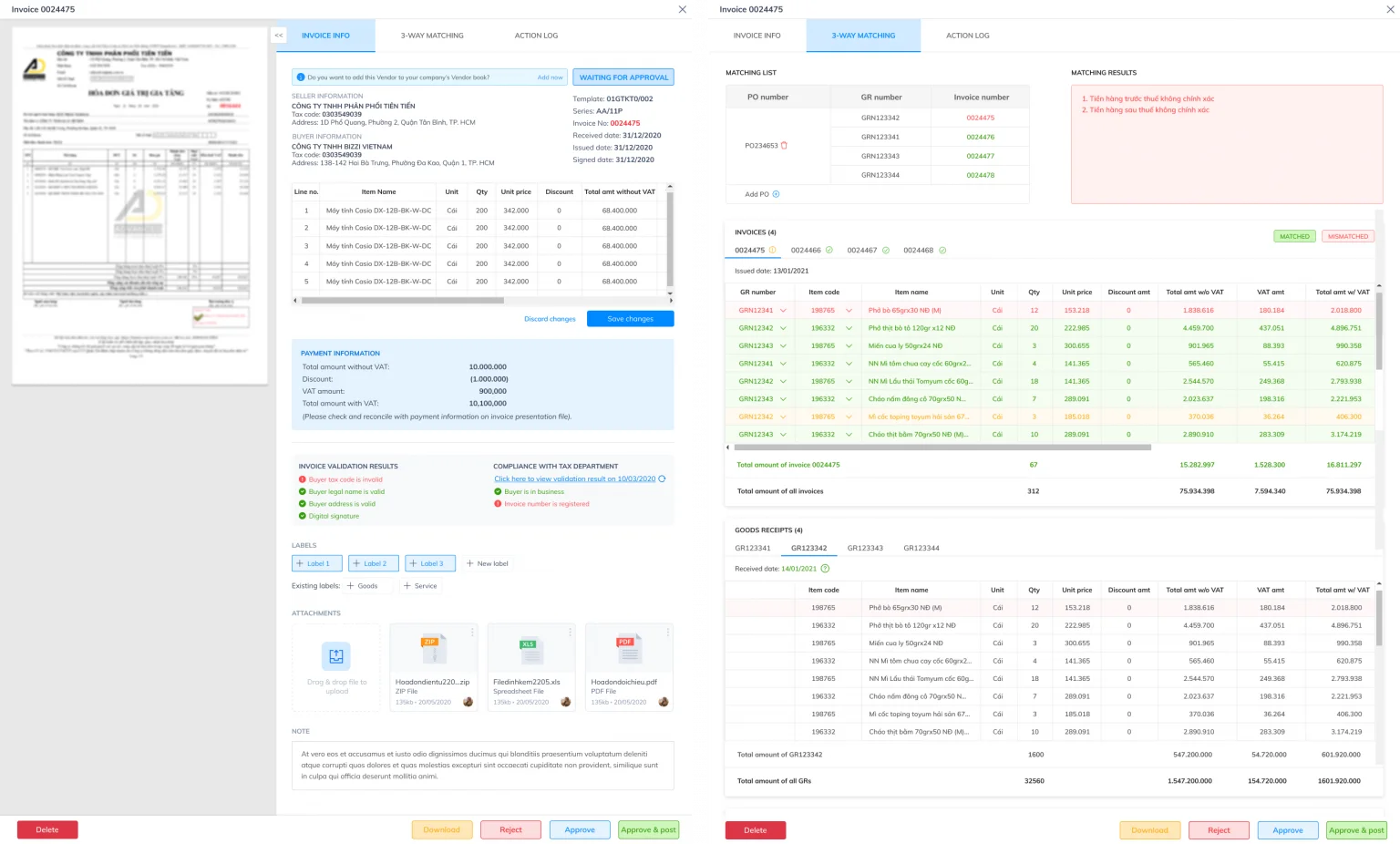
Compare invoice data with purchase orders, delivery receipts, and contract terms to detect discrepancies in quantity, unit price, or tax rate.
Level 5 – Approval, Recording, and Payment
Integrate internal approval processes, debt recording, and payment status tracking.
Level 6 – Archiving, Reporting, and Audit Trail
Centralized data storage supports fast retrieval and provides a complete processing history for auditing or inspection purposes.
How does Bizzi support businesses?
Bizzi helps businesses build comprehensive invoice data management processes:
- Bizzi Multi Matching Automatically receive, read, check, and verify data. Three-way invoice reconciliation Input includes domestic documents such as Purchase Order and Goods Received Note, along with import/export documents such as Bill of Lading and Customs Declaration.
- Bizzi Expense support budget management, cost management and expenditure approval process.
- Bizzi ARM Connecting accounts payable and cash flow data helps businesses track payment status and manage accounts payable effectively.
When should businesses review their invoice archiving processes?
Businesses should immediately review invoices that are being stored in a dispersed manner, processed manually, or that take a long time to retrieve when requested by accountants, auditors, or tax authorities.
Some signs that indicate the current storage process needs improvement include:
- The invoices are stored in multiple personal email accounts or different folders.
- Accountants still have to download and rename each file manually.
- It is not possible to determine which invoices have been reconciled and which are awaiting approval or payment.
- The invoice is not linked to a purchase order (PO), contract, or delivery receipt.
- It is not possible to generate invoice reports by supplier, accounting period, or department in a short timeframe.
- The invoice data is not yet linked to accounts payable and cash flow.
If your business is experiencing one or more of these signs, now is the time to review your entire invoicing process and consider implementing automation solutions to reduce operational risks.
FAQ regarding Circular 32/2025/TT-BTC and invoice archiving.
When does Circular 32/2025/TT-BTC take effect?
Circular 32/2025/TT-BTC takes effect from June 1, 2025, This document provides guidance on the implementation of certain provisions of Decree 123/2020/ND-CP (amended and supplemented by Decree 70/2025/ND-CP) on invoices and supporting documents.
Does Circular 32/2025/TT-BTC replace Circular 78/2021/TT-BTC?
Yes. Circular 32/2025/TT-BTC replaces Circular 78/2021/TT-BTC and updates many new regulations related to electronic invoices, invoice data, and documents.
Is it mandatory for businesses to save XML files of electronic invoices?
Businesses should take note original XML file Because this is electronic data with legal validity, PDF files are merely representations of the content and cannot replace XML data during system verification, comparison, or integration.
Is saving electronic invoices as PDFs sufficient?
No. PDF only supports displaying information for easy reading by users. Businesses should store both XML and PDF files simultaneously to ensure the ability to check, compare, and retrieve data.
Who is responsible for storing electronic invoices within the business?
Businesses are responsible for organizing and storing electronic invoices in accordance with regulations. In practice, the accounting department directly manages the data, while the CFO or chief accountant is usually responsible for developing control processes and ensuring compliance.
What role do electronic invoicing solution providers play in invoice data storage?
The solution provider supports the reception, transmission, storage, and management of invoice data according to the system's functionality. However, businesses still need to evaluate the provider's capabilities in terms of security, accessibility, access control, and integration with internal financial processes.
What checks does a CFO need to perform in the invoice archiving process?
CFOs should focus on factors such as data completeness, reproducibility, access control, processing history, the ability to reconcile with actual transactions, and the level of integration with purchasing, payment, and accounts receivable processes.
What support does Bizzi provide in processing and storing invoice data?
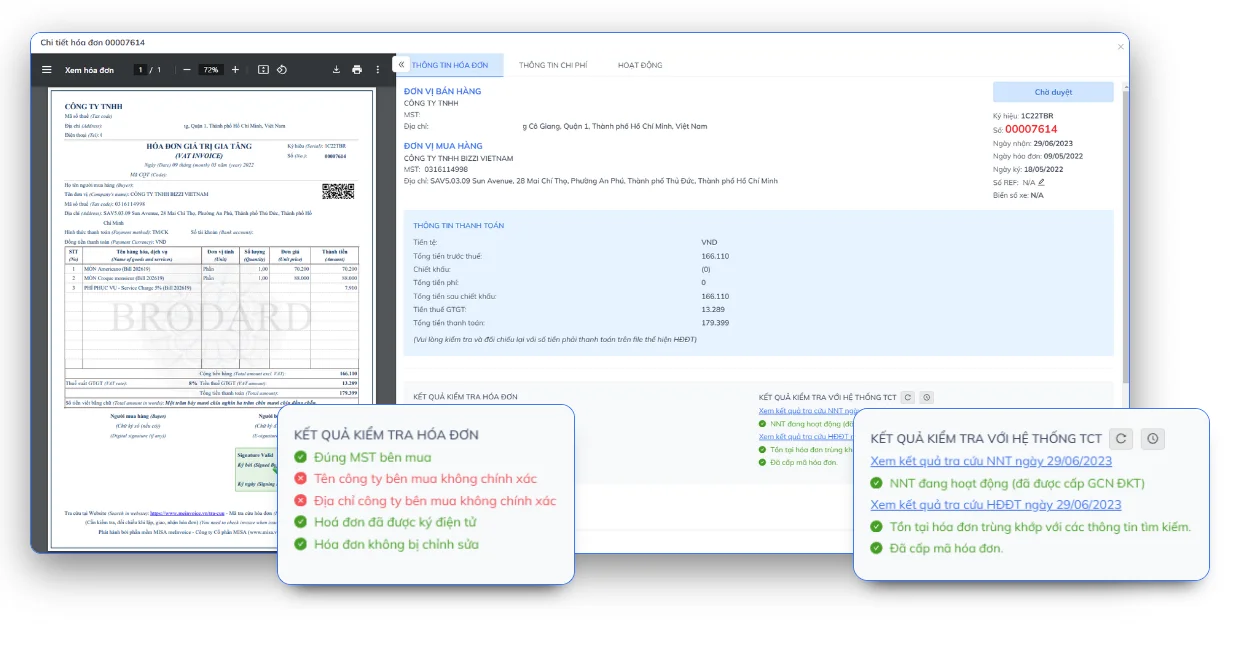
Bizzi helps businesses automatically receive, read, and standardize invoice data, compare it with purchase orders (POs), contracts, and delivery notes, and centrally store all records along with processing history. This helps the finance department reduce manual operation time, increase control, and readily provide data when needed for audits or working with tax authorities.
Conclude
Circular 32/2025/TT-BTC on invoice archiving This not only highlights the requirement for proper management of electronic invoice data but also emphasizes the role of storage systems, data retrieval capabilities, and data control throughout the entire financial and accounting process. For businesses with a large number of input invoices, fragmented storage via email, personal folders, or manual processing not only increases operating costs but also poses risks when reconciling documents, settling taxes, or conducting audits.
Bizzi helps businesses build a centralized electronic invoicing management process that meets the requirements of Circular 32/2025/TT-BTC on invoice archiving. by:
- Automatically receive electronic invoices from multiple sources such as email, vendor portals, and electronic invoicing systems.
- Extract and standardize data from XML/PDF files using AI, reducing manual data entry.
- Verify the validity of invoices, detect duplicate invoices, invoices with incorrect information, or invoices showing signs of risk.
- Compare the invoice with the purchase order (PO), delivery receipt (GRN), contract, and ERP data before recording the debt.
- Centralized storage of invoice data along with the entire processing, approval, and reconciliation history (audit trail) allows for quick retrieval when requested by tax authorities, auditors, or management.
- Connecting AP Automation, Expense Management, and workflows. debt and cash flow management To control the entire invoice lifecycle, from receipt to payment.
Instead of simply meeting minimum storage requirements, businesses can integrate invoice data into a modern, transparent financial management system, ready for audits, inspections, and decision-making.
Sign up for a Bizzi demo. to learn how to automate the process of receiving, checking, and verifying data. Storing electronic invoices according to Circular 32/2025/TT-BTC, This helps accounting teams and CFOs reduce compliance risks, save processing time, and improve the efficiency of corporate financial management. https://bizzi.vn/dat-lich-demo/






