


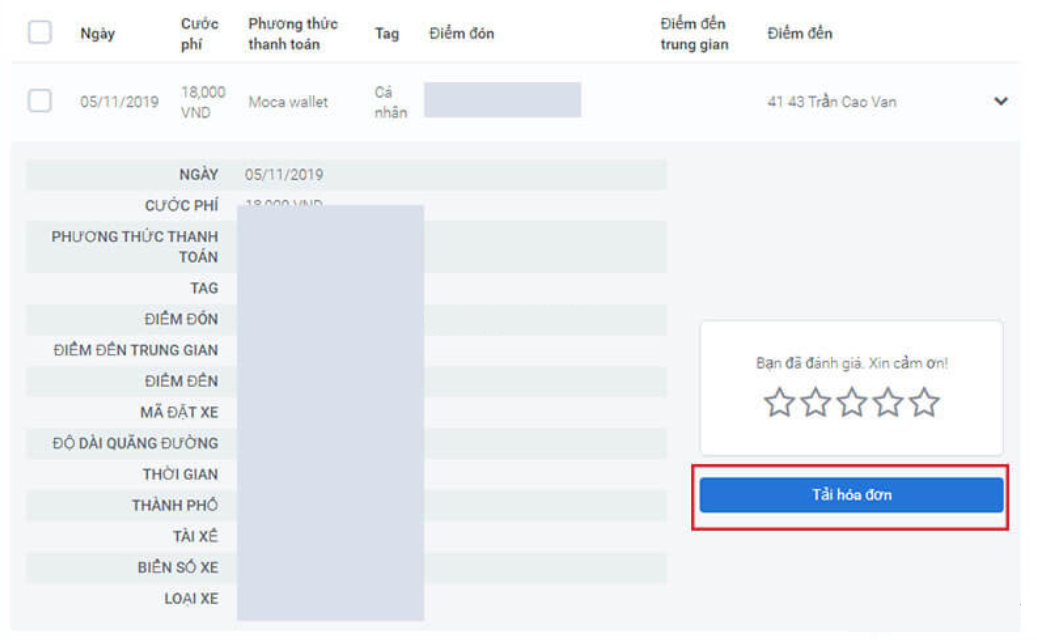
How to get a Grab receipt depends on the type of receipt and the service you used. For business-related rides or transactions, the Business Profile helps separate business receipts from personal expenses. If the business requires a VAT invoice, it's necessary to check the correct invoicing flow within Grab For Business or look it up on Grab's E-Invoice portal.
Especially with GrabFood and GrabMart, The VAT invoice issued by Grab to corporate customers does not represent the full value of the food or goods. According to information currently published by Grab For Business, Grab's VAT invoice for these two services only shows the delivery portion; documentation for the goods or food needs to be verified with the actual restaurant/store.
1. How to get a Grab receipt: First, you need to determine what document you need.
| Type of document | Common purposes | How to receive/check | Points to note |
|---|---|---|---|
| Receipt | Reconcile transactions, reimbursements, or expense reports according to internal regulations. | Business Profile can separate work receipts and send them to work emails or allow you to download a consolidated statement. | Receipts should not be assumed to be VAT invoices. |
| Electronic invoice / VAT invoice | Business invoices are based on actual transactions. | Receive invoices through the Grab/Grab For Business invoice stream and can look them up on the E-Invoice portal once you have the invoice receipt code. | You must check the seller, the details of the service, the buyer's information, and the value on the invoice itself. |
| Monthly invoice / Corporate Billing | The company wants to consolidate business transactions into a single business payment period. | This is a paid option within Grab For Business and requires registration/activation by the business. | Not all Grab accounts or Business Profiles automatically receive a consolidated monthly invoice. |
2. How to get a Grab invoice for your company.
Grab currently separates its usage into two tiers for businesses: Business Profile to enable staff to categorize work transactions and Grab For Business Portal To enable businesses to manage expenses, reporting, and payment/invoicing options at the company level.
-
Create or check a Business Profile
Create a Business Profile in the Grab app using your work email. This profile helps separate work-related transactions from your Personal Profile.
-
Switch to Business Profile before booking services.
Before booking a ride or GrabFood for work, select the correct Business Profile. This is a crucial step to ensure receipts and expense data are properly categorized for business purposes.
-
Check the company's payment methods.
If your company uses the Grab For Business Portal, transactions can be paid using the business method or according to the configured policy. Corporate billing and monthly invoices are features that need to be enabled separately; they are not by default.
-
Receive receipt and check VAT invoice according to service
Business Profile supports receiving work receipts via company email or downloading statements. For VAT invoices, you need to check the business invoicing flow and the scope of invoices for each service as described below.
3. Do GrabCar and GrabBike issue VAT invoices?
Grab For Business is now announcing the possibility of release. Electronic VAT invoice for business transportation transactions.. Therefore, if a business needs invoices for GrabCar/GrabBike services, it should conduct the transaction through its Business Profile/Grab For Business and verify the issued documents after the transaction.
The employee pays and then reimburses the staff.
Use a Business Profile to separate business transactions. Receipts can be used for reimbursement purposes according to internal regulations; if the business requires a VAT invoice, the accountant still needs to verify the actual invoice.
The company processes payments through Grab For Business.
Businesses can manage shipping transactions on the Portal and use billing/invoicing options that match their business account configuration.
4. Do GrabFood and GrabMart issue VAT invoices?
There may be multiple parties involved in the documentation for a GrabFood/GrabMart order. Grab For Business now states that for GrabFood and GrabMart, the VAT invoice issued by Grab only lists the items. delivery section. This means that Grab's invoice should not be automatically assumed to be the invoice for all food or goods in the order.
The terms and conditions for GrabMerchant also stipulate that restaurants/stores are responsible for issuing VAT invoices or valid tax documents for products sold through GrabFood/GrabMart. Therefore, accounting needs to separate:
| Expenditure | Documents to be checked | The publisher needs to determine |
|---|---|---|
| Grab delivery/service fees | An electronic invoice will be issued corresponding to the Grab service portion if the transaction falls within the scope of issuance. | Grab. |
| Value of food on GrabFood | Invoices/receipts for actual food and beverage goods and services. | Restaurants or businesses that sell goods on a transactional basis. |
| Value of goods on GrabMart | Invoice/receipt for the actual goods purchased. | The store/merchant is based on the transaction. |
5. How to get a GrabExpress receipt
GrabExpress is categorized by Grab For Business as a service that can be managed on a business account. Grab has now announced the ability to issue electronic VAT invoices for GrabExpress transactions of businesses, provided the total transaction value falls within that scope.
-
Book GrabExpress using your work profile.
Switch to a Business Profile or Grab For Business account before creating a delivery order for business purposes.
-
Check business information and billing methods.
Ensure that the transaction is properly linked to the company profile and follows the company's payment/invoicing configuration.
-
Save the receipt and look up the VAT invoice when needed.
If the invoice has been issued and you have an invoice receipt code, you can use the Grab E-Invoice portal to look up and download the file.
6. How do individuals obtain Grab receipts?
For personal accounts, it's necessary to distinguish between the goals: Review transaction/receipt or need one VAT invoice. Grab has its own support section regarding setup and receipt requests; menu names in the app may vary by version.
A ride receipt should not be called a "VAT invoice" simply because it contains the time, amount, and transaction information.
7. How to look up and download Grab electronic invoices
Grab now has its own E-Invoice portal for invoice lookup. On the current lookup page, users enter... Invoice code and Verification code, Then, search for and download the invoice when results are available.
-
Open the Grab invoice lookup portal.
Access the Grab E-Invoice Search page.
-
Enter the invoice code
This code is the Search Code used to retrieve the invoice. Grab's instructions also indicate the location of the lookup code at the bottom of the first page of the invoice PDF file, in case the user already has a PDF copy.
-
Enter the verification code and search.
After the system returns the results, open the operations section to view or download the invoice file.
8. What should I do if I don't receive a Grab receipt?
| Situation | It should be checked. | Next action |
|---|---|---|
| No receipt in email. | Work emails, spam/promotions files, and business profiles were used for the transaction. | Open the transaction in the app/Business Centre and use the support section if you need to resend the receipt. |
| I have a receipt but no VAT invoice. | Service type, Business Profile or Grab For Business model, and billing configuration. | Check if the transaction falls within the scope of VAT invoice issuance. |
| GrabFood/Mart only provides receipts for delivery orders. | The portion representing the value of the food/goods and the service provided by the merchant. | Check the receipt/receipt from the restaurant or store. |
| I have the invoice code but can't find it. | Enter the correct Search Code; try searching for old invoices if you are in the legacy system. | If you still don't get a result, contact Grab Support. |
| The business information on the invoice is incorrect. | The declared information and actual supporting documents. | Contact the issuer/Grab Support to process the request according to the current invoicing procedure; do not attempt to edit the PDF/XML file yourself. |
Grab provides in-app support and a Help Centre for both individual customers and Grab For Business users. When submitting a request, please include the transaction code, date, service, and business information for verification.
9. Grab's billing regulations to note in 2026
From 01/07/2026, The current regulatory framework on electronic invoices and electronic documents needs to be compared with... Decree 254/2026/ND-CP and Circular 91/2026/TT-BTC. Decree 254 requires electronic invoices to fully and truthfully reflect the economic transactions that have occurred and to contain the mandatory contents as prescribed.
Therefore, when accountants receive Grab documents, the crucial step is not just "having the PDF file," but determining whether it is an electronic invoice for the transaction to be accounted for or merely a receipt/statement, and then checking the seller's information, buyer's information, service, value, and invoice data.
9.1. VAT rate on Grab services in 2026
According to Grab's announcement regarding the implementation of Resolution 204/2025/QH15, the 8% rate is currently being applied to GrabCar, GrabBike, GrabExpress, GrabFood, and GrabMart services from July 1, 2025, to December 31, 2026, unless a competent authority issues new regulations. When accounting, it is still necessary to base the calculation on the actual invoice for each transaction and separate the portion of goods supplied by the merchant, if any.
Bizzi has compiled the changes separately at Decree 254/2026/ND-CP on electronic invoices and electronic documents.
10. What should businesses check after receiving a Grab invoice or receipt?
- Identify whether the document is a receipt, statement, or electronic invoice.
- Match the user/service to the job purpose or work requirement.
- Verify the business name, tax identification number, and buyer information if the invoice needs to be issued to a company.
- Compare the time, service, amount, and payment method with the actual transaction.
- With GrabFood/GrabMart, separate the delivery portion from the goods/food portion to verify the documentation.
- Save the original electronic invoice file and related data according to the company's documentation procedures.
- Do not conclude that an expense is deductible or tax-deductible based solely on the fact that "an invoice has been received"; all applicable documentation requirements must be checked.
For further examination, please refer to How to check if an electronic invoice is valid and Conditions for deductible expenses when calculating corporate income tax..
11. At what stage is Bizzi suitable when a business has significant Grab expenses?
When there are only a few Grab transactions per month, businesses can save receipts/invoices for each employee and reimburse manually. As the number of transactions increases, the issue often shifts from "whether or not the invoice has been obtained" to... Transaction link – payment request – invoice/receipt – approval For post-audit.
Bizzi Expense Pay
According to the product range announced by Bizzi, Expense Pay supports managing spending requests, limits, payments, and reconciliation; the system can link transactions with invoices, receipts, and approval history for post-audit purposes.
This product fits more directly with travel, business trip, or small expenses incurred by employees.
Processing input invoices
If electronic invoices are collected by businesses via email or a connected data source, Bizzi's invoice processing solution supports data collection, validity verification, centralized management, and integration with ERP/accounting software.
This article does not claim that Bizzi has its own connector that automatically retrieves invoices directly from Grab accounts.
For business travel expenses, businesses can refer to additional information. The process for handling travel expenses, from request to settlement..
Manage expenses and documents on the same flow.
When Grab transactions occur across multiple employees, centralizing payment requests, payments, receipts/invoices, and post-audit status helps Finance reduce manual data merging.
12. Frequently Asked Questions about How to Get a Grab Receipt
Does Grab issue VAT invoices?
There are electronic invoicing streams available for Grab transactions, particularly within Grab For Business. However, the scope of the invoice depends on the service and how the transaction is configured. Receipts should not be defaulted to VAT invoices.
How do I get a Grab invoice for my company?
It's recommended to create a Business Profile using your work email, switch to this profile before booking a service, and check your company's Grab For Business/billing configuration. After the transaction, receive the service receipt and verify the VAT invoice matches the service.
Does GrabFood issue VAT invoices for all food orders?
This should not be interpreted that way. Grab For Business currently states that Grab's VAT invoice for GrabFood and GrabMart only lists the delivery portion. The food/goods portion requires verification of the invoice or document issued by the merchant.
Does GrabExpress issue invoices?
Grab For Business now announces the ability to issue electronic VAT invoices for GrabExpress transactions for businesses. Please submit with the correct business profile and check the actual invoice/bill for your account.
Is a Grab receipt considered a VAT invoice?
Not a default. Receipts are used to record transaction information and can be used for internal reimbursement, while VAT invoices must be invoices issued in accordance with regulations and show the information of the corresponding transaction.
What is the Grab invoice code?
This is the Search Code used on the Grab E-Invoice portal to look up invoices. Users enter the invoice receipt code along with the verification code to search; Grab's instructions also state that the lookup code can be found at the bottom of the first page of the invoice PDF.
How do I re-upload my Grab receipt?
If you already have an invoice code, use the Grab E-Invoice portal to find and download it again. The current portal also has a feature to look up old invoices for legacy data.
What should I do if the company information on my Grab receipt is incorrect?
Do not attempt to edit PDF/XML documents yourself. Contact Grab or the invoice issuer to process the transaction according to current invoicing procedures, and provide the transaction code and correct information for verification.
Does Grab For Business issue consolidated monthly invoices?
Monthly invoice/Corporate Billing is an optional upgrade in Grab For Business and requires activation by the business. This is not a default feature of all Business Profiles.
Is having a Grab receipt sufficient to include it as a business expense?
One shouldn't draw conclusions from just one invoice. Businesses also need to check the purpose of the expense, internal records, payment documents, and applicable tax conditions for that specific expenditure.






