


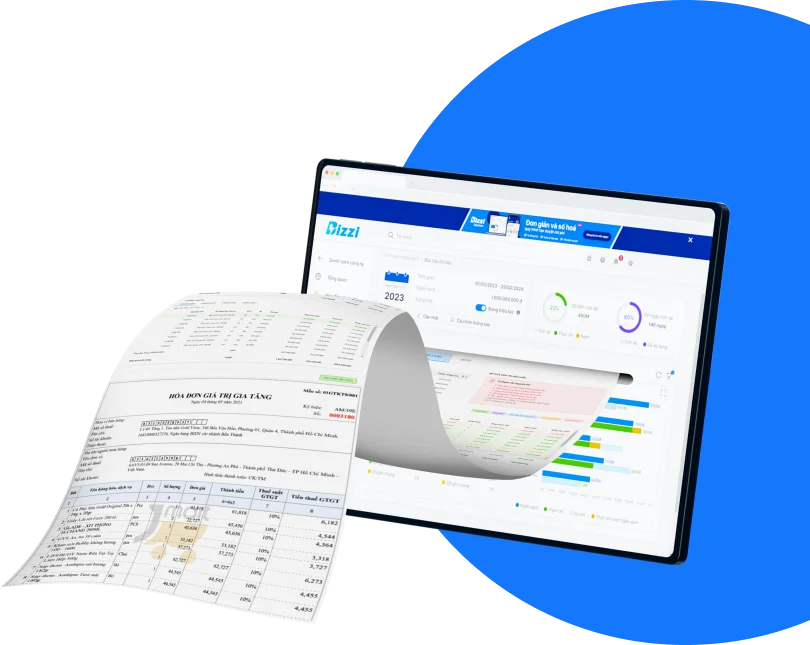
XML invoice reading software This helps accountants open, view, and verify the original data of electronic invoices, including information about the seller, buyer, goods, tax, digital signature, and tax authority code (if applicable). If you only need to view a few invoices, you can use the tax authority's electronic invoice portal or a tool provided by an electronic invoice provider. However, when a business has to process dozens to thousands of input invoices each month, simply being able to "open the XML file" is no longer the only goal.
More importantly, the data in the XML file needs to be checked and compared against the purchase documents, discrepancies detected, and consistently incorporated into the input invoice processing procedure. This is also why many businesses are switching from standalone XML reading tools to automated accounts payable automation systems. Automate the accounts payable process.).
In this article, Bizzi will help you:
- Select XML invoice reading software Suitable for individual needs.
- Know when to use the tax authority's electronic invoicing portal, a vendor's tool, or iTaxViewer.
- Instructions on how to properly open electronic invoice XML files.
- Troubleshooting common errors when unable to open XML files.
- Verify the validity of the invoice data after reading it.
- Determine when a business should switch to an automated bulk XML invoice reading and processing solution.
Which software should I use to read XML invoices?
You can read XML invoices using the tax authority's electronic invoice portal, the electronic invoice provider's lookup tool, iTaxViewer in some suitable cases, XML viewers, or input invoice management systems like Bizzi Bot. The choice of tool depends on the intended use, the number of invoices to be processed, and the business's data control requirements.
In reality, many accountants search for "XML invoice reader software" simply to be able to open XML files received from the provider. However, there is no single tool that suits every situation.
If you only need to quickly check an electronic invoice, free tools or the tax authority's lookup portal are usually sufficient. Conversely, if a business receives invoices from multiple suppliers, branches, or different channels, opening each individual XML file will quickly become a bottleneck in the input invoice processing workflow.
The table below helps you choose the right tool for each situation.
| Tools | When is it appropriate? | Advantage | Limit | Who should it be used for? |
| Tax authority's electronic invoice portal | I need to read and check an XML file. | Invoice information can be looked up and checked. | Manually manipulate each file. | Accountants need quick verification. |
| Electronic invoice provider's lookup portal | There is a link or code provided by the seller. | Display the correct invoice template that was issued. | It depends on the supplier. | Businesses receive few invoices from a few fixed suppliers. |
| iTaxViewer | Reading some XML files in the e-tax ecosystem. | A tool familiar to many tax accountants. | It should not be considered a tool for reading all electronic invoice XML files. | Tax accountants are already familiar with using it. |
| XML viewer or browser | Want to quickly view the file structure? | No additional software installation required. | Difficult to read, often only displays XML code. | A person with technical knowledge |
| Bizzi Bot | It is necessary to read, check, and process many input invoices. | Data standardization, support for verification, reconciliation, and centralized management. | Suitable for business use, not a tool for viewing individual files. | Businesses with a large volume of invoices |
Which tool should you choose in each situation?
The choice of tool should be based on practical needs rather than just its ability to open XML files.
- Necessary quickly check an invoice, The tax authority's electronic invoice portal or the supplier's lookup portal are often suitable options.
- If you are working with XML files within the e-tax ecosystem, iTaxViewer It may be helpful in some cases. However, it should not be assumed that this tool will be able to read all electronic invoice XML files from different providers.
- If users only want to view the data structure, they can open the file using a browser or XML viewer, but the content is usually displayed as data tags, making it difficult for the average user to read.
- For businesses receiving a large volume of input invoices, the need no longer stops at "reading XML files" but shifts to managing the entire invoice lifecycle: receiving, checking, reconciling, approving, synchronizing data, and storing for auditing purposes. In this case, a system like Bizzi Bot It is more suitable because it can support the automation of many steps in the invoice processing workflow.
In other words, Being able to read XML files is just the first step.. The real value for businesses lies in the ability to transform XML data into data that can be controlled, verified, and integrated into the accounts payable process.
What is an XML invoice file and why can't it be opened like a PDF?
Invoice XML file This is the original data file of the electronic invoice, built according to a standard structure so that the system and software can read, process, and exchange data. Meanwhile, PDF file It's simply a visual representation of an invoice, making it easier for users to view, print, or store.
This is also why many people, when opening an XML file for the first time using a browser or text editor, only see lines of code instead of the familiar invoice interface. This does not mean the file is corrupted., XML is simply designed for computers to read and process, not to display directly to the user.
To view the full invoice information visually, you need to use... XML invoice reading software, This includes electronic invoice lookup portals or tools issued by invoice providers. These tools interpret XML data into an easy-to-read invoice interface and support checking important information such as tax identification number, invoice number, date of issue, tax rate, digital signature, and tax authority code (if applicable).
For businesses, The new XML file contains valuable data for processing.. The information in the XML can be entered into the system to check its validity and compare it with the Purchase Order. PO), Goods Receipt GR), contracts, as well as serving accounting and archiving purposes according to accounting procedures. Meanwhile, PDF files primarily serve as visual references for users.
| Criteria | XML file | PDF file |
| Nature | Structured data for system processing | A visual representation for viewing and printing. |
| Main users | Software, systems, and accounting require data verification. | People who need to view or print invoices quickly. |
| Automated processing capability | High quality, can be integrated into the invoice processing workflow. | Lower down, primarily for display purposes. |
| When opened directly | It's possible to display only the XML code lines. | Display the full invoice content. |
| Role in the business | Input data for verification, reconciliation, accounting, and archiving. | Visual reference documents for reference purposes. |
If you want to learn more about the structure, components, and legal value of the XML format, you can refer to the article. What is an electronic invoice XML file?
How to read XML invoices on the General Department of Taxation's portal
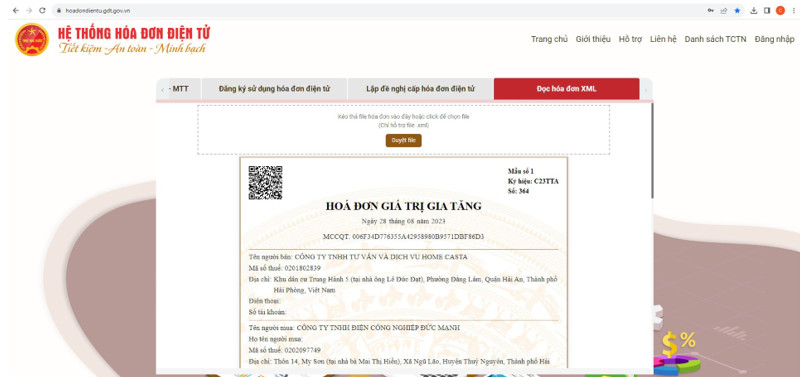
If you just need to open and quickly check one electronic invoice XML file, electronic invoicing portal of General Department of Taxation This is one of the preferred options. It is the official channel for looking up and verifying invoice information, helping accountants compare data from XML files with information displayed on the system before accounting or tax filing.
You can follow these steps:
- Access the General Department of Taxation's electronic invoice portal. Use a web browser and log in, or use the appropriate search function as needed.
- Select the function to read or look up XML invoices. according to the system interface.
- Download the electronic invoice XML file. from computer to system. It is recommended to use the original XML file sent by the seller or electronic invoice provider.
- View the invoice information displayed by the system., This includes all the data that has been converted from XML format to a visual interface.
- Check the important information. like:
- Seller and buyer's tax identification numbers.
- Invoice symbol and invoice number.
- Invoice date.
- The value of the goods, the tax amount, and the total payment.
- Digital signature and tax authority code (for invoices with codes).
- Compare the results with PDF invoices or internal documents such as purchase orders. PO), Goods Receipt GR) or a contract to ensure data consistency.
- Save the test results. if the business needs services for reconciliation, tax settlement, auditing, or document archiving.
Some things to note when reading XML invoice files.
To ensure the accuracy and legal validity of data, accountants should take note of the following points:
- Do not download XML files from unknown sources., Avoid using files that have been modified or not released by the seller.
- Do not edit the content of the XML file before testing. XML is the original data of an electronic invoice; changing its content may compromise the integrity of the document and affect the verification process.
- If the system reports an error when reading the file, Instead of modifying the format or changing the file extension yourself, download the original XML file from the invoice release email, the vendor's lookup portal, or another official source.
For the need to check each individual invoice, the General Department of Taxation's electronic invoice portal is a convenient and reliable option. However, in practice, many businesses receive invoices from multiple suppliers or use multiple electronic invoice issuance systems. In such cases, accountants often switch to using a different system. vendor lookup portal or iTaxViewer To open and check XML files in appropriate situations.
How to read XML files using your billing software or iTaxViewer
Besides the General Department of Taxation's electronic invoice portal, accountants can also open other online platforms. electronic invoice XML file through the provider's lookup portal or using iTaxViewer In some cases, it's appropriate. Each tool is designed for a different purpose, so choosing the right one will save time and minimize errors when reading XML files.
Read XML using the invoice provider's lookup portal.
This is a common method when businesses receive electronic invoices from electronic invoice service providers. Typically, the seller will send an email containing the invoice, a lookup link, or a lookup code for the buyer to view and download the document.
You can follow these steps:
- Open your email or invoice notification. Sent by the seller.
- Access the invoice lookup link. Provided in email or text message.
- Enter the lookup code if the system requires access authentication.
- Choose to view the invoice or download it. Attachments, including XML and PDF files (if any).
- Check the important information. such as the name of the selling entity, tax identification number, invoice number, date of issue, payment amount, tax rate, and invoice status.
- Save the original XML file. to be entered into the company's document management folder or system for the purpose of reconciliation, tax declaration, auditing, and long-term storage.
For businesses that work with multiple suppliers, it's advisable to establish a unified record-keeping system based on time, supplier, or invoice number. This will make searching, comparing, and verifying documents easier later on.
When should you use iTaxViewer?
iTaxViewer It is a familiar software for many accountants when working with XML files. e-tax ecosystem. However, it should be noted that iTaxViewer should not be considered a tool that can read all electronic invoice XML files..
In reality, the ability to open the file depends on the XML format, the data standards of each invoicing system, and the compatibility of the software version being used. Therefore, if you encounter this situation... iTaxViewer cannot open the invoice XML file., However, this is not necessarily a sign that the file is corrupted.
Instead of trying to convert or edit the XML content, you should try the following options in order:
- Use General Department of Taxation's electronic invoice portal to read or check invoice information.
- Open the invoice on electronic invoice provider's lookup portal If a link or lookup code is available.
- Use electronic invoice management software due to the publisher or the company that is implementing it.
- For businesses with a large number of invoices, consider using input invoice processing software It has the ability to automatically receive, read XML data, check, and manage it centrally instead of opening each file individually.
Choosing the right tool not only helps open XML files but also significantly reduces the time spent processing documents in daily work. However, whether using a provider's lookup portal, iTaxViewer, or any other tool... software for reading electronic invoice XML files However, users may still encounter problems such as being unable to open files, displaying only XML code, or receiving format error messages. In the next section, we will explore these issues. Error: Unable to open the invoice XML file. Common problems and how to handle them safely and correctly.
Error: Unable to open invoice XML file, and how to fix it.
During use XML invoice reading software, Accountants may encounter various errors that cause the file to display incorrectly or prevent them from verifying invoice information. In most cases, this doesn't stem from invalid invoices, but rather from other issues. The downloaded file is corrupted, the wrong reading tool was used, the software is incompatible, the file extension has been changed, or the XML data is no longer intact..
The important thing is Do not edit the content of the XML file. To try and open the invoice, the XML file is the original data of the electronic invoice; any changes could affect the integrity of the document and make verification difficult later. Instead, identify the root cause and choose the appropriate solution.
| Common errors | Possible causes | How to handle it |
| Opening the XML file only reveals code. | Currently open in a browser or text editor. | Use the General Department of Taxation's electronic invoice portal, the supplier's lookup portal, or XML electronic invoice reading software Fit |
| iTaxViewer cannot open the file. | Incompatible XML file or outdated software version. | Update to the latest version of iTaxViewer or try reading the results using a different tool. |
| Incorrect XML format | The downloaded file is corrupted, has the wrong extension, or the XML structure is incomplete. | Reload original XML file from email, lookup portal, or invoice provider |
| Vietnamese characters are not displayed correctly. | Character encoding error or incompatible reading tool. | Use software or a portal that supports reading electronic invoices correctly. |
| The invoice could not be verified. | Missing data, corrupted files, or invoices that do not exist in the lookup system. | Check with the seller and compare the invoice information. |
| I only received the PDF file, not the XML. | The seller has either not sent the XML file or has only sent the representation. | Request the seller to provide the original XML file or the link to look up the invoice. |
| Suspicions arise that the XML file has been modified. | The file is no longer in its original form or has been modified after release. | Download the file again from the official source or check it on the General Department of Taxation's electronic invoice portal. |
Some tips to minimize errors when reading XML files.
To reduce processing time and minimize errors when reading electronic invoices, businesses should apply the following principles:
- Always keep it stored original XML file It was sent from the seller, instead of just saving a PDF.
- Only download invoices from official emails, supplier lookup portals, or the General Department of Taxation's electronic invoice portal.
- Regularly update the version of your XML reader software if you are using a tool installed on your computer.
- Do not attempt to change file extensions or edit XML content when encountering file opening errors.
- If the invoice is still unreadable or inaccessible after multiple attempts, you should contact the seller to request a new XML file or verify the invoice status in their system.
For businesses receiving a large volume of incoming invoices, manually detecting and handling these errors can be time-consuming for the accounting department. Therefore, many businesses opt for invoice processing systems that can automatically check formats, detect data anomalies, and classify exceptions upon receipt, reducing risks before invoices proceed to the next processing stage.
After reading the XML file, what information on the invoice needs to be checked?
Readable electronic invoice XML file This is just the first step. Before accounting, filing taxes, or making payments, accountants need to thoroughly check all the information on the invoice to ensure that the document is valid, accurately reflects the economic transaction, and matches the company's purchasing records.
Omitting crucial information can lead to various consequences, such as incorrect tax reporting periods, misrecorded expenses, payments to the wrong suppliers, or risks when tax authorities and auditors review records. Therefore, businesses should develop a consistent checklist to be applied to all input invoices.
Checklist for verification after reading the invoice XML file.
After opening the invoice using XML invoice reading software, Please check the following information in order:
- ☐ Seller's name.
- ☐ Seller's tax identification number.
- ☐ Buyer's name.
- ☐ Buyer's tax identification number.
- ☐ Invoice symbol.
- ☐ Invoice number.
- ☐ Invoice date.
- ☐ Name of goods or services.
- ☐ Quantity and unit price.
- ☐ Applicable tax rate.
- ☐ Value Added Tax.
- ☐ Total amount payable.
- ☐ Seller's digital signature.
- ☐ Tax authority code (for electronic invoices with a code).
- ☐ Invoice status when checked on the system.
- ☐ 3-way comparison with contracts, purchase orders – PO), Goods Receipt GR) or acceptance report, if available.
Instead of simply checking the items on the invoice individually, accountants also need to assess the relationship between the invoice and other documents in the purchasing process to ensure that the transaction is recorded fully, accurately, and is substantiated.
| Information Group | Why is testing necessary? | Risks if wrong |
| Seller/Buyer Information | Identify the correct parties to the transaction. | Incorrect tax identification number, incorrect buyer or seller entity, affecting declaration and accounting. |
| Invoice number, symbol, and date | Ensure correct accounting and tax periods are recorded. | Duplicate invoice numbers, incorrect recording period, or omitted invoices. |
| Goods and services | Confirm the correct economic transaction has occurred. | Incorrect accounting of expenses, incorrect recipients, or incorrect details of purchases. |
| Taxes and total payment | Ensure the accuracy of accounting data and tax returns. | Incorrect value-added tax, incorrect accounts payable, or incorrect payment amount. |
| Digital signature and tax authority code | Verify the validity of the electronic invoice. | Risk of using invalid or unqualified invoices. |
| Verification documents | Confirm that the actual transaction has occurred. | Incorrect payments, missing documentation, or difficulties in proving payment during audits and tax settlements. |
For businesses that generate only a few dozen invoices per month, the above checklist can be done manually while still ensuring efficiency. However, when the number of invoices increases to hundreds or thousands of documents from multiple suppliers and branches, checking each item manually will consume a lot of time and increase the risk of omissions and discrepancies. This is also the time when businesses should consider switching from manual methods. XML reader software simply to automated XML invoice processing system, It has the potential to support data verification, comparison, and control on a large scale.
How does XML reading software differ from automated XML invoice processing software?
XML invoice reading software It helps users open and view data in XML files, while automated XML invoice processing software Support in receiving, checking, comparing, approving, and synchronizing data throughout the entire process of handling input invoices.
Many businesses believe that all they need is to have XML invoice reading software This is sufficient to meet the needs of processing electronic invoices. However, in reality, opening the XML file only solves the first step: displaying the data. For the invoice to enter the accounting and payment process, businesses must still check its validity, compare it with related documents, obtain approval, record it in the accounting system, and store it completely for auditing purposes.
When the number of invoices is only a few dozen files per month, manual reading and verification is still sufficient. However, for businesses with hundreds or thousands of incoming invoices from multiple suppliers, using only XML reading tools will cause accountants to spend a lot of time manually entering, comparing, and verifying data, while also increasing the risk of errors or missing documents.
The table below helps to clearly distinguish between the two groups of solutions:
| Criteria | XML reader software | Automated XML invoice processing software |
| Purpose | Open and view the contents of the XML invoice. | Manage the entire process of handling incoming invoices. |
| Suitable for | Individuals or businesses with few invoices | Businesses process multiple invoices from various sources. |
| Check the data. | Mostly done manually. | It is possible to perform automatic checks based on established rules. |
| Compare the Purchase Order/Gr/Contract. | No or very limited | We can assist with matching with the Purchase Order. PO), Goods Receipt GR) or contract |
| Approve | Not supported | There is an approval process (workflow) based on authority levels. |
| Synchronize ERP/accounting software | Data entry is usually required manually. | Maybe financial ERP integration or customized accounting software |
| Audit trail (processing history) | Limit | Maintain a complete record of receipt, review, editing, and approval. |
| Roles with the CFO/Chief Accountant | File reading assistance tool | Financial operations control tool and accounts payable process (Accounts Payable – AP) |
The biggest difference doesn't lie in ability. reading XML files, which is in the matter Transform XML data into a control process.. An automated invoice processing system can support receiving invoices from multiple sources, standardizing data, comparing them with purchase documents, handling exceptions, recording processing history (audit trail), and synchronizing data to an accounting or ERP system. These are steps that conventional XML-reading software cannot handle.
From a financial management perspective, CFOs and chief accountants are often more concerned with ability. data control, This reduces data entry errors, increases transparency in the approval process, and supports auditing, instead of just being able to view the content of an XML file.
When should businesses use software to automatically read and process XML invoices?
Businesses should consider using XML invoice reading software Combining an automated processing system becomes necessary when the number of incoming invoices increases rapidly, data comes from multiple sources, and manual verification processes begin to become bottlenecks. At this point, the goal is no longer just... Opened XML file, which is Control the entire lifecycle of input invoices. From receiving, checking, and comparing to accounting and archiving.
Initially, accountants could use the supplier's lookup portal or the tax authority's electronic invoicing portal to read each XML file. However, when a business has hundreds or thousands of invoices each month, opening each file for verification becomes time-consuming and increases the risk of missing duplicate invoices, incorrect information, or missing supporting documents.
The table below helps businesses determine the right time to transition from manual to automated processes.
| Token | Is manual reading still appropriate? | Should we automate? |
| Under 50 invoices/month | Maybe | Not mandatory |
| Many suppliers send invoices through multiple channels. | Difficult | Should |
| There are many branches or departments that generate expenses. | Difficult to control | Should |
| Often missing XML files or only saving PDFs. | High risk | Should |
| Duplicate invoices need to be checked. | It's very difficult to do by hand. | Should |
| It needs to be compared with the purchase order/gross order/contract. | Not optimal | Should |
| Multi-level approval process | Not suitable | Should |
| Need audit trail (Processing history) for auditing or tax settlement purposes. | Limit | Should |
| Data needs to be synchronized with ERP or accounting software. | Not suitable | Should |
The signs indicate that the manual XML reading process has become a bottleneck.
Not every business needs to invest in an automation system right away. However, if you frequently encounter one or more of the following situations, continuing to handle them manually will lead to increased operating costs that scale:
- Invoices are sent via multiple emails, multiple lookup portals, or multiple different providers.
- Accountants spend a lot of time re-entering data from XML files into accounting software.
- Each invoice must be checked manually to detect duplicates or incorrect information.
- The reconciliation between invoices, purchase orders (PO), warehouse receipts (GR), and contracts is performed using spreadsheets.
- It is difficult to track the processing status of each invoice or determine who approved, edited, or rejected the document.
These issues not only affect the productivity of the accounting department but also increase the risk of errors in tax filing, payments, and document archiving.
CFO's perspective: Value doesn't lie in "reading XML"“
From a financial management perspective, reading XML files It only addresses the need for individual-level operations: opening files, viewing information, and checking each invoice.
Meanwhile, automated XML invoice processing software Aimed at addressing management issues at the enterprise level. Instead of just displaying data, the system can support standardizing the invoice receiving process, verifying information according to established rules, assisting in comparison with related documents, and recording processing history.audit trail) and synchronize data to the ERP system or accounting software if configured.
For a CFO or Chief Accountant, the biggest benefit isn't about opening files faster, but about the ability to:
- Reduce errors due to manual data entry.
- Increase transparency and traceability throughout the entire invoice processing process.
- Reduce the time required for processing and approving documents.
- It helps control the risk of incorrect or duplicate payments.
- Data standardization is essential for financial reporting, auditing, and tax settlement.
When demand has shifted from “"View XML invoice"” luxurious “"Controlling invoice data across the entire enterprise"”, This is also a good time to consider automation solutions such as Bizzi Bot, Instead of just using individual XML file reading tools, in the next section we will explore how Bizzi Bot helps businesses receive, read, check, and process XML invoices according to a unified process.
How does Bizzi Bot support reading and processing XML invoices?
Bizzi Bot It supports businesses in automatically receiving, reading, checking, comparing, and managing input invoices, suitable when manually opening each XML file is no longer sufficient for operational needs. Instead of just acting as a... XML invoice reading software, Bizzi Bot is designed to integrate data from XML files into the entire Accounts Payable (AP) processing workflow, reducing manual operations and increasing control.
A typical XML invoice processing workflow with Bizzi Bot includes the following steps:
1. Receive invoices from multiple sources.
The system can receive electronic invoices from various sources such as email, invoice portals, or internal sources according to the company's procedures. Centralizing invoices helps reduce the risk of lost documents or scattered storage.
2. Read data from an XML file.
Upon receiving the XML file, Bizzi Bot automatically extracts and standardizes the important information fields, including:
- Seller and buyer information.
- Tax identification number.
- Invoice number and symbol.
- Invoice date.
- The value of the goods, the tax amount, and the total payment.
- Other data fields are used for accounting and reconciliation purposes.
Data standardization significantly reduces manual data entry time and lays the foundation for subsequent control steps.
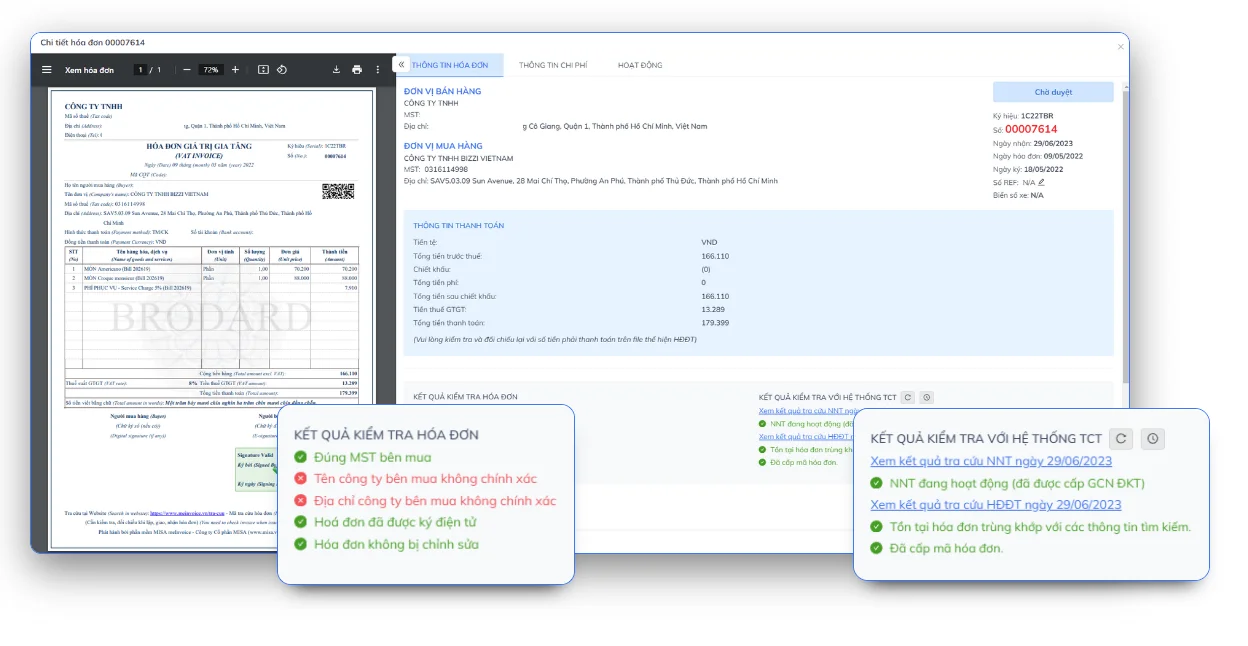
3. Verify invoice data.
After reading the data, the system can assist in checking important information to detect anomalies such as:
- Required information is missing.
- Incorrect data format.
- Missing tax identification number or seller information.
- Differences between key data fields.
These alerts help accountants quickly review invoices before processing them.
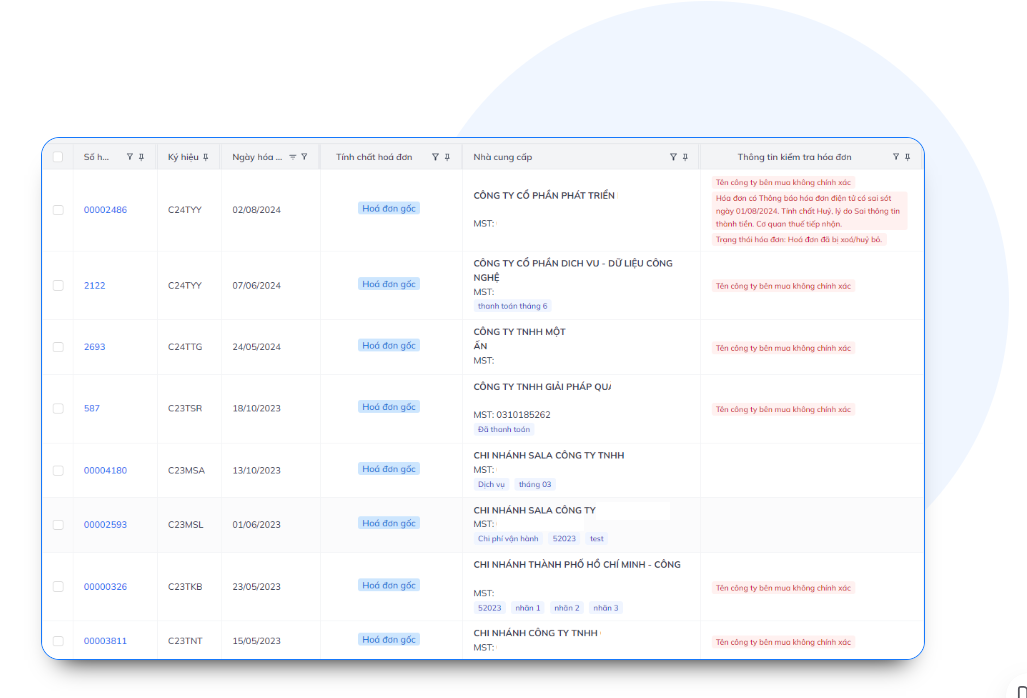
4. Support for verifying supplier information.
Bizzi Bot helps businesses centralize supplier information and supports the control of input documents according to established processes. This reduces the risk of processing invoices with missing information or those that do not meet internal control requirements.
5. Compare with relevant documents.
Instead of checking each document using spreadsheets, the system can support comparing invoices with:
- Purchase Order (PO).
- Goods Receipt (GR).
- Contract.
- Purchase data or other related documents (if the business implements them).
This is an important step in reducing the risk of incorrect payments or improper recording of expenses.
6. Exception handling
Invoices showing signs of irregularities will be processed separately for accounting review, for example:
- The invoice may be duplicated.
- Missing XML file or related documents.
- Incorrect seller or buyer information.
- There is a lack of data for accounting purposes.
- Additional documents are required before approval.
Exception processing allows the accounting department to prioritize handling high-risk cases instead of reviewing all invoices in the same way.
7. Synchronize data with the accounting or ERP system.
After completing the verification process, invoice data can be synchronized to accounting software or the system. ERP (Enterprise Resource Planning) According to the company's configuration, this helps limit repetitive data entry and maintain consistency in financial data.
8. Storing invoices and processing history (Audit Trail)
The entire XML file, processing status, inspection history, approvals, and related operations are stored in the system as follows: audit trail (processing history). This is an important basis for auditing, tax settlement, and tracing discrepancies when they occur.
As the number of incoming invoices increases, the value of a system like Bizzi Bot lies not just in its capabilities. reading XML files, but also in transforming invoice data into data that can be controlled throughout the payment process.
Businesses can start by conducting an assessment. Number of XML invoices per month, number of invoice acceptance points, and current error rate in the processing process. This helps determine which processes should be prioritized for automation first. This approach allows for the selection of solutions that best suit operational needs, rather than spreading investments too thinly across multiple areas.
FAQ about XML invoice reading software
1. Which software can read XML invoices?
You can use the General Department of Taxation's electronic invoice portal, the invoice provider's lookup portal, or some tax XML software such as iTaxViewer where appropriate, browser/XML viewer or invoicing systems such as Bizzi Bot. The choice of tool depends on the intended use, from viewing a single file to processing a batch of incoming invoices.
2. Can iTaxViewer read all XML invoice files?
Do not watch iTaxViewer This tool can read all XML electronic invoice files. This software is popular for reading XML files within the electronic tax ecosystem. For electronic invoices, you should prioritize the tax authority's electronic invoice portal, the supplier's lookup portal, or specialized invoice management software if you need to process them frequently.
3. Why do I only see code when I open the invoice XML file?
This happens because XML is a structured data format for system processing, not a visually intuitive format like PDF. When opened with a browser or text editor, you may only see the data tags. To view the invoice in an easily readable format, use XML. XML invoice reading software or the appropriate search portal.
4. What is the difference between an XML invoice file and a PDF invoice file?
XML files contain the original data of electronic invoices for the system to read, verify, and process automatically, while PDF is a visual representation for viewing or printing documents. Businesses should store both formats simultaneously to meet data management needs and facilitate document comparison or sharing.
5. Is it possible to read multiple invoice XML files simultaneously?
Yes. However, free tools are often suitable for opening individual files. When processing dozens or hundreds of invoices daily, businesses should use a system capable of automatically receiving, reading, checking, classifying, and managing multiple XML files simultaneously to improve processing efficiency.
6. Can XML reading software replace accounting software?
Are not. Software for reading XML electronic invoice files Invoice processing software only supports opening, displaying, and verifying invoice data. Meanwhile, accounting software is responsible for accounting, bookkeeping, and financial reporting. For businesses, the optimal solution is an invoice processing system that can connect to or synchronize data with accounting software and ERP to ensure a seamless process.
Conclude
The choice XML invoice reading software The appropriate method depends on the size and processing needs of the business. If you only need to open and check a few invoices, you can use the tax authority's or invoice provider's lookup portal. However, as the number of incoming invoices increases, manually reading each XML file will struggle to meet the requirements for speed, accuracy, and control.
In that context, automation solutions such as Bizzi Bot Bizzi helps businesses receive and read XML data, verify information, compare documents, track processing (audit trail), and synchronize data with accounting or ERP systems according to a unified process. Instead of just supporting XML file opening, Bizzi aims to transform invoice data into data for financial control and accounts payable (AP) processes.
If your business is struggling to process multiple XML invoices from various vendors or wants to standardize its invoicing process, you can Experience the Bizzi solution. To assess the suitability to actual needs and determine which processes should be prioritized for automation.
Book your appointment here: https://bizzi.vn/dang-ky-dung-thu/






