



Time sheet This data is used by the HR department to compile working days, hours, days off, and overtime before calculating salaries. If a ready-to-use file is needed, businesses can choose a template by month, day, week, shift, or hour from the table below.
Regarding the 2026 filing, please note the following. Circular 200/2014/TT-BTC has expired as of January 1, 2026.. The Circulars TT200, TT107, and TT185 should only be used for comparing records within the period when the documents are still in effect; the Excel 2026 template is designed for internal management and payroll calculation purposes.
1. Download timesheet templates in Excel and Word 2026.
Excel 2026 timesheet template with formulas
This Excel 2026 template consists of 4 sheets: Instruct, Employee list, Symbol and Monthly attendance record. Select the month, year, and work code; the file will automatically compile the total working hours, half-working hours, leave, unpaid leave, sick leave, compensatory leave, and total working hours.
- Suitable for businesses that need monthly timesheets with formulas and automatic aggregation.
- There is a reference symbol table, a list of selected symbols for public services, and a weekend format.
- Do not use macros; businesses can adjust the way work hours are converted according to their internal regulations.
| Demand | Which one should I choose? | Suggest |
|---|---|---|
| General timekeeping on a monthly basis | Excel 2026 Template ↓ | Use this when you need to compile working days before calculating salaries. |
| Track the details day by day. | Daily Samples ↓ | Use this when the HR department needs to review working days, leave, and adjust attendance records. |
| Pay wages or conduct weekly audits. | Weekly template ↓ | Helps detect under-work or incorrect work records before the end-of-month closing date. |
| Part-time staff | Hourly/Part-time template ↓ | Track clock-in times, clock-out times, and total working hours. |
| Factories, shops, and services with multiple shifts. | Shift-based template ↓ | Track employee shifts on a daily basis. |
| Overtime | Overtime form ↓ | Compare the number of overtime hours with the prior approval before calculating salary. |
| Printing is needed for handwritten notes. | Word Template ↓ | Use when manual printing and recording of attendance is required. |
| International personnel | English sample ↓ | Use the English time sheet to standardize recording methods. |
| Small and medium-sized enterprises under Circular 133 | Form TT133 ↓ | Please refer to the currently effective Circular 133 before using it. |
2. Sample timesheets for daily, weekly, and monthly attendance.
Businesses can choose the timekeeping cycle based on their payroll method and the level of verification required. Daily schedules are suitable for detailed reviews; weekly schedules help address discrepancies early; and monthly schedules are convenient for monthly payroll processing.
1. Daily timesheet template
Record attendance, leave, and adjustments on a daily basis. This template is suitable when the HR department needs to check details before compiling the final report for the period.
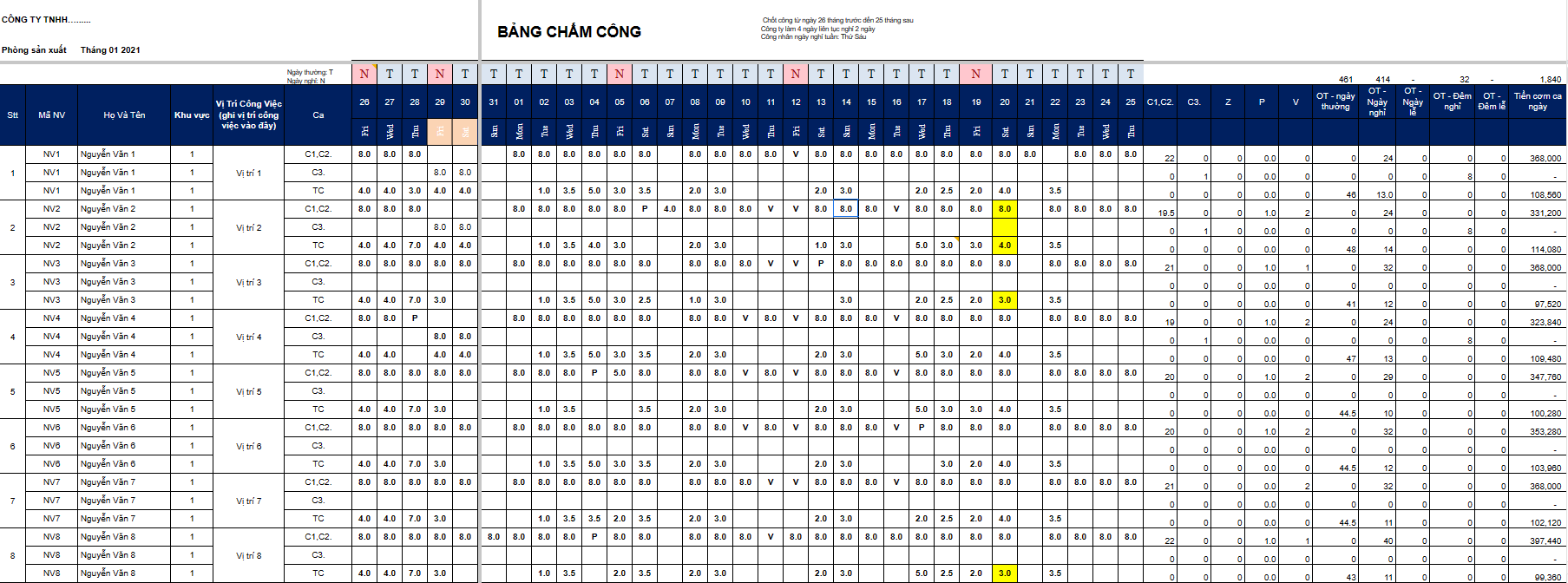
2. Simple daily timesheet template in Excel
Suitable for small teams needing to enter attendance data directly into Excel and summarize it using basic formulas.
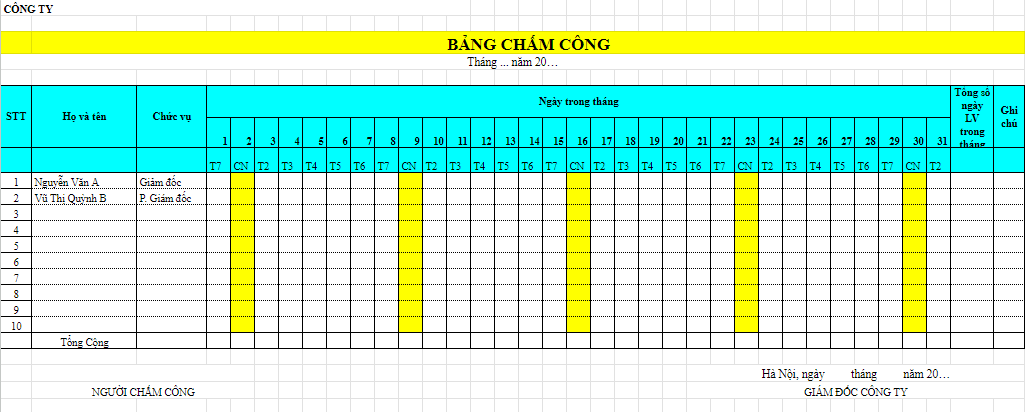
3. Daily timesheet template in Word
Use this when you need to print from handwritten notes or want to edit Word forms without relying on Excel formulas.
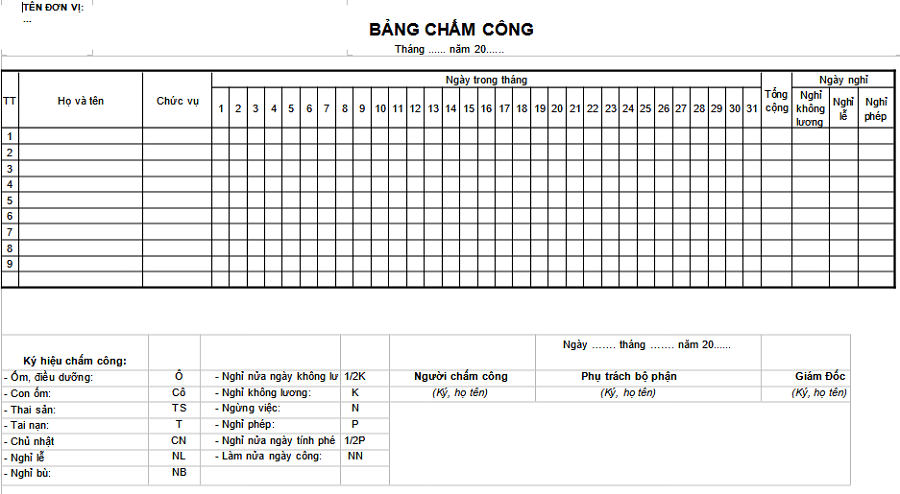
4. Weekly Time Sheet Template
Suitable for work teams or weekly attendance checks, helping to detect under-work and incorrect work assignments earlier.
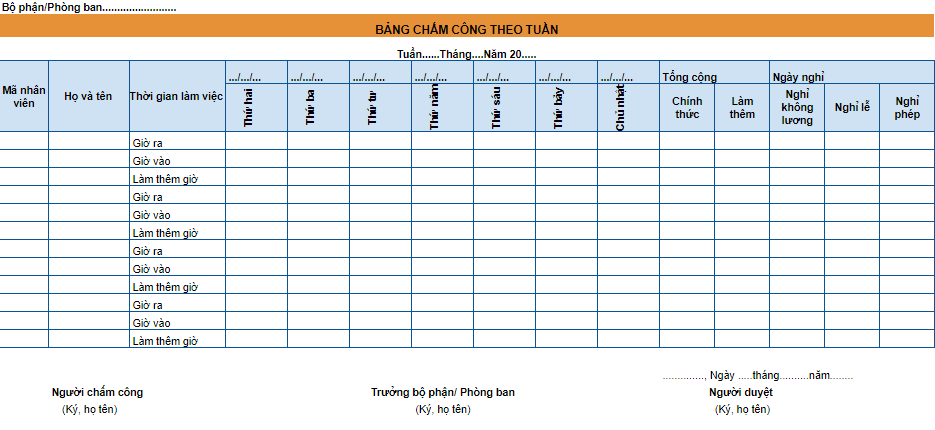
5. Monthly Time Sheet Template
Summarize working days, days off, and work statuses for the month. If you need to calculate the total working days manually, use [tool]. Excel 2026 template with formulas.
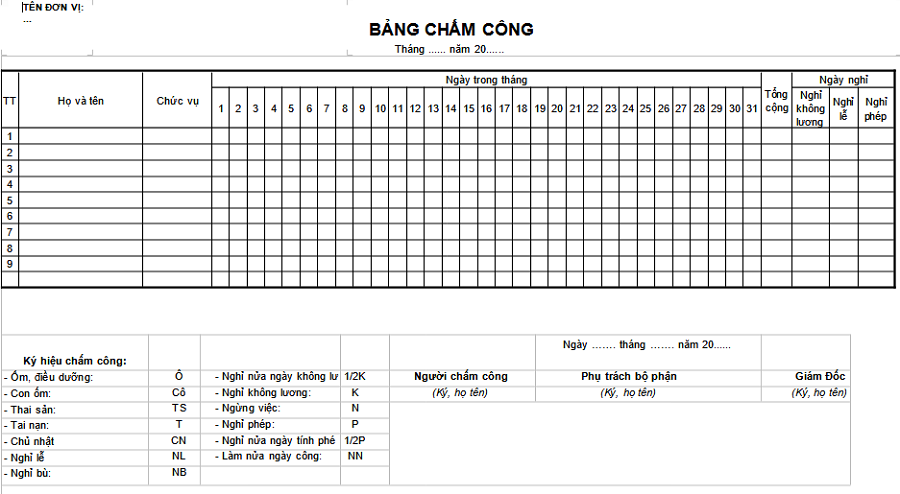
3. Timekeeping templates for shifts, hours, part-time, and overtime.
For manufacturing, retail, service, or groups with flexible work schedules, timesheets should clearly state shifts, actual hours worked, and overtime. Human resources and accounting departments need to agree on the recording method before using the data to calculate salaries.
6. Sample timesheet for a manufacturing company
Track working days, shifts, and overtime hours in a production environment. Before calculating wages, it is necessary to compare approved shifts and overtime hours.
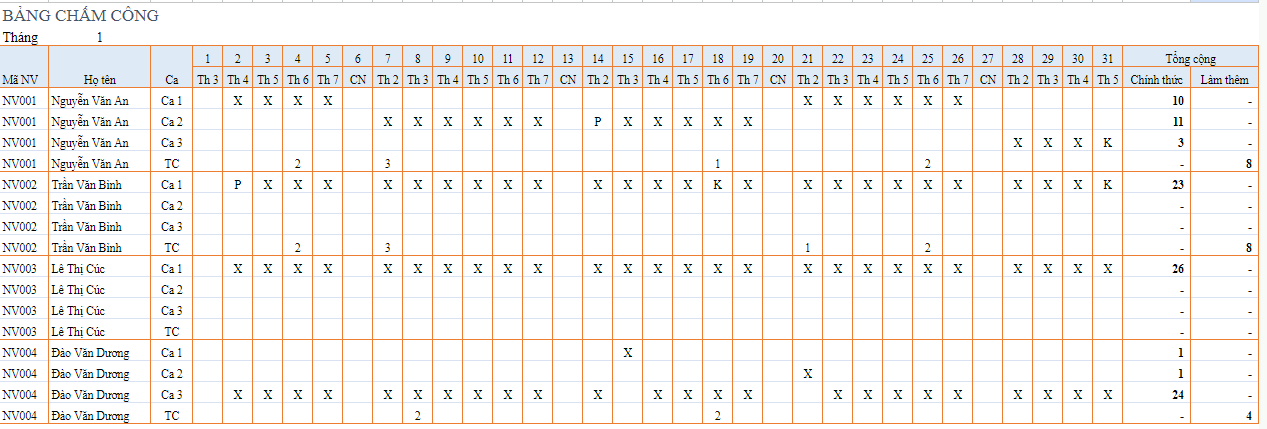
7. Sample overtime time sheet
Track the number of days and hours worked overtime beyond normal working hours. This data should be cross-referenced with overtime approvals before finalizing attendance records.
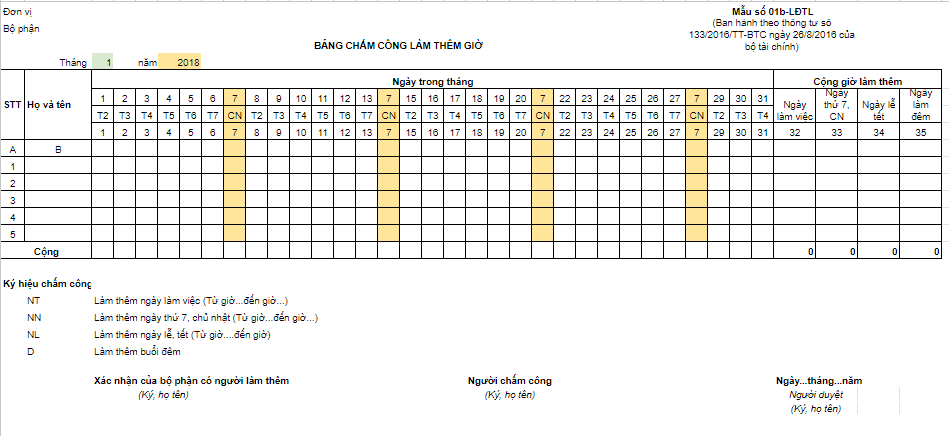
8. Sample time sheet by shift
Suitable for businesses that operate morning, afternoon, evening, or multiple shifts throughout the day, such as manufacturing, retail, and service industries.
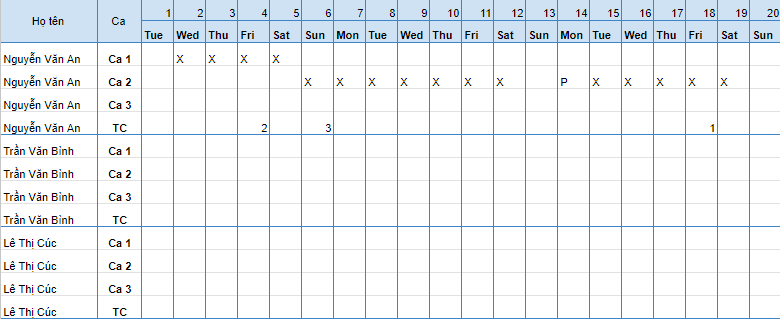
9. Sample hourly timesheet for part-time workers
Record clock-in, clock-out times, and total working hours; suitable for part-time employees or teams with flexible schedules.
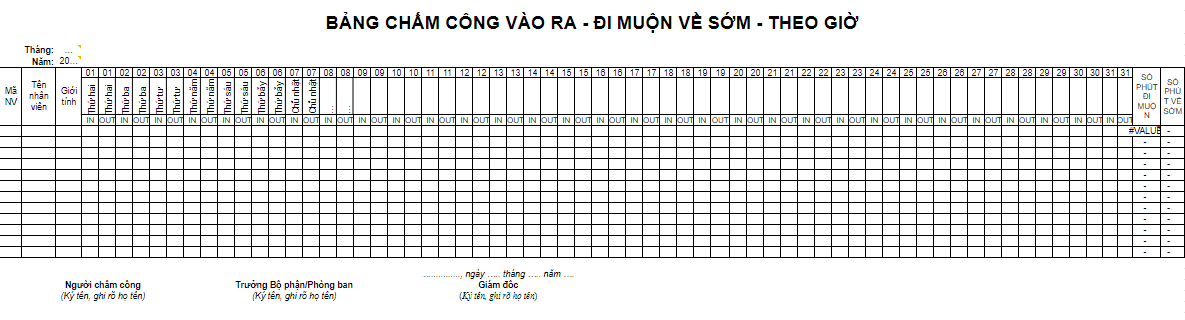
4. Timekeeping template for teachers and businesses with international staff.
Teachers and training centers often need to track teaching hours or attendance. Businesses with foreign staff can use English time sheets to standardize recording and reconciliation.
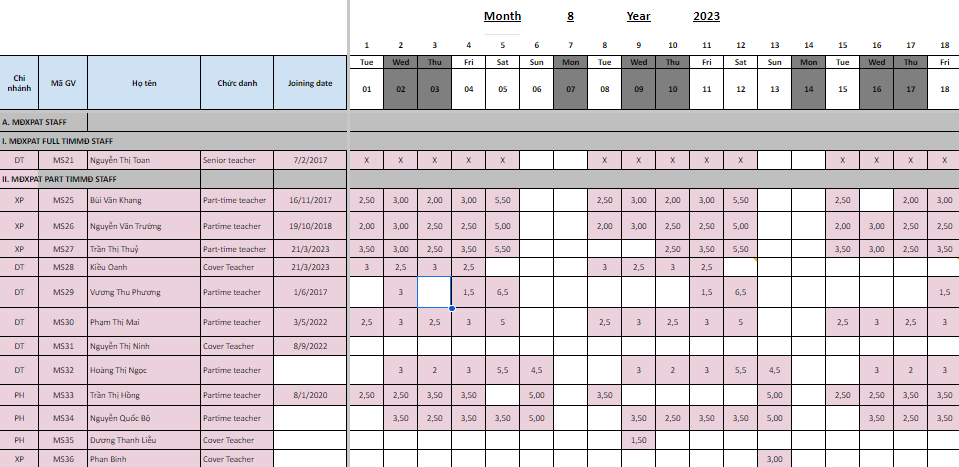
10. Sample teacher timesheet based on teaching hours
Compile the total number of actual teaching hours for each teacher, in accordance with the training center and educational institution.
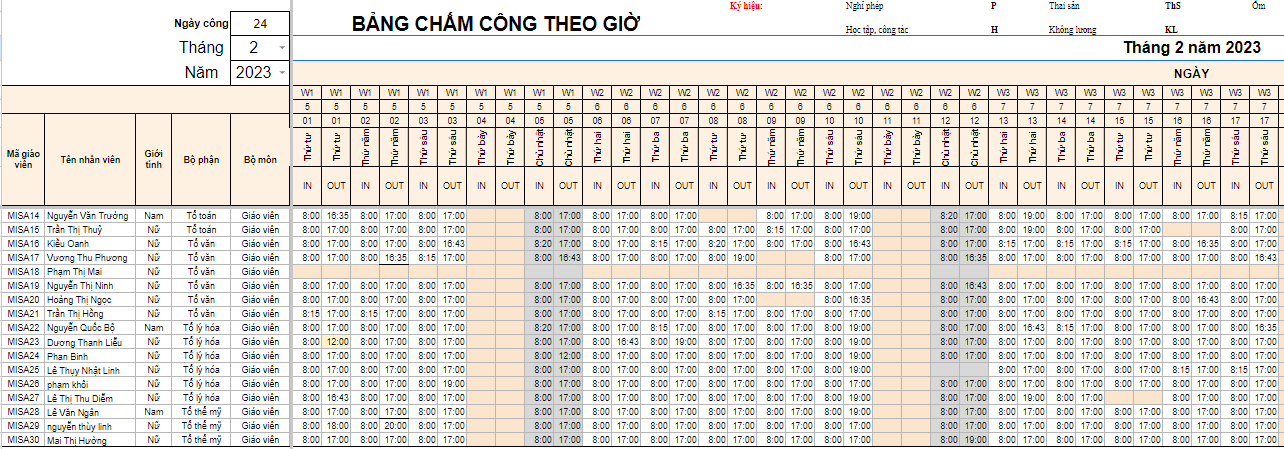
11. Sample teacher attendance sheet based on entry and exit times.
Record the start and end times of your work to help you compare your teaching schedule or working hours at the facility.
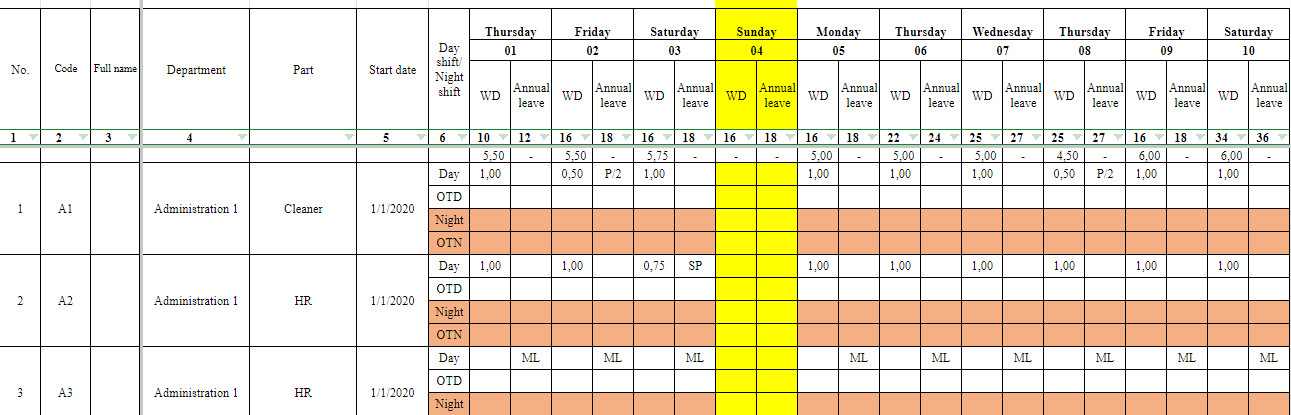
12. Sample time sheet in English
For businesses with foreign employees or those requiring English-language time sheets for work-related verification and comparison.
5. Which timekeeping form template, according to which Circular, is still suitable in 2026?
From January 1, 2026, Circular 99/2025/TT-BTC will take effect, and Circular 200/2014/TT-BTC will be completely repealed. Therefore, businesses need to distinguish between the forms currently used for internal management and those that are only suitable for comparing records from the previous period.
| Document | A situation requiring attention. | Proper usage |
|---|---|---|
| Circular No. 99/2025/TT-BTC | Effective from January 1, 2026, guidelines on corporate accounting procedures. | Use internal forms that are appropriate for your timekeeping and payroll process; do not default an Excel file as a mandatory form simply because it bears the label of Circular 99. |
| Circular No. 133/2016/TT-BTC | Partially in effect; amended as of July 1, 2025. | Small and medium-sized enterprises currently applying Circular 133 should refer to the provisions that are still in effect before implementing it. |
| Circular No. 200/2014/TT-BTC | All provisions expire on January 1, 2026. | For reference only or to compare records created before Circular 200 expired. |
| Circular No. 107/2017/TT-BTC | All provisions expire on January 1, 2025. | Used for cross-referencing administrative and professional records created before January 1, 2025. |
| Circular No. 185/2010/TT-BTC | Expires January 1, 2018. | Used for comparing records generated before January 1, 2018; not applicable to the current period. |
| Circular No. 24/2024/TT-BTC | The accounting framework for administrative and non-business entities will be in effect from January 1, 2025, and some changes have since taken effect. | When processing administrative and professional documents, it is necessary to refer to current regulations instead of continuing to use Circular 107/185. |
| Circular No. 177/2016/TT-BTC | This document pertains to fees and charges in the tourism sector, not to administrative or public sector accounting regulations. | Do not use Circular 177/2016/TT-BTC as the legal basis for time sheets. |
5.1. Is it mandatory for the 2026 time sheet to follow a specific form according to Circular 99?
Businesses should not assume that a timekeeping file is a mandatory form simply because it is labeled with Circular 99. Timekeeping records need to reflect working hours, rest periods, overtime, and other necessary information for the payroll process; at the same time, businesses should clearly define the symbols, the person confirming the work, and how to handle adjustments to working hours.
5.2. In what cases are Circulars TT200, TT107, and TT185 still used?
These templates are primarily suitable for comparing records generated during the period when the document was in effect or for reference in table layout. For the current timekeeping period, existing internal regulations and procedures should be applied.
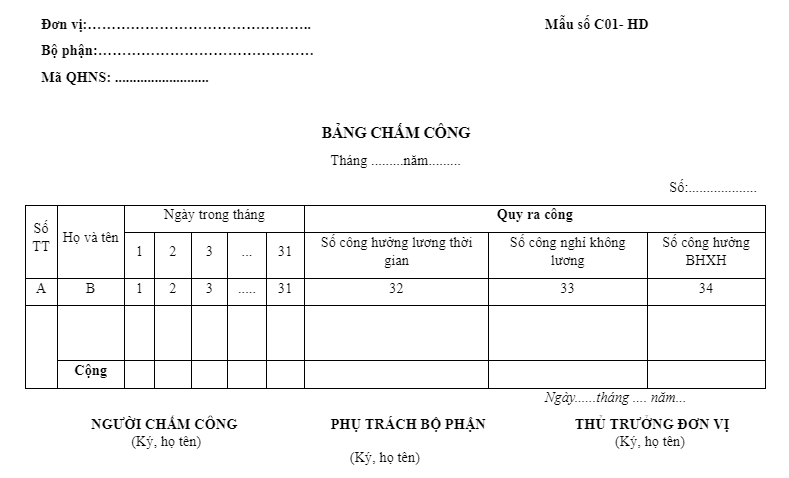
13. Time sheet template according to Circular 133
This applies to small and medium-sized enterprises currently implementing Circular 133. When using it, please refer to the provisions that are still in effect and the amendments that apply from July 1, 2025.
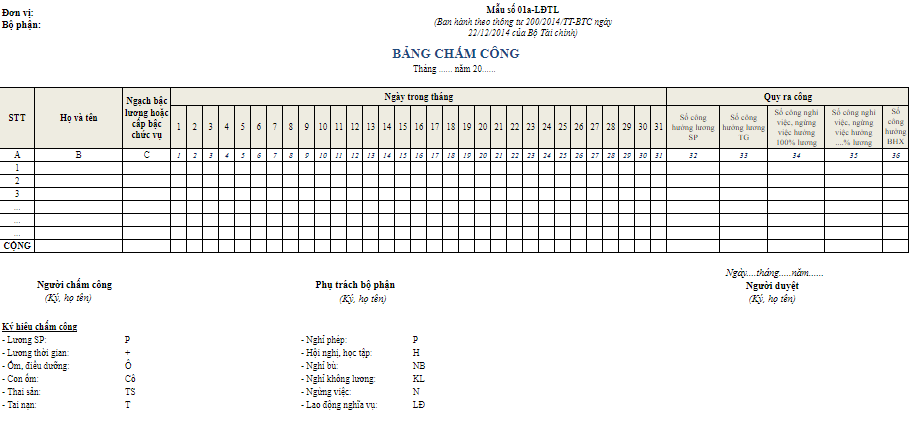
14. Time sheet template according to Circular 200 – reference documents prior to 2026
Circular No. 200/2014/TT-BTC has expired as of January 1, 2026. This form should only be used for reference or to compare documents generated before that date.
15. Sample administrative timekeeping template
This form can be used as a reference for the layout of an administrative time sheet. Circular 177/2016/TT-BTC is not the legal basis for the time sheet.
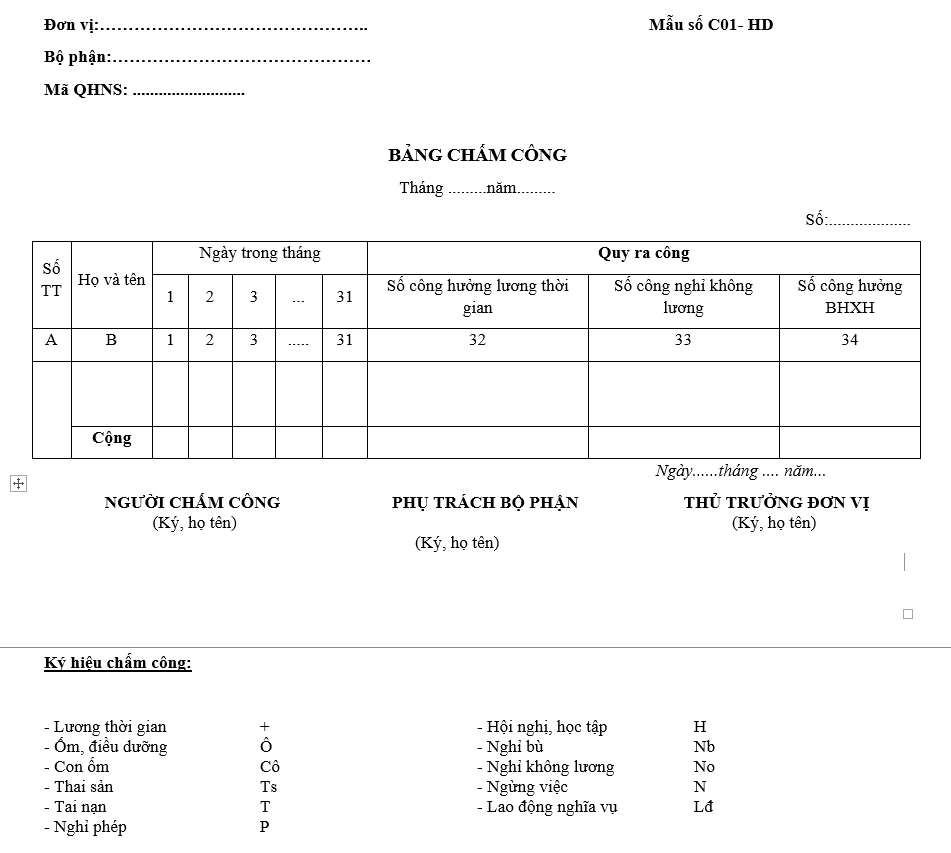
16. Time sheet template according to Circular 107 – reference documents before 2025
Circular 107/2017/TT-BTC has completely expired as of January 1, 2025. This form should only be used when comparing documents from the period when Circular 107 was still in effect.
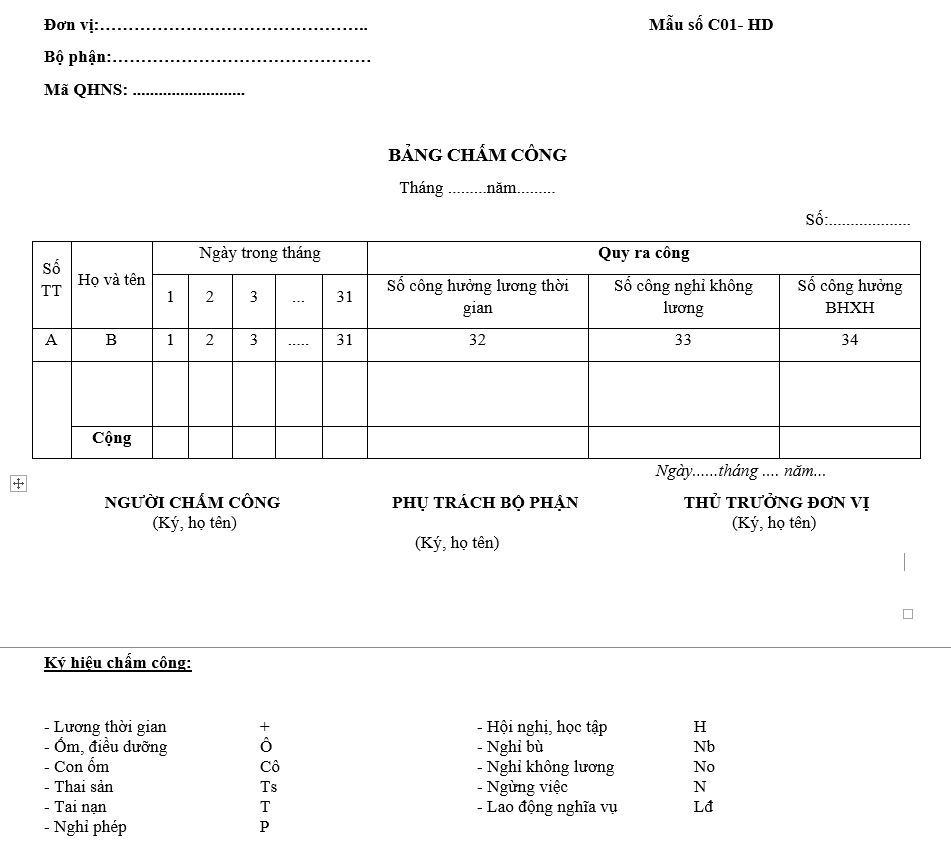
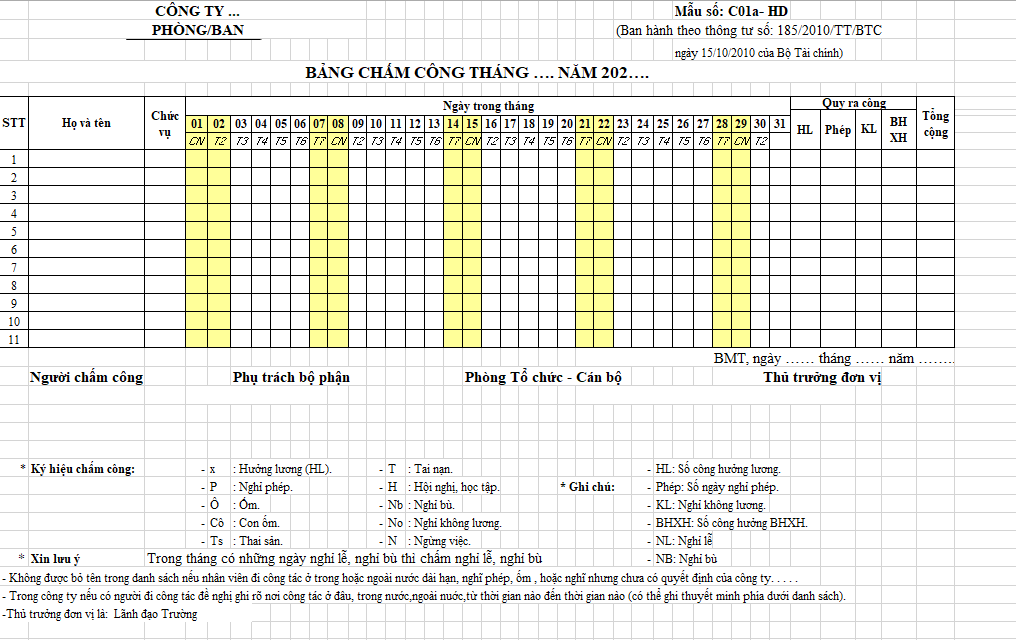
17. Sample time sheet according to Circular 185 – refer to records from before 2018
Circular 185/2010/TT-BTC has expired since January 1, 2018. This form should only be used when comparing documents from the period when Circular 185 was still in effect.
6. What information should a time sheet include?
| Information Group | The data should be | Purpose |
|---|---|---|
| Staff | Employee ID, full name, department/title. | Connecting the right people with public data. |
| Timekeeping period | Applicable month/year or week. | Differentiate data between payroll periods. |
| Working hours | Working days, clock-in/clock-out times, or shifts vary depending on the model. | Record actual working hours. |
| Rest | Leave of absence, unpaid leave, sick leave, compensatory leave. | Compare leave policies and payroll data. |
| Overtime work | Overtime hours, overtime days, related approvals. | Separate overtime hours from regular working hours. |
| Adjust | Reason for correction, person confirming, date of update. | There are traces of data changes after timekeeping. |
| Synthetic | Full time, half time, leave, unpaid leave, total time. | Prepare input for payroll and conduct the final audit. |
7. Timekeeping symbols and methods for easy verification.
Symbols should be short, easy to enter, and used consistently. This is a set of symbols. reference, This is not a mandatory list for all businesses.
| Symbol | Reference meaning | Suggested solutions |
|---|---|---|
| X | Work the full day. | Convert one workday to a daily wage if the internal regulations apply a daily workday system. |
| X/2 | Work half a day | Convert 0.5 man-hours if it aligns with the company's calculation method. |
| P | On leave | Compare the leave request/approval. |
| KL | Unpaid leave | Track this separately when calculating salaries. |
| Ô | Sick leave | Compare relevant records if available. |
| NB | Compensatory leave | The conditions for compensatory leave need to be standardized in internal policies. |
| CT | Collaborate | It may be converted into a working day if internal policy so stipulates. |
| OT | Overtime | The number of hours should be included instead of just marking yes/no. |
8. How to create an Excel timesheet with formulas
A manageable Excel file should separate the employee list, employee code table, and attendance sheet by month. Complex formulas aren't necessary; consistency in attendance entry and verifiable summary data are crucial.
-
Create a list of employees
Each employee should have a unique code to link their name, department, and job title to the timesheet.
-
Create a monthly schedule
Enter the month and year once; you can use DATE, EOMONTH, WEEKDAY, or TEXT to create your own days within the month.
-
Create a symbol selection list.
Use Data Validation to allow time clockers to select X, X/2, P, KL, O, NB, CT… instead of entering it in multiple different ways.
-
Summary of the number of jobs
Use COUNTIF to count each symbol and convert the total to the company's standard amount.
-
Regulations on how to adjust work
After the manager has confirmed the timesheet, any changes should clearly state the reason, the approver, and the update date so that they can be reviewed when needed.
For example, counting the number of workers.
=COUNTIF(E7:AI7,"X")
For example, counting half a job.
=COUNTIF(E7:AI7,"X/2")
9. What should be done if an employee forgets or makes a mistake in clocking in?
When employees forget to clock in or discover data errors, these must be addressed before the timekeeping deadline. Employees should provide explanations, managers should confirm the information, and the HR department should update the data according to internal procedures; end-of-period figures should not be altered without justification.
10. What needs to be checked before finalizing the timesheet and calculating salaries?
- The list of employees for the period is complete and the codes are correct.
- Leave of absence, unpaid leave, and sick leave have been cross-referenced with relevant records.
- Shifts and overtime hours have been confirmed according to internal procedures.
- Cases of forgotten attendance records or corrections to attendance records have been resolved.
- Total work hours are in accordance with the approved work schedule, shifts, and overtime arrangements.
- The manager/department in charge confirmed the data before locking the term.
- The end-of-period timesheet has been saved for reference in case of salary-related questions.
After locking the device, the data can be transferred. Excel/Word employee payroll template To calculate salaries, allowances, and adjustments according to company policy.
11. When does an Excel timesheet start becoming difficult to manage?
| Situation | Excel is still relevant. | A dedicated system should be considered. |
|---|---|---|
| Number of employees | A small, relatively stable group. | Multiple units, shifts, and work locations. |
| Adjusting the work | In rare cases, one person manages the files. | Multiple people are editing simultaneously; approval history is required. |
| Time is calculated by the hour/shift. | Simple rules. | Multiple shifts, rotating schedules, overtime, and complicated rules. |
| Payroll data | It can be manually transferred and inspected. | It needs to be synchronized directly with HRM/payroll. |
| Control | A well-managed source file. | Multiple files, multiple versions, or difficulty in determining the final data. |
12. How is attendance data transferred to the payroll and ERP system?
After the HR department locks the timesheet, the working day and hour data is used to generate payroll. From the payroll, the business then records personnel costs and transfers the necessary data to the financial system or ERP.
Bizzi is not timekeeping software. The Bizzi solution is suitable for expense management and connecting financial data with ERP systems via Open API, enterprise system API, or file integration. See more. types of business expenses.
Connect financial data after finalizing the project.
When payroll data needs to be migrated to an ERP system, businesses should clearly define the source system, data fields, and synchronization methods to minimize data re-entry or discrepancies between departments.
13. Frequently Asked Questions about Time Sheet Templates
What is a time sheet?
A time sheet is a form that records the working hours, working days, days off, and work status of employees during a specific period. Once verified, this data is typically used as input for payroll and human resource management processes.
Where can I download an Excel 2026 timesheet template?
Bizzi provides Excel 2026 templates with formulas and templates for daily, weekly, monthly, shift, and hourly work. Before use, businesses should standardize the notation and conversion methods according to their internal regulations.
Should we use a daily or monthly timesheet?
Daily payroll sheets are suitable when detailed checks and early discrepancies need to be addressed. Monthly payroll sheets are suitable for monthly payroll, but businesses should still retain sufficient data for explanation when adjustments are needed.
Does Circular 99 issue a mandatory time sheet template?
A timekeeping file should not be assumed to be a mandatory form according to Circular 99. Businesses need to choose a form that suits their current work time management, attendance verification process, and payroll calculation methods.
Will the time sheet template according to Circular 200 still be used in 2026?
Circular 200/2014/TT-BTC has been fully repealed as of January 1, 2026, and replaced by Circular 99/2025/TT-BTC. If you need to compare documents issued before this date, you can refer to the corresponding Circular 200 template.
Is Form TT133 still usable?
Circular 133/2016/TT-BTC is still partially in effect and has been amended since July 1, 2025. Small and medium-sized enterprises applying this regulation should refer to the currently effective provisions when using the form.
What do the symbols X, P, KL, and OT on the time sheet mean?
These are typically internal symbols used to record attendance, leave, unpaid leave, or overtime. Businesses should issue or standardize their own set of symbols and use them consistently across human resources, management, and accounting departments.
Which template should part-time employees use?
If wages depend on the actual number of hours worked, an hourly wage scale showing clock-in time, clock-out time, and total hours should be used. If part-time workers still work fixed shifts, a shift-based wage scale can be used.
What should you do if someone forgets to clock in?
There should be a step where employees explain their actions, managers confirm their findings, and the HR department makes adjustments and records the reasons before locking the accounts. Directly modifying end-of-period data without confirmation is not advisable.
What should be included in the overtime time sheet?
Overtime pay should include the number of overtime days, hours worked, shift type or time frame, and necessary approval information. Before calculating overtime pay, businesses need to compare it with applicable labor regulations and internal policies.






