


The following documents include: 12 sample payroll and salary payment forms Businesses can download the payroll forms according to each payment method: monthly, 3P, business, product, hourly/shift, construction worker, collaborator, individual payslip, and Form 01-LĐTL as per Circular 99.
One easy way to choose is to start from how businesses are calculating salaries, not from the file name. If paying by the number of working days, use the monthly template or a simple template; if there are shifts/part-time, use the hourly template; if paying by project volume, use the construction template. After downloading, it's advisable to test it with a small group of employees and review their contracts, salary and bonus regulations, insurance, tax, and payment records before applying it to the entire payroll period.
1. Download 12 Excel/Word 2026 employee payroll templates.
You don't need to download all 12 files. The table below will take you directly to the template closest to your current payroll system. Three additional templates are available in August 2026. Hourly/Shift/Part-time wage table, construction worker salary scale and Form 01-LĐTL according to Circular 99.
| Sample | Suitable when | Format | See details |
|---|---|---|---|
| Simple employee payroll | Fewer salary components, need to track working days and actual earnings. | Excel | See sample |
| Monthly payroll | Regular payroll, multiple employees/departments | Excel | See sample |
| 3P Salary Table | The Position-Person-Performance mechanism is already in place. | Excel | See sample |
| Sales staff salary scale | There is a fixed salary, sales commission, bonuses, and KPIs. | Excel | See sample |
| Salary scale by grade/level | There is an internal salary scale or coefficient system. | Excel | See sample |
| Piecework wage system | Calculated by quantity × unit price | Excel | See sample |
| Hourly/Shift/Part-time wage table | F&B, retail, warehousing, seasonal or flexible shifts | Excel | See sample |
| Construction worker salary scale | Based on daily wages or volume/contract payment per project. | Excel | See sample |
| Collaborator Compensation Payment Table | Payment is based on work, project, or agreed-upon unit price. | Word | See sample |
| Individual payslip | Send detailed income/deduction information for each employee. | Excel | See sample |
| Summary payroll | Data needs to be compiled by department. | Excel | See sample |
| Form 01-LĐTL according to Circular 99 | A payroll payment sheet is needed in the accounting documentation system. | Excel | See sample |
2. Choose a payroll template based on how your company currently pays salaries.
In reality, even though they're all called "payroll," the input data can vary greatly. The best template is one that allows accountants to see the details immediately. Where does salary come from? and it can be traced back to the source document when verification is needed.
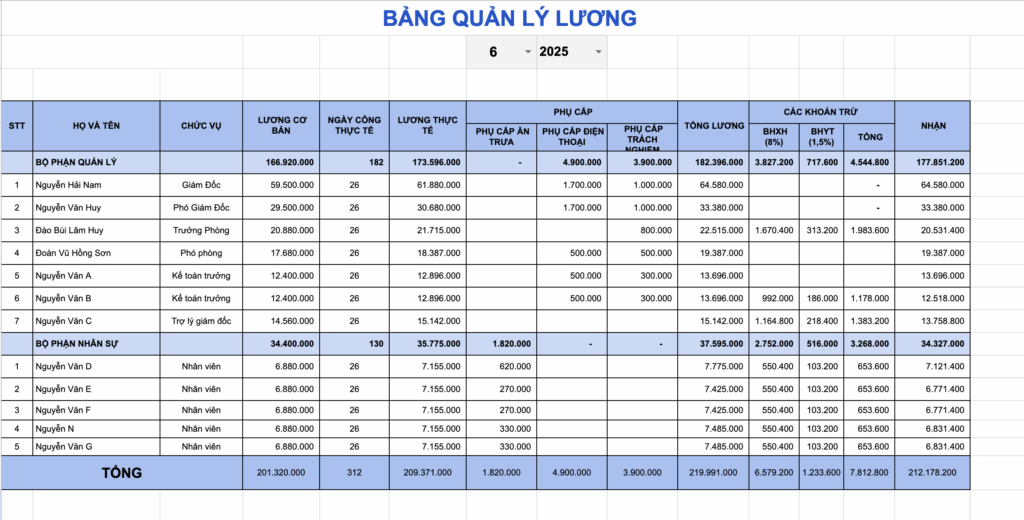
2.1. Simple employee payroll template
Suitable for businesses with a payroll structure that doesn't have too many variables. The file focuses on working days, income, insurance, taxes, advances, and net amount received.
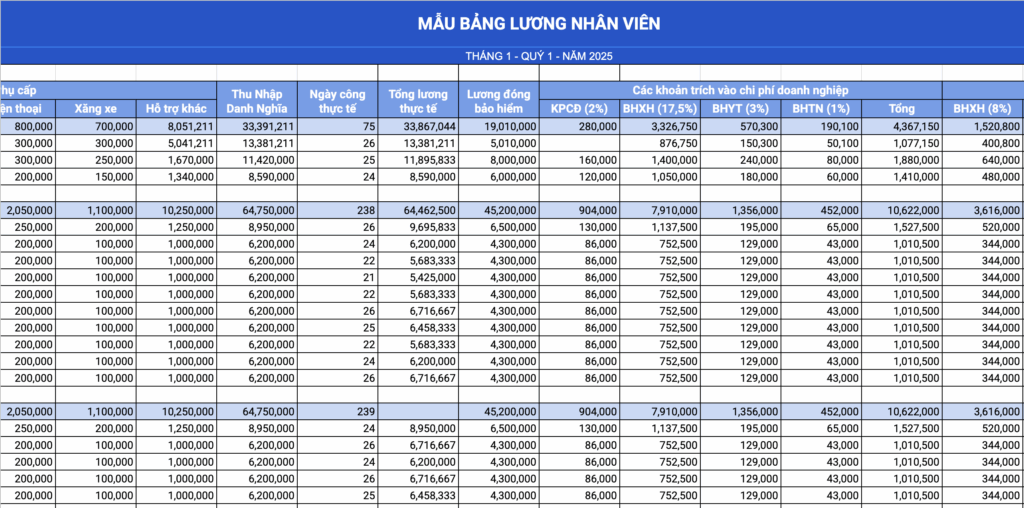
2.2. Monthly salary sheet template
This method is recommended when businesses finalize payroll on a fixed period and need to filter by department. Before finalizing the file, check the list of employees joining/leaving for the month to avoid calculating the full payroll period for those who only worked for part of the month.
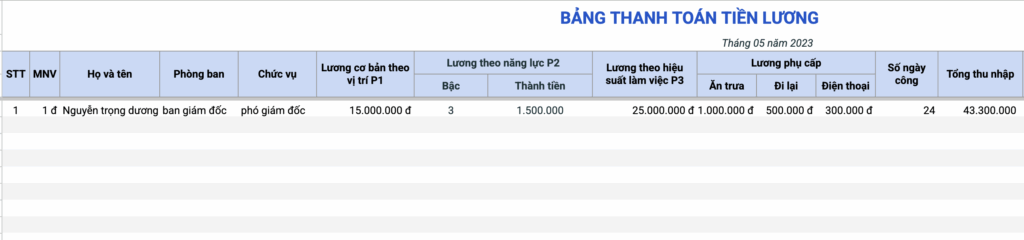
2.3. 3P Payroll Template
This file should only be used when the business already has a way to define P1 – position, P2 – capabilities, and P3 – performance. The file cannot replace the development of a 3P policy; it only helps to consolidate the values that have already been identified and approved.
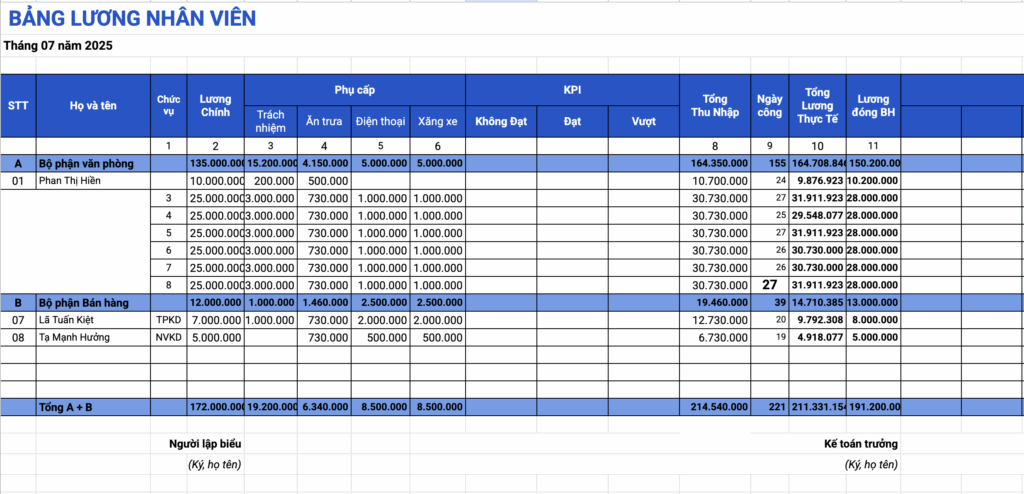
2.4. Sales staff salary sheet template
It's helpful to include both a fixed salary and a variable portion based on sales/KPIs. Sales, commission rates, and bonuses should be separated so that when discrepancies arise, auditors can identify errors in sales data or the salary formula.
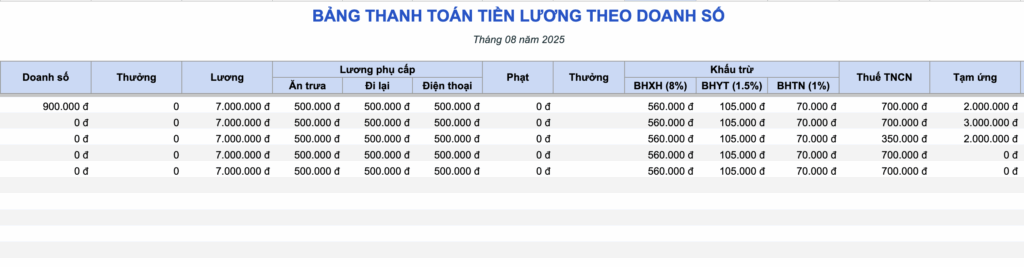
2.5. Salary table template by level/rank
This applies to businesses with an internal salary scale or coefficient system. The coefficients used in the public sector should not be applied as a default for businesses; the salary levels, coefficients, and promotion conditions must adhere to the established policies.
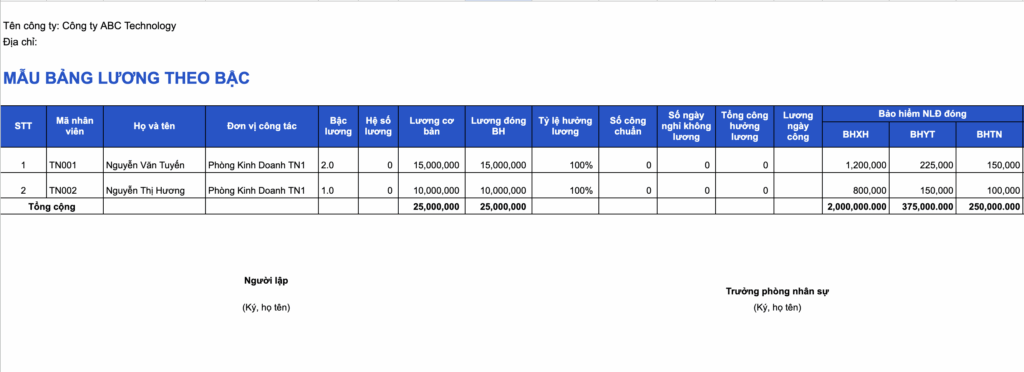
2.6. Sample payroll by product
Suitable for production or work that can be measured by output. The two most important data points are: confirmed volume and The unit price has been approved.; If one of the two is not locked, the total salary may still be correct according to the formula but the transaction will be incorrect.
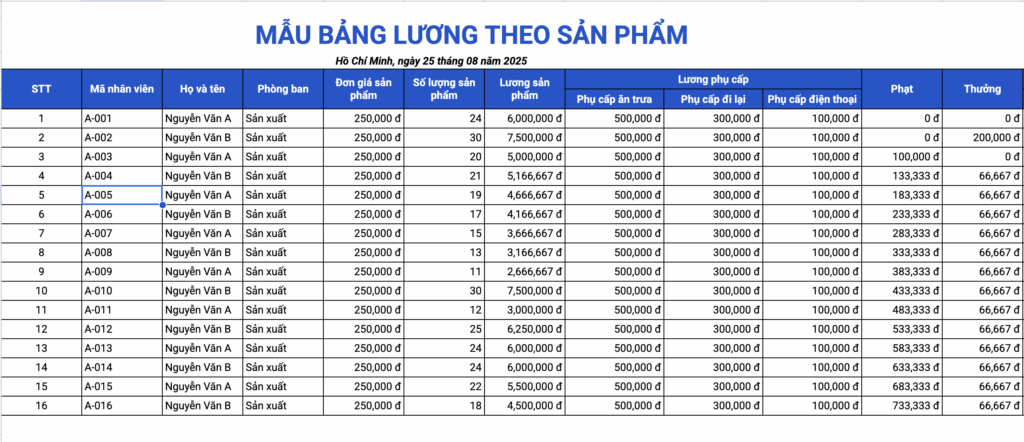
2.7. Sample hourly, shift, and part-time payroll sheet
This template is for stores, F&B businesses, warehouses, part-time employees, or models with flexible shifts. The file separates regular hours, night hours, overtime hours, and corresponding rates, and includes a region selection sheet to check the basic hourly rate against the minimum rate for 2026.
Points to note: The file does not automatically assign an overtime/night shift coefficient to every case. Businesses enter unit prices that have been determined according to the work schedule, agreements, and applicable regulations.
2.8. Sample payroll sheet for construction workers
Instead of using a single employee table, this file separates it into three sheets: by working days, by volume/contract and Summary by project. This layout allows for tracking projects, teams/groups, items, number of work units, or quantities that have been inspected and approved.
If a team receives both daily wages and piecework pay, the source of wage calculation should be recorded separately before totaling, to avoid adding up the same workload twice.
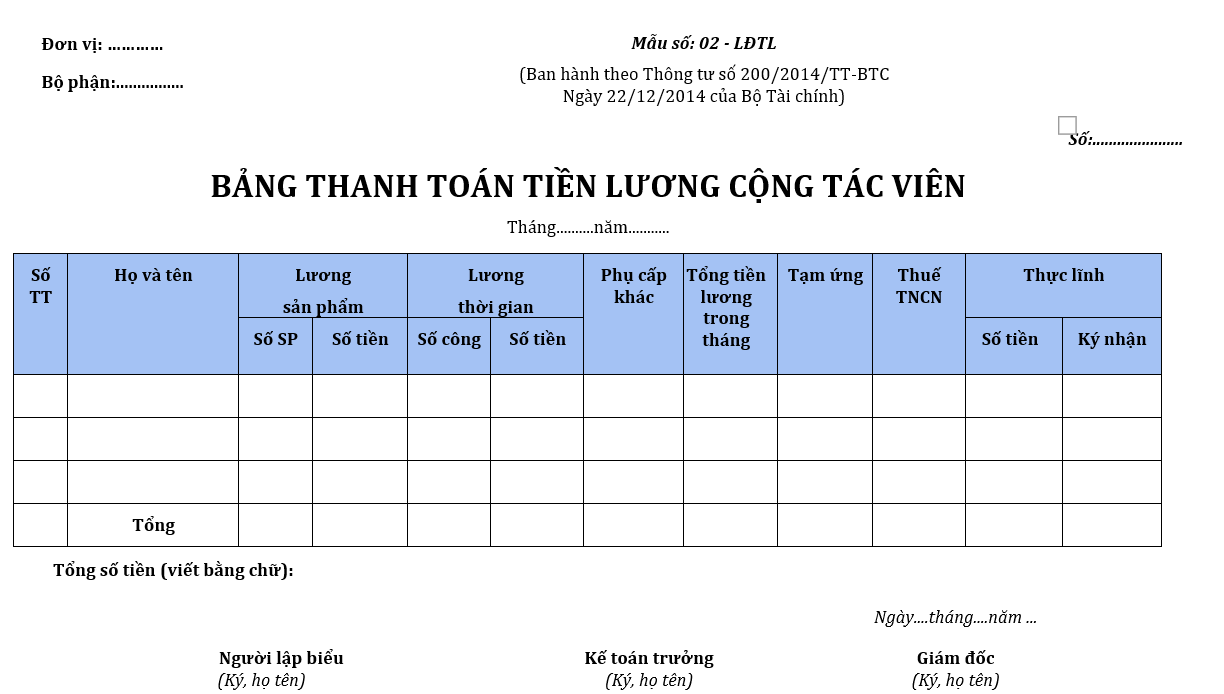
2.9. Sample payment sheet for collaborators
This Word template is suitable for summarizing work, quantities, unit prices, and payable fees. It shouldn't be assumed that all terms like "Collaborator" automatically mean the same insurance or tax obligations; the nature of the relationship and specific documentation need to be considered.
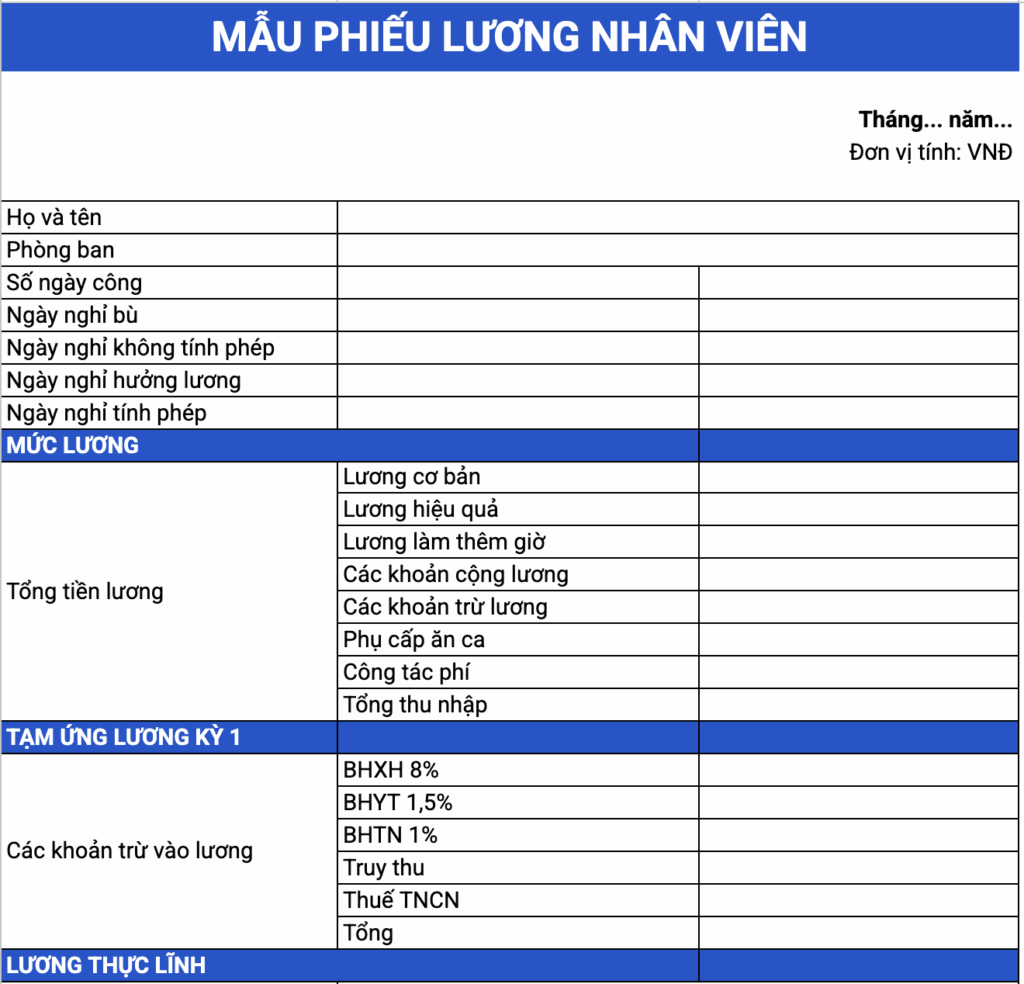
2.10. Individual Payroll Slip Template
This is to allow employees to see how their earnings for the period are calculated: income, insurance, taxes, advances, and justified deductions. The payslip should match the approved payroll, not be a standalone calculation.
2.11. Sample of a consolidated employee payroll sheet
This is suitable when accountants need a summary sheet after the detailed payroll sheet to view expenses and actual receipts by department. It's better to keep the detailed sheet as the source and use the summary sheet for comparison, rather than re-entering the same data in two places.
2.12. Form 01-LĐTL – Salary Payment Table according to Circular 99
Form 01-LĐTL is part of the document group. Labor - wages In Appendix I of Circular 99/2025/TT-BTC. This form is used as a basis for paying salaries, allowances, additional income beyond salary, and for verifying payments to employees.
This is the file you should download if your goal is... payroll payment vouchers according to accounting regulations. If detailed calculations of shifts, KPIs, commissions, or output are needed before determining the amount payable, businesses can still use an internal payroll workbook in the preceding step.
3. What are the differences between a payroll sheet, payslip, salary scale, and Form 01-LĐTL?
Many businesses refer to these documents collectively as "payroll," but their purposes differ. Differentiating them from the outset will make selecting the right file and creating a payment record simpler.
| Document | Main role | When is it needed? |
|---|---|---|
| Excel payroll spreadsheet | Calculated from job/income data to actual amount received. | When businesses need a customized management formula based on working days, KPIs, commissions, products, shifts, or piecework. |
| Payslip | Detailed salary information for each individual. | When it is necessary to send documents to employees for income verification and deductions. |
| Salary scales and pay tables | Establish a salary system based on job/position. | When designing salary policies, recruitment, ranking, and salary adjustments. |
| Form 01-LĐTL | The payroll payment sheet is part of the accounting document system according to Circular 99. | When preparing payroll payment documents in the applicable corporate accounting system. |
Circular 99 includes a whole group of labor and wage documents, not just Form 01-LĐTL. If you are reviewing your document system from the 2026 fiscal year, you can refer to it for more information. List of sample accounting documents according to Circular 99 after you have determined the type of document you need.
4. When using the 2026 payroll system, what changes need to be checked?
A file with the correct formula can still produce incorrect results if outdated parameters are used. Before each important payroll period, it's advisable to check the milestones below instead of just looking at the file name containing "2026".
4.1. Regional minimum wage effective from January 1, 2026
Decree 293/2025/ND-CP, effective from January 1, 2026, stipulates both minimum monthly and hourly wages. For businesses with part-time, shift-based, or daily wage employees, the minimum hourly wage is a particularly useful benchmark.
| Region | Monthly amount | Hour |
|---|---|---|
| I | 5,310,000 VND/month | 25,500 VND/hour |
| II | 4,730,000 VND/month | 22,700 VND/hour |
| III | 4,140,000 VND/month | 20,000 VND/hour |
| son-in-law | 3,700,000 VND/month | 17,800 VND/hour |
The applicable area is determined by the employer's operating location. If the business has multiple units/branches in different regions, it is advisable to check the area for each unit instead of assigning a single rate to the entire company.
4.2. Do not mechanically use "basic salary" as the basis for social insurance contributions.
For employees whose salaries are determined by the employer, the salary used as the basis for mandatory social insurance contributions includes the salary based on the job or position, salary allowances, and other supplementary payments that are agreed upon and paid regularly and stably in each pay period. Therefore, when designing the file, a separate column should be included to define this. Salary used as the basis for social insurance contributions. According to the records of each personnel group.
4.3. Personal Income Tax in 2026: New Deduction Levels and 5-Tier Tax Schedule
For income from salaries and wages of resident individuals, the new regulations apply from the tax year 2026. The deduction for the taxpayer themselves is... 15.5 million VND/month; Each dependent is 6.2 million VND/month. The progressive tariff system has also been reduced from 7 tiers to 5 tiers.
| Level | Taxable income/month | Tax rate |
|---|---|---|
| 1 | Up to 10 million VND | 5% |
| 2 | Between 10 and 30 million VND | 10% |
| 3 | Between 30 and 60 million VND | 20% |
| 4 | Over 60 to 100 million VND | 30% |
| 5 | Over 100 million VND | 35% |
If you need to check the personal deductions and their validity separately, Bizzi has a document page on that topic. Resolution 110/2025/UBTVQH15 on personal allowance deductions. This link is suitable for legal reference; there's no need to repeat the entire tax content in the payroll article.
4.4. Do not include "fines" in payroll as a default deduction.
When employees are late, violate company rules, or incur financial liability, you shouldn't create a "penalty" column and deduct directly based solely on internal regulations. Labor law prohibits using fines or salary cuts as a substitute for disciplinary action; salary deductions must be justified and adhere to applicable limits. In the file, a safer column name would be... “"Other legitimate deductions"” and only enter if the actual records allow it.
4.5. Salary payments of 5 million VND or more per payment, with non-cash payment documents.
In the Corporate Income Tax filing section, the Ministry of Finance is providing guidance: for individual salary and wage payments from... 5 million VND or more Since Decree 320/2025/ND-CP came into effect, businesses need non-cash payment documents to meet the conditions for deductible expenses. Therefore, after finalizing the payroll, accountants should further check the list/payment documents instead of considering creating the Excel file as the final step.
5. How to create a payroll table: starting from source data to actual received amount
When a file contains many formulas, the easiest way to check is to follow the business logic flow. Don't start with the "Net" cell; start with the data that generates revenue.
- Lock the employee list and payroll records.
Record new hires, resignations, unpaid leave, job title changes, or contract changes during the period. - Lock job data.
For time-based wages, verify working days/hours; for piece-rate or contract wages, verify the accepted volume; for sales, finalize sales figures and KPIs before calculating commission. - Calculate income components according to the approved policy.
Separate fixed salary, allowances, commissions, bonuses, overtime pay, or other payments to make it easier to verify their source. - Determine the insurance basis and tax data.
It is not assumed that the entirety of total income is the basis for social insurance contributions or that all income is taxed in the same way. - Calculate advances, deductions based on evidence, and the actual amount received.
If the Net number changes unusually compared to the previous month, it's better to compare each group of changes instead of directly editing the result cell. - Compare payment records.
Review the approved payroll, payslips, transfer/payment voucher lists, and save the final version.
For businesses that pay employees based on time, input data typically begins with timekeeping. If normalization at this stage is needed, address it accordingly. Time sheet templates and how to control employee data. Then, transfer the number of days/hours to the payroll. This is a direct upstream link, not an additional document to read just to complete the process.
Job data → Income components → Insurance/deductions → Taxable income → Personal income tax → Legal advances/deductions → Actual payment → Payment voucher6. Three situations where payroll calculations are likely to follow the correct formula but are technically incorrect.
Employees may start or leave mid-month.
Don't just divide your monthly salary by 26 and multiply by the number of working days if your company's payroll policy doesn't use that method. First, you need to determine the working period, standard working days, paid/unpaid days off, and the calculation principles for months with incomplete working periods.
Hourly, night shift, or overtime staff
A single coefficient should not be locked into a file and used for all shifts. It's necessary to define which hours are regular hours, which are night/overtime hours, and which unit price applies to each specific case. Therefore, the new hour/shift template should have separate input fields for these unit prices.
Sales commission, per product or per project.
When income fluctuates based on results, it's crucial to retain the original data: sales figures, production output, acceptance reports, or contracted quantities. A payroll record with a reasonable total amount but lacking traceability back to its source will be difficult to reconcile during complaints or audits.
7. Checklist before reviewing and paying payroll.
- The list of personnel accurately reflects their employment status during the period.
- Workdays, working hours, KPIs, sales, or volume have been confirmed.
- Income is based on a contract, regulation, or related decision.
- The salary for the job/position has been checked against the appropriate regional minimum wage.
- The salary used as the basis for social insurance contributions is determined separately according to the records.
- The personal allowance and personal income tax rates used were correct for the 2026 tax period.
- Do not use "fines" or "salary cuts" as a form of disciplinary action.
- Individual payslips match the consolidated payroll statement.
- Expenditures of 5 million VND or more per transaction are subject to verification of payment documents when considering corporate income tax eligibility.
- The final file contains locked important formulas, access permissions, and versioning.
8. When is Excel sufficient, and when should the payroll system be evaluated?
There's no fixed number of employees to say, "If you have more than X people, you have to abandon Excel." The deciding factor often lies in the complexity of the data and the ability to manage it, not just the headcount.
| Excel is still relevant when | Specialized payroll should be evaluated when |
|---|---|
| The input data comes from few sources and there is someone responsible for locking the data. | Working days, shifts, KPIs, commissions, and policies come from multiple systems/departments. |
| The formula is relatively stable and can be tested before each period. | Many groups of employees use different calculation rules, which change frequently. |
| The file is subject to permission management, version control, and independent review. | With multiple people editing simultaneously, it's difficult to trace who changed the formula or data. |
| The volume of manual reconciliation remains at an acceptable level. | Accountants/HR staff spend a significant amount of time piecing together data and correcting discrepancies between sources. |
If the real need is payroll, then a suitable payroll/HR system should be evaluated. One shouldn't choose expense management software and expect it to replace timekeeping and payroll.
9. Where does Bizzi fit in after the payroll has been processed?
Payroll and employee costs are two different categories.
Bizzi is not a replacement for timekeeping systems or payroll software. After processing payroll, Finance still has another group of tasks to handle, such as business expenses, expense requests, advances, payments from company funds, and invoice/receipt reconciliation.
With this cost level, Bizzi Expense Pay expense management and payment system It supports the workflow from request, approval, payment to document reconciliation. Therefore, the product link only appears here – after the article has completed its main task of selecting and using a payroll template.
10. Frequently Asked Questions about Employee Payroll Templates
Is it mandatory for Excel 2026 payroll templates to follow a single format?
No. Internal payroll files can be designed to suit the company's payroll and control methods. However, payroll data, insurance, taxes, deductions, and related accounting documents must still be defined according to applicable regulations and records.
Does Form 01-LĐTL under Circular 99 replace the detailed payroll calculation sheet?
Not necessarily. Form 01-LĐTL is the payroll payment sheet in the accounting document system. Businesses may still need the detailed spreadsheet from the previous step to process working days, output, commissions, insurance, or taxes before consolidating them into the payment document.
Is it mandatory for businesses to use a standard 26-day work week?
No. The standard number of days or hours required for work schedules and payroll is already defined. Therefore, files should use the standard number of days/hours as configuration data instead of locking in a specific number for every business.
Does the hourly/shift payment model automatically calculate overtime and night shift pay?
The new template automatically multiplies the number of hours by the user-entered unit price, but does not automatically apply a single legal coefficient to all cases. Before entering the unit price, businesses need to determine the type of hours and the appropriate payment rate based on the work schedule, agreements, and applicable regulations.
Can the construction worker model be used for piece-rate pay?
Yes. The file has separate sheets for quantities/contracts and a summary sheet for each project. When using it, you should enter the confirmed quantities, contract unit prices, and converted hours/days according to the actual records to check the payment amount.
Are freelancers always exempt from paying insurance contributions?
One should not draw conclusions solely from the term "collaborator." The nature of the relationship, the type of contract, and the participants, as defined by applicable regulations, must be considered. Therefore, the collaborator model should not rigidly define a single insurance claim processing method for all cases.
Is it permissible to deduct money from an employee's salary for being late or violating company rules?
Fines or salary deductions should not be used as a substitute for labor disciplinary action. If there is another deduction, the basis, scope, and limits of the deduction must be properly determined before being included in the payroll.
Does paying salaries in cash of 5 million VND or more affect the deductibility of expenses?
Labor regulations regarding the form of salary payment need to be separated from the conditions for corporate income tax filing. According to the current guidance of the Ministry of Finance, salary/wage payments of 5 million VND or more require non-cash payment documentation to meet the conditions for deductible expenses.
Referenced legal sources
- Decree 293/2025/ND-CP on minimum wage levels effective from January 1, 2026.
- Vietnam Social Security: Social Insurance Law 2024 and salary as the basis for mandatory social insurance contributions..
- Ministry of Finance: Main contents of the Personal Income Tax Law 109/2025/QH15.
- Circular 99/2025/TT-BTC guiding the Enterprise Accounting Regime.
- Consolidated text 18/VBHN-VPQH of 2026 – Labor Code.
- Ministry of Finance: Non-cash payment documents are required for salary payments of 5 million VND or more per transaction..
The information is up to August 14, 2026. When applying this to actual cases, businesses need to check the validity, scope of application, and relevant industry guidelines at the time of application.






